



 Larutan
 Pusat layanan
 Tentang kami
 Kontak
Change Your GPS Location: How to Enable Mock Location Xiaomi
 Penny Warren Diterbitkan di 18 Juni 2026Lokasi GPSMembaca 4 menit
Lots of Xiaomi owners hope to mask their GPS location for daily practical needs. Maybe you play Pokémon Go and wish to catch region-exclusive monsters without traveling, or you want to hide your real location on social apps for privacy, or you want to find new matches on a dating app.
Mock location is a built-in Android feature, yet it's hidden in the developer options on Xiaomi MIUI and Hyper OS. This guide explains what mock location Xiaomi is, and shows you simple ways to spoof your GPS on Xiaomi.

Dalam artikel ini:
Part 1. What is Mock Location Xiaomi
Mock location Xiaomi is a feature that allows developers to simulate a different GPS location for testing and geo-tagging purposes. In other words, it tricks location-based apps and services into thinking you're somewhere you're not.
Although this feature is primarily intended for developers to test location-based apps without physically moving, it has practical uses for regular users as well:
- App Testing: Developers can test maps, delivery apps, or location-based features in different regions.
- Privacy Protection: Users can hide their real location to protect online privacy.
- Games: You can explore virtual locations in location-based games.
- Geo-Restricted Content Access: Users can unlock content that's unavailable in their region, such as movies or shows on streaming platforms.
Part 2. Is Mock Location Illegal
Is it illegal to mock location on Xiaomi? The short answer is: mock location itself is not illegal, but misuse can lead to violations of app policies or laws.
If you use mock location Xiaomi for personal use, such as spoofing Pokémon Go location, it is generally legal. However, using it to break laws, commit fraud, or bypass regulations is illegal and can have serious consequences.
Some apps or services don't allow users to use location changers. If they detect that you're using a fake location, your account may be blocked.
Part 3. How to Allow Mock Location on Xiaomi
Before you can use a pengubah lokasi app on your Xiaomi device, you need to enable the mock location Xiaomi in Developer Options. Here's a simple step-by-step guide:
Download a location changer app on your Xiaomi
Pergi ke Pengaturan, lalu klik Perangkat saya > Semua spesifikasi.
Menemukan Versi MIUI and tap it 7 to 10 times repeatedly until you see a message saying "You are now a developer."
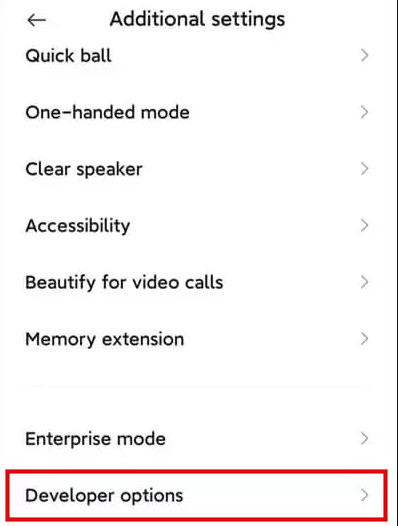
Kembali ke Pengaturan, gulir ke bawah, dan ketuk Pengaturan tambahan > Opsi pengembang.
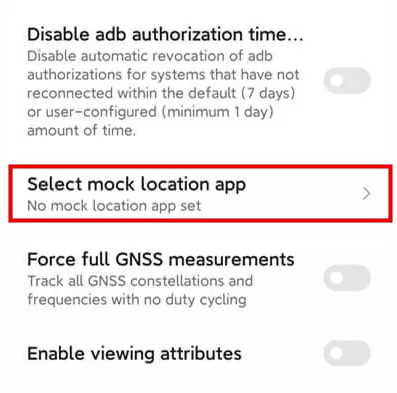
Mengetuk Pilih aplikasi lokasi tiruan and select the mock location app for Xiaomi you downloaded.
Part 4. How to Mock Location on Xiaomi with imyPass iLocaGo
If you're unsure which location changer app to use for mocking location on Xiaomi, sayaPass iLocaGo is a perfect choice. This versatile and powerful tool allows you to simulate movements and change your location freely on apps like Tinder, Snapchat, and more. It is compatible with a wide range of Android and iPhone models and brands.

4.000.000+ Unduhan
Mock your location for both Android and iPhone.
Spoof GPS location on various location-based apps and services.
Customize your speed and route as you like with the joystick.
Mendukung versi terbaru Android 17 dan iOS 27.
Steps to change your location on Xiaomi:
Connect your Xiaomi to the computer using a USB cable or wireless connection. Tap Memercayai on your phone when prompted

Luncurkan perangkat lunak dan pilih opsi Ubah Lokasi dari antarmuka.

Peta akan muncul di layar Anda. Anda dapat menyeret, memperbesar, dan memperkecil untuk menemukan lokasi yang diinginkan. Atau, ketik nama tempat di bilah pencarian untuk menemukannya dengan cepat.

Klik Sinkronkan ke perangkat untuk menerapkan lokasi baru ke perangkat Anda secara instan.
Part 5. FAQS About Mocking Location Xiaomi
FAQ.
-
Apakah saya perlu me-root ponsel Xiaomi saya untuk menggunakan lokasi palsu (mock location)?
Tidak, root tidak diperlukan. Perangkat Xiaomi mendukung lokasi tiruan melalui Opsi Pengembang, sehingga Anda dapat dengan aman mengubah lokasi GPS Anda tanpa memodifikasi sistem.
-
Apa yang harus saya lakukan jika lokasi palsu di Xiaomi tidak berfungsi?
Jika lokasi palsu tidak berfungsi: (1) Pastikan Opsi Pengembang diaktifkan dan Anda telah memilih aplikasi pengubah lokasi. (2) Aktifkan Mode Akurasi Tinggi di pengaturan Lokasi. (3) Periksa bahwa aplikasi memiliki izin untuk mengakses lokasi. (4) Hapus cache aplikasi atau mulai ulang ponsel Anda jika diperlukan. (5) Beberapa aplikasi dapat mendeteksi lokasi palsu dan membatasi akses; cobalah menggunakan pergerakan yang realistis untuk menghindari terdeteksi.
-
Apakah penggunaan lokasi palsu (mock location) akan membuat baterai saya lebih cepat habis?
Ya. Lokasi palsu bisa menggunakan baterai lebih banyak daripada biasanya. Hal ini bisa cukup parah jika Anda mensimulasikan pergerakan atau menggunakan pengubah lokasi dalam waktu lama. Untuk menghemat baterai, aktifkan lokasi palsu hanya saat diperlukan, dan matikan kembali ketika sudah selesai.
-
Bisakah beberapa aplikasi menggunakan lokasi palsu secara bersamaan?
Tidak, Android hanya mengizinkan satu aplikasi bertindak sebagai penyedia lokasi tiruan pada satu waktu. Jika Anda ingin beralih aplikasi, Anda perlu memilih aplikasi baru tersebut di Opsi Pengembang.
Kesimpulan
After reading this guide, you can easily enable mock location on Xiaomi and change your GPS location with imyPass iLocaGo. It is a convenient and simple feature for Xiaomi users. Remember to use GPS spoofing for legitimate purposes. When you're finished, turn off mock location. This helps ensure your daily navigation apps and location-based apps work properly.
Penny berfokus pada pemecahan masalah GPS dan optimasi Windows. Sebelumnya ia bekerja sebagai insinyur dukungan teknis, membantu klien menyelesaikan masalah terkait lokasi dan sistem secara efisien. Berbekal pengalaman di bidang dukungan TI, ia memberikan solusi praktis yang benar-benar berfungsi. Di waktu luangnya, ia suka mendaki dan melakukan geocaching, menguji teknologi GPS di dunia nyata.
Solusi Panas
-
Lokasi GPS
-
Buka kunci iOS
-
Kiat iOS
-
Buka kunci Android


