



 المحلول
 مركز الدعم
 معلومات عنا
 اتصال
اتصالDr.Fone Virtual Location Review: Is It Worth Using for GPS Spoofing?
 بيني وارين نشرت في ٤ يونيو ٢٠٢٦موقع GPSقراءة 4 دقائق
Whenever you want to fake your GPS location on your phone, you need a location changer. Dr.Fone Virtual Location is a popular tool for setting a virtual location. If you're wondering how it performs in location spoofing, you've come to the right place. In this Dr.Fone Virtual Location review, we will introduce its features, pricing, pros & cons, and a powerful alternative in details.

في هذه المقالة:
الجزء 1. نظرة عامة على موقع Dr.Fone الافتراضي (iOS/Android)
Dr.Fone Virtual Location is a GPS spoofing tool for iPhone and Android users. It allows you to change your device's location, simulate movement, and create virtual routes for location-based apps and games. It supports Windows 7 or later and Mac OS 10.13 (High Sierra) or later.
التوافق:
يتوافق Dr.Fone Virtual Location بالكامل مع أنظمة iOS 5.0 وما بعدها، وAndroid 5.0 وما بعدها. يمكنك أيضًا استخدامه على أحدث إصدارات iOS 27 وAndroid 17.
Key Features of Dr.Fone Virtual Location
- Change your GPS location anywhere within a few clicks.
- Hide your real location for privacy in apps like Life360, Tinder, and Find My.
- Simulate GPS movement with One-Stop, Multi-Stop, and Teleport modes.
- Control movement with a joystick or keyboard.
- Save favorite locations and view location history.
- Import and export GPX files for better management.
Pricing of Dr.Fone Virtual Location
You can choose a monthly, quarterly, or annual plan. All plans are for 5 devices and 1 PC.
- Monthly Plan: $14.95
- Quarterly Plan: $29.95
- Yearly Plan: $59.95
Pros & Cons of Dr.Fone Virtual Location
الايجابيات
- تغيير موقعك دون الحاجة إلى كسر الحماية.
- Easy to navigate and user-friendly.
- Offer various customizable features on location spoofing.
سلبيات
- No Lifetime license, so you need to pay for it every year.
- It may occur crashes or lags in the map sometimes.
Real Use Test Result
We tested Dr.Fone Virtual Location on an iPhone 14 (iOS 17) and a Samsung Galaxy S24 (Android 14). The software successfully changed GPS locations and simulated routes. Apps like Life360, Tinder, and Google Maps recognized the new location without issues. The joystick feature also made movement in games like Pokémon GO easier to control. Although occasional crashes or minor lag occurred, they were rare and did not affect the overall experience.
Verdict: Is it Worth Buying
For casual users who only need to hide their location occasionally, Dr.Fone Virtual Location is practical and easy to use. But if you want a long-term solution, alternatives with a lifetime license might be a better choice.
Part 2. How to Use Dr.Fone Virtual Location Step by Step
Want to enjoy more fun on location-based dating apps or games? Download Dr.Fone Virtual Location from the official website and follow the steps below to change your location as you like.
Connect your device with your computer via a USB cable, launch the software, and click Start Now to proceed.
Select the Teleport Mode option from the top-right section.
Type the location where you want to set in the search bar, then click Enter.
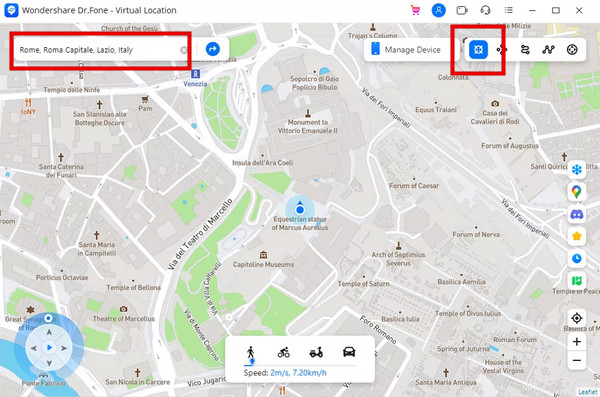
The map will display the location for confirmation, click Move Here to proceed. Your location on smartphone will be instantly changed to the new location.
Part 3. Competitive Alternative to Dr.Fone Virtual Location
If Dr.Fone Virtual Location doesn't meet your needs, you can use an alternative to spoof your GPS location. إيمي باس آي لوكا جو provides one-stop mode, multi-stop mode, or joystick mode for you to customize your route and control your movement with a specific speed. What's more, users can purchase a lifetime license for $69.90, which includes free lifetime upgrades and customer support.

4،000،000+ التنزيلات
قم بتغيير موقع هاتفك إلى أي مكان بنقرة واحدة.
محاكاة مسارات GPS بثلاثة أوضاع وسرعة قابلة للتخصيص.
عرض مواقع التاريخ ووضع علامة على المواقع المفضلة.
يدعم معظم أجهزة iOS تقريبًا، مثل iPhone 18 Pro وغيرها.
قم بتنزيل وتثبيت وتشغيل برنامج imyPass Location Changer على جهاز الكمبيوتر الخاص بك.
لتوصيل جهاز iPhone بجهاز الكمبيوتر الخاص بك، تحتاج إلى إعداد كابل USB.

اضغط على تعديل الموقع على الجانب الأيسر لتزييف موقع GPS الخاص بك.
على الخريطة، انقر على المكان الذي تريد التغيير إليه أو أدخل العنوان في مربع البحث. وأخيراً اضغط على تأكيد التعديل.

لقد تعلمت الآن كيفية انتحال موقعك باستخدام imyPass Location Changer. إذا كنت تريد حفظ المكان لتزييف الموقع بشكل أسرع في المرة القادمة، فما عليك سوى إضافته إلى موقعك المفضل. في التاريخ، يمكنك عرض سجلات موقعك. لمزيد من النصائح الخاصة بجهاز iPhone بخلاف تغيير الموقع، استكشف الروابط المتوفرة.
الأسئلة الشائعة.
-
هل استخدام الموقع الافتراضي لـ Dr.Fone آمن؟
نعم. إنه تزييف موقع آمن. يمكنك استخدامه لحماية معلومات موقعك. وفي الوقت نفسه، لن يقوم بكسر حماية هاتفك.
-
لماذا لا يعمل موقع Dr.Fone الافتراضي؟
قد تكون مشكلة فنية. يمكنك محاولة إعادة تشغيله أو تشغيل جهازك والتأكد من أن لديك اتصالاً مستقرًا بالإنترنت.
-
هل يمكنني شراء ترخيص مدى الحياة لموقع Dr.Fone الافتراضي؟
لا، فهو لا يقدم ترخيصًا مدى الحياة. يمكنك اختيار واحدة من خططها الشهرية والفصلية والسنوية.
-
هل يعرف الآخرون أنني أستخدم Dr.Fone Virtual Location؟
لا. بعد تغيير موقعك، لن يعلم الآخرون أنك تستخدم أداة تغيير الموقع.
-
هل يحتاج موقع Dr.Fone الظاهري إلى كسر الحماية؟
لا، لن يقوم مغير الموقع بكسر حماية هاتفك.
استنتاج
في هذا مراجعة الموقع الافتراضي Dr.Fone, we have delved into its features, pricing, strengths, and limitations. It offers an easy and safe way to spoof your location and make customized virtual routes. But you need to pay for it every year. Sometimes, the map crashes due to technical issues. Therefore, we recommend the best alternative, which is more stable in location spoofing and offers a lifetime license. Apart from the مُغيّر الموقع, we offer more advice and tips for your phone management. Feel free to check the links below.
تركّز بيني على استكشاف أخطاء أنظمة الـ GPS وإصلاحها، إضافةً إلى تحسين أداء نظام ويندوز. عملت سابقًا كمهندسة دعم فني، حيث ساعدت العملاء على حل مشكلات المواقع الجغرافية ومشكلات النظام بكفاءة. وبفضل خبرتها في دعم تكنولوجيا المعلومات، تقدّم حلولًا عملية فعّالة وقابلة للتطبيق. في وقت فراغها، تستمتع برياضة المشي لمسافات طويلة والبحث عن الكنوز الجغرافية (Geocaching)، لتجربة تقنيات GPS في العالم الواقعي.
الحلول الساخنة
-
موقع GPS
- كيفية معرفة ما إذا كان شخص ما قد أوقف موقعه مؤقتًا على Life360
- كيفية إجراء مكالمات انتحال هوية مجانًا
- أفضل مواقع لعبة بوكيمون جو مع الإحداثيات
- أفضل 10 طرق غش في لعبة بوكيمون جو
- 9 أدوات لتغيير الموقع في لعبة بوكيمون جو
- كيفية تتبع موقع جهاز آيفون
- ما هو الموقع الوهمي
- أفضل 5 أذرع تحكم GPS للعبة بوكيمون جو
-
افتح نظام iOS
-
نصائح دائرة الرقابة الداخلية
-
فتح الروبوت


