



 Solução
 Centro de Apoio
 Sobre nós
 Contato
Como contornar rapidamente o bloqueio de ativação do iCloud no iPad
 Samuel Spenser publicado em setembro 24, 2026Desbloquear iOSLeitura de 3 minutos
Activation Lock is a security feature connected to Find My that helps protect your iPad if it is lost or stolen. When Find My is on, you will be asked to enter your Apple Account credentials after you erase or reset the device. But what if you can't provide the credentials? This guide shows you how to bypass Activation Lock on iPad in different situations.

Neste artigo:
- How to Remove Activation Lock on iPad – 6 Ways Compared
- Method 1: Turn Off Find My on Your iPad
- Method 2: Ask the Previous Owner to Remove Activation Lock
- Method 3: Remove the iPad From Find My Remotely
- Method 4: Contact Apple Support
- Method 5: Use a Professional Activation Lock Remover
- Method 6: Bypass iCloud Activation Lock on iPad via DNS
How to Remove Activation Lock on iPad – 6 Ways Compared
The table below gives you a quick overview of the six methods and their main requirements, so you can choose the one that best matches your situation.
| Método | Requires Apple Account? | Requires Previous Owner? | Computer Needed? | Melhor para |
| Desativar Encontrar Meu | Sim | Não | Não | Your own iPad |
| Ask the Previous Owner | Não | Sim | Não | Used iPad |
| Remove From Find My | Previous owner’s account | Sim | Não | iPad you no longer have |
| Entre em contato com o suporte da Apple | Nem sempre | Não | Não | Legitimate owners with proof of purchase |
| imyPass iPassGo | Não | Não | Sim | When standard methods don’t work |
| DNS Workaround | Não | Não | Sim | Older iPadOS versions |
Method 1: Turn Off Find My on Your iPad
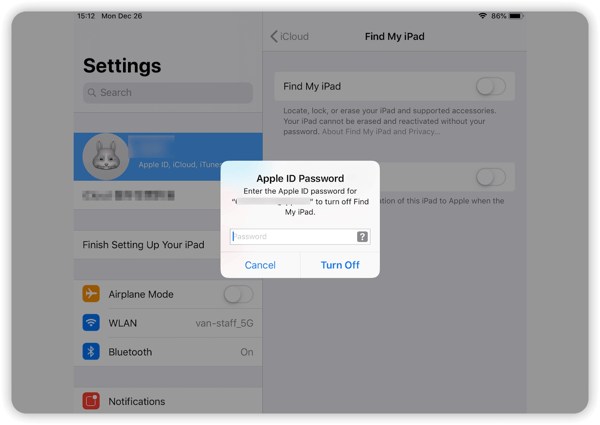
The simplest way to remove Activation Lock from your iPad is to turn off Find My iPad. Activation Lock is automatically enabled when Find My is turned on, so turning off Find My will disable Activation Lock on iPad
Abra o Definições aplicativo no seu iPad.
Tap your profile, then select Encontre o meu.
Toque Encontre meu iPad e desligue Encontre meu iPad.
Se solicitado, digite a senha do seu ID Apple e toque em Desligar confirmar.
Method 2: Ask the Previous Owner to Remove Activation Lock
If you bought a second-hand iPad and it is still linked to the previous owner's Apple Account, you need to ask them to remove the device from their account.
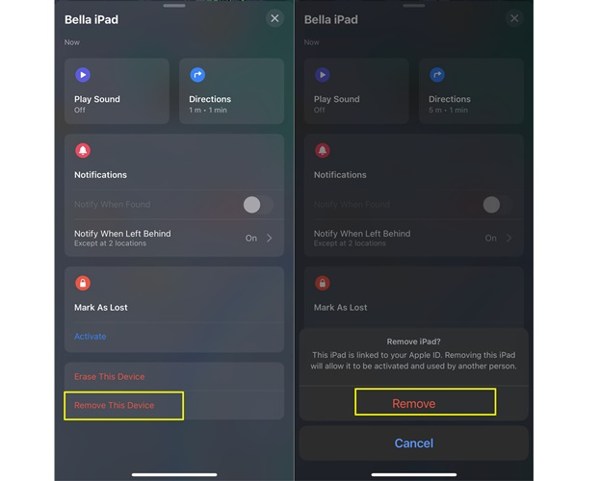
Contact the previous owner and ask them to remove the iPad from their Apple Account.
Ask them to open Encontre o meu on their Apple device and select your iPad from Dispositivos.
Ask them to tap Remover este dispositivo to remove the iPad from their account and disable Activation Lock. You can also ask them to tap Apagar este dispositivo if the iPad has not already been erased.
Method 3: Remove the iPad From Find My Remotely
If you cannot access the iPad directly, you can remove it from Find My remotely. This method allows you to erase the device and remove it from the account linked to it. Once the iPad is removed from Find My, Activation Lock will also be removed.
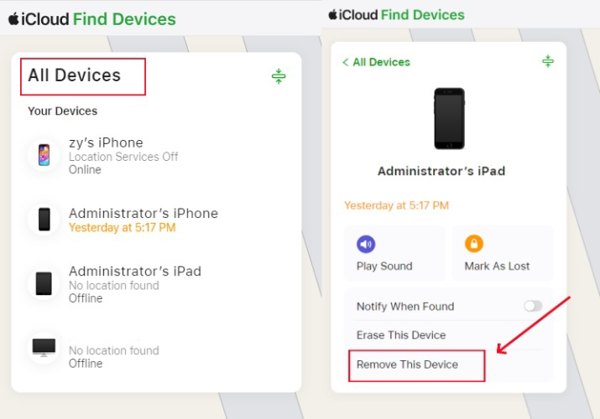
Go to iCloud.com/find and sign in with your Apple ID and password.
Clique Todos os dispositivos at the top and select the iPad you want to remove.
Clique Remover este dispositivo and follow the on-screen instructions to remove your iPad from the account. You can then set up the iPad with your own Apple Account.
Method 4: Contact Apple Support
Apple may be able to help if you meet Apple's ownership verification requirements. You need to provide valid proof of purchase or other information to verify your ownership.
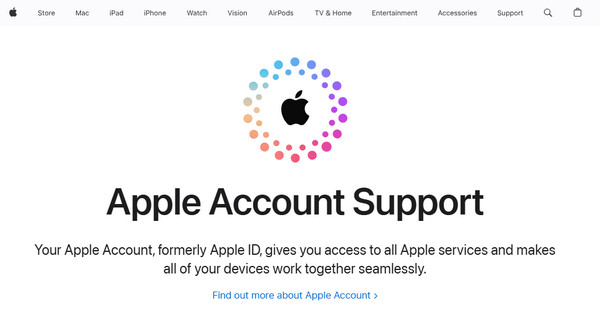
Go to Apple's official support website and choose the option for Apple Account support.
Explain that your iPad is locked by Activation Lock and that you are the legitimate owner
Provide the requested information, such as the iPad's serial number and proof of purchase.
Follow Apple's instructions and wait for the support team to review your request.
Method 5: Use a Professional Activation Lock Remover
If you forget your iCloud account password, you cannot get past Activation Lock on iPad or iPhone. Fortunately, imyPass iPassGo can help you directly bypass iCloud Activation Lock without password. Whether you bought a used iPad, forgot your Apple ID password, or stuck on Activation Lock screen, iPassGo can help you remove these restrictions safely and easily!

Mais de 4.000.000 de downloads
Remove iCloud Activation Lock without password.
Unlock a locked, disabled, or inactive Apple Account.
Remove screen lock, MDM and Screen Time restrictions.
Support the latest versions of iOS and iPadOS.
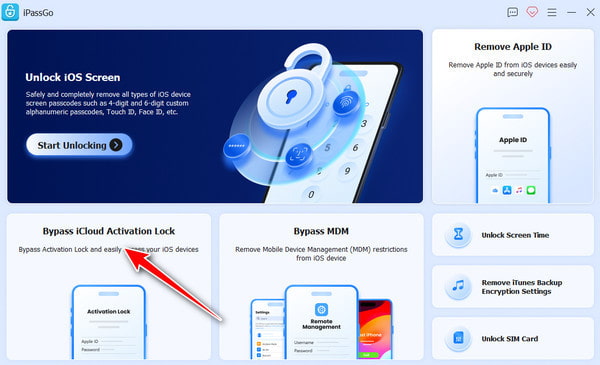
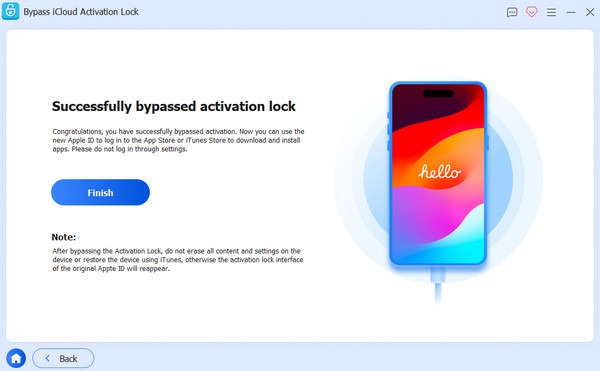
Launch the software and choose Ignorar o bloqueio de ativação do iCloud from the main interface.
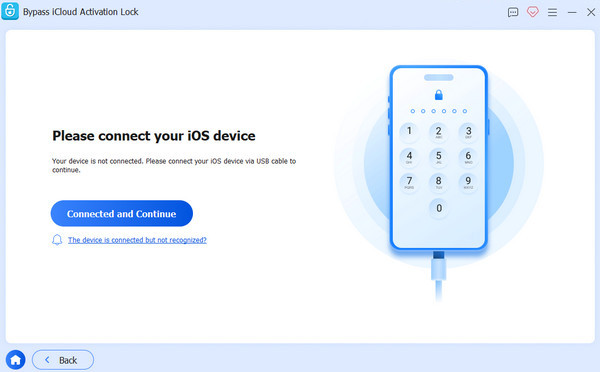
Connect your iOS device to your computer using a USB cable. Tap Confiar on your iOS device when prompted.
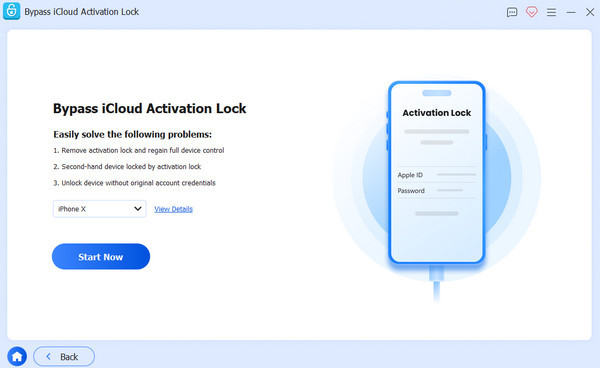
Read the warning carefully, then click Comece agora to begin the iCloud Activation Lock bypass.
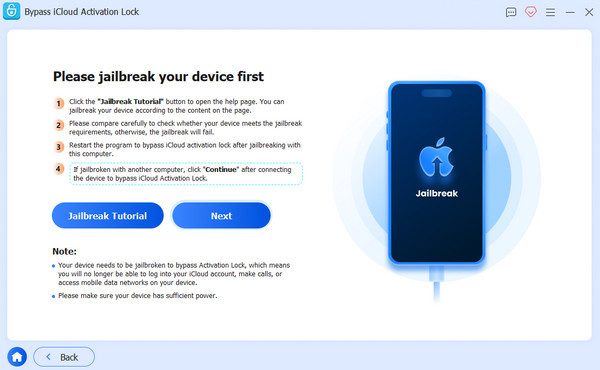
Follow the on-screen tutorial to jailbreak your iPhone.
Verify your device information, then click Comece a ignorar a ativação. Wait patiently for the process to complete.
Method 6: Bypass iCloud Activation Lock on iPad via DNS
Outra opção para contornar o Bloqueio de Ativação do iCloud no seu iPad é alterar as configurações de DNS da sua rede Wi-Fi. Na verdade, esse método explora um bug em versões específicas do iOS. Ele funciona apenas para iPadOS 10 a 8.
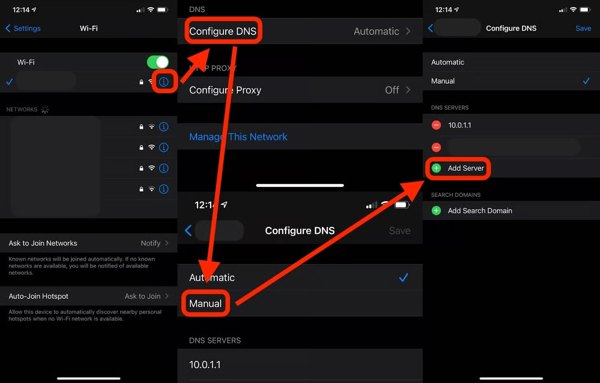
Comece o Definições aplicativo e escolha Wi-Fi.
Toque em Informações botão na sua rede e escolha Mais configurações de WiFi.
Em seguida, toque no Informações botão novamente.
Insira os endereços IP abaixo em DNS seção, dependendo da sua região:
América do Norte: 104.154.51.7
Asia: 104.155.220.58
Europa: 104.155.28.90
América do Sul: 35.199.88.219
Outros: 78.100.17.60
Toque em Voltar botão para ir para a tela anterior.
Selecione sua rede Wi-Fi e digite sua senha Wi-Fi.
Toque Voltar.
Observação:
Pode ser necessário repetir os passos acima várias vezes para ignorar o Bloqueio de Ativação do iCloud no seu iPad.
Conclusão
Este guia compartilhou várias maneiras de ignorar o bloqueio de ativação no seu iPad. If you have the Apple Account password, you may be able to remove Activation Lock directly from the iPad, with the previous owner's help, or via Find My. If you can't remember the password, a third-party tool such as imyPass iPassGo can unlock iCloud account without credentials.
Samuel specializes in password security and digital privacy. He used to work as a cybersecurity consultant for small businesses to protect digital assets. With certifications in Cybersecurity and Ethical Hacking, he turns complex security topics into easy-to-follow advice. He also enjoys sharing password tips to help users protect their accounts more confidently.
Soluções quentes
-
Desbloquear iOS
-
Dicas para iOS
-
Desbloquear Android
-
dicas de senha


