



 Solução
 Centro de Apoio
 Sobre nós
 Contato
How to Download Apps on Your iPhone Without Apple ID
 Clara Prescott publicado em agosto 06, 2026Dicas para iOSLeitura de 3 minutos
Currently, Apple has increased the security of iPhones and iPad devices. Users have to authenticate with their Face ID, Touch ID, or passcode when downloading apps from the App Store, including the free apps. The downside is that you have to enter your passcode repeatedly if you need to download multiple apps. This guide shares multiple ways to download apps without an Apple ID no seu iPhone ou iPad.

Neste artigo:
- Part 1: How to Download Apps Without an Apple ID Using Settings
- Part 2: How to Download Apps Without an Apple ID with Face ID
- Part 3: How to Download Apps Without an Apple ID via Family Sharing
- Part 4: How to Download Apps Without an Apple ID for Pre-installed Apps
- Part 5: Bonus Tip: How to Reset Apple ID Password and Download Apps
Part 1: How to Download Apps Without an Apple ID Using Settings
Through the right settings, you can download apps on iPhone without an Apple ID for free apps or within 15 minutes. Of course, you still need to enter your password if you download a paid app from the App Store.
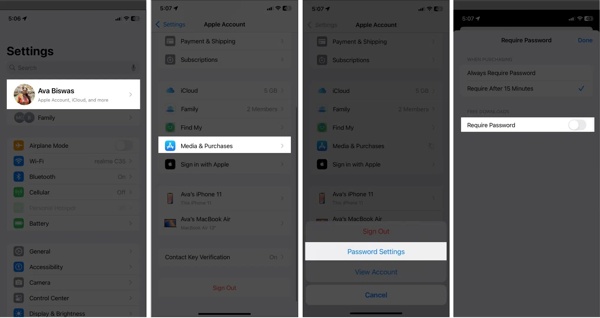
Abra seu Definições aplicativo.
Toque no seu perfil.
Escolha o Mídia e compras opção.
Toque Configurações de senha on the dialog.
Desligar Exigir senha.
Certifique-se de selecionar Exigir após 15 minutos.
Toque em Feito button to save your settings.
Part 2: How to Download Apps Without an Apple ID with Face ID
For new iPhone and iPad models, you can authenticate with Face ID or Touch ID when downloading apps. It means that you can download apps without an Apple ID by scanning your face or fingerprint.
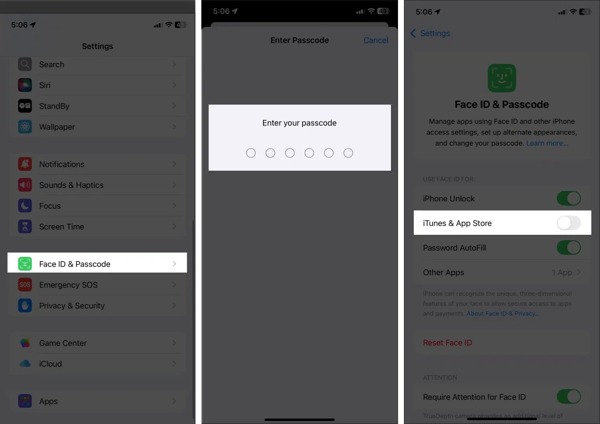
Execute o Definições aplicativo no seu iPhone.
Escolha o ID facial e senha ou ID de toque e senha opção.
Enter your passcode to authenticate.
Ativar/desativar iTunes e App Store debaixo de USE ID DE FACE PARA seção.
Now, you can download apps from the App Store with your Face ID or Touch ID.
Part 3: How to Download Apps Without an Apple ID via Family Sharing
Apple Family Sharing makes it easy for up to six family members to share purchases, subscriptions, storage, and more. If you have joined Family Sharing, you can download apps on your iPhone without an Apple ID.
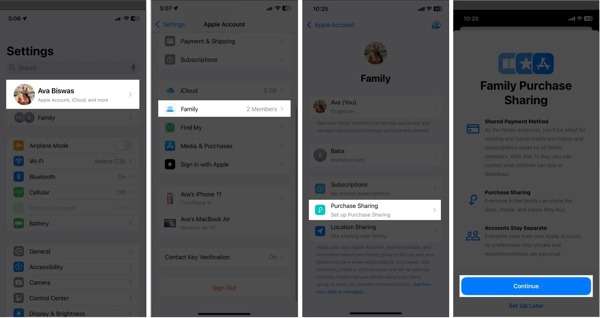
Comece seu Definições aplicativo.
Tap on your profile and choose the Família opção.
Toque em Compartilhamento de compra opção.
Leia a mensagem e toque em Continuar.
Add a payment method if you don’t have one.
Now, a family member can download the apps that others have purchased without authentication.
You May Also Like:
Part 4: How to Download Apps Without an Apple ID for Pre-installed Apps
Another way to download apps without an Apple ID is to use the apps previously installed. If you have installed an app and deleted it, for example, you can download it from the App Store directly without authentication.
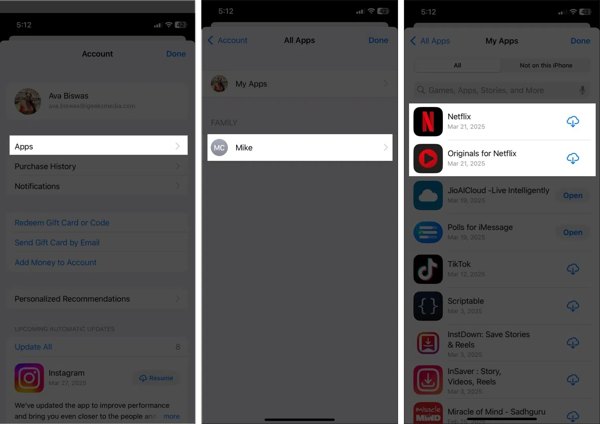
Execute o Loja de aplicativos aplicativo.
Tap on your profile at the top right corner.
Toque Aplicativos to display all apps previously installed.
Find the desired app, and tap the Download button to install it directly.
Part 5: Bonus Tip: How to Reset Apple ID Password and Download Apps
Can you download apps without an Apple ID if you forgot your Apple ID password? No. However, imyPass iPassGo can help you reset your Apple ID password and then download apps on your iOS device easily.

Mais de 4.000.000 de downloads
Remove the old Apple ID credentials easily.
Não exija a senha do seu iPhone ou do ID Apple.
Ofereça recursos de bônus, como ignorando o Tempo de Tela.
Suporte aos modelos mais recentes de iPhone e iPad.
How to Download Apps After Resetting Apple ID Password
Conecte-se ao seu iPhone
Launch the Apple ID removal tool after installing it on your computer. It is available on Windows 11 or earlier and Mac OS X 10.12 or above. Plug your iPhone into your computer with a Lightning cable. Choose the Remover ID Apple modo para continuar.
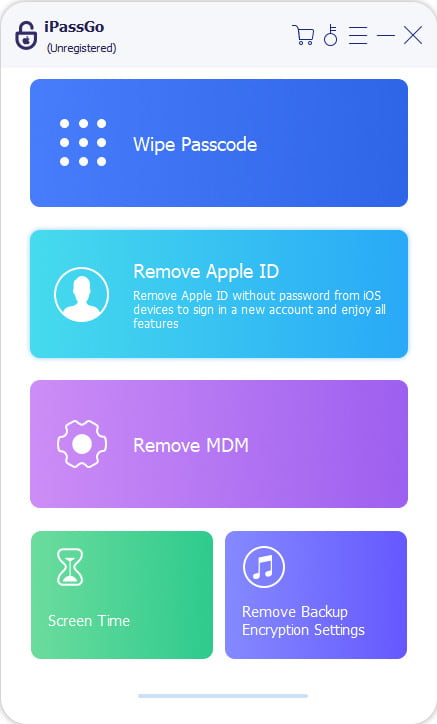
Remove old Apple Account
Depois que seu dispositivo for detectado, clique em Comece agora button. If Find My is enabled, reset all settings on your device. Then, click Confirm Again to initiate the process. If Find My is disabled, the software will begin removing your account immediately.
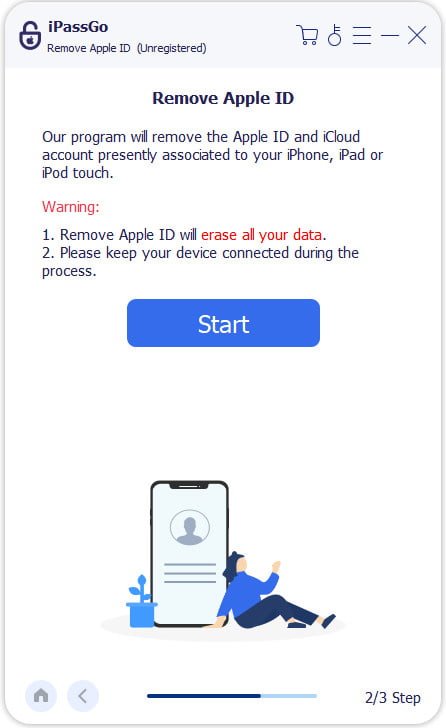
Criar uma nova conta
Quando terminar, configure seu iPhone como um novo dispositivo. Escolha Create a Free Apple Account if you are asked to sign in to an account. Complete setup and download apps from the App Store with the new account password.
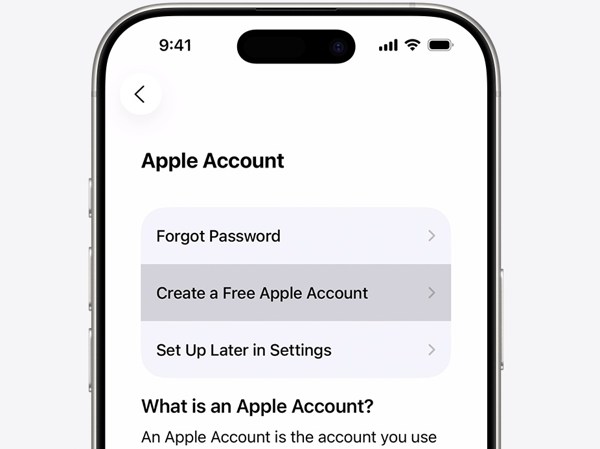
Conclusão
This guide shared five methods to download apps on Apple without an Apple ID. You can adjust settings to download free apps without authenticating. If you are using new models of iPhone or iPad, set up Face ID or Touch ID for downloading apps. Family Sharing is another way to share purchased apps across family members. imyPass iPassGo enables you to reset the forgotten Apple ID password on your iPhone or iPad, so you can download apps quickly.
Clara has over 8 years of experience helping users recover lost files and transfer data. She previously worked as a data recovery technician for a major IT service company. Certified in Data Recovery and Digital Forensics, her articles focus on simple solutions that make complicated recovery tasks easier for everyday users.
Soluções quentes
-
Dicas para iOS
- Como baixar aplicativos sem ID Apple
- How to Factory Reset iPhone
- Como redefinir um iPad para as configurações de fábrica
- Fix Error Connecting to the Apple ID Server
- How to Fix iPhone Unavailable Issue
- How to Quickly Fix SIM Not Support Error
- How to Enter iPhone Recovery Mode
- Is Apple ID and iCloud ID the Same
-
Desbloquear iOS
-
Localização GPS
-
Dicas do Windows


