



 Solução
 Centro de Apoio
 Sobre nós
 Contato
What Is MagFone iPhone Unlocker and How to Use the Software
 Samuel Spenser publicado em julho 22, 2026Desbloquear iOSLeitura de 4 minutos
As a professional unlocking program for iPhone, iPad, and iPod Touch, Desbloqueador de iPhone MagFone can unlock your iOS device without a password. It is well known that passcodes are crucial for the security of your device and personal data. However, as time goes on, chances are that you might forget the passcode, locking yourself out of an iPhone or iPad. This article shares an in-depth review of the software.

Neste artigo:
Part 1. MagFone iPhone Unlocker Review
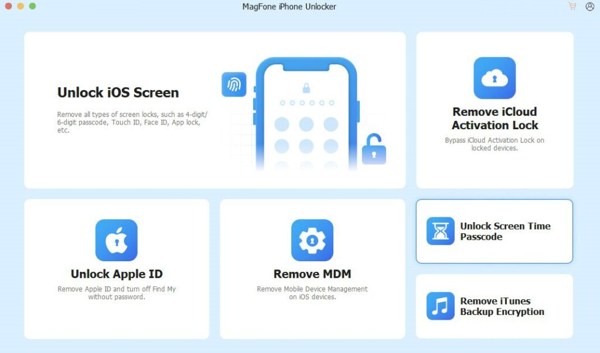
As its name indicates, MagFone iPhone Unlocker is a versatile unlocking program designed to help iOS users remove different types of screen locks, from numeric to alphanumeric codes, from Face ID to Touch ID. It is available when your iPhone or iPad is locked by Apple ID, screen locks, MDM, or Screen Time.
Main Features of MagFone iPhone Unlocker
- 1.Unlock iPhone, iPad, or iPod Touch without the passcode.
- 2.Bypass Screen Time passcode sem perda de dados.
- 3.Get rid of the Apple ID from an iPhone or iPad without a password.
- 4.Bypass MDM solutions from iOS devices instantly.
- 5.Delete iCloud Activation Lock after jailbreaking your device.
- 6.Reset iTunes backup password quickly.
- 7.Work on iOS 27 and earlier.
Is MagFone iPhone Unlocker Free?
While you can download MagFone iPhone Unlocker for free from the official website, it is not freeware. For individual use, the monthly license costs $34.95, the yearly license costs $49.95, and the lifetime license costs $59.95.
Análise do desbloqueador de iPhone MagFone
Pros
- The software is lightweight and runs fast.
- It supports a wide range of iPhones, iPad devices, and iPod Touch devices.
- MagFone iPhone Unlocker integrates features to remove all restrictions.
- There are onscreen instructions for beginners.
Contras
- It requires a computer to unlock an iPhone or iPad.
- The MagFone Activation unlocking feature is only available to iOS 16 and earlier.
- The customer support is not good.
Is MagFone iPhone Unlocker Safe?
According to our test, most antivirus software doesn’t detect malware from MagFone iPhone Unlocker. In other words, MagFone iPhone Unlocker is safe and legit to use if you download the software from the official website or trusted resources.
Part 2. How to Use MagFone iPhone Unlocker
Download MagFone iPhone Unlocker from the official website and install it on your hard disk.
Choose a mode according to your need, such as Desbloquear tela do iOS.
Connect your iPhone or iPad to the computer with a compatible cable.
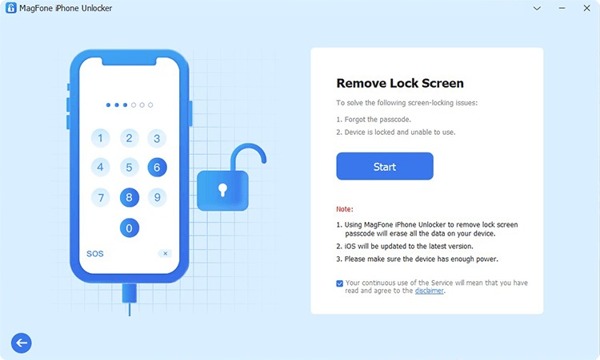
After your device is detected, click on the Começar botão.
Follow the onscreen instructions to put your device into DFU mode or Modo de recuperação.
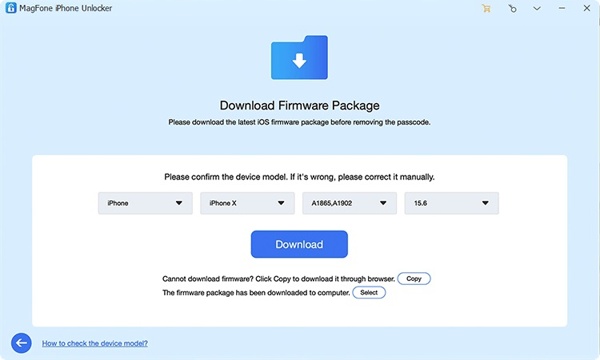
Next, check the device information and click the Download botão para baixar o firmware.
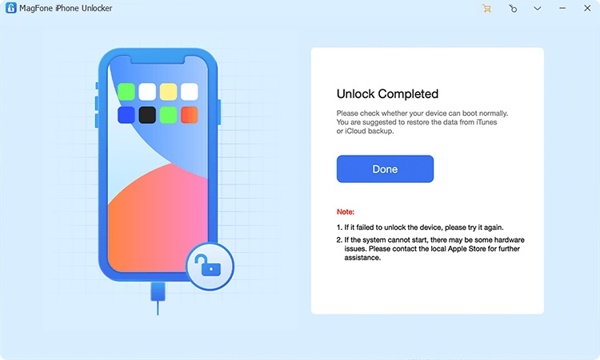
When the download finishes, MagFone iPhone Unlocker will begin unlocking your device immediately.
Part 3. An Ideal Alternative to MagFone iPhone Unlocker
Now, you should understand how MagFone works. However, the software is unavailable to all iOS devices. In fact, the success rate is different, depending on the condition of your device. From this point, we recommend imyPass iPassGo as an alternative program. It can meet all your needs to access your iPhone or iPad without any restrictions.

Mais de 4.000.000 de downloads
Remove any screen locks from an iPhone/iPad/iPod Touch.
Delete MDM, Apple ID, or Screen Time passcode easily.
Ofereça recursos de bônus, como bypassing iCloud Activation Lock.
Unlock the SIM card on an iPhone.
Compatible with a wide range of iPhones and iPad devices.
How to Use MagFone iPhone Unlocker Alternative
Conecte-se ao seu iPhone
Launch the alternative to MagFone iPhone Unlocker once you install it on your PC. There is another version for Mac. Plug your iPhone into your PC with a Lightning cable. If prompted, tap Confiar na tela para confiar neste PC.
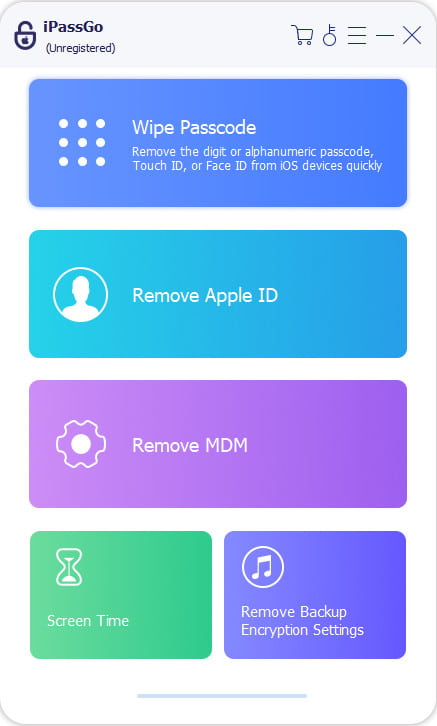
Escolha um modo
Escolha o Desbloquear tela do iOS mode if you want to regain access to your device. Once your device is recognized, the software will load the device information. Click the Comece agora botão para seguir em frente.
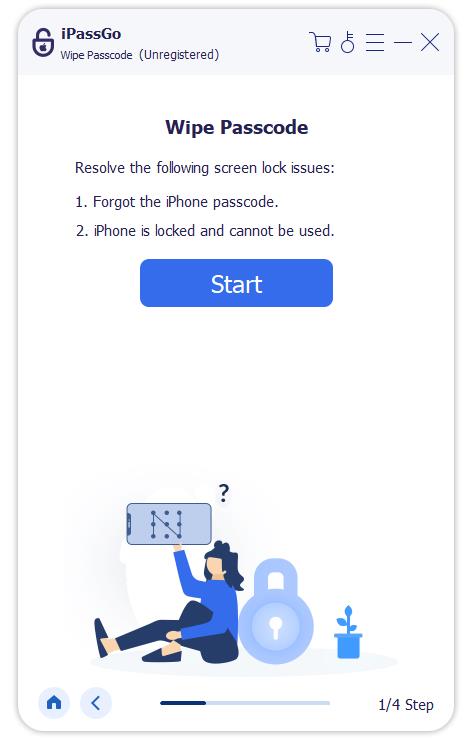
Desbloqueie seu iPhone
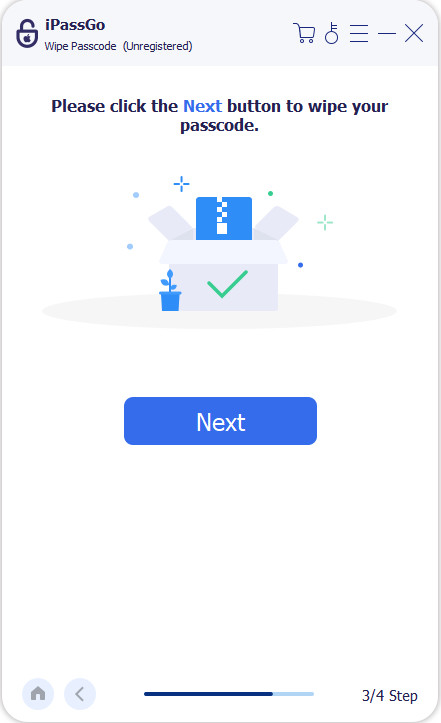
The software will begin downloading the firmware package. It may take a few minutes. Then, click the Começar a remover button to continue. When prompted, click Confirm Again to begin unlocking your device. When it is done, disconnect your device and unlock it directly.
Conclusão
Este artigo reviewed MagFone iPhone Unlocker, one of the professional iPhone unlocking software programs. We shared the information you should know, like what the software can do, its benefits and drawbacks, and the prices. Moreover, we explained how to use the software to unlock your iOS device when you forgot the passcode. We also recommended an alternative program, imyPass iPassGo. It is easier to use and delivers a higher success rate for iPhones and iPad devices.
Samuel specializes in password security and digital privacy. He used to work as a cybersecurity consultant for small businesses to protect digital assets. With certifications in Cybersecurity and Ethical Hacking, he turns complex security topics into easy-to-follow advice. He also enjoys sharing password tips to help users protect their accounts more confidently.
Soluções quentes
-
Desbloquear iOS
-
Dicas para iOS
-
Desbloquear Android
-
dicas de senha


