



 Solução
 Centro de Apoio
 Sobre nós
 Contato
How to Unlock Your Boost Mobile iPhone Without Data Loss
 Penny Warren publicado em setembro 09, 2026Desbloquear iOSLeitura de 3 minutos
As one of the popular American telecommunication companies and mobile virtual network operators, Boost Mobile offers prepaid and postpaid wireless services. Currently, it serves millions of subscribers and provides flexible plans with unlimited call, text, and data options. However, Boost Mobile locks iPhones to its network, meaning users can only use them on Boost's wireless network and not on other carriers. This guide shares proven ways to unlock Boost Mobile cell phones.

Neste artigo:
Part 1: Boost Unlocking Policy
If your iPhone is locked to Boost Mobile, you cannot use other carriers. If you try to activate your phone on another carrier's network or change the initial programming or settings, you may not be able to reactivate the device for use with other services. To unlock your carrier lock, you'd better learn the Boost Mobile unlock policy:
For Postpaid Devices
- 1.Boost Mobile will unlock your iPhone after completing the financing plan.
- 2.If you purchase a device from Boost Mobile, you need to pay for it in full to be unlocked.
For Prepaid Devices
- 1.Your device can be unlocked one year after initial activation.
- 2.You have met all payment or usage requirements.
- 3.The prepaid device balance must be paid off in full.
- 4.Your Boost Mobile account must be active.
For Military Personnel
- 1.You or a family member on your account must be an active member of a branch of the United States military.
- 2.You or a family member on your account with Boost Mobile has been issued overseas deployment papers.
- 3.You are a current, authenticated Boost Mobile customer.
- 4.Your Boost Mobile account is in good standing.
Part 2: How to Check If Your Boost Mobile Device Is Locked
Option 1: Check if Your Boost Mobile iPhone is Locked Using Another SIM
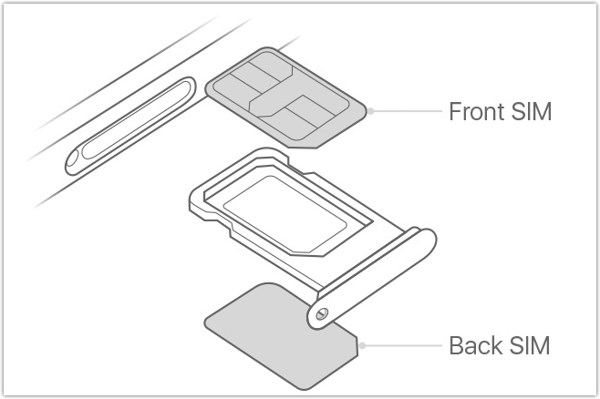
One easy way to tell if Boost Mobile locks your iPhone is by using a SIM card from other carriers, such as Verizon, T-Mobile, and more. Insert a paper clip or SIM eject tool into the small hole of the SIM card tray on your iPhone, and pull it out to remove the SIM tray. Place another SIM card into the tray, and insert the tray into your iPhone. If your device can read the new card, your iPhone is unlocked by Boost Mobile.
Option 2: Check if the Boost Mobile iPhone is Locked in Settings
Another way to check if your iPhone is unlocked is to find the information in the built-in Settings app. This way doesn't require another SIM card or other hardware. All you need is your iPhone passcode.
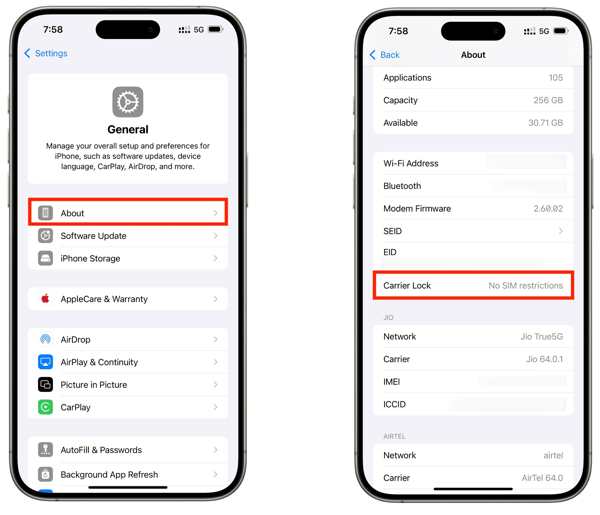
Turn on your iPhone with your passcode.
Abra o Definições aplicativo.
Vamos para Em geral e Sobre.
Mover para o Bloqueio de operadora cabeçalho.
Se isso mostrar Sem restrições de SIM, your iPhone is unlocked by Boost Mobile.
Part 3: How to Unlock a Boost Mobile Phone
According to Boost Mobile, it will unlock your iPhone automatically once you meet the requirements of the unlocking policy. If not, Boost Mobile will immediately notify you that your device is eligible to be unlocked.
Way 1: Unlock Boost Mobile iPhone Online
Turn on your handset.
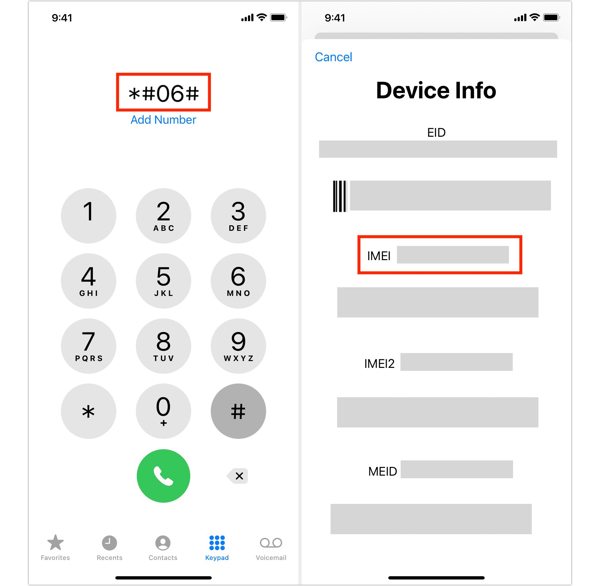
Execute o Telefone aplicativo.
Discar *#06# e toque no Chamar button to show the IMEI number.
Next, access https://www.boostmobile.com/unlock in a browser.
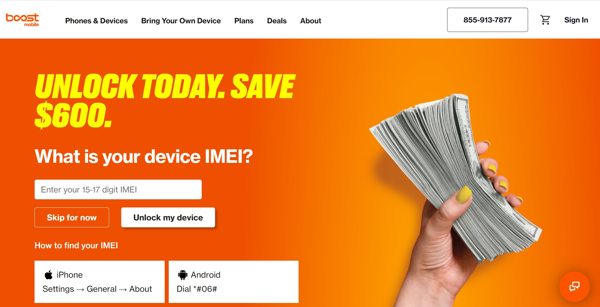
Enter your IMEI number into the field and click Unlock my device.
Offer the required information and submit your request.
Once Boost Mobile receives your request, it will unlock your device.
Way 2: Unlock Boost Mobile iPhone by Call
Get your IMEI number in the Definições ou Telefone aplicativo.
Contact at 833-502-6678.
Submit your unlocking request.
Offer the necessary information and wait for Boost Mobile to unlock your iPhone.
You May Also Like:
Part 4: How to Unlock Boost Mobile iPhone on Your Own
As mentioned previously, you must meet the unlocking policy to unlock your iPhone. If you cannot meet the policy, you have to unlock a Boost Mobile phone yourself using imyPass iPassGo. It can remove carrier lock from an iPhone quickly, even if you cannot meet the unlocking policy. Compared to online unlock services, it is safer and delivers a high success rate.

Mais de 4.000.000 de downloads
Unlock iPhones locked by Boost Mobile in three steps.
Proteja seus dados durante o processo.
Don't require any password or extra fees.
Offer bonus features, like unlocking Screen Time.
Work on the latest models of iPhone and iPad.
How to Unlock Boost Mobile iPhone on Your Own
Install the Boost Mobile unlock tool
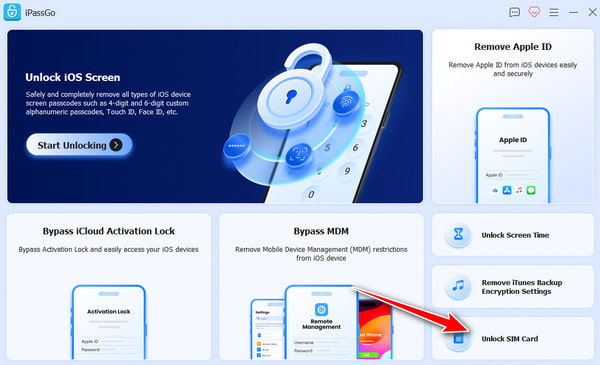
Download and install the Boost Mobile unlock software on your PC. There is another version for Mac computers. Launch it when you want to unlock your Boost Mobile iPhone. Choose the Unlock SIM Card modo para prosseguir.
Conecte-se ao seu iPhone
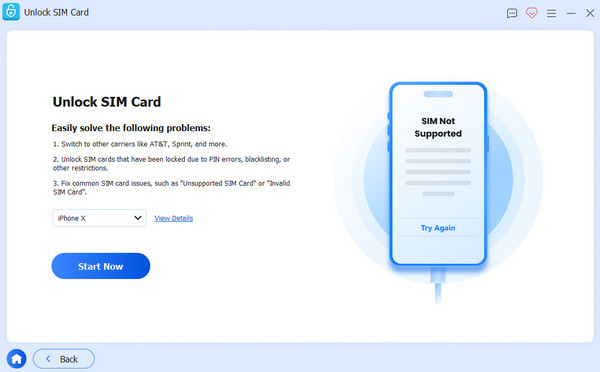
Connect your iPhone to your PC with a Lightning cable. When prompted, make sure to trust this PC. Then, the software will detect your iPhone immediately. Click the Comece agora botão.
Unlock Boost Mobile iPhone
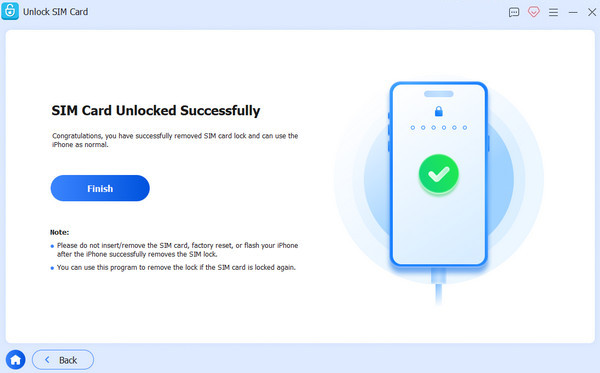
Once the software loads your device information, check it, and click the Comece a ignorar button to continue. Follow the onscreen instructions to set up your device. When you finish, click on the OK button to begin unlocking your carrier. When it is done, click Terminar to close the software and disconnect your iPhone. Now, you can insert a new SIM card in your iPhone.
Conclusão
This guide explained everything you need to know about unlocking a Boost Mobile cell phone. First of all, you should learn the unlocking policy for Boost Mobile, including Postpaid and Prepaid devices. Moreover, follow our steps to check if Boost Mobile still locks your device. Of course, we shared the proven ways and detailed steps to unlock your device quickly. If you cannot meet the policy, imyPass iPassGo is an intuitive way to get rid of the Boost Mobile lock from your mobile device on your own.
Penny focuses on GPS troubleshooting and Windows optimization. She formerly worked as a technical support engineer, helping clients solve location-based and system issues efficiently. Backed by IT support experience, she provides practical solutions that really work. In her free time, she likes hiking and geocaching, testing GPS tech in the real world.
Soluções quentes
-
Desbloquear iOS
-
Dicas para iOS
-
Desbloquear Android
-
dicas de senha


