



 Solução
 Centro de Apoio
 Sobre nós
 Contato
Unlock Verizon Phone to Use Your Preferred SIM Card
 Samuel Spenser publicado em maio 20, 2026Desbloquear iOSLeitura de 3 minutos
Buying an iPhone from official Apple stores around the globe is the most suggested purchase for users. But buying from carriers is also convenient, as they offer deep discounts and promotions, like Verizon. Additionally, users buy from them when they buy an iPhone on a monthly installment plan.
However, there are some limitations to the network of your iPhone. You cannot use other SIM cards, aside from the one offered by Verizon. But what can you do if you need one for traveling abroad or other valid reasons? Learn como desbloquear um telefone Verizon with this article as you scroll below.

Neste artigo:
Part 1. Verizon's Unlock Policy
Before anything else, it is a must that you know the Verizon unlock policy. This way, you know when and how your iPhone can be unlocked. In fact, these unlock policies are also the same when you unlock AT&T phones, T-Mobile, and other carriers.
- Automatic Unlock: Devices purchased from Verizon are automatically unlocked 60 days after purchase.
- Financing/Retail: If purchased via payment plan or full retail price, the 60-day rule applies.
- Prepaid Devices: Prepaid devices are unlocked 365 days after activation.
- Lost/Stolen: Devices reported as lost or stolen will not be unlocked until the claim is cleared.
Part 2. How to Unlock Your Verizon iPhone (Step-by-Step)
A glimpse of the unlocking process of your Verizon iPhone is tackled in the previous section. In this section, the step-by-step guides to unlock the Verizon iPhone are included. See them from the list below.
1. The Automatic Unlock (Most Users)
It was mentioned that the iPhone from the Verizon carrier will be automatically unlocked after 60 days from its purchase. This method does not need a third-party tool, application, or other downloadable options. Know how to set up your iPhone after the automatic unlock by the carrier.
Turn off your iPhone. Then, get a SIM card ejector and place another SIM card from your preferred carrier. Later, turn the iPhone back on.
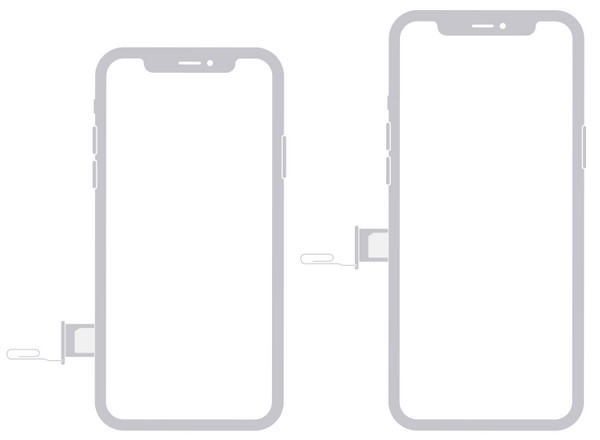
Ensure that you follow the on-screen instructions, including connecting the iPhone to Wi-Fi or mobile data. Later, wait for the activation to take place.
2. Submitting a Manual Unlock Request (If Needed)
Alternatively, you can submit a Verizon unlock request to unlock a SIM card on the iPhone. However, this method requires different information from your iPhone, including your personal information. You must gather the information before contacting the mentioned carrier. You need to know the IMEI number of your iPhone, proof of purchase, and other critical information.
Additionally, the unlocking process of Verizon in unlocking your iPhone can last 1 to 3 days. In some cases, it can last a week or a month. Please refer to the steps below to know how to submit a manual unlock request with Verizon.
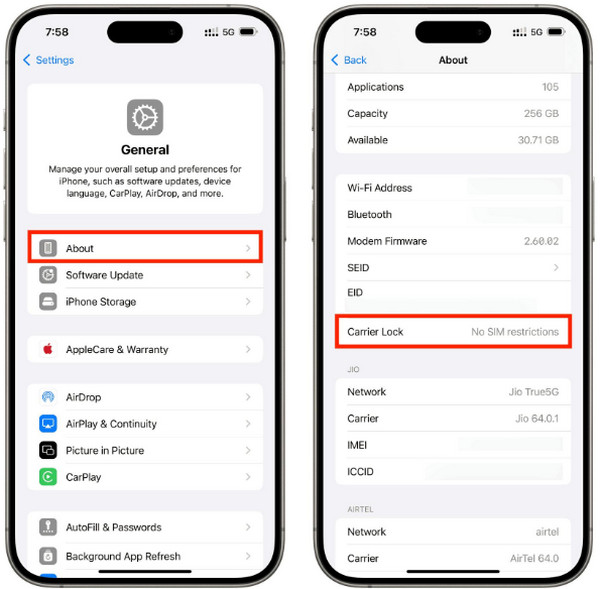
Know the IMEI number of your iPhone from Verizon. If you do not know it, tap the Definições app on an iPhone from the Home Screen section. Then, tap the Em geral button from the list. Tap the Sobre button on the screen. Finally, go to the IMEI section to know it. You may also dial *#06#.
Please call Verizon from your iPhone. You can dial the 611 or (800) 922-0204 hotline. Alternatively, you can visit their physical store or visit their official website to use the online chat to contact them. Finally, you can now wait for the process to be done, and you will be notified.
3. What About Third-Party Unlock Services
Third-party services that can unlock an iPhone from Verizon can also be used. You can use a downloaded tool or online programs. However, the success rate of the tools does not guarantee you a high success rate. The reason is that unlocking your iPhone Verizon without meeting the requirements or the unlock policy is illegal.
Part 3. How to Check If Your Verizon iPhone Is Unlocked
After the unlocking process, you might want to check if the iPhone is unlocked. This way, you know its status. Checking it can be done with your iPhone itself without the need for third-party tools or apps. How to tell if my Verizon phone is unlocked? Please use the steps below as your reference.
Abra o Definições opção do Tela inicial section of your iPhone after unlocking it. Then, the app will show you the list of options that can be done with the mentioned Apple device. Please select the Em geral button from the options list.
Vou ao Sobre section. Then, all of the important information about the iPhone will appear on the screen. Please swipe down on the screen and go to the Bloqueio de operadora section. If the iPhone is unlocked, you will see the No SIM Restrictions mensagem.
Part 4. If You Want to Unlock the Screen of Verizon iPhone
The iPhone from Verizon can also experience issues, including a forgotten passcode. If so, imyPass iPassGo is the ultimate solution to the said problem. Passcodes, PINs, Touch ID, and Face ID can be removed in a few clicks! It does not need an internet connection because the tool works with a USB cable and offline. Besides that, there are other features it can bypass on your iPhone. It includes iCloud Activation Lock, Screen Time, MDM, SIM lock, and more. Do you want to use the tool? The detailed instructions on how to use it are posted below.
Pay a quick visit to the website of imyPass iPassGo. Then, download the tool from the first interface. Locate the downloaded file and set it up. It depends on the requirements of the tool for your computer. Later, install and open it to start the process.
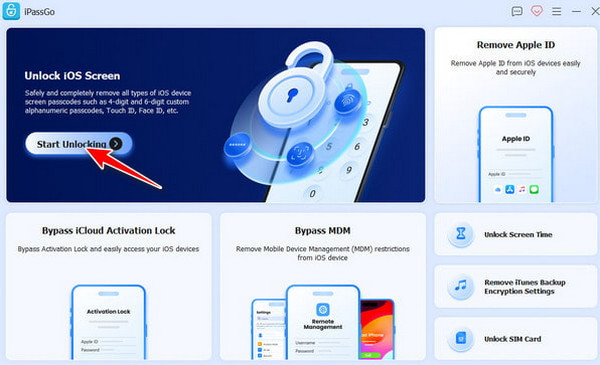
The supported features of the tool will appear. Please select the Comece a desbloquear button at the top left. Later, plug your iPhone into the computer using your compatible USB cable. Select your iPhone from the listed devices and click the Comece agora botão para prosseguir.
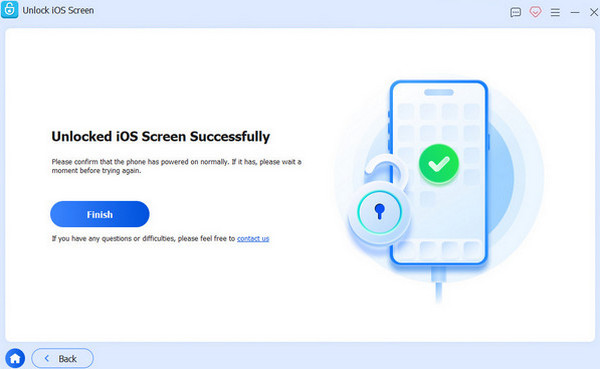
The firmware package will start to download. Please click the Começar a remover button at the bottom. The tool will require you to confirm the process afterward. Click the Confirm Again button at the bottom. The unlocking process will start. Click the Terminar botão para concluir o processo.
Conclusão
All in all, you can only desbloquear um telefone Verizon when the unlock policy of the mentioned carrier is met. The three leading methods for the unlocking process are here. imyPass iPassGo can also be discovered when you want to unlock the screen of your Verizon iPhone. Downloading the tool will help you know it even more!
Samuel specializes in password security and digital privacy. He used to work as a cybersecurity consultant for small businesses to protect digital assets. With certifications in Cybersecurity and Ethical Hacking, he turns complex security topics into easy-to-follow advice. He also enjoys sharing password tips to help users protect their accounts more confidently.
Soluções quentes
-
Desbloquear iOS
-
Dicas para iOS
-
Desbloquear Android
-
dicas de senha


