



 Soluţie
 Centru de asistență
 Despre noi
 a lua legatura
How to Unlock Your Boost Mobile iPhone Without Data Loss
 Penny Warren publicat pe septembrie 09, 2026Deblocați iOSLectură de 3 minute
As one of the popular American telecommunication companies and mobile virtual network operators, Boost Mobile offers prepaid and postpaid wireless services. Currently, it serves millions of subscribers and provides flexible plans with unlimited call, text, and data options. However, Boost Mobile locks iPhones to its network, meaning users can only use them on Boost's wireless network and not on other carriers. This guide shares proven ways to unlock Boost Mobile cell phones.

În acest articol:
Part 1: Boost Unlocking Policy
If your iPhone is locked to Boost Mobile, you cannot use other carriers. If you try to activate your phone on another carrier's network or change the initial programming or settings, you may not be able to reactivate the device for use with other services. To unlock your carrier lock, you'd better learn the Boost Mobile unlock policy:
For Postpaid Devices
- 1.Boost Mobile will unlock your iPhone after completing the financing plan.
- 2.If you purchase a device from Boost Mobile, you need to pay for it in full to be unlocked.
For Prepaid Devices
- 1.Your device can be unlocked one year after initial activation.
- 2.You have met all payment or usage requirements.
- 3.The prepaid device balance must be paid off in full.
- 4.Your Boost Mobile account must be active.
For Military Personnel
- 1.You or a family member on your account must be an active member of a branch of the United States military.
- 2.You or a family member on your account with Boost Mobile has been issued overseas deployment papers.
- 3.You are a current, authenticated Boost Mobile customer.
- 4.Your Boost Mobile account is in good standing.
Part 2: How to Check If Your Boost Mobile Device Is Locked
Option 1: Check if Your Boost Mobile iPhone is Locked Using Another SIM
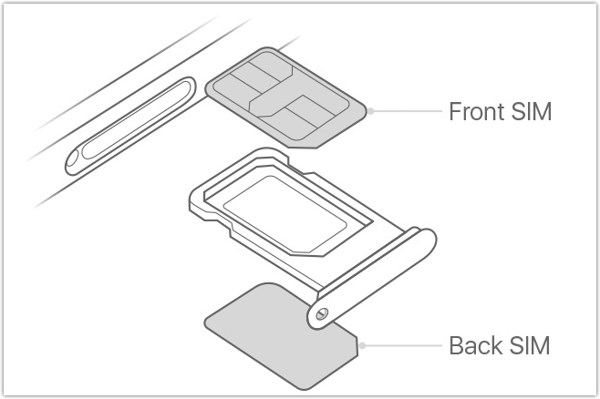
One easy way to tell if Boost Mobile locks your iPhone is by using a SIM card from other carriers, such as Verizon, T-Mobile, and more. Insert a paper clip or SIM eject tool into the small hole of the SIM card tray on your iPhone, and pull it out to remove the SIM tray. Place another SIM card into the tray, and insert the tray into your iPhone. If your device can read the new card, your iPhone is unlocked by Boost Mobile.
Option 2: Check if the Boost Mobile iPhone is Locked in Settings
Another way to check if your iPhone is unlocked is to find the information in the built-in Settings app. This way doesn't require another SIM card or other hardware. All you need is your iPhone passcode.
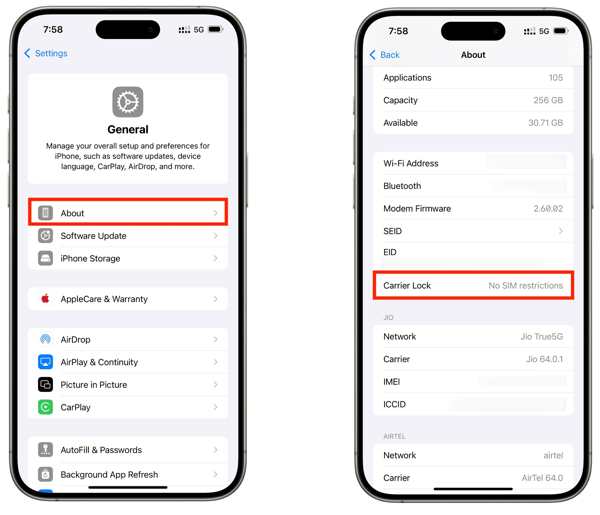
Turn on your iPhone with your passcode.
Deschide Setări aplicația.
Mergi la General și Despre.
Treci la Blocare de transport rubrica.
Dacă se arată Fără restricții SIM, your iPhone is unlocked by Boost Mobile.
Part 3: How to Unlock a Boost Mobile Phone
According to Boost Mobile, it will unlock your iPhone automatically once you meet the requirements of the unlocking policy. If not, Boost Mobile will immediately notify you that your device is eligible to be unlocked.
Way 1: Unlock Boost Mobile iPhone Online
Turn on your handset.
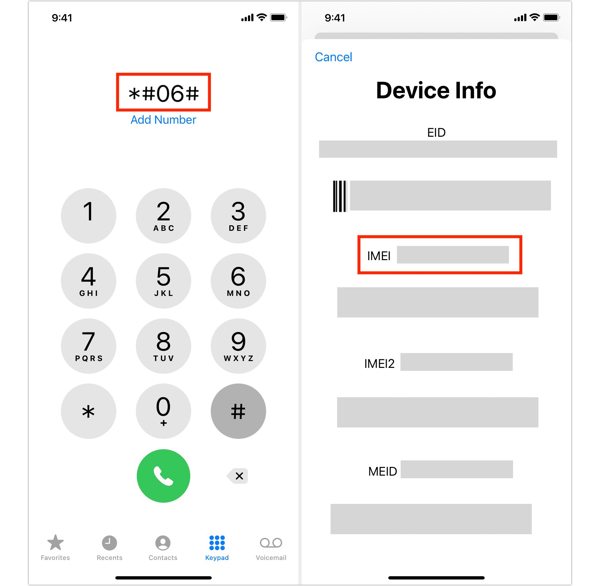
Rulați Telefon aplicația.
Apelează *#06# și atingeți Apel button to show the IMEI number.
Next, access https://www.boostmobile.com/unlock in a browser.
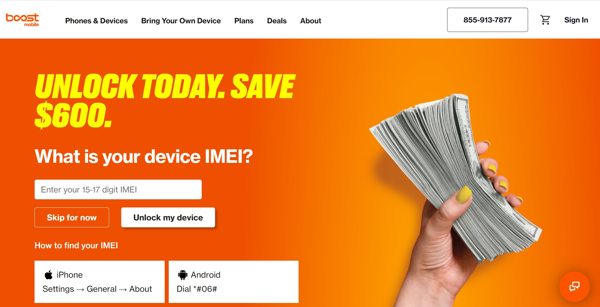
Enter your IMEI number into the field and click Unlock my device.
Offer the required information and submit your request.
Once Boost Mobile receives your request, it will unlock your device.
Way 2: Unlock Boost Mobile iPhone by Call
Get your IMEI number in the Setări sau Telefon aplicația.
Contact at 833-502-6678.
Submit your unlocking request.
Offer the necessary information and wait for Boost Mobile to unlock your iPhone.
S-ar putea să îți placă și:
Part 4: How to Unlock Boost Mobile iPhone on Your Own
As mentioned previously, you must meet the unlocking policy to unlock your iPhone. If you cannot meet the policy, you have to unlock a Boost Mobile phone yourself using imyPass iPassGo. It can remove carrier lock from an iPhone quickly, even if you cannot meet the unlocking policy. Compared to online unlock services, it is safer and delivers a high success rate.

Peste 4.000.000 de descărcări
Unlock iPhones locked by Boost Mobile in three steps.
Protejați-vă datele în timpul procesului.
Don't require any password or extra fees.
Oferă funcții suplimentare, precum deblocarea Screen Time.
Work on the latest models of iPhone and iPad.
How to Unlock Boost Mobile iPhone on Your Own
Install the Boost Mobile unlock tool
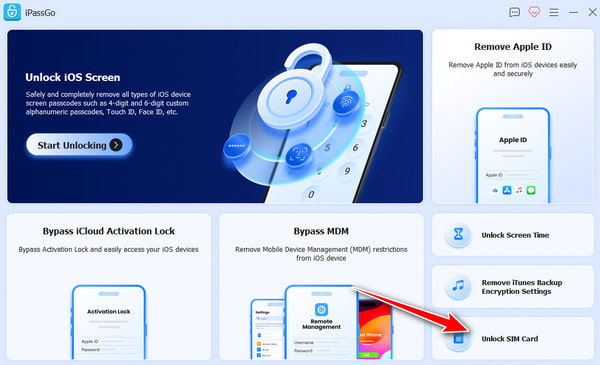
Download and install the Boost Mobile unlock software on your PC. There is another version for Mac computers. Launch it when you want to unlock your Boost Mobile iPhone. Choose the Deblochează cartela SIM modul pentru a continua.
Conectați-vă la iPhone
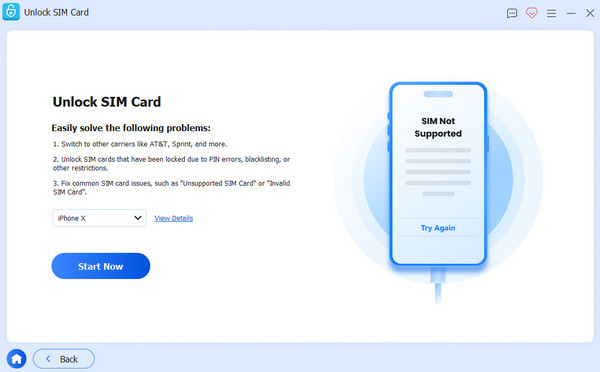
Connect your iPhone to your PC with a Lightning cable. When prompted, make sure to trust this PC. Then, the software will detect your iPhone immediately. Click the Începe acum buton.
Deblochează un iPhone Boost Mobile
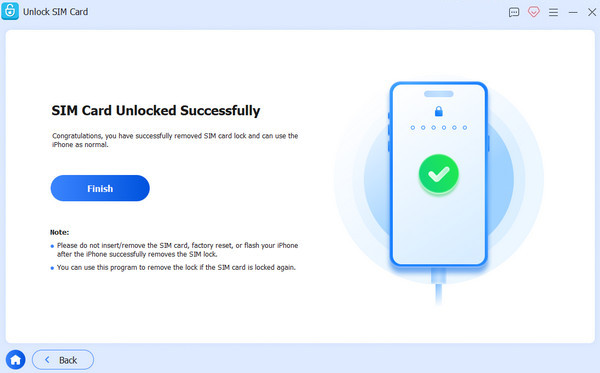
După ce software‑ul încarcă informațiile dispozitivului tău, verifică-le și dă clic pe Începeți să ocoliți buton pentru a continua. Urmează instrucțiunile de pe ecran pentru a configura dispozitivul. Când ai terminat, dă clic pe O.K buton pentru a începe deblocarea operatorului. După finalizare, dă clic pe finalizarea pentru a închide software‑ul și a deconecta iPhone‑ul. Acum poți introduce o nouă cartelă SIM în iPhone‑ul tău.
Concluzie
Acest ghid ți‑a explicat tot ce trebuie să știi despre deblocarea unui telefon mobil Boost Mobile. În primul rând, ar trebui să afli politica de deblocare pentru Boost Mobile, inclusiv pentru dispozitive Postpaid și Prepaid. În plus, urmează pașii noștri pentru a verifica dacă Boost Mobile încă îți blochează dispozitivul. Desigur, am împărtășit metode dovedite și pași detaliați pentru a‑ți debloca rapid dispozitivul. Dacă nu poți îndeplini politica, imyPass iPassGo este o modalitate intuitivă de a elimina singur blocarea Boost Mobile de pe dispozitivul tău mobil.
Penny se concentrează pe depanarea GPS și optimizarea Windows. Anterior a lucrat ca inginer de asistență tehnică, ajutând clienții să rezolve eficient probleme legate de localizare și de sistem. Sprijinită de experiența în suport IT, oferă soluții practice care chiar funcționează. În timpul liber îi place să facă drumeții și geocaching, testând tehnologia GPS în lumea reală.
Soluții fierbinți
-
Deblocați iOS
-
Sfaturi iOS
-
Deblocați Android
-
Sfaturi privind parola


