



 פִּתָרוֹן
 מרכז תמיכה
 עלינו
עלינו איש קשר
How to Fix Life360 Not Working on iPhone and Android
 פני וורן פורסם ב 27 במרץ 2026מיקום GPSקריאה של 3 דקות
"My wife and I use Life360 to update our location. Recently, my wife's location hasn't updated. She left the house 15 minutes ago, but Life360 still shows her as home. Why is Life360 not working?" As a popular location-sharing app, Life360 enables users to track and be tracked with family and friends. However, some users encounter issues with the app. This article shares eight solutions to fix this problem quickly.

במאמר זה:
Part 1: Why Life360 Is Not Working
Life360 uses GPS technology to track location. Once you have the app installed on your mobile device, it continually updates your whereabouts and shares the information with your circles. It also taps into Wi-Fi and Bluetooth signals. The main causes why Life360 is not working include:
1. Poor GPS and internet connection.
2. Life360 is restricted or blocked.
3. Your device is in low power mode.
4. Life360 is outdated or stuck.
5. תקלות תוכנה.
Part 2: How to Fix Life360 Not Working
Solution 1: Check App Permissions
Why am I not getting Life360 notifications? In most cases, the problem is due to the notification permission being blocked. The solution is simple: check your app permissions and enable notifications.
באייפון
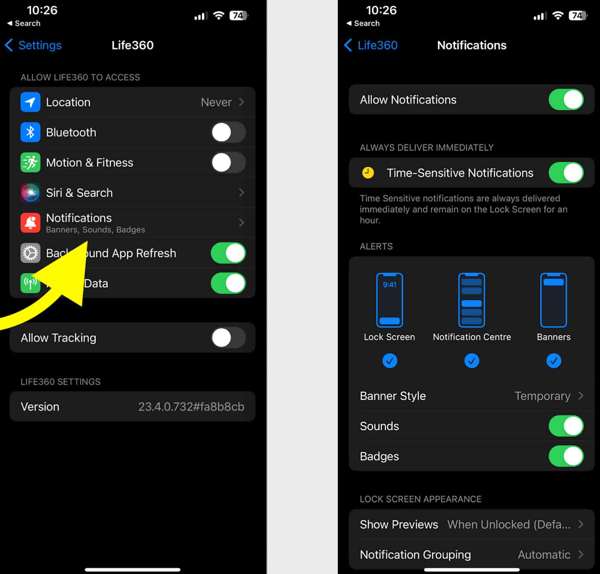
פתח את ה הגדרות אפליקציה.
בחר Life360 והקש התראות.
הפעל Allow Notifications ו Time-Sensitive Notifications.
באנדרואיד
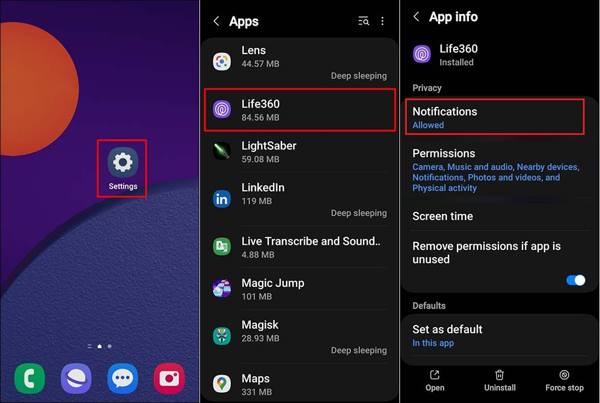
לָרוּץ הגדרות.
לך ל אפליקציות ולבחור Life360.
Tap Notifications, and choose להתיר.
Solution 2: Update Life360
If you could not be located on Life360, you'd better update your app. The outdated app may lead to a variety of issues. In fact, the developer fixes bugs and adds new features in each update of the app.
באייפון
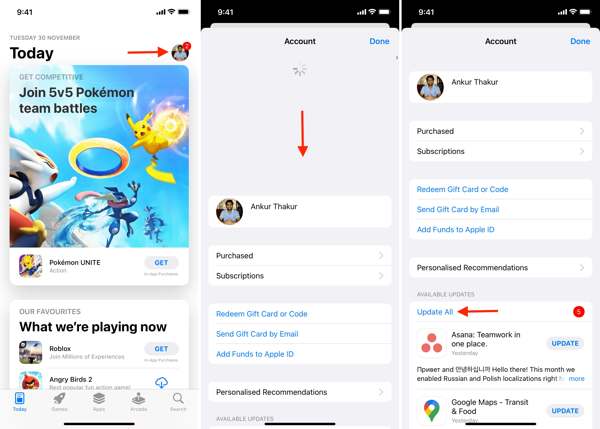
פתח את שלך חנות אפליקציות.
הקש על הפרופיל שלך.
החלק כלפי מטה מראש המסך.
בֶּרֶז עדכון for Life360.
באנדרואיד
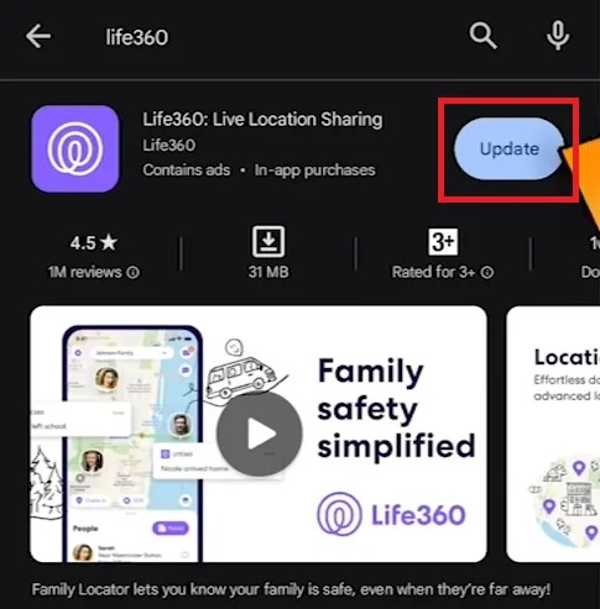
פתח את ה Play Store and find Life360.
Check if an update is available.
הקש על עדכון לַחְצָן.
Solution 3: Restart the App
Why does Life360 say I'm driving when I'm not? This problem is partly because your app or device gets stuck. You can force stop the app and restart Life360 to share your location as usual.
באייפון
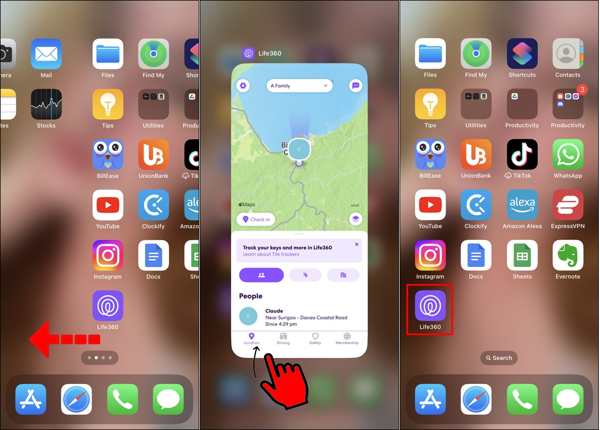
גישה אל מחליף אפליקציות במכשיר שלך.
Swipe left and right to find the Life360 app.
Tap the app and swipe upward to close it.
Then, open Life360 again.
באנדרואיד
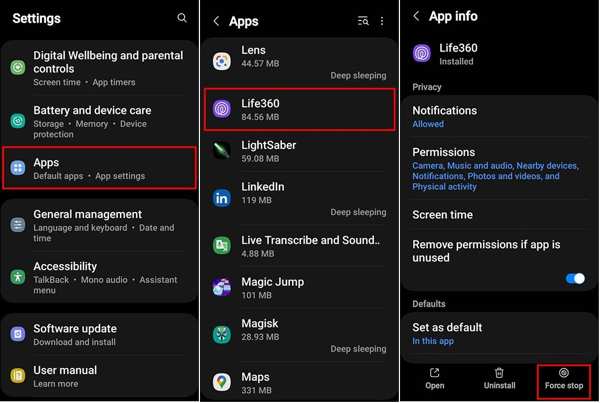
לך ל אפליקציות ב הגדרות.
בחר Life360 והקש עצירה בכוח.
Then, reopen the app.
Solution 4: Check Your Account
After changing your account credentials for Life360, you must update them on all your devices. Plus, you have to update it if the associated email or phone number stops being used. Otherwise, Life360 won't work today.
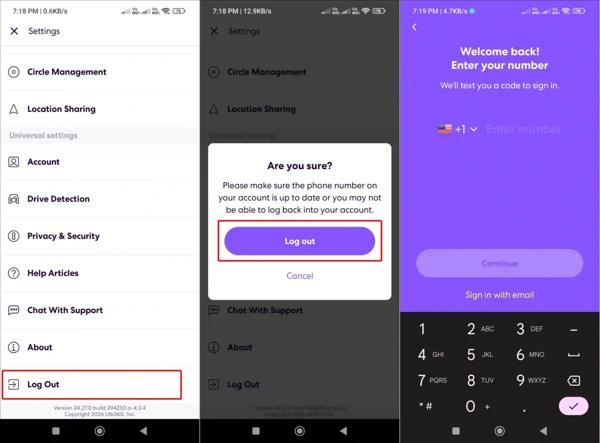
לָרוּץ Life360 בטלפון שלך.
הקש על הגדרות לחצן עם סמל גלגל השיניים.
גלול מטה והקש להתנתק.
Restart your iPhone or Android phone.
Next, sign in with your account and password.
Solution 5: Enable Location Sharing
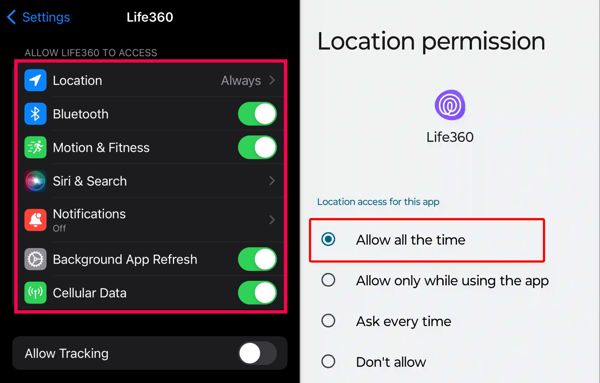
Life360 works through the GPS on your mobile phone. If you accidentally disable Location Sharing, the Life360 app won't work. Therefore, you'd better check Location Sharing for Life360 and keep it on.
באייפון
בחר Life360 אצלך הגדרות אפליקציה.
בֶּרֶז מקום ולבחור תמיד.
לאחר מכן הפעל את מיקום מדויק.
באנדרואיד
הפעל את הגדרות אפליקציה.
לך ל אפליקציות ולבחור Life360.
בֶּרֶז הרשאות ובחר מקום.
Enabling Location Sharing in Always mode ensures Life360 can update your location continuously, even when the app is in the background.
הפעל השתמש במיקום מדויק.
קריאה מורחבת:
Solution 6: Allow Background App Refresh
If your Life360 is not showing speed, you need to allow Background App Refresh. Once you disable this option, Life360 cannot update your location and speed when it is running in the background.
באייפון
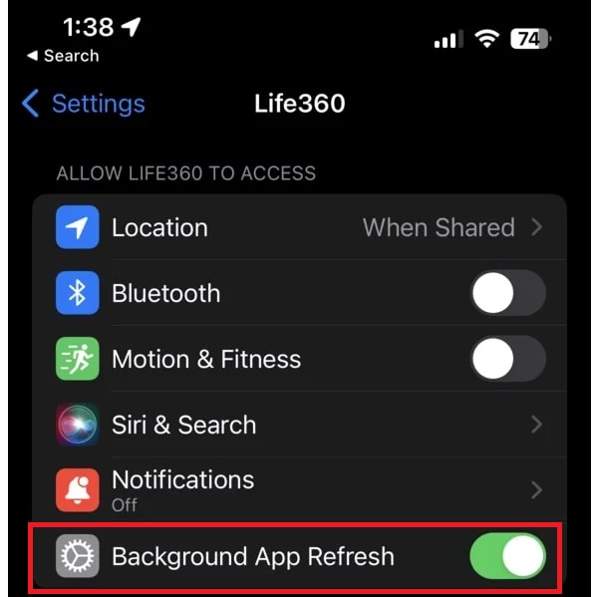
בחר Life360 ב הגדרות.
אתר את Allow Life360 to Access סָעִיף.
הפעל רענון אפליקציית רקע.
באנדרואיד
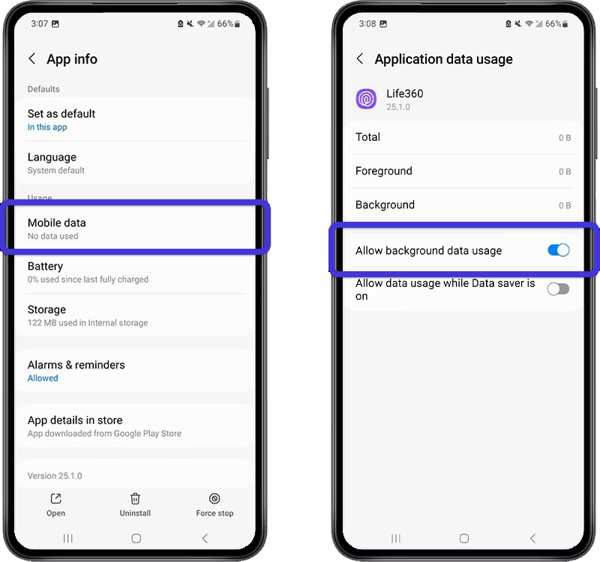
לך ל אפליקציות ב הגדרות.
בחר Life360 והקש Mobile Data & Wi-Fi.
הפעל אפשר שימוש בנתוני רקע.
Part 3: Bonus Tip: How to Change Life360 Location Without Notifying Others
iLocaGo is an effective method to change your Life360 location to anywhere on your iPhone or Android phone. More importantly, the user-friendly design makes it easy to use, especially for beginners.

4,000,000+ הורדות
Change Life360 location with one click.
Use an accurate address or any position.
הצע מספר מצבים למטרות שונות.
Support a wide range of iPhones and Android devices.
How to Change Life360 Location Without Notifying Others
Install the Life360 location spoofing tool
Launch the Life360 location spoofing tool after installing it on your computer. Connect your iPhone or Android phone to your computer with a compatible USB cable.

בחר מצב
בחר שנה מיקום if you need to change the static location. The other three modes, מצב עצירה אחת, מצב ריבוי עצירות, ו מצב ג'ויסטיק, משמשים ליצירת מסלולים וירטואליים.

שנה את מיקום Life360
Input an address into the field or click a position on the map. Finally, click the לְשַׁנוֹת button. Now, you can open the Life360 app on your mobile device, and the app should update your location automatically.

סיכום
This article explained what you should do if Life360 אינו פועל. תוכל ללמוד מהם הגורמים העיקריים לבעיה זו. בנוסף, תוכל לעקוב אחר הפתרונות שלנו צעד־אחר־צעד כדי לתקן את אפליקציית מעקב המיקום שלך ולשתף את המיקום שלך עם המשפחה והחברים. אם ברצונך להסתיר את המיקום האמיתי שלך בעת השימוש ב‑Life360, iLocaGo עשוי לעזור. הוא מאפשר לך לזייף את המיקום הגיאוגרפי שלך הן באייפון והן במכשיר אנדרואיד.
פאני מתמקדת בפתרון תקלות GPS ובאופטימיזציה של Windows. בעבר עבדה כמהנדסת תמיכה טכנית, וסייעה ללקוחות לפתור בעיות מבוססות מיקום ובעיות מערכת באופן יעיל. הודות לניסיונה בתמיכת IT, היא מספקת פתרונות מעשיים שבאמת עובדים. בזמנה הפנוי היא אוהבת לטייל ברגל ולעסוק ב־geocaching, ובכך לבחון טכנולוגיות GPS בעולם האמיתי.
פתרונות חמים
-
מיקום GPS
-
בטל את הנעילה של iOS
-
טיפים ל-iOS
-
בטל את הנעילה של אנדרואיד


