



 Soluzione
 Centro di supporto
 Chi siamo
 Contatto
How to Fix Life360 Not Working on iPhone and Android
 Penny Warren pubblicato su 27 marzo 2026Posizione GPSLettura di 3 minuti
"My wife and I use Life360 to update our location. Recently, my wife's location hasn't updated. She left the house 15 minutes ago, but Life360 still shows her as home. Why is Life360 not working?" As a popular location-sharing app, Life360 enables users to track and be tracked with family and friends. However, some users encounter issues with the app. This article shares eight solutions to fix this problem quickly.

In questo articolo:
Part 1: Why Life360 Is Not Working
Life360 uses GPS technology to track location. Once you have the app installed on your mobile device, it continually updates your whereabouts and shares the information with your circles. It also taps into Wi-Fi and Bluetooth signals. The main causes why Life360 is not working include:
1. Poor GPS and internet connection.
2. Life360 is restricted or blocked.
3. Your device is in low power mode.
4. Life360 is outdated or stuck.
5. Problemi software.
Part 2: How to Fix Life360 Not Working
Solution 1: Check App Permissions
Why am I not getting Life360 notifications? In most cases, the problem is due to the notification permission being blocked. The solution is simple: check your app permissions and enable notifications.
Su iPhone
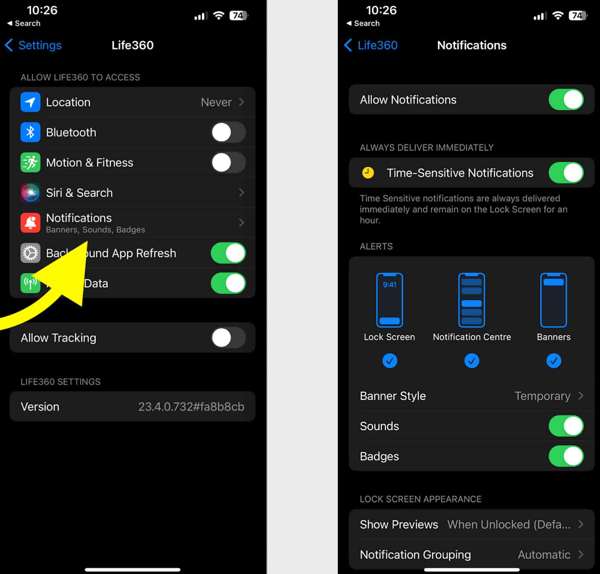
Apri il Impostazioni app.
Scegliere Vita360 e tocca Notifiche.
Attivare Allow Notifications e Time-Sensitive Notifications.
Su Android
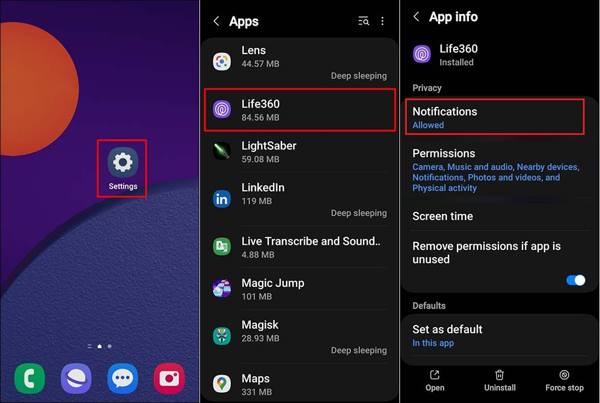
Correre Impostazioni.
Vai a App e scegli Vita360.
Tap Notifications, and choose Permettere.
Solution 2: Update Life360
If you could not be located on Life360, you'd better update your app. The outdated app may lead to a variety of issues. In fact, the developer fixes bugs and adds new features in each update of the app.
Su iPhone
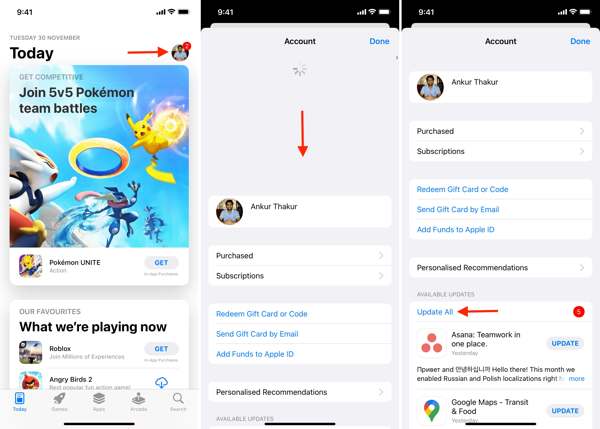
Apri il tuo App Store.
Tocca il tuo profilo.
Scorri verso il basso dalla parte superiore dello schermo.
Rubinetto AGGIORNAMENTO for Life360.
Su Android
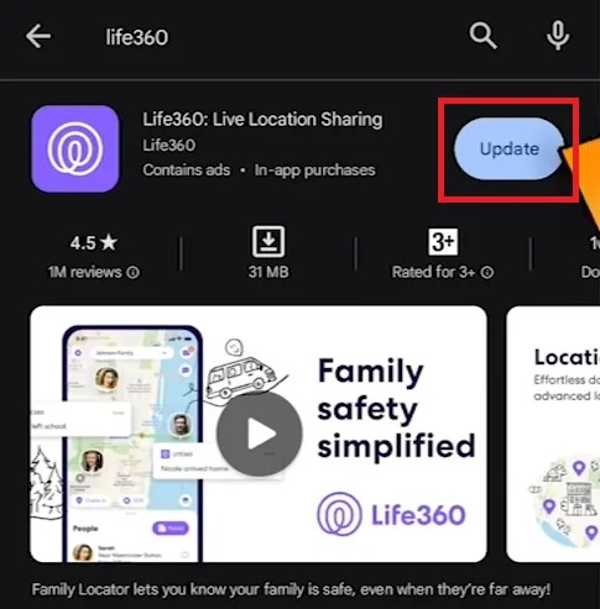
Apri il Play Store and find Vita360.
Check if an update is available.
Clicca il Aggiornamento pulsante.
Solution 3: Restart the App
Why does Life360 say I'm driving when I'm not? This problem is partly because your app or device gets stuck. You can force stop the app and restart Life360 to share your location as usual.
Su iPhone
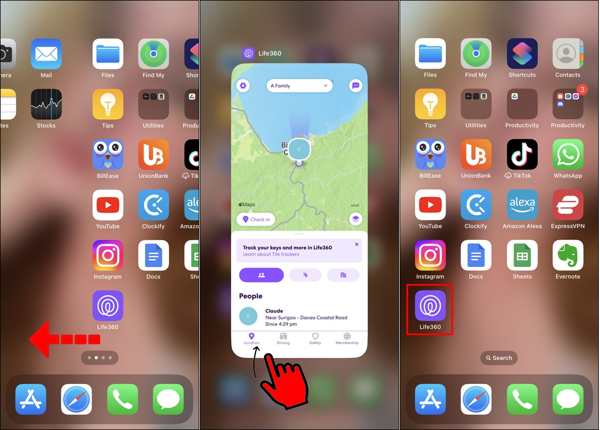
Accedi al Selettore di app sul tuo dispositivo.
Swipe left and right to find the Life360 app.
Tap the app and swipe upward to close it.
Then, open Life360 again.
Su Android
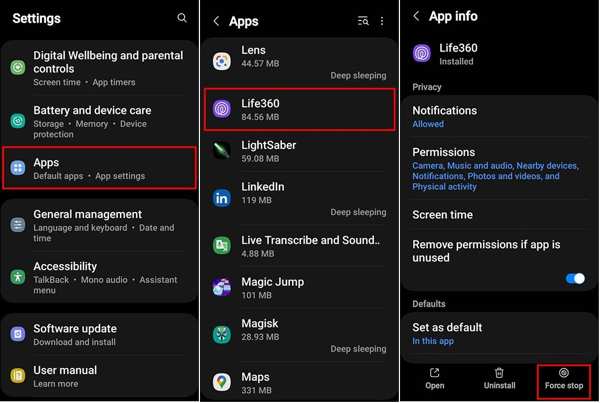
Vai a App in Impostazioni.
Scegliere Vita360 e tocca Forza l'arresto.
Then, reopen the app.
Solution 4: Check Your Account
After changing your account credentials for Life360, you must update them on all your devices. Plus, you have to update it if the associated email or phone number stops being used. Otherwise, Life360 won't work today.
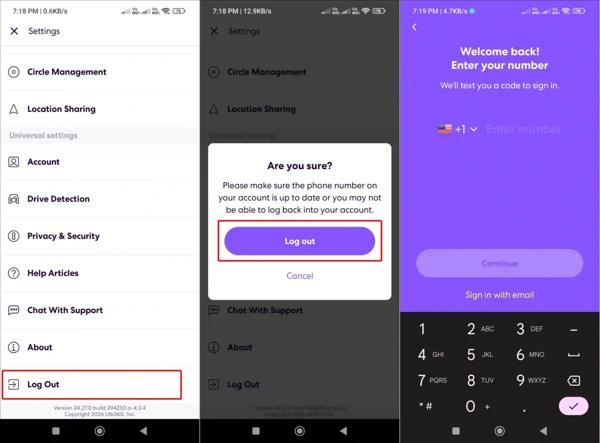
Correre Vita360 sul tuo telefono.
Clicca il Impostazioni pulsante con l'icona di un ingranaggio.
Scorri verso il basso e tocca Disconnettersi.
Restart your iPhone or Android phone.
Next, sign in with your account and password.
Solution 5: Enable Location Sharing
Life360 works through the GPS on your mobile phone. If you accidentally disable Location Sharing, the Life360 app won't work. Therefore, you'd better check Location Sharing for Life360 and keep it on.
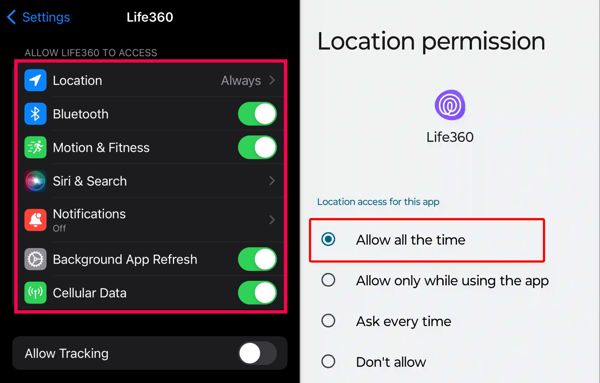
Su iPhone
Scegliere Vita360 nel tuo Impostazioni app.
Rubinetto Posizione e scegli Sempre.
Poi attiva Posizione precisa.
Su Android
Corri il Impostazioni app.
Vai a App e scegli Vita360.
Rubinetto Permessi e seleziona Posizione.
Enabling Location Sharing in Always mode ensures Life360 can update your location continuously, even when the app is in the background.
Attivare Usa la posizione precisa.
Lettura estesa:
Solution 6: Allow Background App Refresh
If your Life360 is not showing speed, you need to allow Background App Refresh. Once you disable this option, Life360 cannot update your location and speed when it is running in the background.
Su iPhone
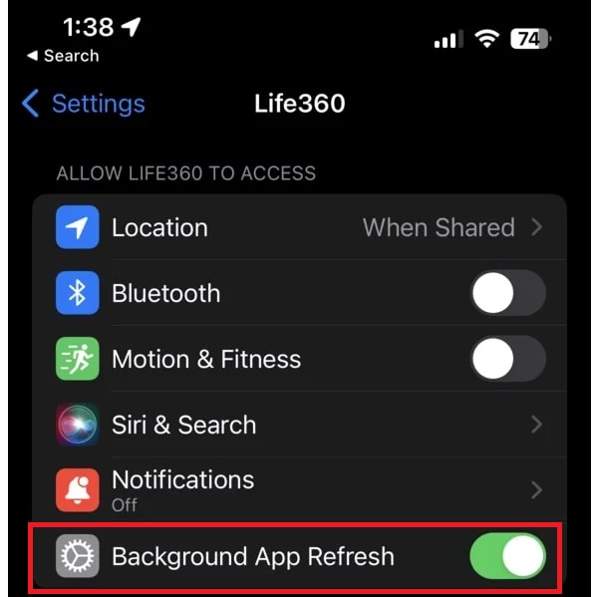
Scegliere Vita360 in Impostazioni.
Individua il Allow Life360 to Access sezione.
Attivare Aggiornamento app in background.
Su Android
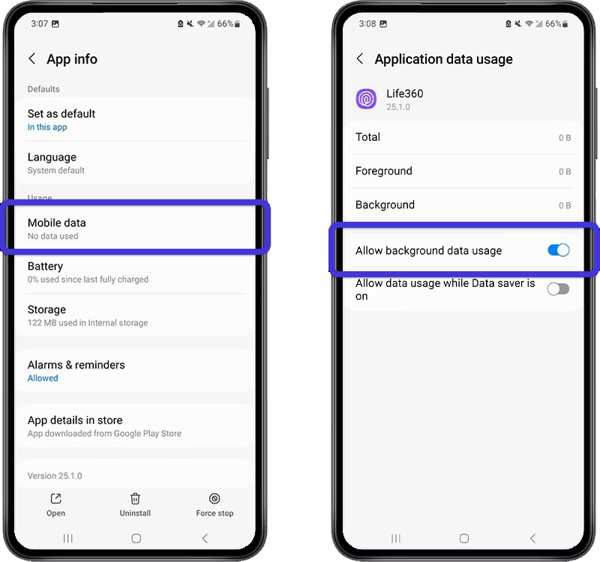
Vai a App in Impostazioni.
Scegliere Vita360 e tocca Mobile Data & Wi-Fi.
Attivare Consenti l'utilizzo dei dati in background.
Part 3: Bonus Tip: How to Change Life360 Location Without Notifying Others
iLocaGo is an effective method to change your Life360 location to anywhere on your iPhone or Android phone. More importantly, the user-friendly design makes it easy to use, especially for beginners.

Oltre 4.000.000 di download
Change Life360 location with one click.
Use an accurate address or any position.
Offri più modalità per scopi diversi.
Support a wide range of iPhones and Android devices.
How to Change Life360 Location Without Notifying Others
Install the Life360 location spoofing tool
Launch the Life360 location spoofing tool after installing it on your computer. Connect your iPhone or Android phone to your computer with a compatible USB cable.

Scegli una modalità
Scegliere Modifica posizione if you need to change the static location. The other three modes, Modalità One-stop, Modalità Multi-stop, e Modalità joystick, vengono utilizzati per creare percorsi virtuali.

Cambia la posizione di Life360
Input an address into the field or click a position on the map. Finally, click the Modificare button. Now, you can open the Life360 app on your mobile device, and the app should update your location automatically.

Conclusione
This article explained what you should do if Life360 non funziona. Puoi conoscere le principali cause di questo problema. Inoltre, puoi seguire una per una le nostre soluzioni per ripristinare il corretto funzionamento dell’app di tracciamento della posizione e condividere la tua posizione con familiari e amici. Se desideri nascondere la tua posizione reale quando usi Life360, iLocaGo è utile. Ti permette di falsificare la geolocalizzazione sia su iPhone che su telefoni Android.
Penny è una redattrice senior di imyPass. Si è concentrata sulla scoperta di soluzioni perfette per la localizzazione GPS in tutti gli scenari e ha anche esperienza nella riparazione di computer.
Soluzioni calde
-
Posizione GPS
- Le migliori posizioni di Pokemon Go con le coordinate
- Disattiva la tua posizione su Life360
- Come cambiare posizione su iPhone
- Recensione di iSpoofer Pokemon Go
- Imposta posizioni virtuali su iPhone e Android
- TikTok Traccia la tua posizione
- Monster Hunter ora Joystick
- Recensione di IP Location Finder
- Cambia la posizione di Mobile Legends
- Cambia posizione su Tiktok
-
Sblocca iOS
-
Suggerimenti per iOS
-
Sblocca Android


