Solução
 Centro de Apoio
 Sobre nós
 Contato
How to Prevent Others from Tracking WhatsApp Location & Status
 Penny Warren publicado em outubro 09, 2026Localização GPSLeitura de 3 minutos
Quick answer: Is WhatsApp traceable?
- Location and online status: Sim, if you share them on WhatsApp.
- Account: Sim, if someone gets access to your unlocked phone.
- Messages in transit: Usually no. WhatsApp uses end-to-end encryption, so the content of your chats stays between you and the people you're talking to.
That's the short version. Most people worry about someone watching where they are, when they're online, or reading their messages. The reality is more limited than the scare stories, but you still have to lock a few things down yourself. Here's what actually works to avoid WhatsApp trackers.

Neste artigo:
Tip 1. How to Avoid Tracking on WhatsApp Location
WhatsApp only shows your location when you actively share it.
If you share Localização ao vivo in a chat, it updates in real time for a set period, which can be 15 minutes, 1 hour, or 8 hours. Current location shared in a chat is just a static pin. Both are end-to-end encrypted, so WhatsApp and Meta can't see the coordinates you send; only the people in that chat can. Still, the safest move is not to share it at all unless you really need to.
Turn Off WhatsApp Live Location Sharing
If you're already sharing WhatsApp Live Location and want to stop:
Open the chat where you shared Live Location.
Tap the live map that appears in the location message.
Toque Stop Sharing. The other person will still see the last pin you sent, but it won't keep updating.
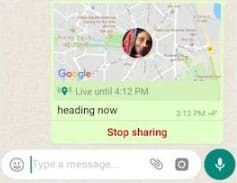
Você também pode ir para Settings > Account > Privacy > Live Location to see every chat you're currently sharing with and stop them from there.
Restrict WhatsApp's Location Permission
This stops the app from getting your GPS data in the first place.
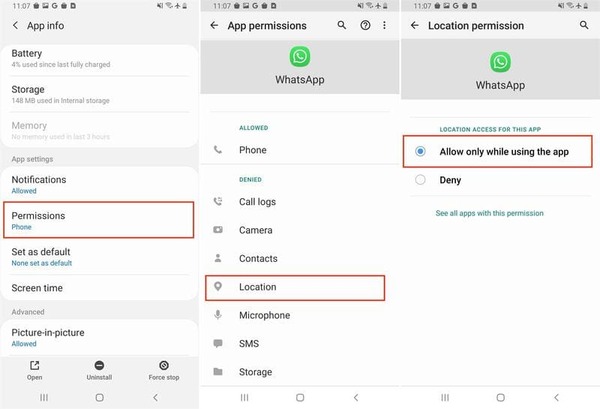
No Android:
Open your phone's Settings.
Vamos para Aplicativos ou Apps & notifications e selecione O que você acha do WhatsApp?.
Toque Permissions > Location.
Escolher Negar ou Allow only while using the app, dependendo de suas necessidades.
No iPhone:
Abrir Definições.
Scroll to WhatsApp.
Toque Localização.
Selecionar Nunca ou Ao usar o aplicativo.
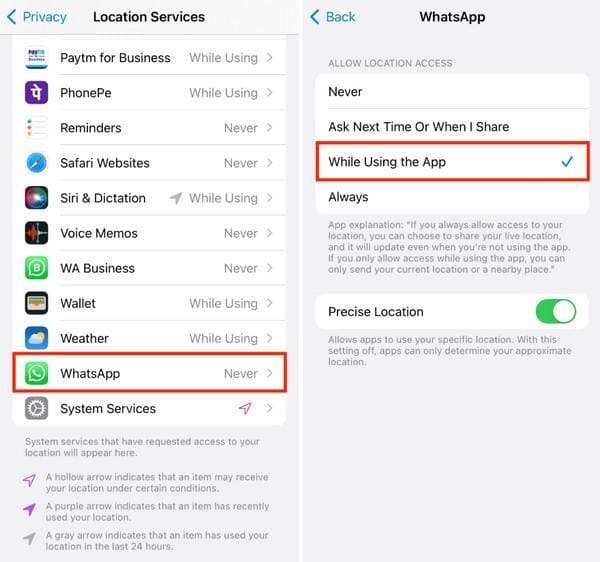
Without permission, Live Location and current location sharing simply won't work.
Fake Phone Location
Algumas pessoas usam imyPass iLocaGo to spoof GPS so WhatsApp thinks you're somewhere else. That is to say, you can fake your geolocation when accessing WhatsApp on your iPhone or Android phone with a few taps. In most cases, hiding your location is enough, but spoofing is a useful workaround when you have to share and want the pin to be wrong.
Mais de 4.000.000 de downloads
Oculte e falsifique a localização do WhatsApp em dispositivos móveis facilmente.
Use um endereço preciso ou qualquer local.
Create virtual locations and routes with your mouse and keyboard.
Available for a wide range of services and games.
Supports the latest versions of iOS and Android.
Conecte-se ao seu iPhone
Launch the best WhatsApp spoofing software after you install it on your PC or Mac. Next, connect your phone to your PC with a Lightning cable. If prompted, make sure to trust your computer. Then, the software will detect your device automatically.
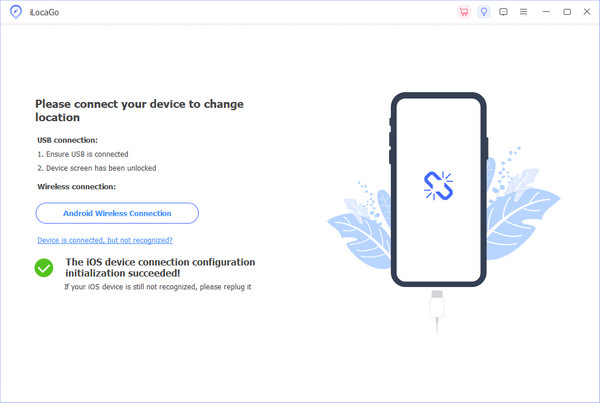
Escolha um modo
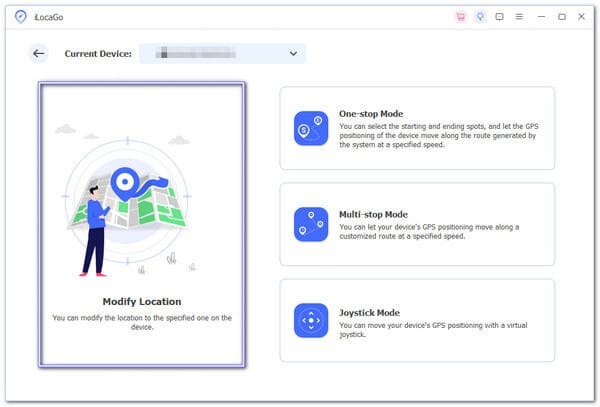
To stop your WhatsApp location from being tracked, choose Modificar localização. Escolher Modo de parada única, modo de parada múltipla, ou Modo joystick instead to create a virtual route.
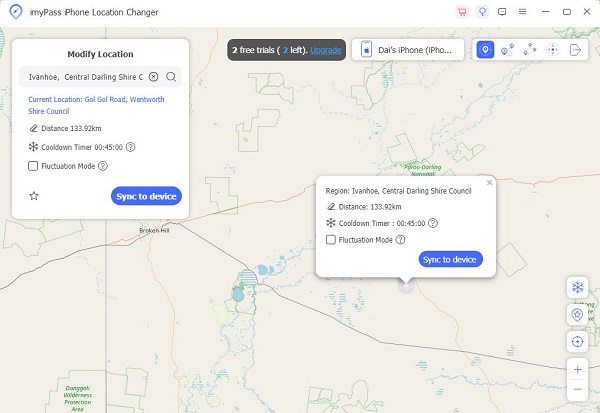
Localização falsa para WhatsApp
Em seguida, sua localização será marcada no mapa. Se você tiver um endereço exato, insira-o na caixa à direita. Modificar localização dialog. If not, click on the proper position on the map. Finally, click on the Sync to Device button to modify your phone location immediately. Now, you can visit WhatsApp, but no one can track your location. You can also use this program to change your location on TikTok.
Tip 2. How to Stop WhatsApp Online Status Tracking
WhatsApp online status shows whether you're using WhatsApp at that moment. You'll usually see it right under a contact's name in a chat. Last Seen shows the last time you opened the app. Both can be turned off.
Open Privacy Settings
Open WhatsApp. On Android, tap the três pontos in the top right, then Definições. On iPhone, go to the Settings tab at the bottom. Then tap Privacidade.
Change Privacy Restrictions
Toque Last Seen and Online. Sob Who can see my last seen, escolher Nobody, ou My Contacts Except... if you only want to block certain people. Under Who can see when I'm online, selecione Same as Last Seen.
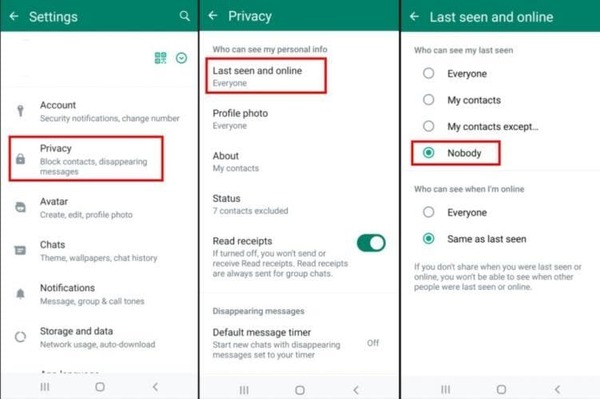
Once you hide yours, you also lose the ability to see other people's last seen and online status. That's the trade-off. Read receipts, the blue ticks, are separate. You can turn those off independently in the same Privacy menu if you want.
Note that even with these settings, advanced technical tricks involving delivery receipts can sometimes still detect activity. For everyday use, though, hiding last seen and online is enough to stop the casual checking most people worry about.
Tip 3. How to Prevent Tracking on WhatsApp Account
If someone has physical access to your unlocked phone, they can open WhatsApp and see everything. The bigger risk for remote access is linked devices.
Log out suspicious linked devices
Check Linked Devices
Open WhatsApp on your phone.
- On Android: tap the three dots > Linked devices.
- On iPhone: go to Settings > Linked devices. You'll see a list of every device currently connected.
Remove Unwanted Devices
Tap any device you don't recognize, then tap Log out.
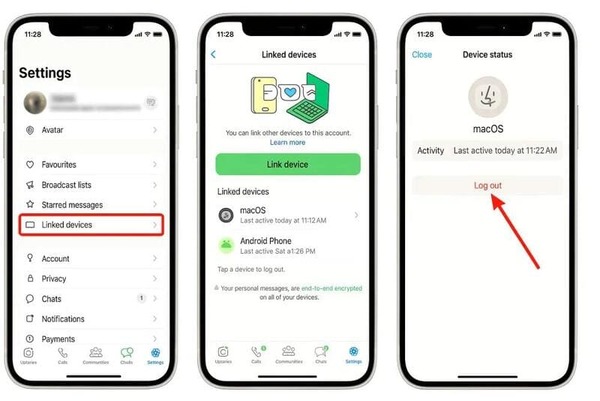
Check this list every few weeks. WhatsApp also automatically logs out inactive devices after a while, but it's still smart to look yourself.
Set up WhatsApp two-step verification
This adds a PIN code that someone needs if they try to register your number on a new phone.
Abrir WhatsApp > Settings, or three dots > Settings.
Toque Account > Two-step verification > Enable.
Create a 6-digit PIN. Better be different from your screen passcode.
Add an email address so you can recover the PIN if you forget it.
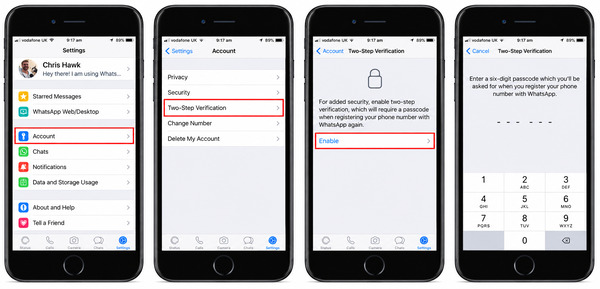
Once it's on, anyone trying to move your account to another device will need that extra code. Don't share the PIN or the registration codes WhatsApp sends you.
Conclusão
Stop sharing your location or fake it with imyPass iLocaGo. Hide your online status. Set an extra WhatsApp PIN. Do the three things above and you've covered the practical WhatsApp Tracking risks most people face.
Penny focuses on GPS troubleshooting and Windows optimization. She formerly worked as a technical support engineer, helping clients solve location-based and system issues efficiently. Backed by IT support experience, she provides practical solutions that really work. In her free time, she likes hiking and geocaching, testing GPS tech in the real world.
Soluções quentes
-
Localização GPS
-
Desbloquear iOS
-
Dicas para iOS
-
Desbloquear Android