



 Solução
 Centro de Apoio
 Sobre nós
 Contato
How to Enable and Change Location on Google Chrome
 Penny Warren publicado em fevereiro 06, 2026Localização GPSLeitura de 3 minutos
It cannot be denied that Google Chrome is a great web browser on both computers and mobile devices. However, it does monitor your online activity, such as your searches, watch history, and more. More importantly, it collects your location data. According to Google, it uses your location data to provide more personalized experiences. If you worry about your security and privacy, this tutorial tells you how to change Chrome's location settings.

Neste artigo:
Part 1: An Easy Way to Change Location on Chrome for iOS and Android
Google doesn't allow you to set a location in Chrome on a mobile device. Fortunately, iLocaGo can meet your needs. It is able to change your geolocation with a fake region. Then, Google Chrome and websites won't track your real location. More importantly, Chrome cannot recognize your action.

Mais de 4.000.000 de downloads
Change the location of Chrome without disabling it.
Support both accurate addresses and any position.
Hide your real location without notifying others.
Offer bonus features, like creating virtual routes.
Compatível com uma ampla variedade de iPhones e dispositivos Android.
How to Change the Location of Chrome on iOS or Android
Conecte-se ao seu telefone
Open the location changing software once you install it on your computer. It is available on Windows 11/10/8/7 and macOS 10.12 or above. Link your iPhone or Android phone to your computer with a suitable USB cable. It allows you to link an Android to a computer with Wi-Fi.

Escolha Modificar local
Next, you will be presented with the menu window:
Modificar localização is used to fake your GPS location on the phone.
Modo de parada única can create a virtual route with starting and ending spots.
Modo de parada múltipla is used to make a virtual route with starting and multiple stops.
Modo joystick can make a route with your mouse or keyboard.
Here, we choose Modificar localização.

Change Chrome location
Then, type in an address into the field or click the desired position on the map. Finally, click the Modificar button to confirm the change. Now, you can open Chrome on your handset and access websites.

Part 2: How to Change Location on Chrome on Desktop
How to Change the Location of Chrome for Search Settings
Chrome filters your search results according to your region. If you want to set the location in Chrome for search results, you can complete it quickly with the proper settings. Here are the steps below:
Clique no Definições button on your Chrome.
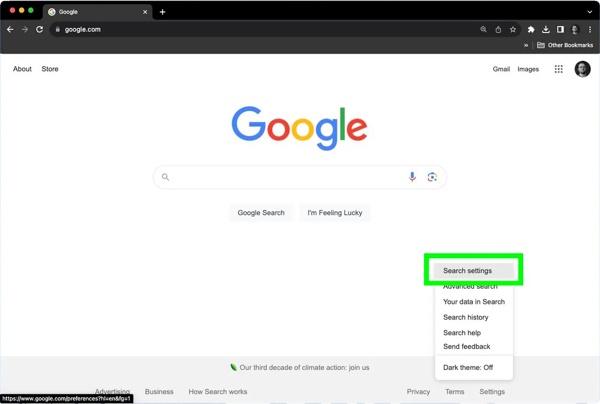
Escolher Search settingse escolha Other settings.
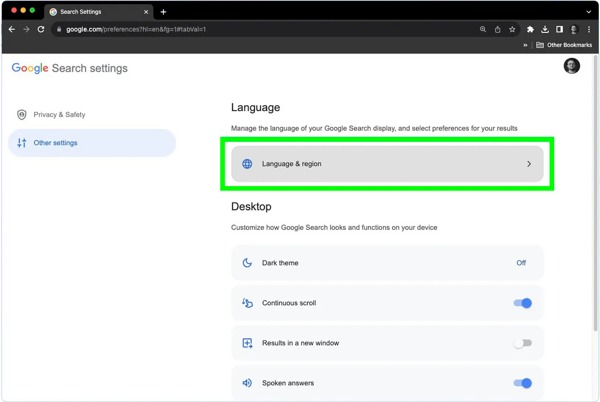
Clique no Language & region opção.
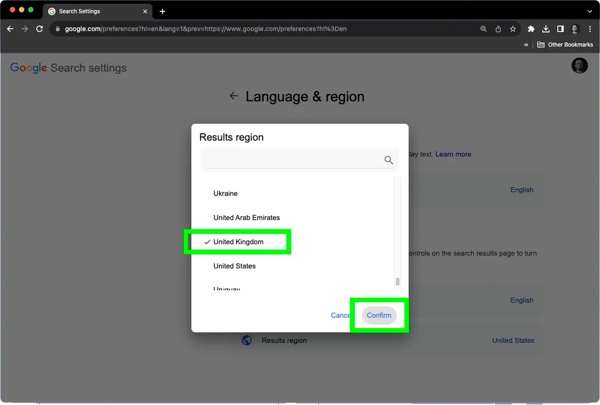
Escolher Results region, select the desired country, and click confirme.
How to Change Location on Chrome with the Developer Tools
A common way to change Google location settings on Chrome is through the Developer Tools. After location changing, all websites cannot detect your real location. The workflow is a little complicated, and we share it below:
Open your Chrome and go to a website.
Imprensa Ctrl + Shift + I on a PC or Cmd + Option + I on a Mac to fire up Developer Tools.
Clique no Cardápio button with a three-dot icon at the top right corner.
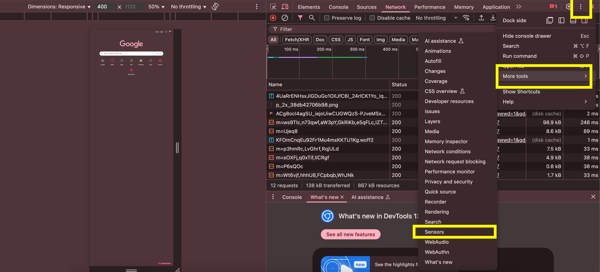
Escolher Mais ferramentas e selecione Sensores.
Encontre e clique no Localização ou Geolocation opção.
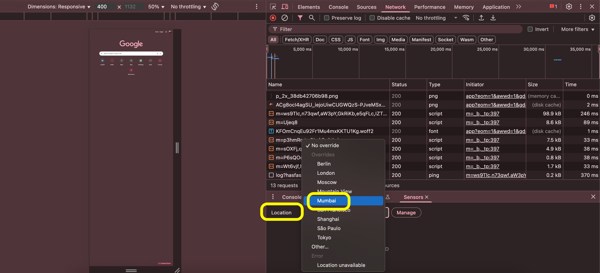
Here, you can pick a proper location. If you want to set it manually, choose Custom location, and enter latitude and longitude.
Leitura Estendida:
How to Change Location on Chrome Using an Extension
Another way to change location on Google Chrome is to look for a specific extension, such as Location Guard. You can download it from the Chrome Web Store and force modify your Chrome location.
Search for the location changing extension in the Chrome Web Store, and add it.
Next, click the extension button on the top ribbon.
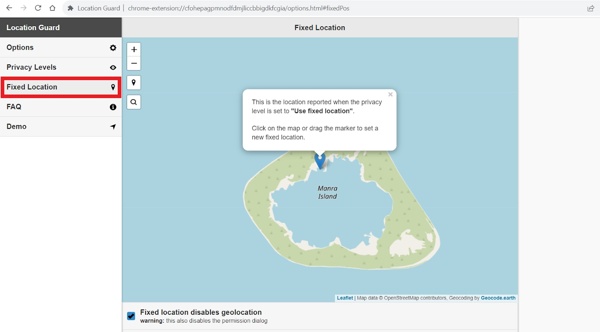
Escolher Opções, e vá para o Localização Fixa aba.
Move the location marker to the desired destination.
Then, close the page and visit a test website.
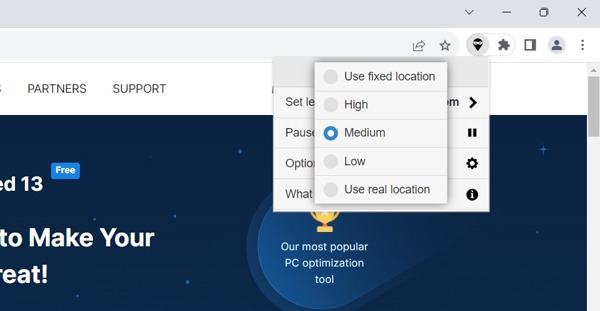
Click the extension button, click Set level for, e selecione Use fixed location.
Next, close the extension menu.
Part 3: How to Change Chrome Location by Disabling Location
You can decide to enable location permission in Chrome or disable it. Once you disable Location in Chrome, websites cannot recognize where you are currently. That is another way to protect your privacy and enhance security.
How to Stop Allowing Location on Chrome on Desktop
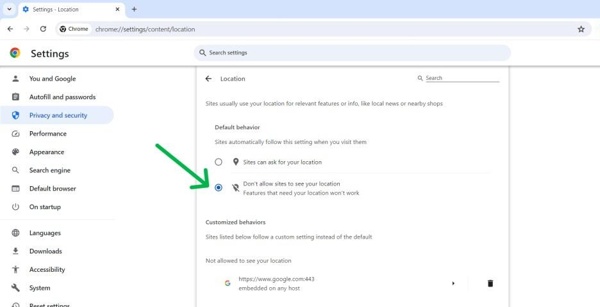
Clique no Cardápio button with a three-dot icon at the top right side.
Escolher Definições, e vá para o Privacidade e segurança aba.
Clique no Site settings opção.
Bater Localização debaixo de Permissões seção.
Selecionar Don't allow sites to see your location.
How to Disable Location on Chrome for iOS
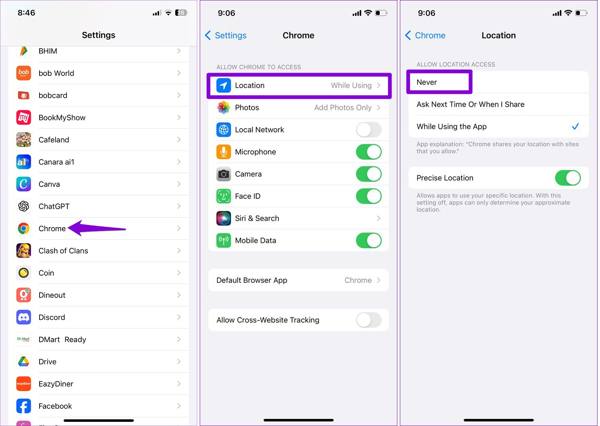
Execute o Definições aplicativo no seu iPhone.
Scroll down, go to Aplicativose escolha Cromo.
Toque em Localização opção e selecione Nunca.
How to Disable Location on Chrome for Android
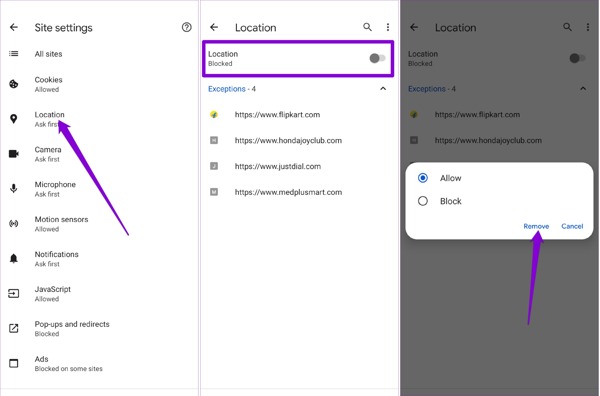
Run your Google Chrome app on your phone.
Toque em Cardápio botão com um ícone de três pontos.
Escolher Definições e escolher Site settings debaixo de Avançado seção.
Encontre e toque no Localização opção.
Desligar Localização to stop allowing location on Chrome.
Observação: Besides, you can also disable Chrome location access in the Settings app on your Android phone.
Conclusão
Este guia explica como change location on Chrome on Windows, macOS, iOS, and Android. You can set the location for Google search results in your Chrome directly. If you wish to allow Chrome location and set it manually, the built-in Developer Tools are available. Moreover, you can use a location-changing extension. We also shared the ways to disable location on Chrome. iLocaGo is able to customize your geolocation when accessing websites on Chrome on a mobile device.
Penny focuses on GPS troubleshooting and Windows optimization. She formerly worked as a technical support engineer, helping clients solve location-based and system issues efficiently. Backed by IT support experience, she provides practical solutions that really work. In her free time, she likes hiking and geocaching, testing GPS tech in the real world.
Soluções quentes
-
Localização GPS
-
Desbloquear iOS
-
Dicas para iOS
-
Desbloquear Android


