



 Solução
 Centro de Apoio
 Sobre nós
 Contato
Hulu Home Location Override: How to Watch Hulu Outside the US
 Penny Warren publicado em junho 18, 2026Localização GPSLeitura de 4 minutos
Hulu is a popular streaming platform for watching TV shows, movies, live sports, and Live TV online. However, it has strict rules that it's only available in the United States. Many users wonder:" Can I watch Hulu Live TV away from home?"
If you're trying to unblock Hulu from outside the US, you may need to modify your Hulu location. While it may sound complicated, it's actually easier than you think. In this guide, we'll show you how to change your Hulu Home location passo a passo.

Neste artigo:
Part 1. How to Enable Location Services for Hulu
Before using this streaming software, you will be prompted to enable location services first. Check how to enable location services on browsers or devices.
No Android
Vamos para Definições > Segurança e localização > Localização.
Alternar Localização to On.
Debaixo Recent location requests, make sure Hulu is allowed to access your location.
No iOS
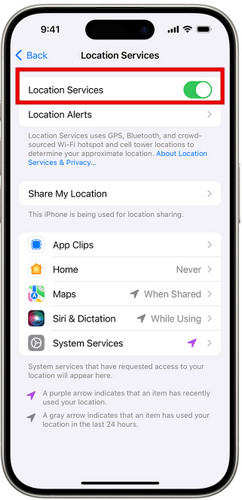
Vamos para Definições > Privacidade > Serviços de localização.
Alternar Serviços de localização to On if it's off.
Role para baixo para encontrar Hulu, escolher Ao usar o aplicativo ou Sempre.
On Chrome
Clique Mais (three vertical dots) in the top right corner and select Definições.
Scroll down to select Avançado.
Vamos para Privacidade e segurança > Configurações do site > Serviços de localização.
Alternar Ask before accessing para Sobre, and make sure Hulu is allowed.
On Edge
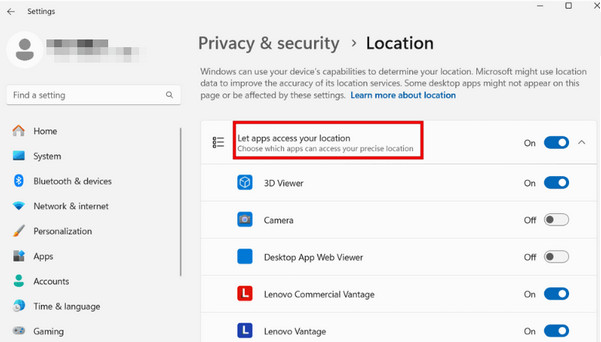
Click the Windows Começar botão, então vá para Definições > Privacidade > Localização.
Role para Choose apps that can use your precise location and ensure Edge is enabled.
Part 2. Why Does Hulu Say Location Error
Some users report receiving location errors saying they're not at home while using Hulu Live TV. Generally, this happens because Hulu cannot verify that your current network matches your designated Home network. Common causes include:
- Using a living room device connected to a network other than the one set as Home network.
- Connecting to a mobile network or a network Hulu identifies as mobile/non-residential.
- Using a shared Wi-Fi network, such as in a dorm, office, or apartment.
- Switching your Internet Service Provider (ISP) or changing your IP address.
In these cases, you can update your home network to resolve this issue. The detailed steps are provided in Part 3.
Part 3. How to Change Home Location on Hulu
Hulu allows you to update your home location up to four times per year. If you're encountering location errors with Hulu, follow these steps to manually change your Hulu home location.
If you change Hulu home location too many times, Hulu may display location error messages.
Visit the Hulu official website and sign in to your Hulu account.
Click the profile icon and choose Conta no menu suspenso.
Role para baixo até Privacidade e configurações section, then click Set or Change Home.
Confirm and save the new location.
Part 4. How to Watch Hulu Outside the United States
Hulu is only officially available in the United States due to licensing restrictions. If you travel abroad or live outside the US, you cannot stream movies, shows, or episodes on Hulu. But don't fret. There are still ways to let you enjoy your favorite shows in other regions.
Method 1: Using a Virtual Location Tool
A professional location changer can help you effortlessly hide your GPS location and unlock content and websites from different regions across the world. It is a highly recommended tool that lets you spoof your location easily and watch anything on Hulu even you're in Mexico, Canada, France, or almost anywhere else.

Mais de 4.000.000 de downloads
Change your location on Hulu, Facebook, and more location-based apps.
Unlock geo-specific shows, games, movies without limitations.
Simulate your movement with a custom route and adjustable speed.
Fully compatible with the latest Android 17 and iOS 27.
Steps to change your location on Hulu:
Connect your device to the computer using a USB cable. For Android users, you can also use a wireless connection. Tap Confiar on your phone when prompted.

Launch the software and choose the Modificar localização option from the interface.

A map will appear on your screen. You can drag, zoom in, and zoom out to find the desired site. Alternatively, type the place name in the search bar to quickly find it.

Clique Sincronizar com o dispositivo to apply the new location to your device instantly.
Method 2: Using a VPN
Using a reliable VPN also can mask your IP address and unlock geographical restrictions. For a smoother streaming experience, avoid using free VPNs, as they are often overcrowded, unstable, and slow.
Choose and install a reputable VPN on your device.
Launch the VPN and log in to your account.
Select a US server, and connect to it.
Clear cookies and cache for Hulu, then open Hulu and sign in to your account.
If Hulu detects your VPN, try switching to another US server or reconnecting to refresh your IP address.
Conclusão
Changing your Hulu location can help resolve common location errors and bypass geo-restrictions outside the United States. If you're looking for a reliable Hulu home location override solution, localização virtual tools like imyPass iLocaGo can help you watch Hulu TV Live while traveling anywhere!
Penny focuses on GPS troubleshooting and Windows optimization. She formerly worked as a technical support engineer, helping clients solve location-based and system issues efficiently. Backed by IT support experience, she provides practical solutions that really work. In her free time, she likes hiking and geocaching, testing GPS tech in the real world.
Soluções quentes
-
Localização GPS
-
Desbloquear iOS
-
Dicas para iOS
-
Desbloquear Android


