



 Solução
 Centro de Apoio
 Sobre nós
 Contato
8 Best Apps for Location Sharing on iOS and Android Devices
 Penny Warren publicado em junho 18, 2026Localização GPSLeitura de 4 minutos
Location sharing is far more than a part of parental control. It lets parents learn the locations of their children in real time and keep their children safe. Moreover, location sharing is less about control and more about making things secure and smooth, especially when someone is traveling, running late, or walking home at night. This article identifies the top 8 location-sharing apps for iPhone and Android phone users.

Neste artigo:
Part 1. Comparison of Best Location Sharing Apps
Methodology
We researched the popular location-sharing apps in our lab to identify the top items. Furthermore, we reviewed hundreds of users and collected their opinions. When testing these apps, we focus on a few factors, like accuracy, privacy, ease of use, and more.
| Dispositivos de suporte | Melhor para | |
| Vida360 | iOS 17.2+ Android 10+ | Share location safely |
| Google Mapas | iOS 16.0+ Android 9.0+ | Share location across platforms |
| Apple Find My | iOS 14.0+ | Share location with family |
| GeoZilla | iOS 16.6+ Android 4.1+ | Family safety tracking |
| Glympse | iOS 16.6+ Android 7.0+ | Temporarily share location |
| Snapchat | iOS 15.0+ Android 6.0+ | Share location among youngers |
| mSpy | iOS 15.0+ Android 4.4+ | Structured transparency during sensitive periods |
| iSharing | iOS 15.1+ Android 7.0+ | Family tracker with basic alerts |
Part 2. Top 8 Location Sharing Apps
1 principal: Life360
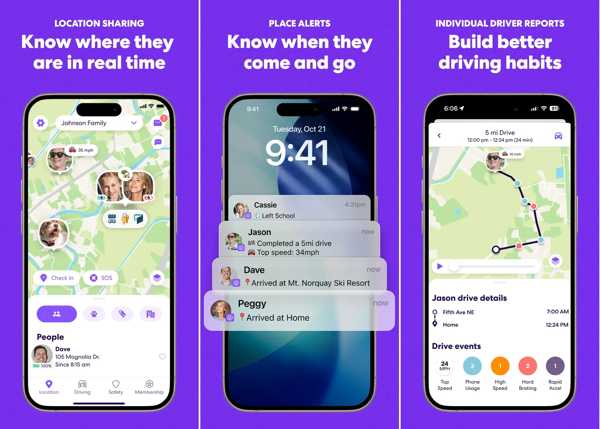
As one of the best location-sharing apps, Life360 allows you to effortlessly keep tracking on your pets, friends, kids, and other essentials with useful features. It makes finding family and friends easier.
Prós
- Send the precise location to friends.
- Identify theft protection.
- Offer roadside assistance.
- Integrate advanced location sharing.
Contras
- The prices are high.
- The app is large and takes up space.
Leituras relacionadas:
Top 2: Google Maps
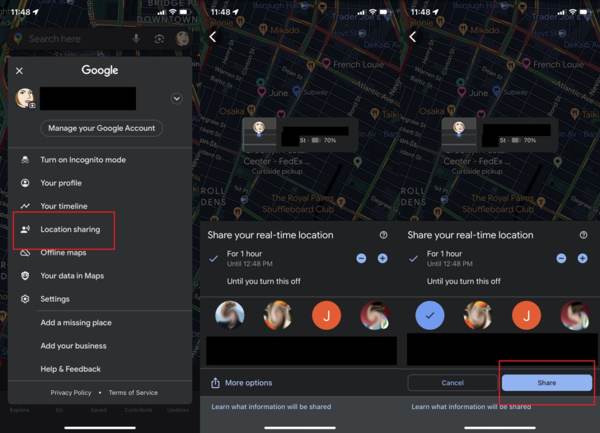
Google Maps location sharing app and navigation app. It reads the real-time GPS metadata on your iPhone or Android phone precisely. Users can discover oceans of information and share live or pinned locations with others.
Prós
- Share location easily.
- Navigate the world in real time.
- Plan trips and experiences.
- Offer different views.
Contras
- Some street images are outdated.
- Fuzzy privacy commitment.
Top 3: Apple Find My
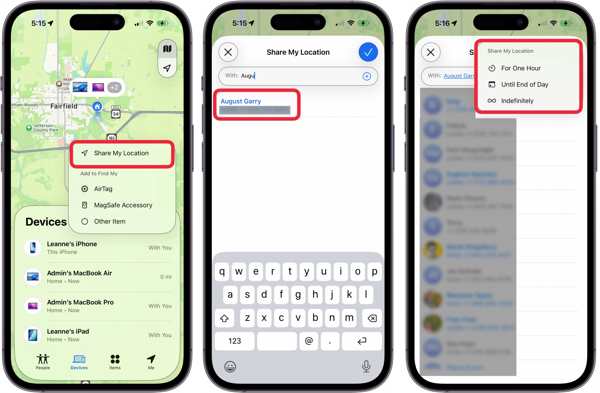
Apple has merged Find My Friends and Find My iPhone into a single app, Find My. It is an iPhone app to share location with family safely. It enables users to share their locations with friends and family in a single app.
Prós
- Safe to use.
- Track locations through Apple ID.
- Share location with friends and family.
- Totalmente gratuito para usar.
Contras
- It is unavailable to Android users.
- There are bugs.
Top 4: GeoZilla
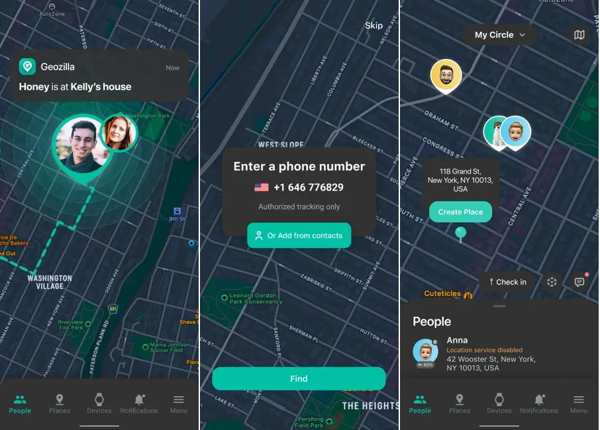
GeoZilla is a free location-sharing app on iPhone and Android devices. It helps you keep loved ones safe, learning where they are and coming to their rescue. The app allows you to build circles for location sharing.
Prós
- Locate the family with GPS.
- Learn the location and route of your family.
- Check in to assure your family you are safe.
- Text and share images.
Contras
- The shared locations are not accurate.
- It may decrease battery life.
Top 5: Glympse
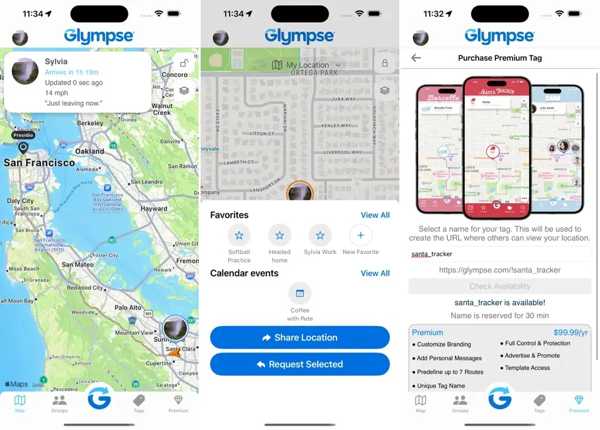
Glympse is a real-time location sharing app. The app makes it easy to temporarily share your live location with friends, family, and others. It works seamlessly across devices and keeps everyone connected.
Prós
- Share location without sign-up.
- Work on any devices.
- Auto-expiring location sharing.
- Track kids, carpools, or teams.
Contras
- It is not working unless it runs in the foreground.
- There are delays.
Top 6: Snapchat
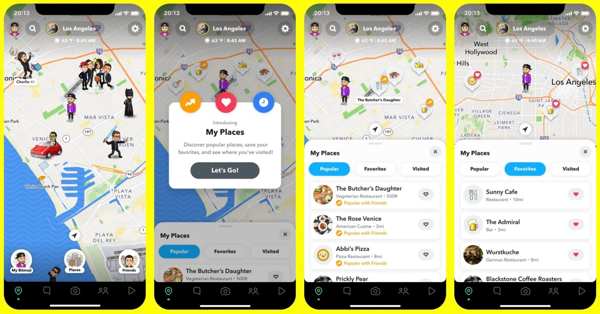
Snapchat is another app to share location between iPhone and Android devices. As a popular social platform among youngers, Snapchat integrates a variety of features to share and track locations.
Prós
- Share your location instantly.
- Enable real-time messaging with friends.
- Offer creative tools.
- Reach younger audiences.
Contras
- You must have an account.
- Customer support may have slow response times.
Top 7: mSpy
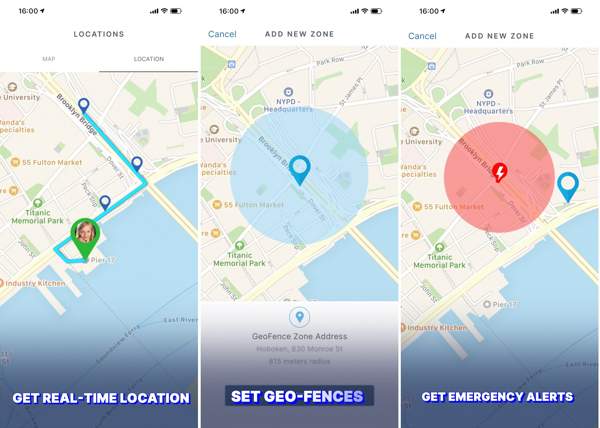
mSpy is a location-sharing app on Android and iPhone. It is designed for family tracking and helping families stay connected. If you wish to stay aware of your family’s location, this app can meet your needs.
Prós
- Check the real-time GPS location.
- View location history.
- Create virtual areas and receive notifications.
- View the contact list of the tracked devices.
Contras
- Não possui uma versão gratuita.
- This app is expensive.
Top 8: iSharing
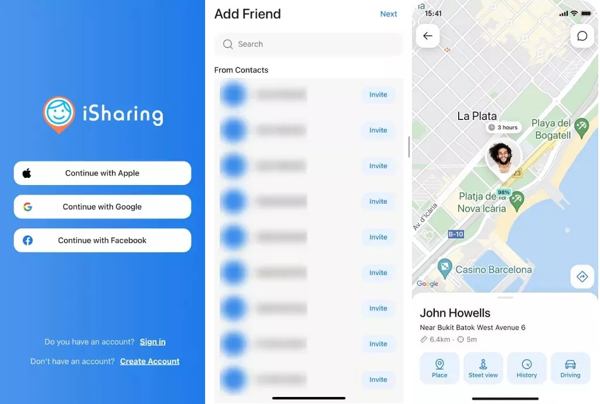
iSharing is a comprehensive family location sharing app for mobile devices. It keeps your loved ones safe and connected in real-time across iPhone, iPad, Android, web, and other platforms.
Prós
- Track locations in real time.
- Find lost devices easily.
- Get instant notifications.
- Share live locations.
Contras
- The alerts are annoying.
- It is only free on Android.
Part 3. Bonus Tip: How to Spoof Location on iPhone/Android
If you want to hide your location without disabling location sharing, imyPass iLocaGo is a good option. It is able to fake your geolocation on your iPhone or Android phone with no technical skills.

Mais de 4.000.000 de downloads
Modify GPS location with a single click.
Simulate movements with different modes.
Ofereça opções personalizadas, como velocidade.
Support a wide range of iPhones and Android devices.
How to Spoof Location on Your iPhone
Conecte-se ao seu dispositivo
Launch the location spoofer after installing it on your PC. There is another version for Mac. Connect your iPhone or Android phone to your PC with a compatible cable.

Escolha um modo
If you want to change the static location, choose the Modify Location mode. The other three modes, Modo de parada única, Modo de parada múltipla, e Modo joystick, são usados para criar rotas virtuais.

Fake iPhone location
Enter an accurate address or click a position on the map. Finally, click the Modificar botão para confirmar.

Conclusão
Now, you should learn the top 8 best location-sharing apps. Some of them are free to use, like Google Maps. Others require a subscription or a license. You can discover an appropriate one according to our review and your situation. imyPass iLocaGo can help you fake your location without others knowing.
Penny focuses on GPS troubleshooting and Windows optimization. She formerly worked as a technical support engineer, helping clients solve location-based and system issues efficiently. Backed by IT support experience, she provides practical solutions that really work. In her free time, she likes hiking and geocaching, testing GPS tech in the real world.
Soluções quentes
-
Localização GPS
-
Desbloquear iOS
-
Dicas para iOS
-
Desbloquear Android


