


 Solução
 Centro de Apoio
 Sobre nós
 Contato
Android Location Spoofing Guide: Methods, Risks, and Tips
 Penny Warren publicado em novembro 03, 2026Localização GPSLeitura de 4 minutos
Sometimes, you may not want your Android phone to show where you really are. Or you may want to unlock exclusive features in another region. Spoofing your Android location is possible, but before you start, it's important to know how these tools work and what limitations they have. Here, you'll learn Como alterar a localização no Android and the key things to consider.

Neste artigo:
Part 1: Why Do People Spoof Android Location
Android location spoofing means changing the location shown by your device to a different place instead of your actual location. People spoof Android location for various reasons, including:
- Test location-based apps: Developers and testers may use a fake GPS location to test app features in different regions without moving.
- Protect location privacy: Some users don't want apps to track their real location, so they use a spoofed location to hide where they are.
- Explore location-based content or services: Some apps, games, and websites offer different features depending on where you are. You can set your location to another region and explore content not available.
Part 2: Risks and Considerations When Spoofing Android Location
Before changing your location on Android, consider the following limitations and risks:
1. Terms of service restrictions
Some apps and games don't allow fake GPS, and getting caught can mean more than a warning. Your account could be suspended or banned. Check the game's rules first, especially if you've spent time or money on your account.
2. Security risks
Watch out for apps that ask for strange permissions. Third-party fake GPS location Android apps shouldn't need access to your contacts or messages. If an app comes from an unknown developer and asks for more access than you'd expect, it's better to leave it alone. There are plenty of things you shouldn't have to risk just to change your GPS location.
3. Location accuracy problems
Once your location is spoofed, other apps will use those coordinates, too. You might get directions from the wrong starting point or see inaccurate local information. If you need to get somewhere, turn spoofing off.
Part 3: Spoof Android Location with a Fake GPS Location App
A fake GPS app is the easiest way to change your location on Android. These apps create a virtual location and mask your real location. imyPass iLocaGo is a location changer that lets you modify your Android GPS location without rooting or jailbreaking your device. It provides a simpler way to spoof your location on any apps, simulate real-time movement and protect your privacy. Besides Android, iLocaGo also supports iPhone location spoofing.
Mais de 4.000.000 de downloads
Change your location to anywhere on Android phone.
Fake GPS location on Tinder, Snapchat, and more apps.
Simulate movement with a customized speed and stops.
Support all popular Android brands and the latest Android 17.
How to Spoof Location on Android with imyPass iLocaGo
To use a location changer, you need to enable Developer Options and set the fake GPS app as the Mock Location App first.
Enable Developer Options
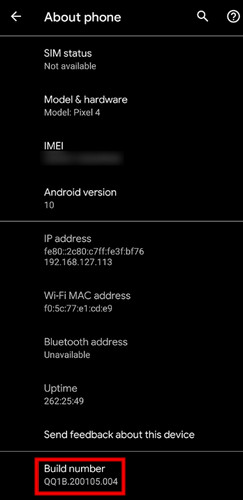
Vamos para Definições > Sobre telefone. Scroll down to find Número da versão and tap it seven times. A message will appear saying, "You are now a developer."
Set Up a Mock Location App
Voltou para Definições e aberto Opções de desenvolvedor. Scroll down and find Selecione o aplicativo de localização simulada. Tap it and select the fake location app that you installed.
Connect Your Phone to a Computer
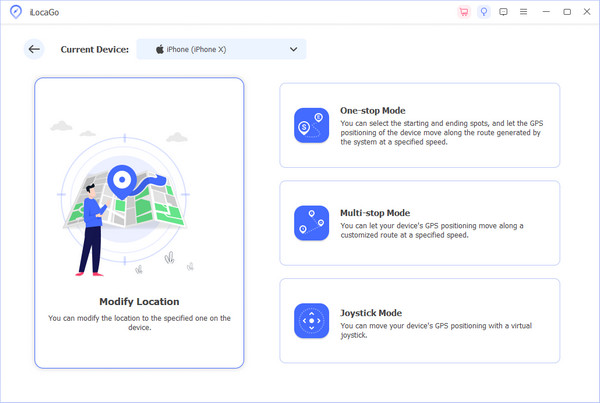
Connect your Android phone to the computer using a USB cable, and tap Confiar on your phone when prompted. Launch the software and choose the Modificar localização option from the interface.
Change Your Android GPS Location
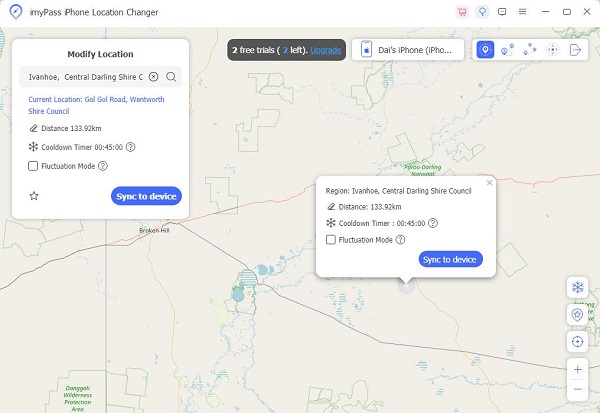
A map will appear on your screen. You can drag, zoom in, and zoom out to find the desired site. Alternatively, you can also enter a specific place name in the search bar to quickly locate it. Click Sincronizar com o dispositivo to apply the new location to your iPhone instantly.
Part 4: Can a VPN Change Your Location on Android
Can a proxy or VPN change location on Android? A proxy or VPN can change your online location, but it works differently from GPS spoofing. To understand why, you first need to know how a VPN works.
A VPN replaces your real IP address with the server's IP address. Your Android phone's GPS location stays the same. Apps that use GPS data, such as maps, navigation apps, and location-based games, can still see where you actually are.
A VPN alone won't fool GPS-based apps. If you only need to change your IP-based location, a VPN can help. But to change your GPS position, you need a dedicated GPS location changer.
Conclusão
Usando um Android location spoofer can be useful, but there are a few things to keep in mind. Before using any GPS location spoofer, check the app's terms of service, review required permissions and avoid unreliable apps. Knowing these details can help you change your Android location more smoothly and safely.
Penny focuses on GPS troubleshooting and Windows optimization. She formerly worked as a technical support engineer, helping clients solve location-based and system issues efficiently. Backed by IT support experience, she provides practical solutions that really work. In her free time, she likes hiking and geocaching, testing GPS tech in the real world.
Soluções quentes
-
Localização GPS
-
Desbloquear iOS
-
Dicas para iOS
-
Desbloquear Android


