



 Solução
 Centro de Apoio
 Sobre nós
 Contato
Concrete Tutorial to Track Your Cell Phone Location
 Penny Warren publicado em junho 23, 2026Localização GPSLeitura de 4 minutos
Tracking cell phone location is a powerful feature for Android users. It allows you to stay connected and safe. In fact, Android makes sharing your location easy and effortless, like you are coordinating with friends on a hike, ensuring your kids know your location, or simply keeping track of your own phone. This tutorial shares multiple ways to track your or your friends’ cell phones in various situations.

Neste artigo:
Part 1. How to Track Cell Phone Location by Google
Google has released the Find My Device feature. It is built into every Android device running Android 8 or higher. If you have enabled this feature on your device, you can track the cell phone location online for free.
Preconditions
- 1.Your phone runs Android 8 and later.
- 2.Find My Device has been enabled on your phone.
- 3.Your phone connects to Wi-Fi or mobile data.
- 4.The Google account associated with your device.
How to Track Your Cell Phone Online
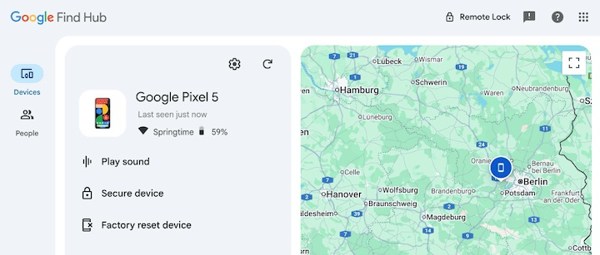
Go to www.google.com/android/find/ in a browser.
Log in with your Google account and password.
Vou ao Dispositivos aba.
Choose your phone to track it on the map.
Google Find Hub allows you to ring, lock, and factory reset your phone.
How to Track Your Cell Phone in Google Find Hub
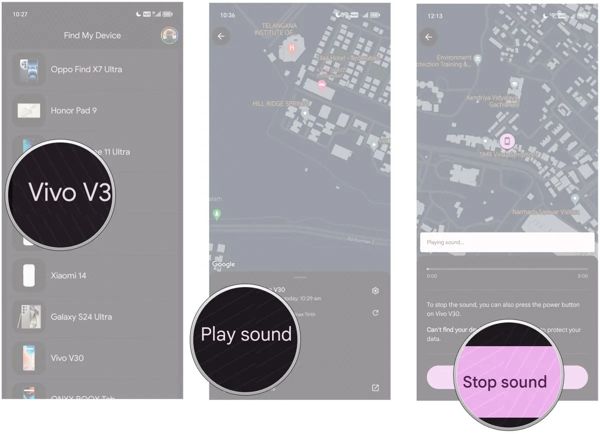
Open the Find Hub app on a borrowed phone.
Sign in with your Google account.
Now, you will see all devices associated with the account.
Choose your phone from the list to track a phone by location.
Then, you can tap Play sound to find your phone.
Part 2. How to Track a Samsung Phone Location
If you are using a Samsung phone, you can track the cell phone location for free using SmartThings Find or Samsung Find. The former is the webpage to track Samsung devices, and the latter enables you to track a Samsung device on an Android phone.
How to Track a Cell Phone on SmartThings Find
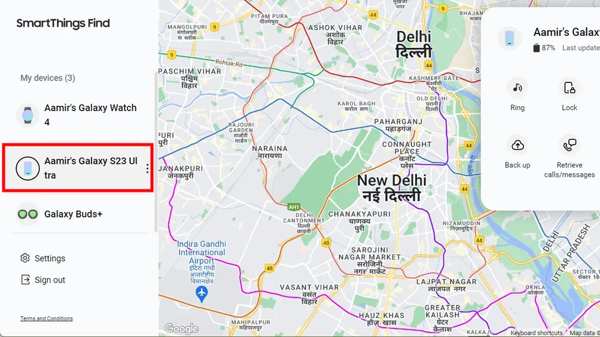
Access smartthingsfind.samsung.com in your browser.
Log in with your Samsung account.
Choose your phone under the My devices seção.
Then, it will be tracked on the map.
You can ring, lock, back up, and erase your phone.
How to Track a Cell Phone on Samsung Find
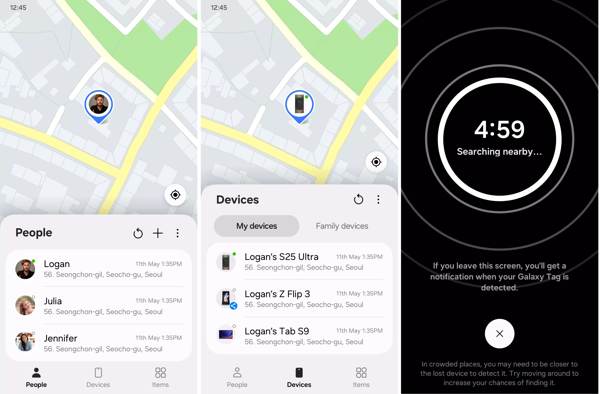
Install and open the Samsung Find app on an accessible phone.
Log in with the associated Samsung account.
Go to the Devices tab and choose your phone from the list.
Then, track the cell phone for free.
Leituras relacionadas:
Part 3. Top 3 Phone Location Trackers
In addition to the built-in apps for tracking phone location, there are third-party location tracker apps. They usually include in-app purchases but offer advanced features, like tracking your friends’ locations.
1 principal: Life360
Key Features of Phone Location Tracker
- 1.Track live locations.
- 2.Share location with circles.
- 3.Integrate privacy policy.
- 4.Collect precise geolocation data.
How to Track a Cell Phone
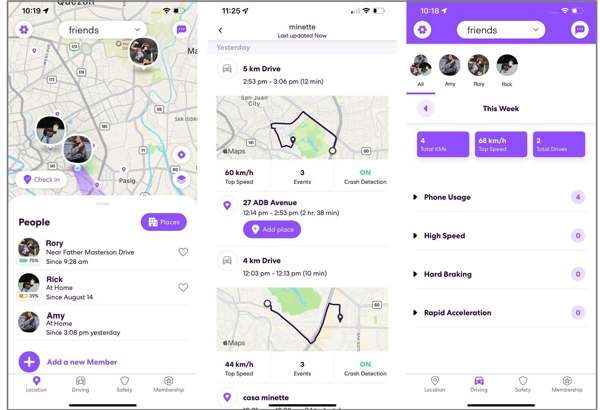
Download the phone location tracker from the Play Store.
Open the app and create an account.
Toque create a new circle and name it.
Invite contacts with an invite code.
Now, you can track cell phone location.
Top 2: Glympse
Key Features of Cell Phone Location Tracker
- 1.Track cell phone location for free.
- 2.Share live location.
- 3.Share your location with a group.
- 4.Integrate privacy features.
How to Track a Cell Phone
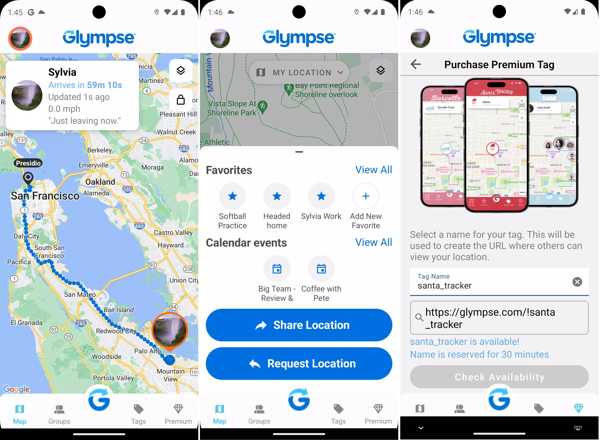
Run the cell phone location tracker app.
Escolher Compartilhar localização ou Solicitar Localização.
Set the time you wish your location to be shared.
Em seguida, toque em Compartilhar.
Top 3: Google Maps
Key Features of Phone Tracker by Location
- 1.Share live locations.
- 2.Track your movements.
- 3.Available for a wide range of Android phones.
- 4.Ofereça recursos de bônus.
How to Track a Cell Phone
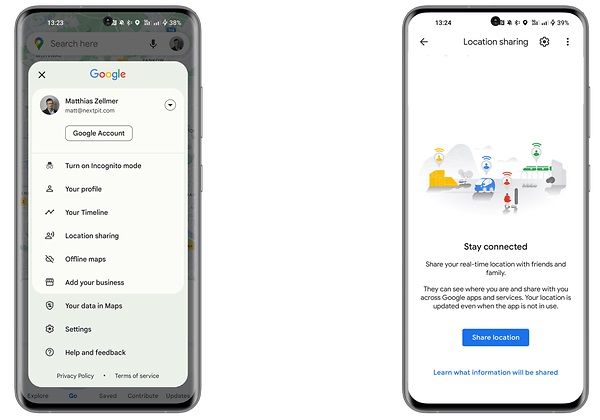
Abra o Google Mapas aplicativo.
Toque na sua foto de perfil.
Escolher Compartilhamento de localização.
Toque New share and set the duration.
Choose the contact and tap Enviar.
Part 4. Bonus Tip: How to Prevent Location Tracking
If you worry about someone else tracking your cell phone location, imyPass iLocaGo can help you protect your privacy. It is able to fake your phone location without installing anything on your mobile device.

Mais de 4.000.000 de downloads
Fake your phone location with any address in one click.
Crie rotas virtuais com vários modos.
Ofereça opções personalizadas, como velocidade.
Support accurate addresses and any positions.
Compatible with almost all Android brands and models.
How to Prevent Location Tracking on Your Phone
Conecte-se ao seu telefone
Launch the location spoofing software once you install it on your computer. It is available on Windows 11/10/8/7 and macOS 10.12 or above. Connect your phone to your computer with a compatible USB cable or a Wi-Fi network.

Escolha um modo
After your phone is recognized, you will be taken to the mode window. The Modificar localização mode is used to change the static location of your phone. The other three modes, Modo de parada única, Modo de parada múltipla, e Modo joystick, are used to simulate movements. Here, we choose Modificar localização.

Fake phone location
Input an accurate address into the field once the map window appears. Or click the right position on the map. Finally, click the Modificar button. Now, you can prevent others from tracking your cell phone location.

Conclusão
This guide shared multiple apps for tracking phone location on Samsung and other brands. The Google Find My Device feature is available to almost all Android devices. For Samsung users, SmartThings Find and Samsung Find are available. Moreover, we recommended third-party location tracking apps. If you intend to prevent others from tracking your phone location, imyPass iLocaGo é uma boa opção.
Penny focuses on GPS troubleshooting and Windows optimization. She formerly worked as a technical support engineer, helping clients solve location-based and system issues efficiently. Backed by IT support experience, she provides practical solutions that really work. In her free time, she likes hiking and geocaching, testing GPS tech in the real world.
Soluções quentes
-
Localização GPS
-
Desbloquear iOS
-
Dicas para iOS
-
Desbloquear Android


