Solução
 Centro de Apoio
 Sobre nós
 Contato
How to Track Someone Live Location on iOS and Android
 Penny Warren publicado em agosto 06, 2026Localização GPSLeitura de 3 minutos
Tracking someone's location is not only a useful feature but also able to enhance security. When you date a friend, you can quickly find them with the live location. If your child or family member visits a new city, tracking the location can protect your family in real time. Using the right methods can meet your needs efficiently. This guide shares the proven methods and detailed steps.

Neste artigo:
Part 1: How to Track Someone's Location on iPhone
If you are using an iPhone or iPad, you can track someone's live location for free without extra software or hardware. The native Find My and iMessage allow you to complete the job on your iOS device.
How to Track Someone's Location on iPhone by Find My
Execute o Definições aplicativo e toque Família abaixo do seu perfil.
Toque Continuar if you haven't set up Apple Family.
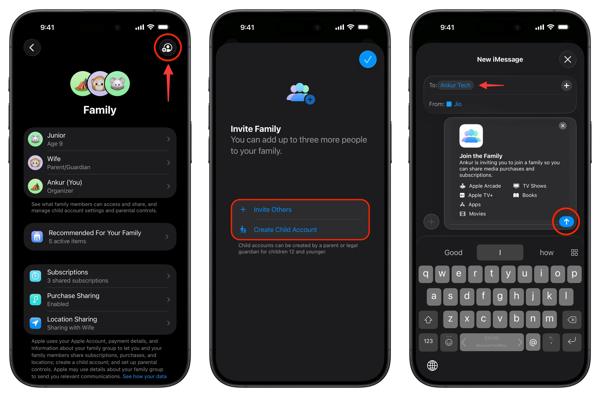
Toque Adicionar pessoa, escolher Invite Others, and send the invitation.
After the recipient accepts the invitation, move on.
Abra o Encontre o meu aplicativo no seu dispositivo.
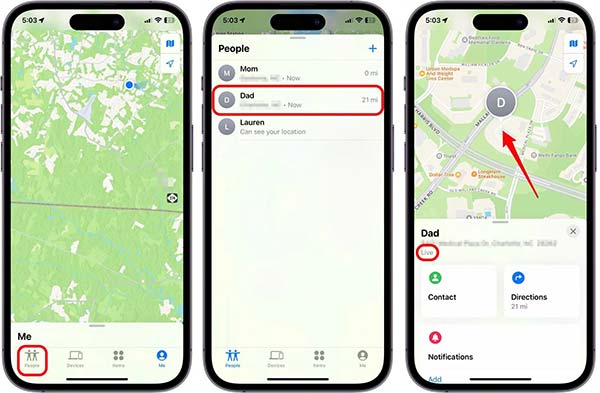
Vou ao Pessoas aba na parte inferior.
Choose the person whose location you want to know.
If the person is sharing their location, you will know the location of someone on the map immediately.
How to Know Someone's Location on iPhone via iMessage
If the other's Find My doesn't update location, you can also directly request their real location.
Abra o mensagens app and go to the chat with the desired person.
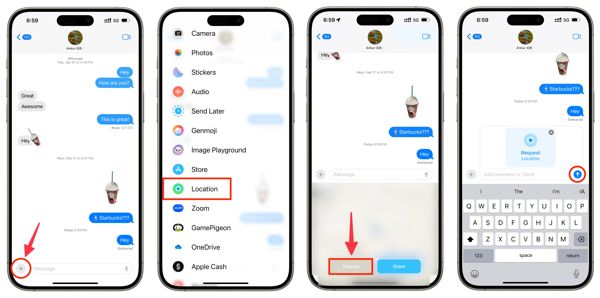
Toque em Adicionar button next to the message field
Escolher Localização na barra de ferramentas.
Toque em Solicitar botão e aperte Enviar.
If the contact receives your request, tap the Compartilhar botão, escolha Indefinidamente, e bater Enviar.
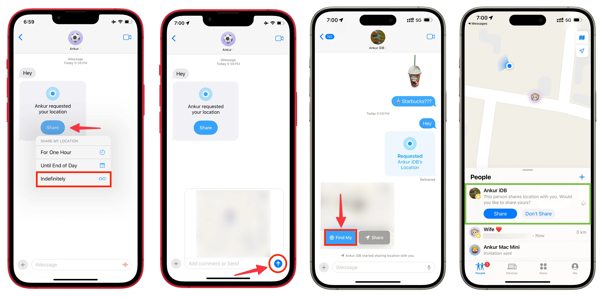
When you want to track someone's location live on iPhone, tap the Encontre o meu botão.
Part 2: How to Track Someone's Location on Android
Tracking someone's live location on Android devices is not difficult, either. Google Maps enables you to track or share locations for free. Plus, the Google Maps app allows you to track locations in messaging apps, like WhatsApp.
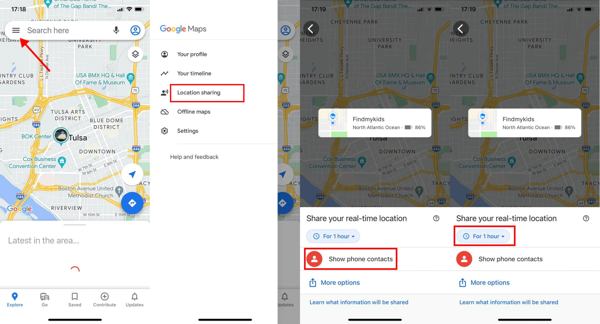
Abra o Google Mapas app on your friend's or family's phone.
Tap on the profile and choose Compartilhamento de localização.
Toque Show phone contacts and choose your name.
If the contact is not on the list, tap Add People to add someone new.
Set how long to track the location.
Por fim, toque no Compartilhar localização botão para confirmar.
Now, turn on your phone, open the Google Maps app, and track someone's live location.
Part 3: How to Prevent Someone from Tracking Your Location
In most cases, you will be notified if someone is tracking your location. However, some apps and services let others track your location without you knowing. Fortunately, imyPass iLocaGo can help you resolve this problem. It hides your real GPS location on your iPhone or Android phone from any addresses.
Mais de 4.000.000 de downloads
Fake GPS location on mobile devices with a virtual location.
Simulate movements with your mouse and keyboard.
Ofereça vários modos para diferentes propósitos.
Won't install anything on your mobile phone.
Support a wide array of iPhones and Android devices.
How to Prevent Someone from Tracking Your Location
Conecte-se ao seu telefone
Launch the location spoofing software once you install it on your computer. It is available on Windows 11/10/8/7 and Mac OS X 10.12 or above. Connect your iPhone or Android phone to your computer with a compatible cable. If prompted, tap Confiar on your screen to trust this computer.
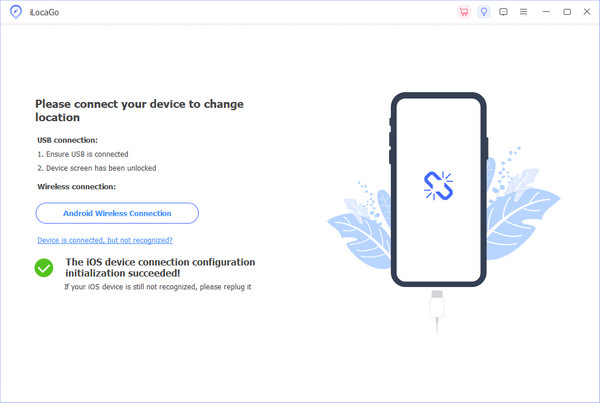
For Android, you can also wirelessly connect it to your computer with Wi-Fi.
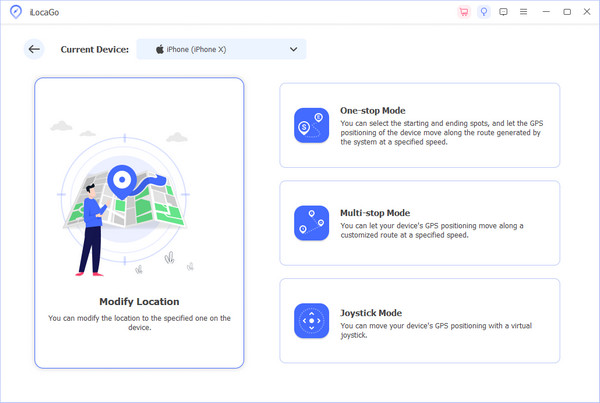
Escolha um modo
Escolha o Modificar localização option if you need to fake the static location of your device. The other three modes, Modo de parada única, Modo de parada múltipla, e Modo joystick, are used to make virtual routes. To prevent someone from tracking your live location, choose Modificar localização.
Hide your location
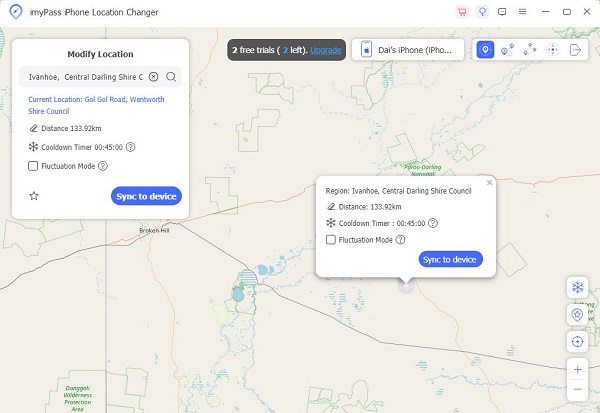
Type in an accurate address into the field once the interactive map window appears. If you don't have an address, click the destination on the map directly. Finally, click the Modificar button to confirm it. Now, you can access your iPhone or Android phone. This program can also help you fake your Twitter (X) location.
Conclusão
Now, you should learn three methods to track the location of someone on your iPhone or Android phone. Apple's Find My app allows you to track your friend or family member's location. The prerequisite is that they are using iOS devices, too. The built-in Messages app is another option to track location after the contact accepts your request. Google Maps is a quick way to track GPS location on Android devices. Moreover, we recommended imyPass iLocaGo to prevent others from tracking your location.
Penny focuses on GPS troubleshooting and Windows optimization. She formerly worked as a technical support engineer, helping clients solve location-based and system issues efficiently. Backed by IT support experience, she provides practical solutions that really work. In her free time, she likes hiking and geocaching, testing GPS tech in the real world.
Soluções quentes
-
Localização GPS
-
Desbloquear iOS
-
Dicas para iOS
-
Desbloquear Android