Solução
 Centro de Apoio
 Sobre nós
 Contato
How to Unlock Android Phone and Tablet with IMEI Number
 Gideon Byron publicado em julho 29, 2026Desbloquear AndroidLeitura de 3 minutos
Every mobile device has an Internet Mobile Equipment Identity, also called IMEI. Carriers, like AT&T, Verizon, and more, use your IMEI number to verify the device on their network and lock your SIM card. Unlocking IMEI refers to giving your carrier the IMEI number so it can push an unlock to their systems. Once the carrier flips that switch, your phone can accept SIMs from other carriers. This guide shares Verificação de desbloqueio de IMEI with proven methods.

Neste artigo:
Part 1: How to Check If My IMEI Is Unlocked on a Phone
Way 1: Use a SIM Card from Other Carriers
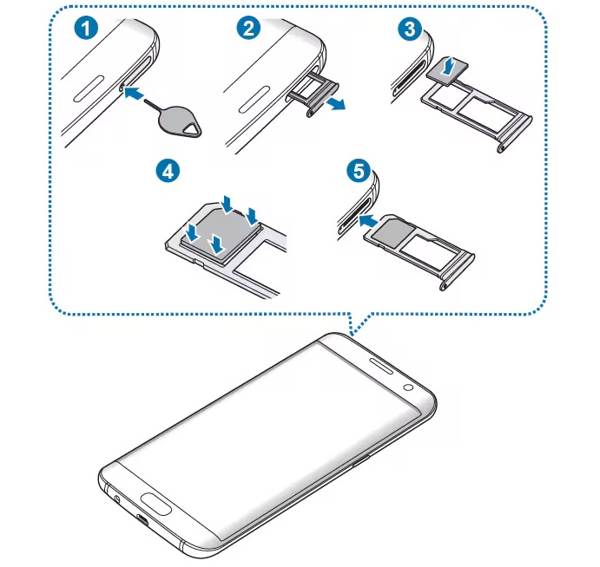
One easy way to check if your phone is unlocked IMEI free is by using another SIM card. Power off your phone by holding the Poder button. Locate the SIM slot on your phone according to your device model. Use a SIM ejector tool or paperclip to pop out the tray, and remove the current SIM card. Next, put a new SIM card in the tray and insert it into your device. Turn on your phone and check if the new SIM card is detected. If not, chances are that your IMEI is locked.
Way 2: Check IMEI Unlock in Settings
Another way to check your IMEI to see if your phone is unlocked is the Settings app. If you find several network providers, your IMEI is unlocked. If you only see one carrier, it means that your IMEI number is locked.
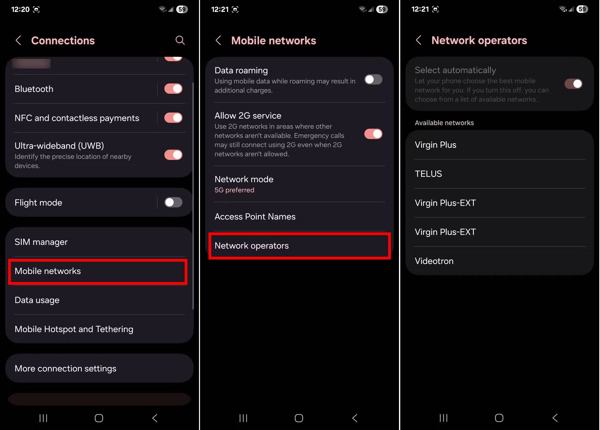
Execute o Definições aplicativo no seu celular.
Vou ao Rede e Internet, Conexões, or similar option.
Escolher Mobile network, Cellular network, or something similar.
Toque Avançado, Network operators, or something similar.
Check the carriers under the Available networks cabeçalho.
Way 3: Check IMEI Status by Contacting Your Carrier
A straightforward way to check the IMEI unlock status is to contact your carrier. You can call the customer support and ask them if your phone is locked to their network or if it is free to use with any carrier.
Alternatively, some carriers provide an online portal or web app where you can check the status after inputting your phone's serial number or IMEI number.
Way 4: Find out If Your Phone IMEI Is Unlocked Online
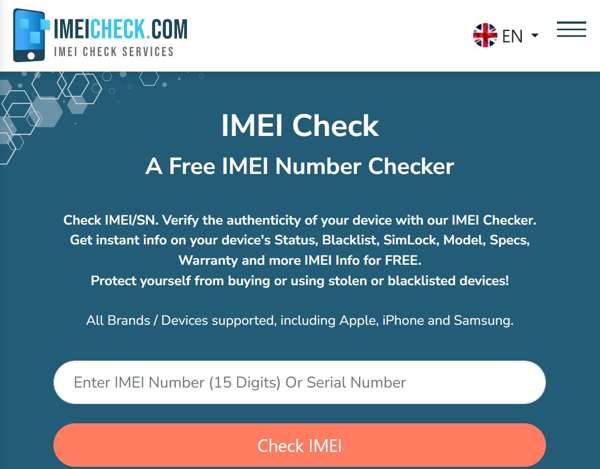
An online IMEI unlock checker is an option to find out if a phone is unlocked with IMEI, such as IMEI Check. It allows you to learn the IMEI status once you offer your IMEI number. This tool is free of charge.
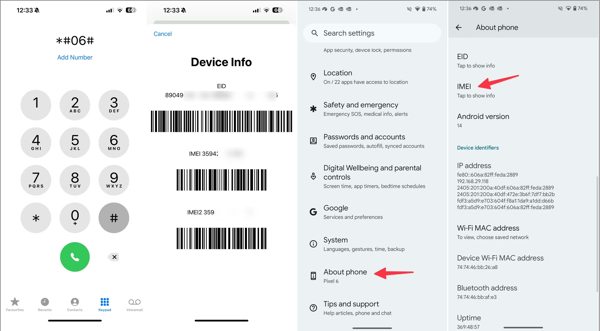
Abra o Definições aplicativo, toque em Sobre telefone, e bater IMEI to check the IMEI number.
If you cannot find the IMEI number in Settings, run your Telefone app, type *#06#, e toque no Chamar botão.
Go to https://imeicheck.com/imei-check in a browser.
Input your IMEI number into the field and click Check IMEI.
You May Also Like:
Part 2: How to Unlock a Phone with IMEI Number by Carrier
Following your carrier's device unlocking policy, you can unlock a phone with the IMEI number. The device unlock policies are different, depending on your carrier. Generally speaking, you must be in service for a period. Your device must not be reported stolen or lost. Moreover, you must complete the contract and make full payment. You can find the device unlock policy on your carrier's official website.
Call your carrier's customer support:
- Verizon: 800-922-0204
- AT & T: 866-925-4389
- T-Mobile: 877-746-0909
- Celular dos EUA: 888-944-9400
Find the IMEI number on your phone.
Offer the IMEI number and other information, like your account and contract.
Once your carrier receives your request, it will unlock your IMEI number.
Observação:
Some carriers provide device unlocking websites or apps, like AT & T.
Part 3: How to Unlock a Phone with IMEI Using a Third-party Service
If you cannot complete the device unlocking policies, you have to unlock a phone with an IMEI number with a third-party service. Fortunately, there are online IMEI unlocking services. All you need to do is find a reputable service, like Mobile Unlocked.
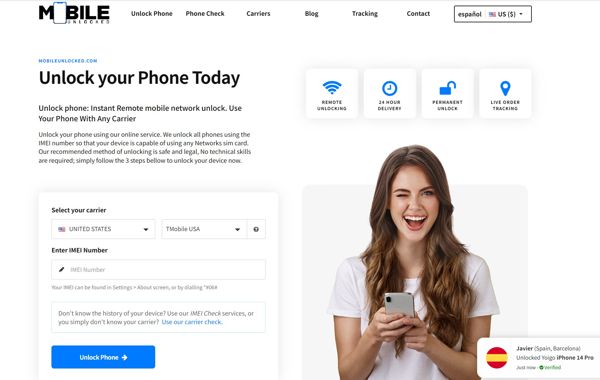
Access https://www.mobileunlocked.com/ in a web browser.
Select your carrier, country, and enter your IMEI number.
Clique no Desbloquear telefone botão.
Offer other information and check out the bill.
Confirm and submit your request.
In a few days, you will receive the instructions to unlock your phone with IMEI.
Part 4: Bonus Tip: A Quick Way to Unlock a Phone
In addition to unlocking a phone with the IMEI number, you may be locked out of your device after forgetting the lock screen password. Thankfully, imyPass AnyPassGo can help you resolve this problem. The intuitive interface simplifies the workflow.

Mais de 4.000.000 de downloads
Unlock your phone without the password in 3 steps.
Work for digit password, pattern, fingerprint, and Face ID.
Bypass FRP without your Google account password.
Support a wide range of phone brands and models.
How to Unlock Your Phone Without an IMEI Number
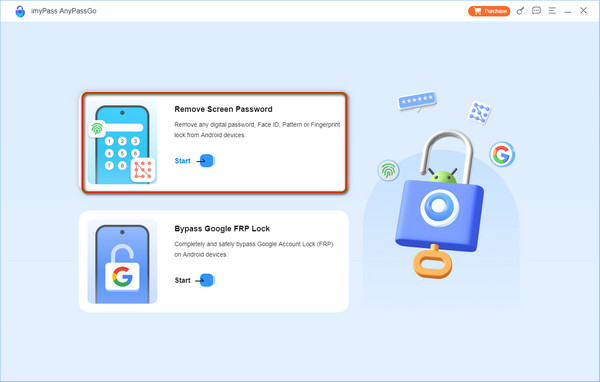
Install phone unlocking software
Launch the phone unlocking software once you install it on your computer. It is compatible with Windows 11/10/8/7. Choose the
Conecte-se ao seu telefone
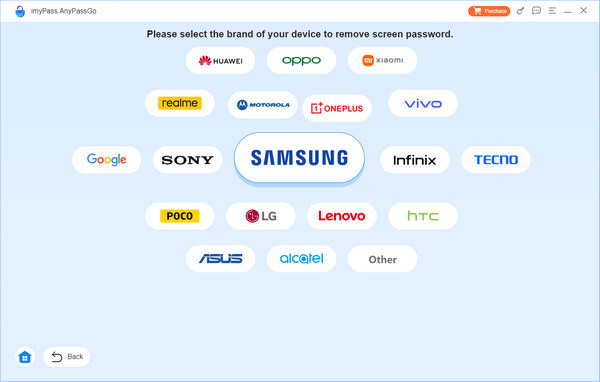
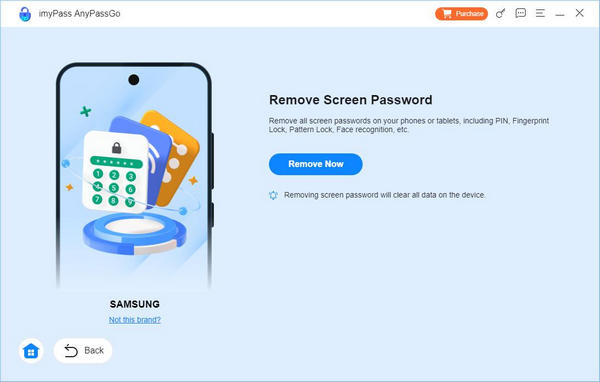
Escolha o Remover senha da tela option and select your phone brand on the window. Connect your phone to your computer with a compatible USB cable.
Desbloqueie seu telefone
Once the software detects your device, click the Remover agora button to begin removing any kind of screen locks immediately. When it is done, close the software and disconnect your phone. Restart your device and unlock it directly.
Conclusão
Este guia explica como unlock a phone for free with the IMEI number. First of all, you can check the status of your IMEI number on your phone, with a new SIM card, by asking your carrier, or using an online IMEI checking service. Moreover, you can follow our steps to unlock your phone and switch to any network provider. Plus, we recommended imyPass AnyPassGo to help you unlock your phone screen without the password.
Gideon writes about unlocking iOS, Android, and Windows devices. He previously worked as a mobile device specialist in a repair center, assisting customers with locked devices and password recovery. In his spare time, he tests new unlock tools, customizes smart devices and makes complex unlock processes simple and safe.
Soluções quentes
-
Desbloquear Android
-
Desbloquear iOS
-
dicas de senha
-
Dicas para iOS