Solução
 Centro de Apoio
 Sobre nós
 Contato
Android Bootloader Unlock Guide: Step-by-Step for All Major Brands
 Gideon Byron publicado em julho 01, 2026Desbloquear AndroidLeitura de 3 minutos
Want to upgrade your old Android models to the latest version? Want to customize your Android phone beyond the stock settings? The desbloqueio do bootloader can do all for you. You can install custom ROMs, gain root access, and actually reshape how your phone works. Even an old device can feel new again!
But you probably have some questions: Will I lose my data? Will it void my warranty? Is the process different for Samsung, Xiaomi, OnePlus, or Motorola? This guide answers all questions, step by step, so that you can unlock the bootloader safely.

Neste artigo:
- Part 1. What is a Bootloader and Why Unlock It?
- Part 2. Preparation Steps (Before You Start)
- Part 3. How to Unlock the Bootloader on Android
- Part 4. After Unlocking: The "Software Integrity" Warnings
- Part 5. Risks & Benefits of Unlocking the Bootloader
- Bonus: How to Unlock Android Screen Lock Without Passcode
Part 1. What is a Bootloader and Why Unlock It?
A bootloader is a small program to verify your operating system's integrity and initiate the boot process so that you can get to your phone's operating system and use it. Similar to the BIOS (Basic Input/Output System) in a computer, it ensuring device security and prevent unauthorized modifications or tampering.
A locked bootloader restricts your ability to modify system settings and parameters on your device. Most users unlock the bootloader to get more control over their device. For example, they can install newer Android versions on older phones. They can also install custom ROMs for extra features. Some users do it to create a more personalized interface.
Part 2. Preparation Steps (Before You Start)
Before unlocking the bootloader, it's important to finish these essential preparation steps.
Check Phone Eligibility
First, check if your phone manufacturer allows bootloader unlocking. Then, see if your region or carrier has any restrictions.
Faça backup dos seus dados
Unlocking the bootloader will perform a factory reset on your phone, it will erase all your data and reset your system settings. Make sure to back up all important data, so that you can restore your Android from a backup.
Enable Developer Options
Navegar para Definições, tocar Sobre telefone. Tocar Número da versão repeatedly until you see a confirmation message says "You are now a developer!"
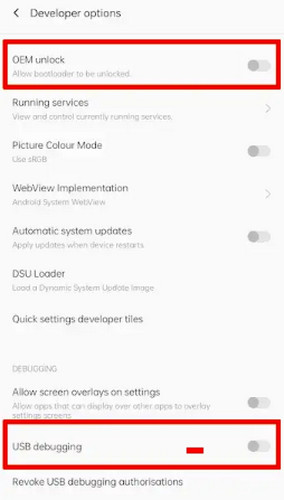
Enable OEM Unlock and USB Debugging
No Opções de desenvolvedor, ativar Desbloqueio OEM e Depuração USB.
Install ADB & Fastboot Tools
Download and install ADB (Android Debug Bridge) and Fastboot tools on your computer. These tools help your PC to communicate with your phone and execute unlocking commands.
Part 3. How to Unlock the Bootloader on Android
Once you've completed the preparation steps, you're ready to unlock your Android's bootloader. We give a step-by-step bootloader unlock guide for major Android brands.
Motorola Bootloader Unlock (The Official Website Method)
Motorola provides an official bootloader unlocking method for its eligible devices. Around 80-90% of eligible devices can complete the unlock successfully if the device is carrier-unlocked and supported by Motorola's unlock program.
Download ADB Fastboot on your computer and extract the contents. Connect your phone to the computer and let the drivers install.
Open the extracted folder, press the SHIFT key, right-click, and select Open PowerShell window here.
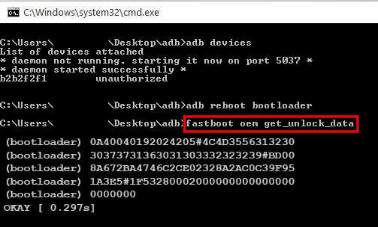
Type "adb devices" in the command prompt and allow USB debugging.
Type "adb reboot bootloader" to restart your phone in bootloader mode.
When the phone boots into the bootloader, type "fastboot devices" to confirm the connection. Use the volume buttons to scroll and the Power button to select Boot To Download Mode.
Type "fastboot oem get_unlock_data" to receive unlock data strings. Copy and paste the strings into a text editor and remove all spaces.
Go to the Motorola bootloader unlock website and sign in.
Paste the string on the website and click Can my device be unlocked? You'll receive an email with the unlock key.
In the command prompt, type "fastboot oem unlock YOUR_UNLOCK_KEY", replacing YOUR_UNLOCK_KEY with the unlock key. Your Motorola device is now successfully unlocked!
Samsung Bootloader Unlock (The Knox Void Method)
Samsung is significantly more restrictive. On modern Galaxy devices, bootloader unlocking success is estimated at only 30-60% depending on region and model. Many US carrier models, like Verizon/AT&T, cannot be unlocked at all.
Turn off your device completely. Then press and hold the Aumentar o volume e Volume baixo buttons, and connect your phone to a PC using a USB cable. The device will boot into Download Mode.
In Download Mode, press and hold the Aumentar o volume button. Take a moment to read the warning on the screen, then confirm to unlock the bootloader.
After setup, return to Opções de desenvolvedor. You should see that OEM Unlocking is enabled, indicating the bootloader has been unlocked.
OnePlus Bootloader Unlock (The Fastboot Method)
OnePlus has one of the highest success rates among Android brands. The success rate is around 90–95% on global unlocked models.
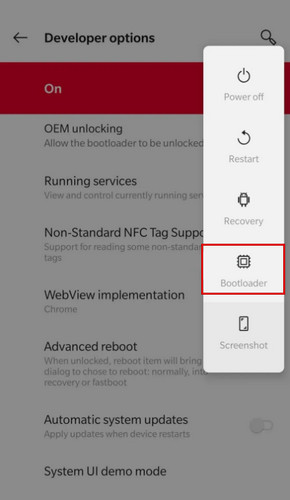
After enabling OEM Unlocking, scroll down and locate Advanced reboot. Toggle on this option to enable this feature.
Long-press the Power button to bring up the power menu for your device. Tap the Bootloader option to make your phone immediately begin booting into Fastboot Mode.
Once your phone reboots, connect the device to your PC and run "adb reboot bootloader."
Open a command window in the Platform Tools folder and run "fastboot devices." If a device serial number appears, the connection is working correctly and you can continue.
Execute the following command "fastboot flashing unlock." For older OnePlus models, use "fastboot oem unlock."
A confirmation screen will appear on the device. Use the volume keys to select Desbloqueie o Bootloader e pressione o Poder button to confirm. The phone will erase all data and reboot automatically.
Xiaomi Bootloader Unlock (The Mi Unlock Tool Method)
Xiaomi uses a controlled unlock system, so success is not immediate even if the device is eligible. The unlock success rate is effectively 100% after the device is approved. But the waiting time takes longer from 7 days to 30 days.
Abrir Definições > Configurações adicionais > Opções de desenvolvedor > Mi Unlock Status e toque Adicionar conta e dispositivo. Wait for the confirmation message indicating that the account has been successfully linked to the phone.
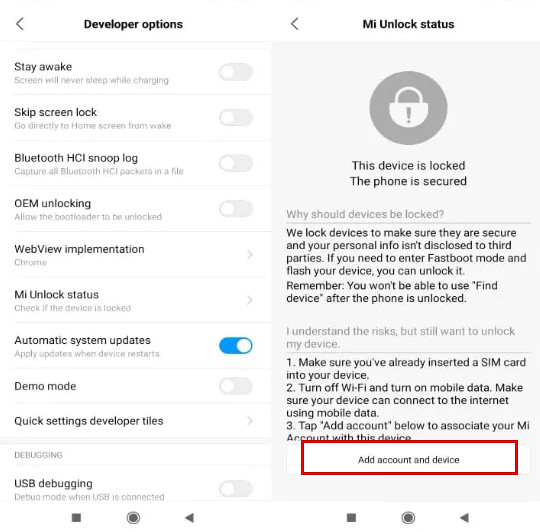
Power off the device. Press and hold Volume baixo e Poder until the Fastboot logo appears, then connect the phone to your computer with a USB cable.
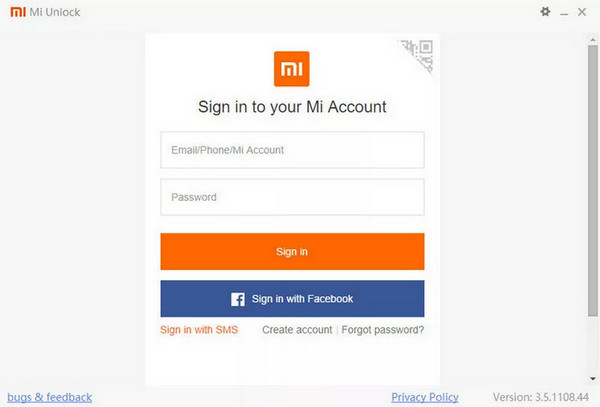
Launch the Mi Unlock Tool on your PC and sign in with the same Mi Account. After the tool detects the device, click Desbloquear and follow the on-screen instructions. Once approved, the tool will unlock the bootloader, perform a factory reset, and reboot the device.
Part 4. After Unlocking: The "Software Integrity" Warnings
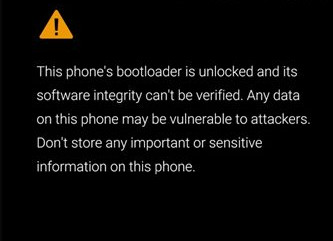
After successfully unlocking the bootloader, you may notice warning messages every time the device starts up. This is normal and simply indicates that the device's software integrity can no longer be verified by the manufacturer. These bootloaders unlock warnings do not affect normal use, but some banking, payment, or security-focused apps may behave differently on an unlocked device.
Part 5. Risks & Benefits of Unlocking the Bootloader
Before unlocking your bootloader, consider both the advantages and potential risks.
Benefícios:
- You can install custom ROMs.
- You can gain root access to fully control the Android operating system.
- You can install custom recovery environments such as TWRP.
- You can customize system files, startup animations, and kernels.
- You can extend the lifespan of older devices.
Risks:
- Unlocking the bootloader will erase all your data.
- It will weaken Android's security model.
- You may face warranty limitations.
- Some apps may not work properly.
- The unlock may trigger boot loops or software issues.
If you plan to root your device or install custom software, the bootloader unlock is often necessary. For users who only need to unlock your phone, keeping the bootloader locked is the safer option.
Bonus: How to Unlock Android Screen Lock Without Passcode
Unlocking the bootloader gives you greater control over your Android device, but it isn't the solution for every problem. If you're simply locked out of your phone because you've forgotten the passcode, a dedicated Android unlock tool is often a much faster and easier option. imyPass AnyPassGo is designed to help users regain access to their Android devices by removing various types of screen locks without passcode.
Mais de 4.000.000 de downloads
Remove PINs, passcodes, patterns, fingerprints, and face locks.
Ignorar bloqueio do Google FRP easily on supported devices.
Regain access to a locked, damaged, disabled Android.
Suporte a uma ampla variedade de marcas e modelos de Android.
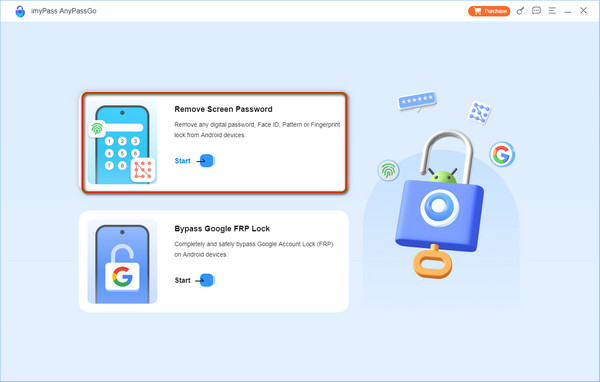
Launch the software on your computer and select the Remover senha da tela da interface.
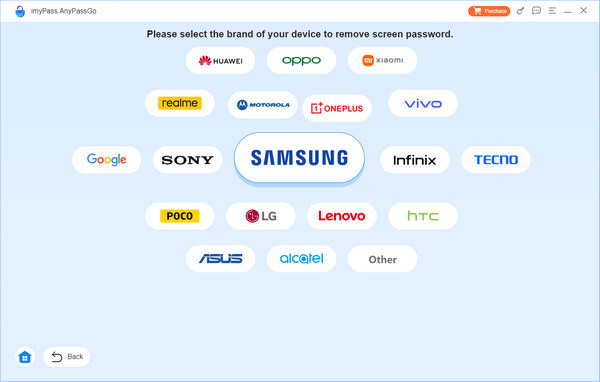
Na próxima tela, selecione a marca do seu dispositivo.
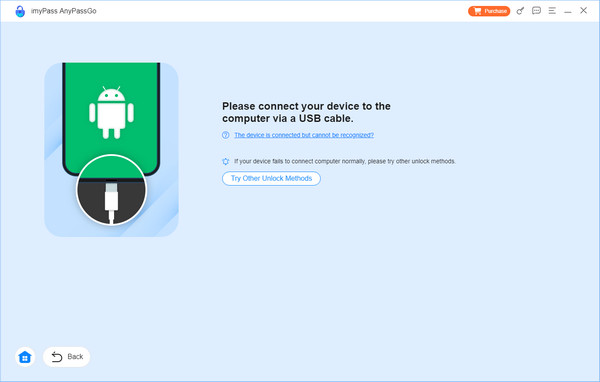
Connect your Android to your computer using a USB cable.
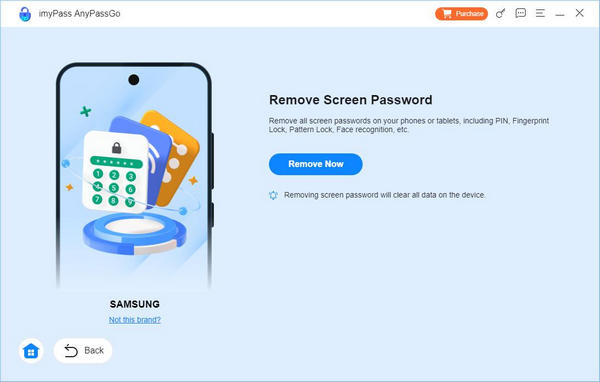
Once your Android device is successfully connected to your computer, click the Remover agora button to start removing the screen lock.
Observação:
This process will erase all data on your device. Make sure you have a recent backup so you can restore your Android afterward.
Conclusão
Resumidamente, unlocking the bootloader is powerful, but you should use it carefully. It gives you full control over your Android, but it comes with risks like losing data or triggering security warnings. If you want to remover conta do Google do telefone, tools like imyPass AnyPassGo can safely do this for you without a passcode.
Gideon writes about unlocking iOS, Android, and Windows devices. He previously worked as a mobile device specialist in a repair center, assisting customers with locked devices and password recovery. In his spare time, he tests new unlock tools, customizes smart devices and makes complex unlock processes simple and safe.
Soluções quentes
-
Desbloquear Android
-
Desbloquear iOS
-
dicas de senha
-
Dicas para iOS