



 Solução
 Centro de Apoio
 Sobre nós
 Contato
Can the Apple Store Unlock Your iPhone Without Password
 Samuel Spenser publicado em maio 09, 2026Desbloquear iOSLeitura de 3 minutos
"I accidentally changed my password, and now I cannot remember it. Could Apple stuff at the Apple Store help me to unlock my iPhone without losing any data?" If you have the same question, maybe you are locked out of your iOS device and forgot the lock screen passcode. In fact, you have options to regain access to your device even if you forgot your passcode. Anyway, this article will answer this question and share more information.

Neste artigo:
Part 1. Can iPhone Unlock My iPhone
The lock screen passcode is used to protect your iPhone and data. You can enter the passcode and unlock your device to get to the Home screen. Can the Apple Store unlock your iPhone? Unfortunately, the answer is no. If you have forgotten the passcode, you will have to reset your device.
Part 2. How to Unlock a Locked iPhone
As mentioned previously, you have several ways to unlock a locked iPhone on your own when you forgot your passcode. Of course, these methods have some prerequisites. We share the proven methods respectively.
How to Unlock an iPhone Without Apple Store on Computer
Preconditions
- 1.A versão mais recente do iTunes ou do Finder.
- 2.Um computador.
- 3.A USB cable.
No Windows e no macOS Mojave ou anterior, abra o iTunes.
On macOS Catalina or later, open Finder.
Connect your iPhone to the computer with a compatible cable.
Put your iPhone in Modo de recuperação:
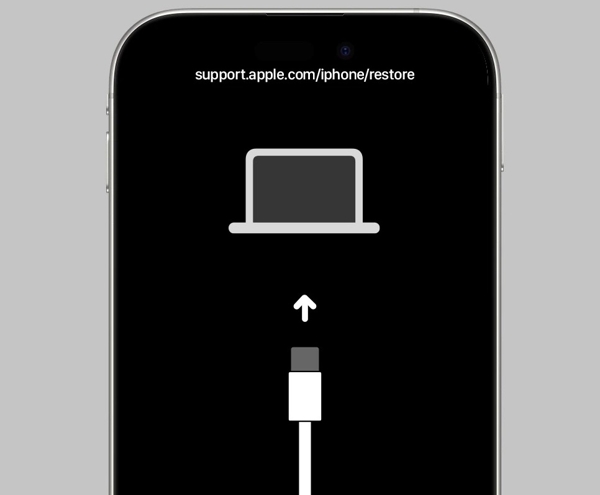
iPhone com Face ID
Press and quickly press the Aumentar o volume botão.
Faça a mesma coisa com o Volume baixo botão.
Segure o Lado button to enter Recovery Mode.
iPhone 7/7 Plus
Pressione e segure o Volume baixo + Lado botões juntos.
When the Recovery Mode screen appears, release the buttons.
iPhone with a Home button
Pressione e segure o Lar + Poder botões simultaneamente.
Let the buttons go once your device enters Recovery Mode.
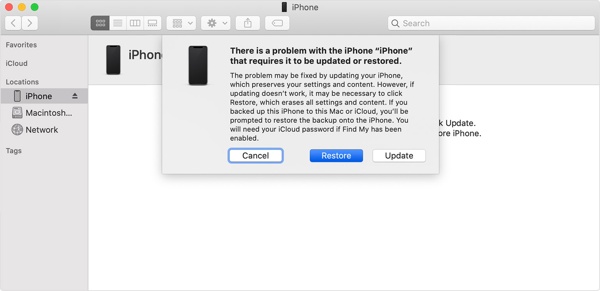
Depois que o iTunes ou o Finder detectar seu iPhone, clique no Restaurar botão.
When restoring finishes, your iPhone will restart.
Then, you can unlock your iPhone without Apple and set it up as a new device.
How to Unlock an iPhone Without Apple Using Another Apple Device
Preconditions
- 1.Find My iPhone has been enabled.
- 2.Another Apple device associated with the same Apple ID.
- 3.Sua senha do ID Apple.
- 4.The Find My app.
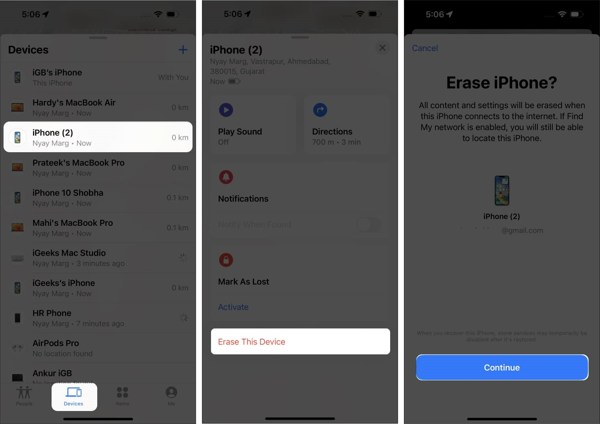
Execute o Encontre o meu aplicativo.
Vou ao Dispositivos tab and choose your iPhone.
If you cannot find your iPhone, tap Adicionar ao lado de Dispositivos, escolher Adicionar AirTag, and add your device.
Toque ou clique no Apagar este dispositivo botão.
Quando solicitado, toque em Continuar.
Follow the on-screen instructions to erase your device and unlock your iPhone without going to the Apple Store.
How to Unlock an iPhone Without Apple Store Online
Preconditions
- 1.Find My iPhone has been turned on.
- 2.Seu ID Apple e senha.
- 3.Seu iPhone está online.
- 4.A web browser.
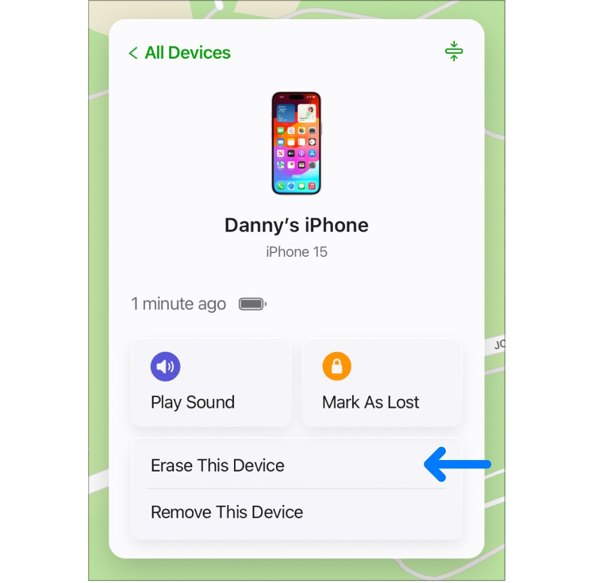
Acesse www.icloud.com/find em um navegador da web.
Efetue login com seu ID Apple e senha.
Escolha seu iPhone entre os Todos os dispositivos lista.
Clique no Apagar este dispositivo option on the pop-up dialog.
Enter your Apple ID password again.
Click Erase again to confirm unlocking your iPhone without Apple Store.
Leitura Estendida:
How to Unlock a Disabled iPhone Without Apple Store
Preconditions
- 1.Your iPhone has been updated to iOS 15.2 or above.
- 2.Your iPhone is disabled due to too many failed passcode attempts.
- 3.Sua senha do ID Apple.
No iOS 17 e superior
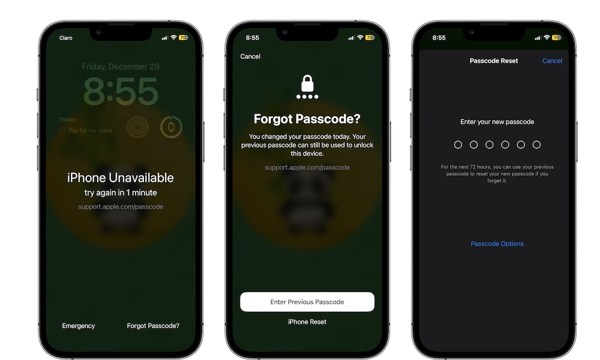
Toque em Esqueci a senha botão na parte inferior.
If you just changed your passcode within 72 hours, choose Enter Previous Passcode.
Unlock your iPhone with the old passcode and enter a new passcode.
If not, choose Redefinição do iPhone, enter your Apple ID password, and begin erasing your device.
On iOS 15.2 and above
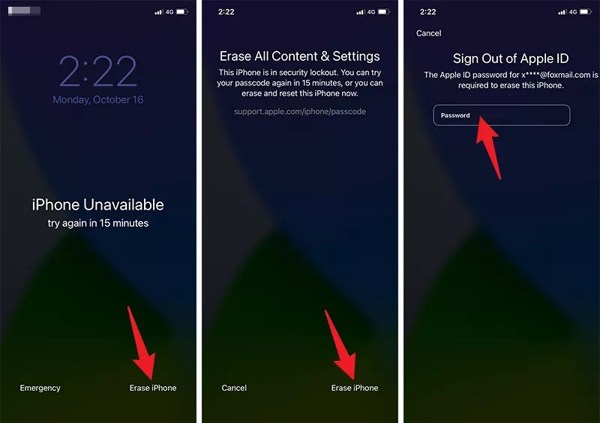
Toque em Apagar iPhone botão na parte inferior.
Read the warning and tap Apagar iPhone.
Next, input your Apple ID password to begin unlocking your iPhone without Apple.
Part 3. How to Unlock a Locked iPhone Without a Password
Your Apple ID password plays a key role in unlocking an iPhone without the Apple Store. In fact, Apple staff also need your password to unlock your device. However, imyPass iPassGo can unlock any iPhone without restrictions.

Mais de 4.000.000 de downloads
Unlock an iPhone without a password.
Remove digit passcodes, Face IDs, and Touch IDs.
Work for a locked or disabled iOS device.
Offer bonus features, like MDM bypassing.
Support a wide range of iPhones and iPads.
How to Unlock Your iPhone Without the Password
Conecte-se ao seu dispositivo
Download and install the iPhone unlocking software on your PC and Mac. Launch it and choose the Limpar senha mode to proceed. Plug your iPhone into your computer with a Lightning cable. If prompted, trust this computer.
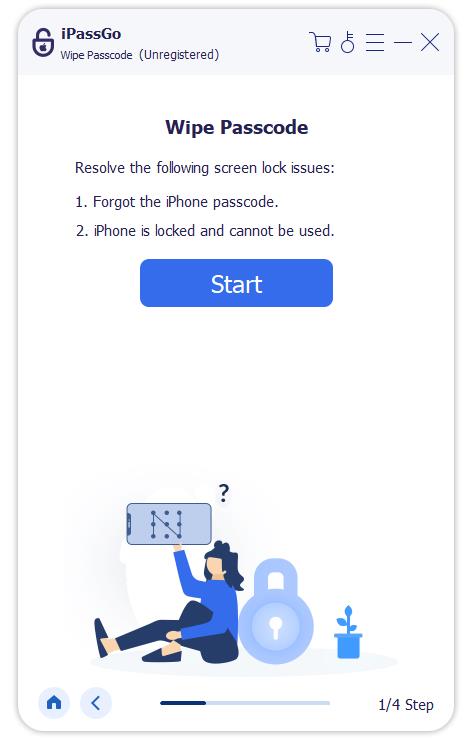
Baixe o firmware
Clique no Começar button after your iPhone is recognized. Once your device information is loaded, check it. Then, click the Download botão para iniciar o download do firmware.
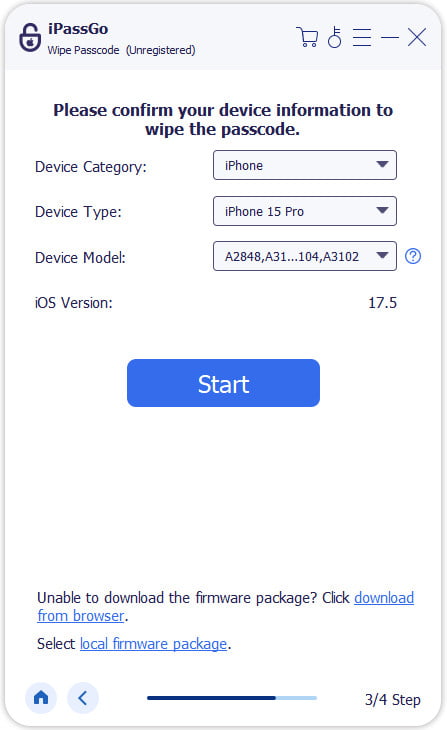
Unlock your iPhone without Apple
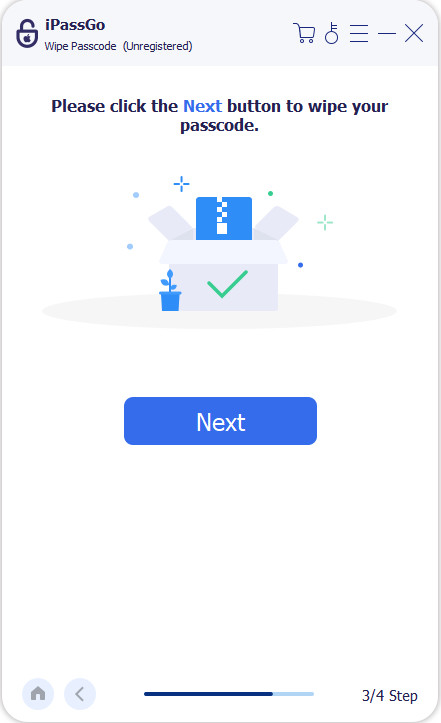
When the firmware downloading finishes, click the Desbloquear button to continue. Read the notification and confirm unlocking your iPhone without the Apple Store. Follow the prompts to complete the process. When it is done, your iPhone will restart. You can set it up as a new device.
Observação:
To avoid data loss, back up your iPhone before the process. Then, you can restore the backup when setup.
Conclusão
This article answered whether Apple can unlock your iPhone. More importantly, we shared multiple ways to unlock your iOS device on your own when you forgot your lock screen passcode. In other words, you can unlock a locked iPhone if you can meet the preconditions. imyPass iPassGo is the ultimate option to remove screen locks on your iPhone without any restrictions.
Samuel specializes in password security and digital privacy. He used to work as a cybersecurity consultant for small businesses to protect digital assets. With certifications in Cybersecurity and Ethical Hacking, he turns complex security topics into easy-to-follow advice. He also enjoys sharing password tips to help users protect their accounts more confidently.
Soluções quentes
-
Desbloquear iOS
-
Dicas para iOS
-
Desbloquear Android
-
dicas de senha


