



 Solução
 Centro de Apoio
 Sobre nós
 Contato
A Detailed Review on What You Should Know About IBM MDM
 Samuel Spenser publicado em agosto 27, 2026Desbloquear iOSLeitura de 3 minutos
Choosing the right MDM solution starts with understanding which IBM product you're actually evaluating. That's because IBM uses the term MDM for two different technologies. Master Data Management helps organizations create a single, trusted source of business data. On the other hand, Mobile Device Management enables IT teams to manage and secure smartphones, tablets, and computers.
Esse IBM MDM review covers both product lines to help you determine which one to use in your organization. We will explain the differences between IBM Master Data Management and Mobile Device Management. This includes their key features, summarized feedback, pros, and cons. We will also explore training, certification, and support resources. By the end of this post, you'll have a clear understanding of IBM's MDM offerings.

Neste artigo:
Part 1: What Is IBM MDM?
What is IBM MDM? In actuality, IBM's product portfolio is confusing because the acronym MDM refers to two different technologies. Before evaluating IBM's offerings, you need to know which product is under discussion. Though both share the same acronym, they function entirely differently. So, answering the question depends on whether you are referring to Master Data Management or Gerenciamento de dispositivos móveis.
Part 2: The Master Data Management (MDM) Product Line
What Is IBM Master Data Management?
The IBM Master Data Management unifies data, cleanses it for data quality, and implements data governance and stewardship. It eliminates information fragmentation within departments to establish a single source of truth. It can handle multiple entity types, including individuals, organizations, products, and physical locations.
Legacy Products: IBM Initiate MDM
IBM Initiate MDM links, matches, and cleans data to create a trusted 360 view of core entities. It uses smart algorithms to link related records even if they have incorrect spellings. It can also find and merge duplicate profiles in different company databases.
User Sentiment & Ratings
InfoSphere MDM has average approval and recommendation ratings of 83% to 95% from various trusted tech review sites. It is highly praised for cleaning, governing, and merging master data on diverse enterprise silos. It can strongly manage massive data volumes and link with internal corporate tech stacks.
Pros & Cons
Prós
- Accurately links and combines data with statistical rules.
- IBM InfoSphere MDM manages large volumes of enterprise data.
- Built-in tools manage data stewardship and regulatory compliance.
Contras
- Difficult to master for new developers and business users.
- Expensive licensing and setup costs suit large enterprises best.
Part 3: The Mobile Device Management (MDM) Product Line - MaaS360
What Is IBM MaaS360?
Mobile Device Management is delivered through MaaS360, a Unified Endpoint Management (UEM) platform. It focuses on tracking all company-owned and personal devices. It allows administrators to split business data from personal apps to maintain user privacy and corporate security. It can also factory reset an iPhone if it is locked out or unusable.
User Sentiment & Ratings
MaaS360, also known by many as IBM 360 MDM, scores a 64% to 94% positive sentiment rate. It is highly rated for its Secure Container environment that isolates company assets from personal user data on BYOD devices.
Pros & Cons
Prós
- Manage iOS, Android, and other devices from a single central console.
- Uses AI to flag risk behavior, malicious apps, and threats.
- Isolates company data from personal files on employee-owned devices.
Contras
- The administrative portal and configuration settings are confusing.
- Synchronization bugs and delays when pushing updates.
Part 4: Training, Certification & Knowledge Resources
IBM MDM Certification Pathways
For Master Data Management (InfoSphere)
This path is a good start for professionals who pursue IBM MDM certification. It instructs how to gather, organize, and cleanse important business data, including customer lists, product details, and accounts. After completing the training and passing the tests, you'll get a digital badge or certificate.
For Mobile Device Management
For IBM MaaS360, this path is for IT professionals who manage mobile device hardware. It teaches IT teams how to secure and manage endpoint devices using a cloud-based UEM platform. It also covers how to set up security rules, lock work apps, and protect company data on remote devices.
IBM MDM Knowledge Center & Documentation
IBM provides several official resources to help administrators, developers, and IT teams deploy, manage, and troubleshoot its MDM products.
IBM Documentation: The official documentation library contains product manuals, installation guides, configuration instructions, API references, troubleshooting articles, release notes, and security recommendations.
IBM Redbooks: IBM Redbooks are technical guides written by IBM experts and experienced practitioners. They provide best practices, deployment strategies, architecture recommendations, integration examples, and implementation instructions.
IBM TechXchange Community: IBM TechXchange is an online community. Developers, administrators, and IT professionals can ask technical questions, discuss product updates, share tips, and find solutions to IBM MDM services issues.
Consulting & Managed Services
Many organizations rely on professional services to speed up MDM implementation and reduce deployment risks. IBM and its partner network offer consulting and managed services that support businesses throughout the entire lifecycle.
IBM Consulting: IBM's consulting team works directly with organizations to plan, design, implement, and optimize MDM and MaaS360 deployments.
Global Systems Integrators (GSIs): IBM partners with global consulting firms to deliver large-scale MDM projects. These partners provide experienced consultants who help integrate IBM solutions.
Managed Services Providers (MSPs): Organizations that prefer to outsource day-to-day operations can work with MSPs to manage their IBM environments.
Part 5: Recommended Tool Integration - imyPass iPassGo
When you want to remove the IBM mobile MDM from your iOS, but no longer have the admin's credentials, you don't have to worry. imyPass iPassGo can help you bypass the Mobile Device Management profile from IBM. With it, you can remove MDM restrictions to free your phone and regain access to its features. Besides MDM removal, it can also unlock numeric passcodes, Apple ID, biometric authentications, Screen Time passcodes, iCloud activation lock, SIM card, and iTunes backup encryption settings.
Baixar e instalar imyPass iPassGo on your computer and launch it after setup.
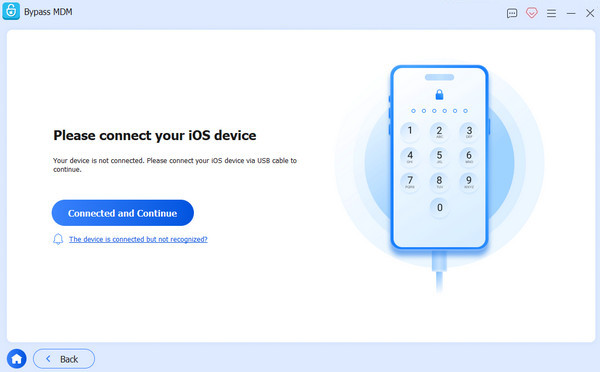
Selecione os Ignorar MDM mode, then use a USB cable to connect the iPhone to your computer.
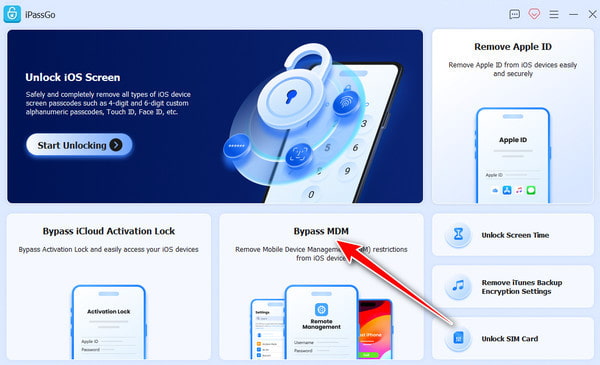
When the software recognizes the connected iPhone, click Começar to begin removing the MDM profile.
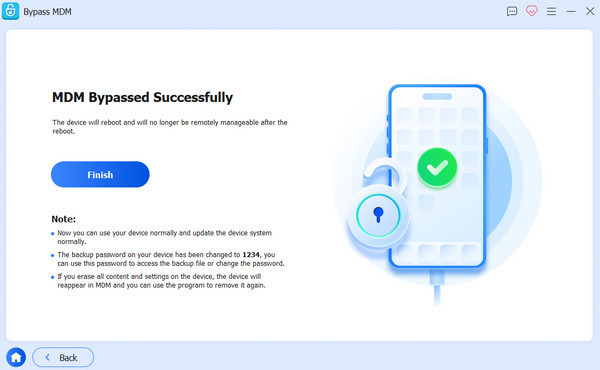
Once the MDM profile has been removed successfully, your device will restart automatically. When it powers back on, you can use it without MDM restrictions.
Conclusão
IBM MDM offers two distinct solutions that address different enterprise needs. IBM Master Data Management is built for organizations that need to unify, govern, and maintain accurate business data. Meanwhile, IBM Mobile Data Management focuses on securing and managing mobile devices and endpoints. Both provide powerful features, but they also require careful planning, training, and ongoing administration. If you need to remove an MDM profile from an iPhone that you own, imyPass iPassGo can be your companion. It can remove Mobile Data Management without requiring the administrator's credentials. It helps you regain access to your device quickly and efficiently.
Samuel specializes in password security and digital privacy. He used to work as a cybersecurity consultant for small businesses to protect digital assets. With certifications in Cybersecurity and Ethical Hacking, he turns complex security topics into easy-to-follow advice. He also enjoys sharing password tips to help users protect their accounts more confidently.
Soluções quentes
-
Desbloquear iOS
-
Dicas para iOS
-
Desbloquear Android
-
dicas de senha


