Solução
 Centro de Apoio
 Sobre nós
 Contato
Why Is My iPhone Locked to Owner? How to Fix It Quickly
 Samuel Spenser publicado em abril 03, 2026Desbloquear iOSLeitura de 3 minutos
iPhone bloqueado para o proprietário is an Activation Lock security feature designed by Apple to prevent anyone else from using your device if lost or stolen. When Activation Lock is enabled, this message may appear after a factory reset. But what if your iPhone shows this message even though you are the original owner? Don't worry. This article will answer all the queries about this topic and introduce effective ways to solve the problem.

Neste artigo:
- Parte 1: O que significa quando um iPhone informa que está bloqueado para o proprietário?
- Parte 2. Remover iPhone bloqueado para proprietário com senha ou ID Apple – 2 maneiras
- Part 3: How to Remove iPhone Locked to Owner Screen
- Parte 4: Perguntas frequentes sobre iPhone bloqueado para o proprietário
Parte 1: O que significa quando um iPhone informa que está bloqueado para o proprietário?
The iPhone Locked to the Owner screen appears after a restauração de fábrica se Encontre meu iphone is enabled. When this feature is turned on, Activation Lock automatically protects the device from being used without the original Apple ID and password. So, if your iPhone is lost or stolen, a thief can't use it or access your data.
However, this protection can become a problem if the device is reset without removing the Apple ID before being sold or transferred. If you bought a second iPhone with the iPhone Locked to the Owner screen, the problem will be tricky. This usually means the previous owner did not remove their Apple ID before restaurar as configurações de fábrica do iPhone. In this case, removing Activation Lock without the original credentials can be difficult, but this guide introduces possible solutions in Part 3.
Parte 2. Remover iPhone bloqueado para proprietário com senha ou ID Apple – 2 maneiras
1. Remover o iPhone bloqueado para o proprietário diretamente no iPhone
Se você souber a senha do ID Apple ou a senha de tela do iPhone, ou ainda conseguir entrar em contato com a pessoa que lhe vendeu o iPhone usado, remover a ativação do iCloud será fácil. Veja como remover o bloqueio do iCloud:
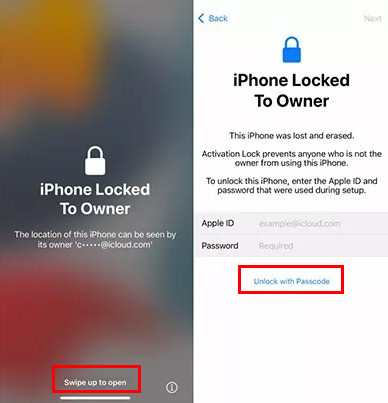
Remover iPhone bloqueado para proprietário usando o ID Apple
On the Locked to Owner screen, swipe up to unlock.
Digite o ID Apple e a senha que foram usados antes da redefinição de fábrica.
Então o iPhone será desbloqueado e você poderá acessá-lo.
Remover iPhone bloqueado para proprietário usando senha
Swipe up to open the device.
Toque em Desbloquear com senha botão.
Digite a senha anterior usada antes da redefinição de fábrica.
2. Remover o iPhone bloqueado para o proprietário no iCloud.com remotamente
A terceira maneira de remover o bloqueio do iCloud é acessar iCloud.com com o ID Apple e a senha anteriores. Dessa forma, você pode remover o iPhone bloqueado na tela do proprietário remotamente.
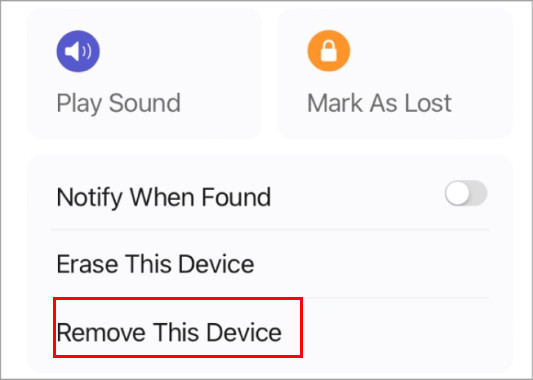
Open iCloud.com and log in with your Apple ID, then go to Encontre dispositivos.
Clique Todos os dispositivos and select the iPhone you want to remove.
Clique Remover este dispositivo, e a ativação do iCloud será removida remotamente.
Observação:
Erasing a device through iCloud will permanently delete all data stored on the iPhone. Make sure to back up important information in advance.
Part 3: How to Remove iPhone Locked to Owner Screen
Can you bypass iCloud Activation lock for free? It's important to understand that bypassing Activation Lock without the original Apple ID credentials is generally difficult. Most serviços gratuitos de bypass do iCloud are unreliable and may even steal your personal information.
If you cannot contact the previous owner or access the original Apple ID, a specialized tool like imyPass iPassBye can help bypass the iPhone Locked to Owner screen. Although the program is not free, it provides a trial version that allows you to test its functionality. It supports multiple iOS versions, including iOS 17.
Follow the steps below to use imyPass iPassBye:
Download imyPass iPassBye on your Windows PC or Mac. After installation, launch the program to begin.
Use a USB cable to connect your iPhone to the computer. When prompted on your device, tap Confie neste computador continuar.
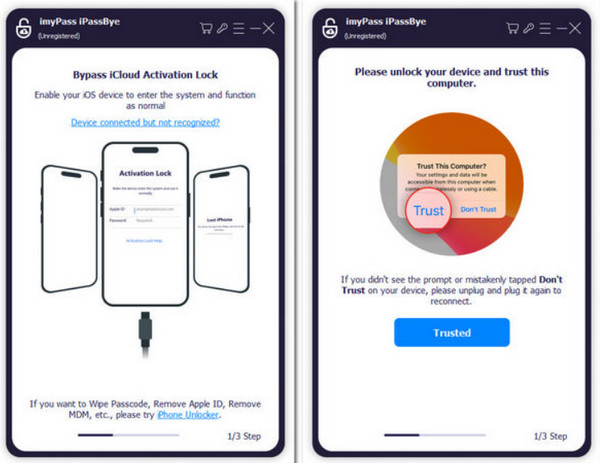
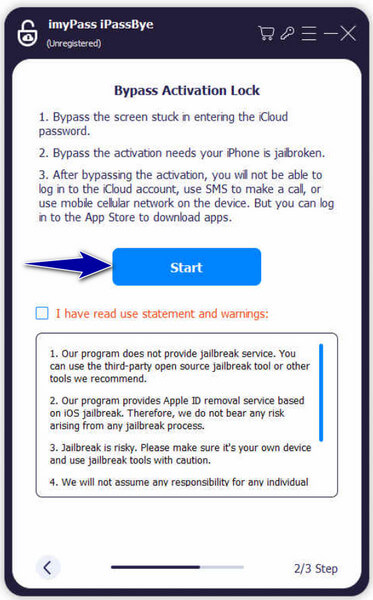
Follow the on-screen tutorial to put your iPhone into jailbreak mode. After completing this step, click Próximo para prosseguir.
Observação:
After bypassing Activation Lock, some features may remain unavailable, including cellular connectivity, Apple ID sign-in, and certain iCloud services.
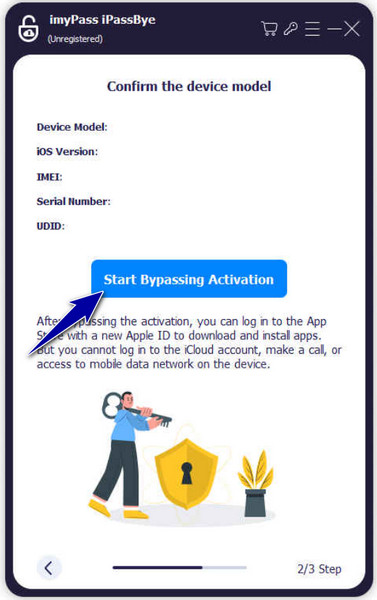
Check the device information shown on the screen and confirm it is correct. Then click Iniciar a ativação do bypass to begin the process. After the bypass is completed, you will receive a notification on your computer.
Observação:
Apple does not officially support bypassing Activation Lock without the original Apple ID credentials. If possible, the safest solution is to contact the previous owner and ask them to remove the device from their account remotely.
Perguntas frequentes.
-
O que acontece se eu encontrar um iPhone perdido bloqueado para o proprietário?
É melhor devolver o iPhone perdido ao seu legítimo proprietário. Você pode contatá-los usando as informações de contato de emergência exibidas na tela de bloqueio. Se isso falhar, entregá-lo às autoridades permite-lhes localizar o proprietário.
-
O que devo fazer ao comprar um iPhone bloqueado online?
Se você comprou um iPhone bloqueado e não foi informado de que a ativação estava bloqueada, entre em contato com o vendedor e solicite o reembolso. Se eles recusarem, você deve relatar o problema à plataforma que usou para comprá-lo.
-
A Apple desbloqueará meu iPhone se eu não tiver o recibo original?
In most cases, Apple will not remove Activation Lock without valid proof of purchase, such as the original receipt. If you don’t have it, Apple Support is unlikely to unlock the device.
Conclusão
Não hesite em fazer o iPhone bloqueado para ignorar o proprietário e acesse seu iPhone. Se você não sabe a senha ou o ID Apple, imyPass iPassBye é uma opção confiável. Para todos os leitores deste artigo, vocês podem baixar este programa gratuitamente.
Samuel specializes in password security and digital privacy. He used to work as a cybersecurity consultant for small businesses to protect digital assets. With certifications in Cybersecurity and Ethical Hacking, he turns complex security topics into easy-to-follow advice. He also enjoys sharing password tips to help users protect their accounts more confidently.
Soluções quentes
-
Desbloquear iOS
-
Dicas para iOS
-
Desbloquear Android
-
dicas de senha