



 Solução
 Centro de Apoio
 Sobre nós
 Contato
What Is MDMPatcher Universal and How to Use the Software
 Samuel Spenser publicado em agosto 13, 2026Desbloquear iOSLeitura de 3 minutos
To enhance IT security, more and more organizations have deployed Mobile Device Management solutions to manage, control, and monitor the mobile devices of colleagues. If your iPhone or iPad is enrolled in MDM, you will lose full control of your device. Without the admin password, you have to use a professional tool, such as MDMPatcher Universal, to get rid of MDM profiles. This article introduces and reviews the software.

Neste artigo:
Part 1: What Is MDMPatcher Universal
MDMPatcher Universal is a popular tool designed to bypass MDM solutions on iPhones and iPad devices. Since it is an open-source project, everyone can use the tool without paying a penny. Furthermore, it won't jailbreak your device during the process.
Key Features of MDMPatcher Universal
- 1.Remove MDM profiles in a few steps.
- 2.Regain full control over your iOS device.
- 3.Não é necessário fazer jailbreak.
- 4.Integrate an easy-to-use interface.
- 5.Bypass MDM with a Mac computer.
- 6.Support for a variety of MDM solutions.
Requirements of MDMPatcher Universal
- 1.It works for iPhone 13 and earlier.
- 2.Your iPhone must run iOS 15 and later.
- 3.It requires macOS 10.13 or higher, equipped with Intel or M1.
Benefits of MDMPatcher Universal
- 1.It won't ask you to desbloquear seu iPhone or iPad when removing MDM.
- 2.It can bypass MDM restrictions effectively.
- 3.The process is quick and fast.
- 4.It is open source and free to use.
Downsides of MDMPatcher Universal
- 1.It is only available on macOS computers.
- 2.After factory resetting, you need to repeat MDM bypassing.
- 3.It doesn't work for the latest models of iPhone.
Part 2: How to Use MDMPatcher Universal
Go to www.ipsw.me in your web browser.
Download the IPSW file according to your device model.
Connect your iPhone to the computer with a USB cable.
Coloque seu dispositivo no Modo de Recuperação:
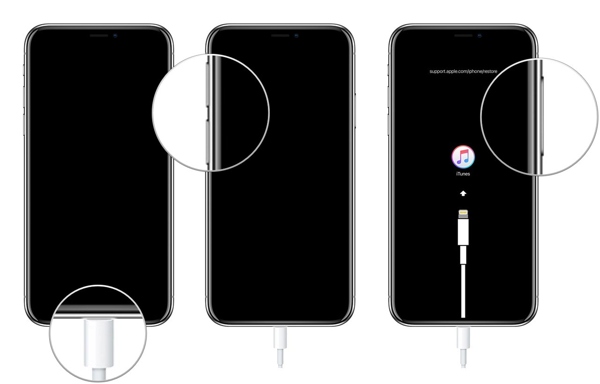
- Pressione e solte rapidamente o Aumentar o volume botão.
- Faça a mesma coisa com o Volume baixo botão.
- Pressione e segure o Lado button until it enters Recovery Mode.
Once your computer detects your device in Recovery Mode, hold the OPTION key on your keyboard, and click the Atualizar ou Restaurar botão.
Open the IPSW file you just downloaded and hit Abrir.
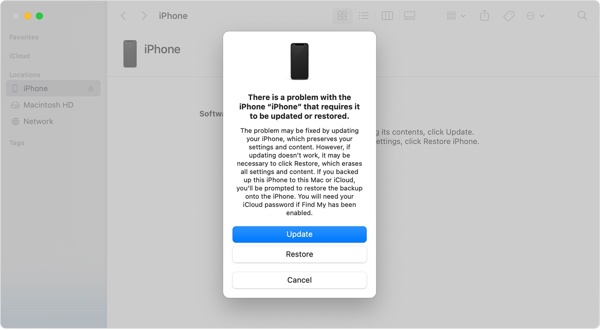
Clique Atualizar ou Restaurar.
If the IPSW file is successfully installed, your device should reboot.
Follow the instructions to set up your iPhone.
Certifique-se de conectar-se a uma rede Wi-Fi.
Download the MDMPatcher Universal dmg file from GitHub.
Next, open the application.
Run Finder, click your iPhone, and the screen should say Activating.
Once the screen says Iniciar, check your device information on the MDMPatcher Universal app.
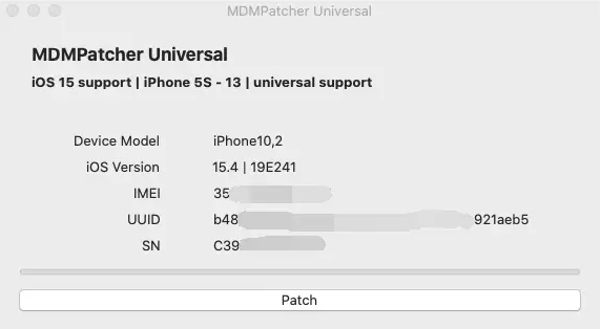
Clique no PATCH botão.
Wait for your iPhone to reboot, follow the setup instructions to complete the process.
Part 3: An Alternative to MDMPatcher Universal
Since MDMPatcher Universal is only available to specific iPhone models and iOS versions, you may need an alternative solution if it is unavailable for your device. imyPass iPassGo, for example, allows you to get rid of MDM profiles and get full control of your iOS device.

Mais de 4.000.000 de downloads
Remove MDM on your iPhone in 3 steps.
Don't require iPhone passcode or Apple ID password.
Proteja seus dados durante o processo.
Ofereça recursos de bônus, como remoção do ID Apple.
Compatível com uma ampla variedade de modelos de iPhone e iPad.
How to Bypass MDM from Your iPhone Without Data Loss
Install the MDM bypass tool
Download and install the MDMPatcher Universal alternative for Windows and Mac on your computer. Then, launch it from your desktop. Choose the Bypass MDM mode to proceed.
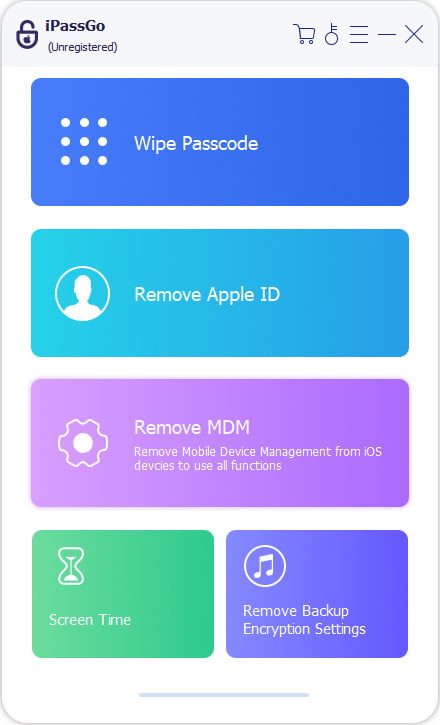
Conecte-se ao seu iPhone
Plug your iPhone into your computer with a Lightning cable. If prompted, tap Confiar on your screen to trust this computer. Then, the software will detect your device automatically. If your device isn't recognized, disconnect it and reconnect your iPhone.
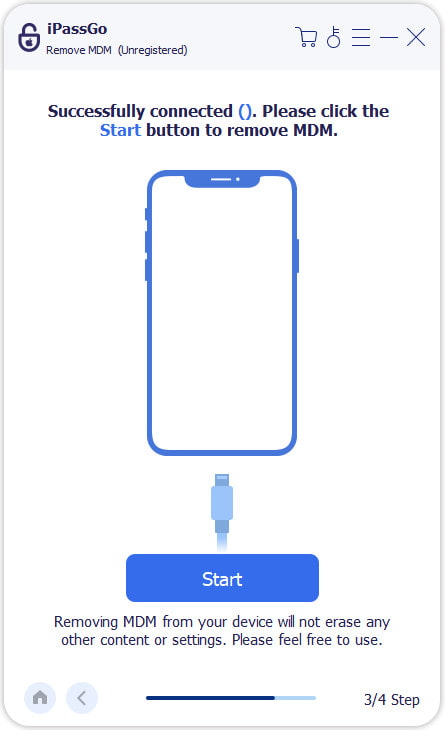
Ignorar MDM
Por fim, clique no botão Começar button to begin removing the MDM profile from your iPhone. When it is done, disconnect your iPhone and close the software. Then, restart your device and check if MDM is removed successfully in the Definições aplicativo.
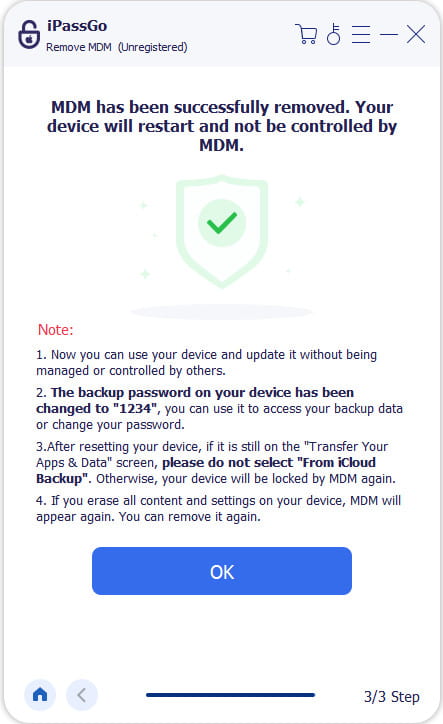
Conclusão
This article reviewed one of the professional MDM bypassing tools, MDMPatcher Universal. It can help you get rid of the MDM profile from your iPhone or iPad without the admin password or bypassing code. If your device is enrolled in an MDM solution, follow our steps to get full control again. If the tool is unavailable on your iPhone or iPad, try imyPass iPassGo as an alternative solution. It works on almost all iPhone and iPad models.
Samuel specializes in password security and digital privacy. He used to work as a cybersecurity consultant for small businesses to protect digital assets. With certifications in Cybersecurity and Ethical Hacking, he turns complex security topics into easy-to-follow advice. He also enjoys sharing password tips to help users protect their accounts more confidently.
Soluções quentes
-
Desbloquear iOS
-
Dicas para iOS
-
Desbloquear Android
-
dicas de senha


