Solução
 Centro de Apoio
 Sobre nós
 Contato
How to Factory Reset Your Windows 11/10/8/7/XP/Vista
 Penny Warren publicado em setembro 09, 2026Dicas do WindowsLeitura de 3 minutos
Factory resetting Windows 11/10 or earlier is a powerful functionality that enables you to restore your PC to its original state. It can be useful when you are experiencing performance issues, software glitches, preparing to sell your computer, or simply want a fresh start. This comprehensive guide will walk you through how to complete the process with the proven methods and detailed steps for every scenario.

Neste artigo:
Part 1: Before Factory Resetting Windows
Resetting a Windows computer will erase all data on your PC, including the software you installed. Plus, the process requires enough battery power. Before proceeding, complete these essential preparations.
- 1.Back up all important files to an external hard drive, like documents, photos, videos, bookmarks and logins, game saves, and more.
- 2.Save the applications installed on your PC and their settings, like your username and password.
- 3.Ensure sufficient battery life or connect to power.
- 4.Remove and disconnect all peripherals and accessories.
- 5.Free up storage space of at least 10GB.
- 6.Disable or uninstall third-party antivirus software.
Part 2: How to Factory Reset Windows 11/10 from Settings
You can reset the computer to factory settings on Windows 11/10 by going to Settings and opening the Recovery menu. The prerequisite is that your PC is still accessible and you remember your user password.
On Windows 10
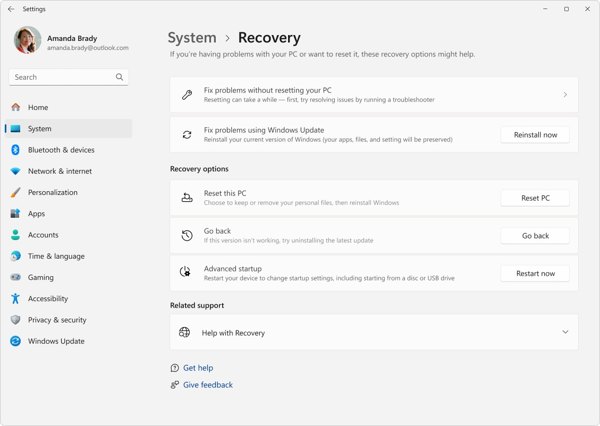
Clique com o botão direito do mouse no Começar menu at the bottom left corner and choose Definições.
Escolha o Atualização e segurança option from the menu.
Clique no Recuperação option on the left sidebar.
Clique no iniciar botão sob o Redefinir este computador seção.
Escolher Kee my files ou Remover tudo, depending on your situation. The former will remove all programs and restore settings to their default. The latter will erase everything on your PC.
On Windows 11
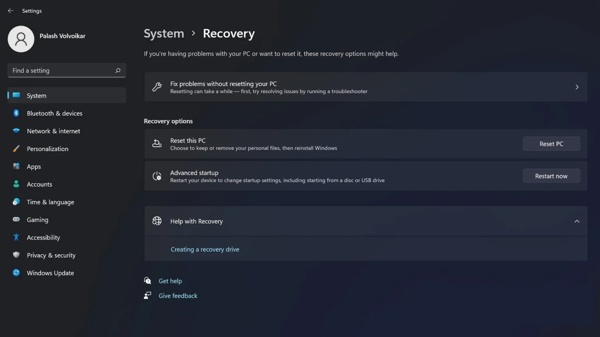
Abra o Definições aplicativo do Começar cardápio.
Vamos para Sistema e Recuperação.
Clique no Redefinir o PC botão no Redefinir este computador cabeçalho.
Escolher Mantenha meus arquivos ou Remover tudo.
Quando solicitado, escolha Download na nuvem ou Local reinstall to reinstall Windows.
Read the message and click Próximo.
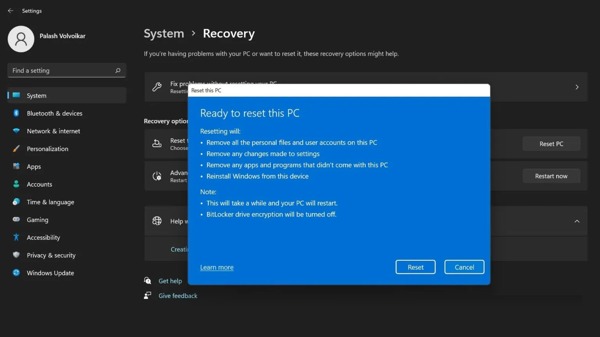
Por fim, clique no botão Redefinir botão para iniciar o processo.
Part 3: How to Master Reset PC from Windows RE
If your PC is inaccessible, you can factory reset Windows 11 without Settings. You need to boot your PC into Windows Recovery Environment without entering the standard operating system.
Power on your PC.
On the login screen, hold the Mudança tecla no seu teclado enquanto clica no Poder botão.
Escolher Reiniciar to boot in Windows Recovery Environment.
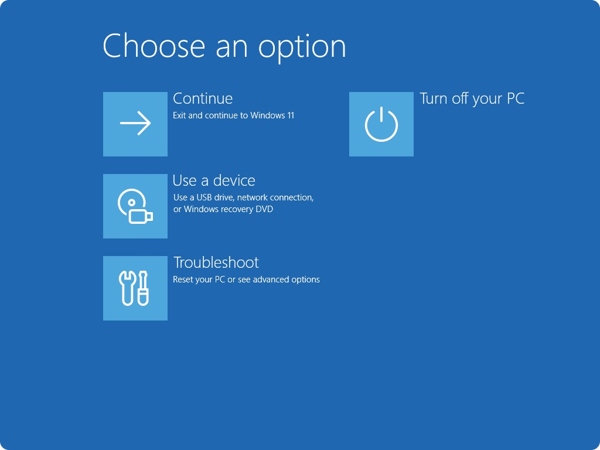
Navegar para Solucionar problemas e Redefinir este computador.
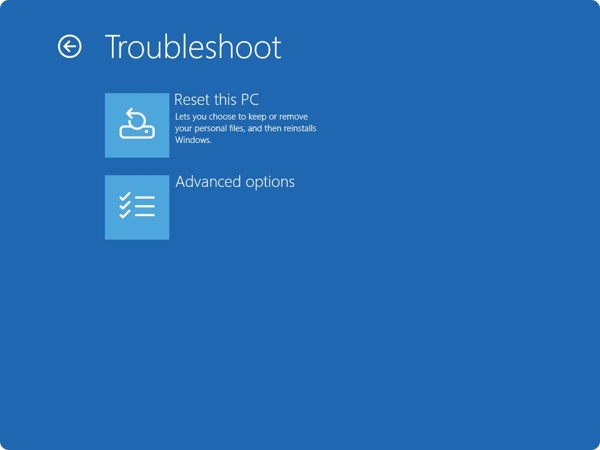
Escolher Mantenha meus arquivos ou Remover tudo.
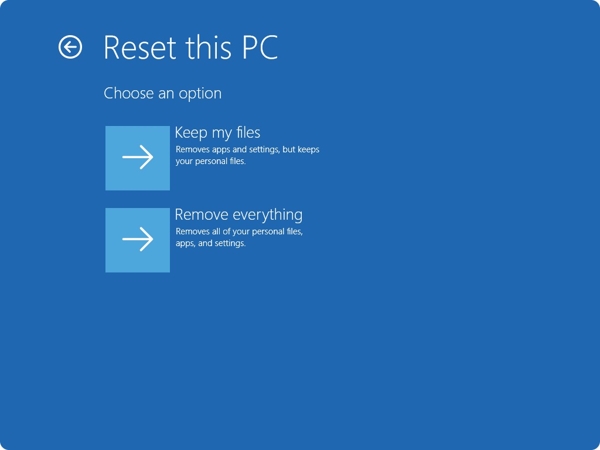
Follow the onscreen instructions to initiate the process.
When the process finishes, your PC will restart.
Part 4: How to Factory Reset Windows with Installation CD
If you forgot your login credentials, you have to factory reset Windows 11 without the password using the installation CD. First of all, you need to create an installation CD on an accessible PC. We share the steps below:
Create an installation disk or USB on an accessible PC.
Insert the disk into your computer.
Restart or power on your PC.
aperte o F11 ou F12 key on your keyboard during the boot-up process.
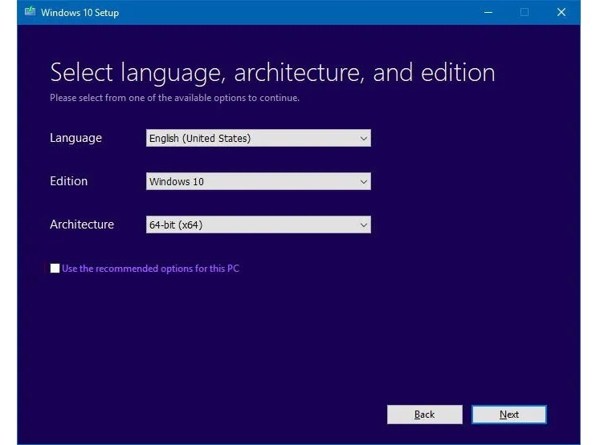
Fill out the form on the configuração do Windows janela e clique Próximo.
Clique no Instalar agora botão para seguir em frente.
Enter the product key or ignore it, and click Próximo.
Select the right edition of Windows, and click Próximo.
Marque a caixa ao lado I accept the license terms to agree and hit Próximo.
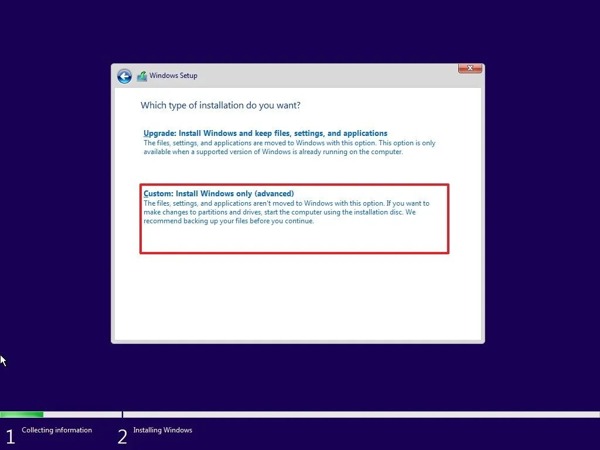
Escolha o Custom: Install Windows only(advanced) opção.
Select the partition you want to install Windows on and hit Próximo to begin factory resetting Windows 7 and later.
You May Also Like:
Part 5: Bonus Tip: How to Reset Windows Password
If you just forgot your login password, you don't need to factory reset Windows. Alternatively, Redefinição de senha do Windows imyPass allows you to reset your password without losing data. Moreover, the intuitive interface makes it easy to navigate.
Mais de 4.000.000 de downloads
Reset Windows login password quickly.
Create a password reset disk with one click.
Work for administrator and user accounts.
Proteja seus dados durante o processo.
How to Reset Windows Password Without Factory Resetting
Crie um meio de redefinição de senha
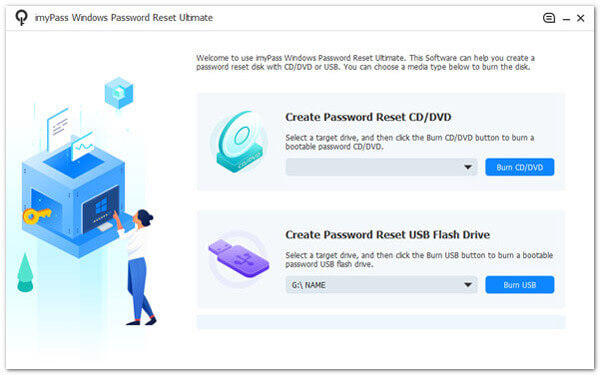
Install the Windows Password Reset software on an accessible PC and launch it. Insert a blank disk or flash drive into the PC. Choose the medium under Criar CD/DVD de redefinição de senha ou Criar unidade flash USB de redefinição de senha accordingly. Click the Gravar CD/DVD ou Gravar USB button to make a bootable medium.
Select your account
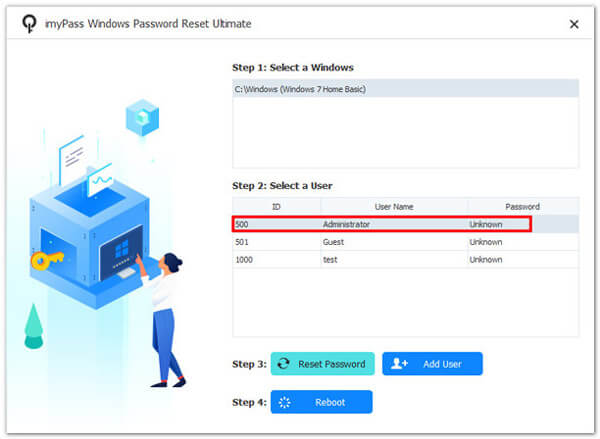
Insert the bootable disk or drive into your PC. Start your computer and boot into the password reset medium. Next, choose your Windows and select your account.
Redefinir sua senha
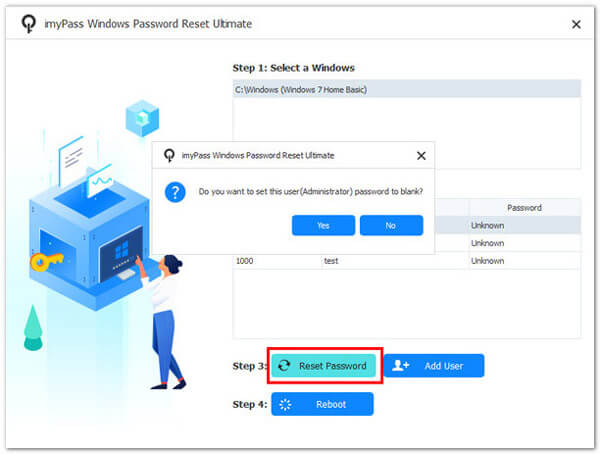
Clique no Redefinir senha button to continue. When you are asked whether you want to set the user password to blank, click Sim ou OK to confirm it. Or you can create a new account by hitting the Adicionar usuário button. Once you are done, click the Reinício button to restart your PC. Then, you can enter your machine directly.
Conclusão
Este guia compartilhou várias maneiras de factory reset Windows 11/10/8/7 and earlier. For Windows 11/10, the reset-PC option in the Settings app is available to bring your computer to the factory status. Windows RE is another way to reset your PC. The installation disk is available to reset almost all versions of Windows. Redefinição de senha do Windows imyPass is an easy way to regain access to your PC if you forgot your Windows password.
Penny focuses on GPS troubleshooting and Windows optimization. She formerly worked as a technical support engineer, helping clients solve location-based and system issues efficiently. Backed by IT support experience, she provides practical solutions that really work. In her free time, she likes hiking and geocaching, testing GPS tech in the real world.
Soluções quentes
-
Dicas do Windows
-
Senha do Windows
-
Corrigir janelas
-
dicas de senha

Redefinição de senha do Windows
Redefinir conta de administrador/usuário do Windows
Download grátis Download grátis