Soluţie
 Centru de asistență
 Despre noi
 a lua legatura
Cum să ocolești ușor modelul de deblocare pe telefonul sau tableta Android
 Gideon Byron publicat pe 19 august 2026Deblocați AndroidLectură de 3 minute
Ai uitat modelul de deblocare Android și nu îți mai poți folosi telefonul sau tableta? Există vreo modalitate de a debloca telefonul Android fără să pierzi datele? Ești în locul potrivit! Acest ghid acoperă 5 metode dovedite de a deblocați blocarea modelului de pe telefonul tău Android, inclusiv metode oficiale, servicii Google și software profesionist de deblocare.

În acest articol:
- Partea 1: Cea mai ușoară metodă de a debloca modelul fără parolă
- Partea 2: Cum să deblochezi modelul în modul Recovery
- Partea 3: Cum să deblochezi modelul cu contul Google
- Partea 4: Cum să deblochezi modelul cu Google Găsește-mi dispozitivul
- Partea 5: Cum să deblochezi modelul de ecran pe un telefon Samsung
Partea 1: Cea mai ușoară metodă de a debloca modelul fără parolă
Indiferent dacă ai uitat modelul de deblocare, ai primit un telefon la mâna a doua sau nu poți introduce codul din cauza unui ecran spart, iyPass AnyPassGo te poate ajuta să rezolvi toate aceste probleme! Poate elimina orice tip de blocare a ecranului de pe telefonul sau tableta ta Android, inclusiv model, cod de acces, amprentă, PIN sau recunoaștere facială. Acest instrument puternic este compatibil cu aproape toate mărcile și modelele importante care rulează Android 5-16. Îl poți folosi chiar și pentru a ocoli blocarea Google FRP fără parolă!
Peste 4.000.000 de descărcări
Elimină modelul de deblocare de pe telefonul tău în câteva minute.
Ocolește codul de acces al ecranului, PIN-ul, amprenta sau deblocarea cu fața.
Ocolește cu ușurință blocarea Google FRP fără parola contului.
Compatibil cu o gamă largă de mărci și versiuni de Android.
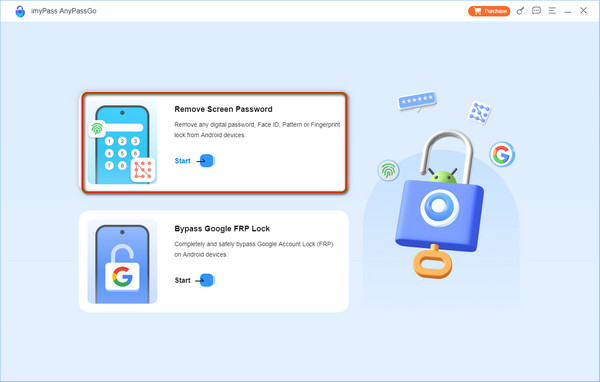
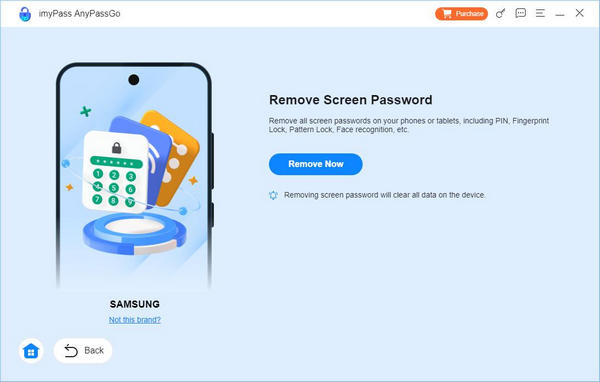
Lansați imyPass AnyPassGo pe computer și selectați Eliminați parola ecranului caracteristică.
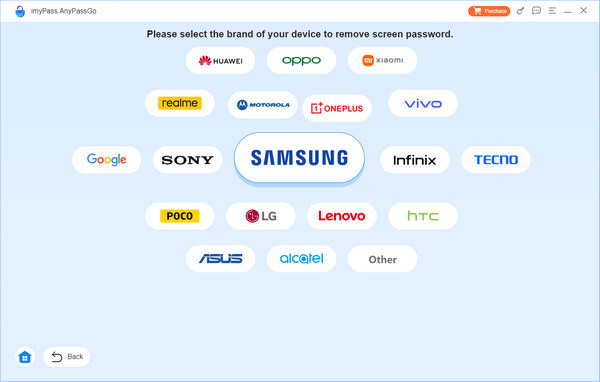
Selectează marca dispozitivului tău. Dacă nu o găsești, fă clic pe opțiunea Alte . Conectează telefonul Android la computer.
Once connected, click the Eliminați acum apă pe buton pentru a începe eliminarea modelului de deblocare de pe telefonul tău.
Notă:
Acest proces va șterge toate datele și setările de pe telefon, așa că asigură-te că ai la dispoziție un backup recent!
Partea 2: Cum să deblochezi modelul în modul Recovery
Dacă ai uitat modelul de deblocare Android, îl poți elimina efectuând o resetare la setările din fabrică în modul Recovery. Această metodă funcționează pe majoritatea telefoanelor și tabletelor Android, inclusiv pe dispozitive Samsung, Pixel și Motorola. Totuși, va șterge toate datele și setările de pe dispozitiv, așa că asigură-te că înțelegi consecințele înainte de a continua.
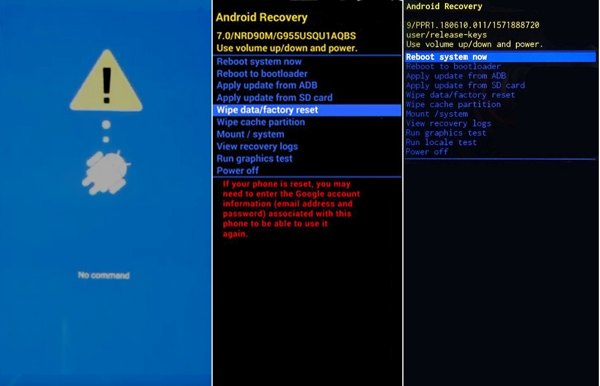
Țineți apăsat butonul Putere apă pe buton, apoi selectează opțiunea de a opri telefonul sau tableta.
Apasă și menține apăsată combinația corectă de butoane până când apare ecranul Recovery Mode sau bootloader.
- Pentru dispozitivele Samsung, menține apăsate butoanele Creșterea volumului + Putere până când apare sigla Samsung.
- For Pixel phones, hold the Volum scăzut + Putere buttons until you see the bootloader screen.
- For Motorola phones, hold the Volum scăzut + Putere până când apare ecranul bootloader.
Poți verifica pe site-ul oficial al producătorului dispozitivului pentru a găsi combinația corectă de butoane.
Folosește butoanele de Volum pentru a selecta Șterge datele / setările din fabrică, apoi apasă butonul Putere pentru a confirma. Selectează Yes pentru a începe eliminarea modelului uitat.
După ce resetarea este completă, selectează Restartati acum și apăsați tasta Putere butonul. După repornirea dispozitivului, configurează-l din nou și creează un nou model de blocare a ecranului.
Partea 3: Cum să deblochezi modelul cu contul Google
One easy way to unlock an Android phone's pattern lock without a factory reset is through the associated Google account. This way is only available on Android 4.4 and earlier. The benefit is that you won't lose your data.
Draw the wrong pattern repeatedly.
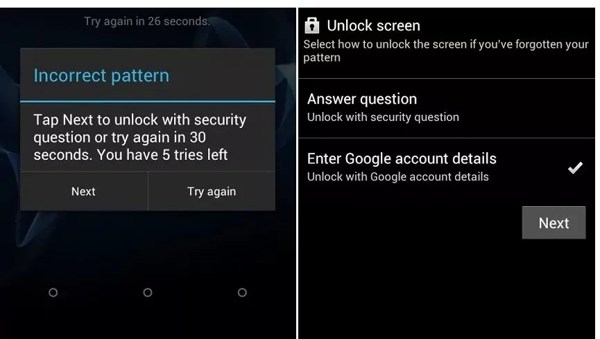
Când vezi Am uitat modelul option at the bottom, tap it.
Selectați Enter Google account details or a similar option and tap Următorul.
Enter your Google account and password.
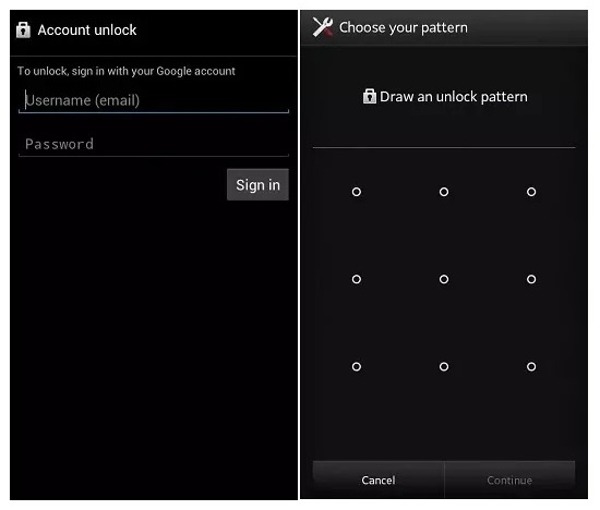
Apasă pe Loghează-te buton.
Next, draw a new unlock pattern.
Apasă pe Continua butonul pentru a confirma.
Now, unlock your device with the new pattern.
Partea 4: Cum să deblochezi modelul cu Google Găsește-mi dispozitivul
Google Găsește-mi dispozitivul, acum numit Google Find Hub, este un serviciu integrat de localizare a dispozitivelor pentru utilizatorii Android. Îți permite să deblochezi modelul de ecran Android cu un cont Google. Poți debloca telefonul sau tableta cu o parolă nouă. Condiția este să fi activat Find Hub pe telefon sau tabletă și dispozitivul să fie conectat la internet în mod stabil.
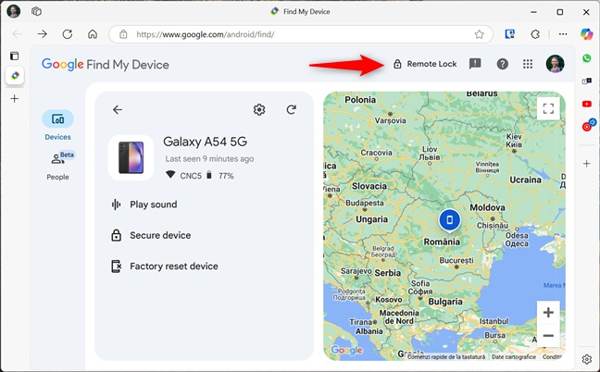
Accesează https://www.google.com/android/find/about într-un browser web și conectează-te cu contul Google asociat dispozitivului blocat.
Alege telefonul sau tableta din lista de dispozitive.
Apasă pe Remote Lock opțiunea și creează o nouă parolă pentru dispozitivul tău. Apoi pornește dispozitivul și deblochează-l cu noua parolă.
Partea 5: Cum să deblochezi modelul de ecran pe un telefon Samsung
Dacă vrei să deblochezi modelul de ecran al unui telefon Samsung fără resetare la setările din fabrică, încearcă serviciul Samsung Find My Mobile (acum integrat în SmartThings). Acesta le permite utilizatorilor să își gestioneze, localizeze și deblocheze dispozitivul de la distanță. Totuși, funcția de deblocare la distanță a fost anulată începând cu 2023, astfel că modelele mai noi nu pot folosi această metodă.
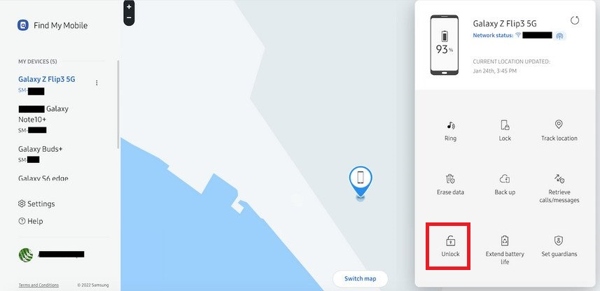
Accesează smartthingsfind.samsung.com într-un browser și autentifică-te cu contul Samsung.
Alege telefonul blocat din bara laterală.
Apasă pe Deblocați butonul din bara de instrumente.
Apoi, verifică din nou acreditările contului Samsung, iar telefonul tău Samsung ar trebui să fie deblocat de la distanță.
Concluzie
Acum ai aflat 5 moduri de a omite blocarea prin model pe telefonul Android atunci când îl uiți. Modul Recovery poate elimina modelul de ecran printr-o resetare la setările din fabrică, dar îți va șterge datele. Dacă folosești un dispozitiv Android mai vechi, încearcă opțiunea Forgot Pattern. Serviciile Google Găsește-mi dispozitivul și Samsung Find My Mobile îți pot debloca dispozitivul de la distanță. Dacă aceste metode nu reușesc, iyPass AnyPassGo este opțiunea finală pentru a elimina blocările de ecran Android fără parolă.
Gideon scrie despre deblocarea dispozitivelor iOS, Android și Windows. Anterior a lucrat ca specialist în dispozitive mobile într-un centru de reparații, ajutând clienții cu dispozitive blocate și recuperarea parolelor. În timpul liber, testează noi instrumente de deblocare, personalizează dispozitive inteligente și face ca procesele complexe de deblocare să fie simple și sigure.
Soluții fierbinți
-
Deblocați Android
- Recenzie pentru instrumentul AddROM de ocolire FRP
- Cum să ocolești FRP cu vnROM
- Cum să ocolești ușor FRP pe ZTE
- Recenzie detaliată a FRP Hijacker
- Cum să ocolești FRP pe Revvl 5G
- Cum să ocolești FRP pe Samsung fără PC
- Cum să ocolești FRP pe Galaxy A7 Lite fără PC
- Recenzie Easy Flashing FRP Bypass 8.0 APK
-
Deblocați iOS
-
Sfaturi privind parola
-
Sfaturi iOS