



 Çözüm
Çözüm Destek Merkezi
 Hakkımızda
 İletişim
What Location Expired Mean on iPhone and How to Fix It
 kuruş warren yayınlandı 23 Haziran 2026GPS Konumu4 dakikalık okuma
"When my friends and I are trying to share our location, my iPhone says Expired Location before the location can even load in. Why does it say Location Expired?" According to our research, this common error occurs when your iPhone cannot update or share its current location information. Some iPhone users face this frustrating issue. This article shares the effective solutions to fix this error without losing data.

Bu makalede:
Part 1. What Does Location Expired Mean and Why Does It Occur
What does Location Expired mean? The error message is alarming on iOS devices. It interrupts the ability to track or share your whereabouts. Typically, this error occurs when sharing location on the Messages or other apps. It means that the location information is no longer available or up-to-date. When the error appears, you cannot see the shared location or share your location on your iPhone.
Before walking through the solutions, let’s explore the underlying causes why it keeps saying Location Expired on your iPhone.
- 1.Location Services is disabled accidentally.
- 2.Find My is restricted or stuck.
- 3.There is a problem with your iPhone’s network connection.
- 4.The location was shared a long time ago and has naturally expired.
- 5.Outdated iOS.
- 6.Yazılım aksaklıkları.
Part 2. How to Fix Location Expired on iPhone
While seeing an iPhone error message saying Location Expired can be frustrating, you can try the solutions below one by one to fix this error on your iPhone. Then, you can share your location normally.
Solution 1: Double Check Location Services
Aç Ayarlar iPhone'unuzda.
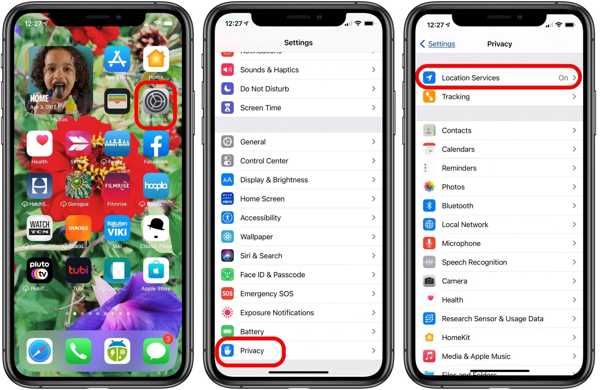
şuraya git Mahremiyet sekme.
Şuna dokunun: Konum Hizmetleri buton.
Şunu açın: Konum Hizmetleri seçenek.
Ardından, Konumumu Paylaş buton.
Şunu açın: Konumumu Paylaş seçenek.
Make sure to allow the desired contact to fix the Location Expired on iPhone.
Çözüm 2: iPhone'unuzu yeniden başlatın
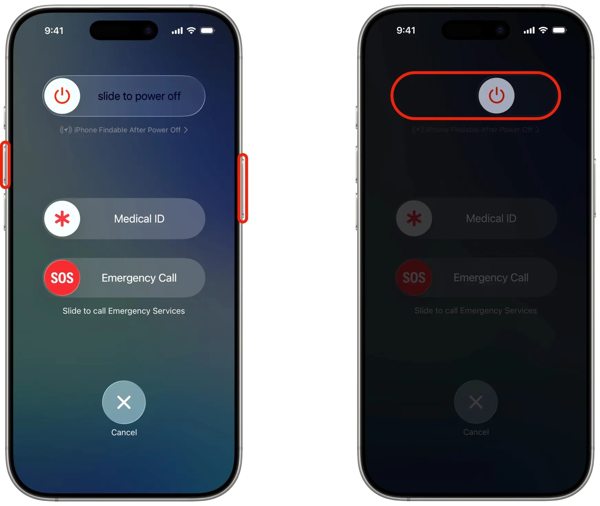
Face ID’li bir iPhone’da, herhangi bir Hacim düğme + Taraf button together. For an iPhone without Face ID, press and hold the Taraf veya Güç buton.
When the power-off screen pops up, release the buttons or button.
Cihazınızı kapatmak için kaydırıcıyı sağ tarafa doğru hareket ettirin.
After your touchscreen turns black, wait for a few minutes.
Then, hold down the Side veya Güç Apple logosunu görene kadar düğmesine basın.
Now, try to share your location again to check if Location Expired is fixed.
Çözüm 3: Tarih ve Saati Doğrulayın
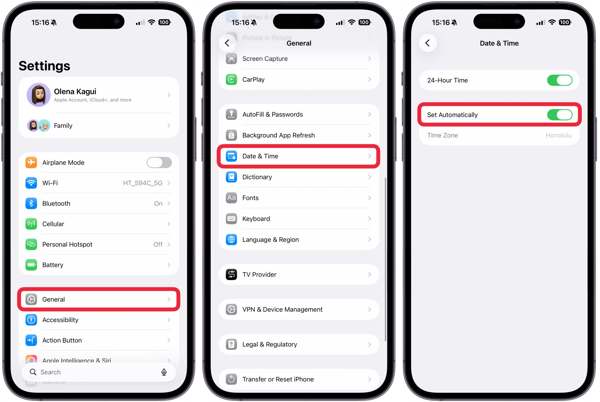
seninkine git Ayarlar uygulamasını ana ekranınızdan indirin.
Şu yöne rotayı ayarla Genel ve Tarih ve Saat.
Açık konuma getirin Otomatik olarak ayarla.
Connect to a stable network and fix Location Expired on iPhone.
Solution 4: Check Your Network
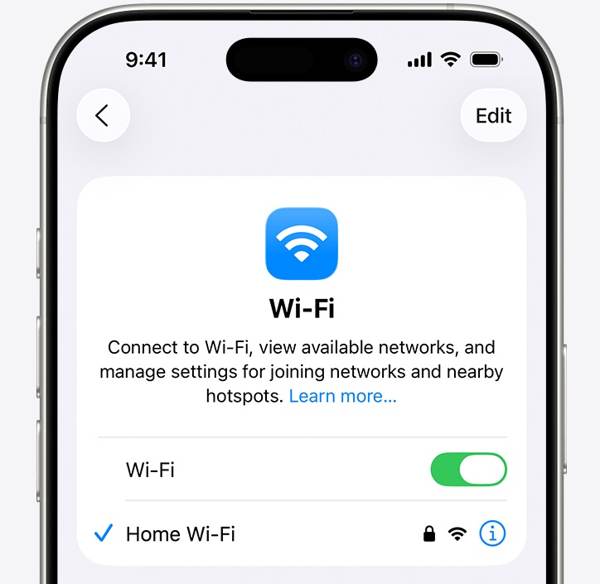
Sharing location on iPhone works through an internet connection. If you are using Wi-Fi and Location Expired occurs on your iPhone, connect to a cellular data network or vice versa. Then, share your location again.
Solution 5: Re-enable Find My
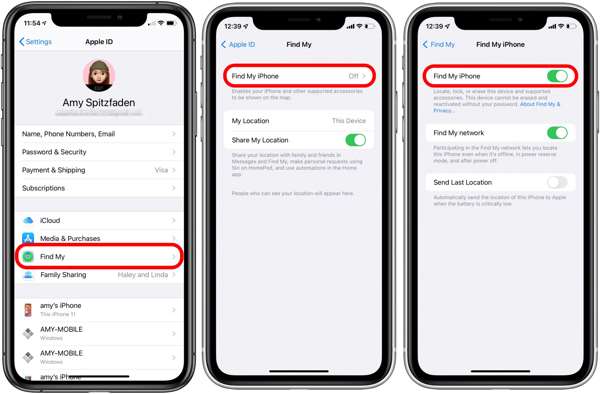
Başlat Ayarlar uygulamasını ana ekranınızdan indirin.
Profilinize dokunun.
Seç Bul seçenek ve dokunuş Telefonumu bul.
Açık konuma getirin Telefonumu bul ve Find My network to fix Location Expired on iPhone.
If Find My iPhone is enabled, toggle it off and turn it back on.
Çözüm 6: iOS'u güncelleyin
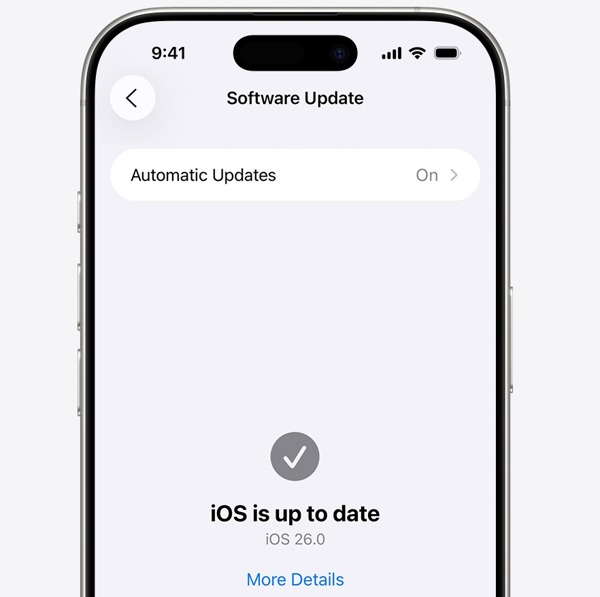
Çalıştırın Ayarlar uygulama.
Şu yöne rotayı ayarla Genel ve Yazılım güncellemesi.
Bir güncelleme mevcutsa, İndir ve Yükle buton.
Follow the onscreen instructions to update the iOS.
İşlem tamamlandığında iPhone'unuz yeniden başlatılacak.
Try to share your location to see if the Location Expired error disappears.
Çözüm 7: Konum ve Gizliliği Sıfırla
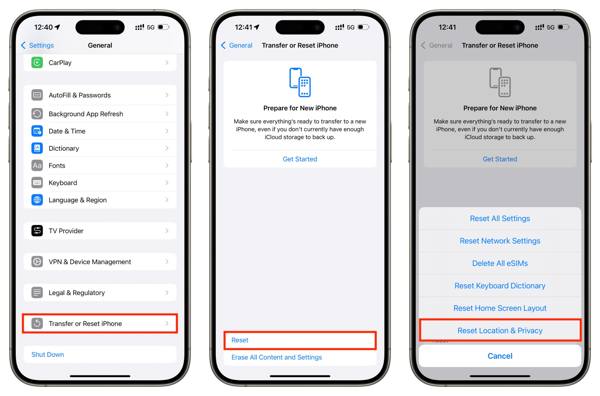
Aç Ayarlar cihazınızda uygulama.
git Genel ve iPhone'u Aktarın veya Sıfırlayın.
Şuna dokunun: Sıfırla buton.
Seç Konum ve Gizliliği Sıfırla seçenek.
Next, turn on Location Services and Find My iPhone to fix Konum Süresi Doldu.
İlgili Okumalar:
Part 3. One-stop Solution to Fix iPhone Location Expired
If you have performed the common solutions but the iPhone Location Expired error persists, you can try imyPass iLocaGo. It allows you to share any location without turning off Location Services on iOS devices. Plus, the user-friendly design makes it easy to use.

4.000.000+ İndirme
iPhone konumunu sahtele tek tıkla.
Birden fazla modla hareketleri simüle edin.
Work with accurate addresses and any locations.
Hız gibi özel seçenekler sunun.
Geniş bir iPhone ve Android cihaz yelpazesini destekler.
How to Fix Location Expired on Your iPhone
iPhone'unuzu tespit edin
Launch the iPhone location spoofing software once you install it on your PC. There is another version for Mac. Next, connect your iPhone to your PC with a Lightning cable. Then, the software will detect your device immediately.

Bir mod seçin
Seç Konumu Değiştir mode if you want to change the static location. The other three modes, Tek Durak Modu, Çoklu Durdurma Modu, ve Joystick Modu, sanal rotalar oluşturmak için kullanılır.

Konumunu sahtele
Next, type in an accurate address into the field. If you don’t have an address, click the right position on the interactive map. Finally, click on the Değiştir button to confirm it. Now, turn on your iPhone and check if the Location Expired error is resolved.y.

Çözüm
This article explained why it says Location Expired on your iPhone. More importantly, we shared the effective solutions to help you fix this error and enable you to share your location as usual. The good news is that software glitches or conflict settings cause this error. If the common solutions are unavailable, try imyPass iLocaGo. It allows you to share any address around the world on your iPhone without disabling Location Services.
Penny, GPS sorun giderme ve Windows optimizasyonuna odaklanır. Daha önce teknik destek mühendisi olarak çalışmış, müşterilerin konum tabanlı ve sistemle ilgili sorunlarını verimli bir şekilde çözmelerine yardımcı olmuştur. BT destek deneyimine dayanarak gerçekten işe yarayan pratik çözümler sunar. Boş zamanlarında yürüyüş yapmayı ve jeocaching ile uğraşmayı sever; böylece GPS teknolojisini gerçek dünyada test eder.
Sıcak Çözümler
-
GPS Konumu
-
iOS'un kilidini aç
-
iOS İpuçları
-
Android'in kilidini aç


