



 解决方案
解决方案 支持中心
支持中心 关于我们
关于我们 联系
联系iPhone 上 GPS 不工作——原因、解决方法与故障排查
 潘妮沃伦 发表于 2026 年 2 月 11 日GPS定位3 分钟阅读
一旦定位跟踪失效,就连最简单的导航也会变得不可靠。 iPhone GPS 不工作 通常问题更多源于软件设置、信号干扰或校准错误,而非硬件损坏。了解 iOS 处理位置信息的方式,有助于尽快排除故障。本指南按“容易修复”和“较难修复”两类来划分,从基础设置检查到深入系统诊断,帮助你毫无疑问地恢复精准定位。我们会先从快速修复方法开始,然后进入具体使用场景,最后再介绍高级故障排查方案。

第 1 部分:快速修复 iPhone GPS 不工作问题(先试这些)
方法 1:切换定位服务
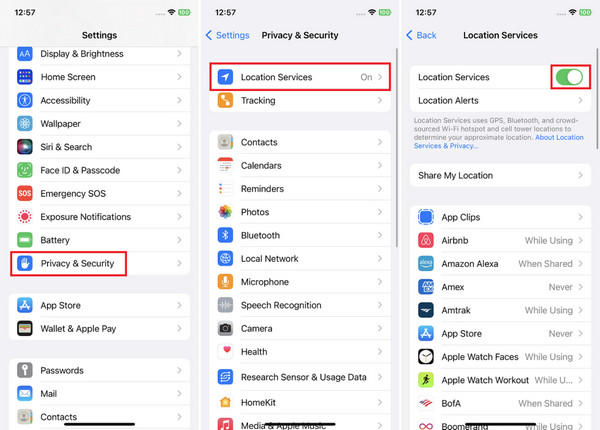
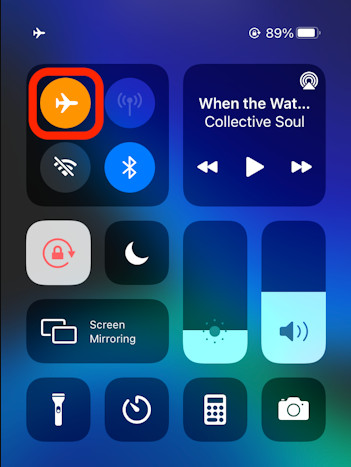
当 iPhone GPS 不工作时,首先要检查的是“定位服务”。此功能使 iOS 能够利用 GPS、Wi‑Fi 和蜂窝数据来确定位置。你只需前往“设置 > 隐私与安全性 > 定位服务”,并确保它是“开启”的。先关掉,等待大约 10 秒钟,再重新打开。这样可以重新激活系统的定位进程,通常能修复短期的跟踪问题。 设置 > 隐私和安全 > 位置服务 方法 2:飞行模式 上. 如果 iPhone 上 GPS 不工作,很可能是网络信号卡住或不稳定。飞行模式可以相当于重启所有无线连接。打开“控制中心”或“设置”,开启“飞行模式”,等待大约半分钟。然后再把飞行模式关闭,手机会重新连接蜂窝网络和 GPS 信号。这在旅行或网络环境变更之后尤其有效。
方法 3:强制关闭并重新打开地图类 App
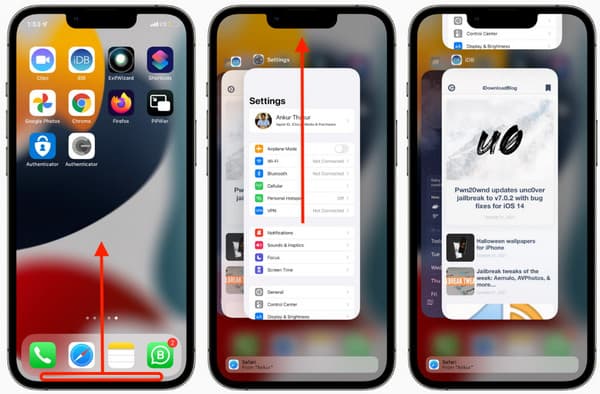
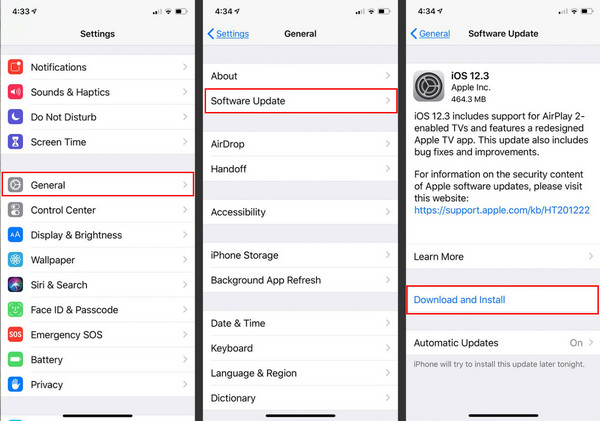
当 iPhone 的 GPS 只是在某个特定 App 里失效时,问题可能出在应用本身。你可以从屏幕底部上滑并停顿,完全划掉该地图类 App。然后重新打开,并在需要时允许其访问位置信息。这样可以清除可能干扰实时定位的临时应用数据。 控制中心, 方法 4:检查 iOS 系统更新 上 系统版本过旧可能会因未修复的软件漏洞导致 iPhone GPS 不准确。前往“设置 > 通用 > 软件更新”。安装所有可用更新。Apple 往往会在 iOS 更新中加入 GPS、连接性和传感器方面的改进,能直接提升定位质量与稳定性。 离开, 方法 5:核对 App 定位权限.
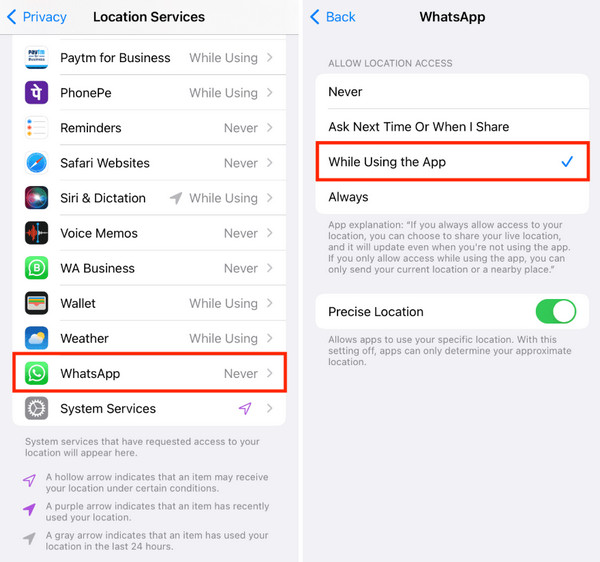
如果你在想“为什么我的 iPhone GPS 不工作”,应用的权限设置是非常常见的原因。打开“设置 > 隐私与安全性 > 定位服务”,向下滚动找到有问题的 App,点进去“定位”。将其设为“使用应用期间”或“始终”,具体取决于该 App 的功能需求。同时,如果有“精确位置”选项,请将其开启。
方法 6:重置定位与网络设置.
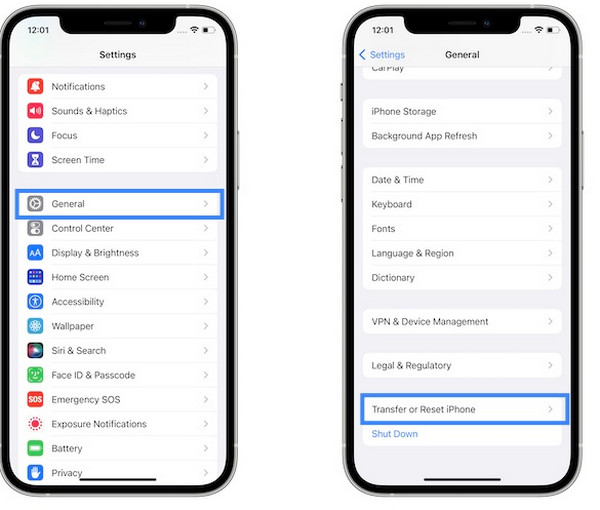
当 iPhone 在驾车时 GPS 不工作,损坏的网络或定位数据可能是罪魁祸首。前往“设置 > 通用 > 传输或还原 iPhone > 还原 > 还原位置与隐私”或“还原网络设置”。这不会删除任何个人数据,但会恢复默认的 GPS 与网络设置,通常能解决长期存在的导航问题。
1. 车内 GPS 不工作 设置, 打开 一般的, 然后 软件更新. 当 iPhone 在开车时 GPS 不工作,问题往往与信号遮挡或车载连接设置有关。汽车的金属车身、有色挡风玻璃或手机在中控台的位置,都可能干扰 GPS 信号。可以先把 iPhone 放在靠近挡风玻璃的地方,以获得更强的信号。
如果你使用了 CarPlay 或蓝牙,请先断开,确保只使用蜂窝数据来测试 GPS。另外,确认在导航类 App 中将“定位服务”设为“始终允许”,因为后台限制会在行驶过程中中断实时跟踪。
2. GPS 不准确或位置“乱跳” 设置, 当 iPhone GPS 不准确时,通常与校准或网络干扰有关,表现为定位点随机移动或更新缓慢。第一步可以先关闭 Wi‑Fi,仅在蜂窝网络下使用 GPS,因为微弱或不稳定的 Wi‑Fi 信号会导致定位偏差。确保在地图应用中打开“精确位置”。你还可以重启手机,并通过以“8”字形移动手机来重新校准指南针,以稳定定位,消除突然跳点现象。 地点. 1. 检查物理损坏 使用应用程序时 或者 总是, 如果在尝试完所有基础方法后 iPhone 的 GPS 依然不工作,就要认真考虑是否存在物理损坏。接收 GPS 信号的内部天线可能因跌落、挤压甚至进水而受损。检查设备是否有裂痕、凹陷或其他损伤,尤其是背板和 SIM 卡托附近——这些位置通常是天线部件所在区域。哪怕是轻微碰撞也可能削弱卫星信号接收。Apple 及运营商都确认,硬件损坏会影响包括 GPS 在内的无线性能。 精确定位 2. 使用基带/场测模式进行诊断.
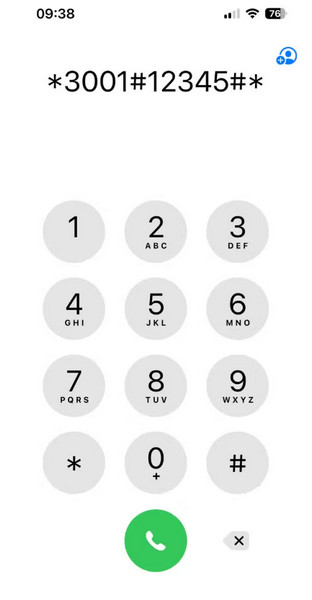
如果 iPhone 上的 GPS 在多个 App 中都持续失效,可以利用“场测模式(Field Test Mode)”来确认设备是否正常接收信号。这个隐藏的诊断工具会显示原始蜂窝和信号数据,有助于排除软件设置问题。打开“电话”App,输入特定指令(例如 *3001#12345#*,实际代码以 Apple 最新说明为准)并拨出,即可进入场测模式。然后查看信号指标、详细网络状态和连接情况。如果你持续看到信号值极低或几乎没有信号,那很可能是天线或接收模块故障,而不是应用软件的问题。
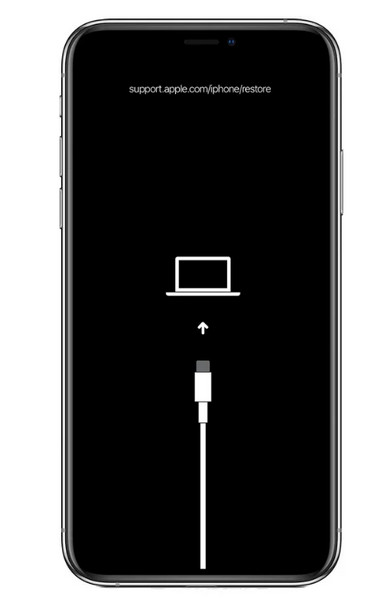
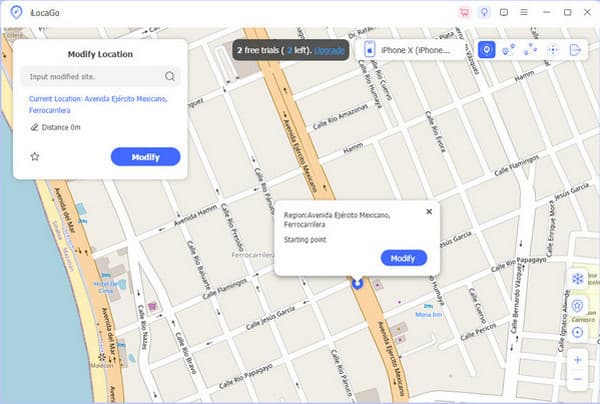
3. 通过电脑执行 DFU 刷机恢复 设置, 打开 一般的, 然后 转移或重置 iPhone, 轻敲 重置,并选择 如果在重置和更新之后 iPhone 的 GPS 仍然不工作,DFU(设备固件升级)模式刷机是最后一级的软件层面检查。DFU 模式会重写固件和 iOS 系统,清除常规恢复无法修复的深层系统损坏。用数据线将 iPhone 连接到电脑,通过正确的按键组合进入 DFU 模式,然后在 Finder 或 iTunes 中执行“恢复 iPhone”。此过程会抹掉设备中的所有数据,因此必须事先完整备份,或者使用专业工具先备份并在之后恢复数据。如果在 DFU 之后 GPS 依旧失效,几乎可以断定是硬件问题。 或者 重置网络设置. 如果你的 GPS 在某些 App 或测试中出现错误,或者 iPhone 定位不准确,手动更改手机位置在测试或开发场景中会很有帮助,例如检查 App 在不同地区的表现。一种可靠方案是使用 iLocaGo,这是一款桌面端的虚拟定位工具,能在无需越狱的情况下为 iPhone 设定虚拟 GPS 位置。
第 2 部分:针对特定场景的解决方法
使用 iLocaGo,你可以在地图上选择任意地点,同步到设备上作为当前位置,甚至还能设置多点路线并调整移动速度,以模拟不同地点间的移动,非常适合 App 测试,如在 Snapchat 上修改位置以及测试各种基于位置的功能表现。
iPhone 上的 GPS 不工作.
In case you have a car play or Bluetooth, unplug and make sure that you are only using the cellular data to test the GPS. Furthermore, verify that Location Services are turned on to always be on with navigation apps, as background limitations disrupt real-time tracking during movement.
2. GPS Inaccurate or "Jumping"
When the iPhone GPS is not accurate, issues are typically related to calibration or network interference, a location pin may be randomly moving, or it may be slow to update. The first steps include disabling Wi-Fi and using GPS only with cellular connectivity, as due to weak Wi-Fi signals, GPS positioning becomes inaccurate. Ensure that Precise Location is on in mapping applications. The re-reboot of the phone and recalibration of the compass can also be used by moving the phone in a figure of eight shape to stabilize the location tracking and eliminate the sudden jumps.
第 3 部分:高级硬件与软件检查
1. Check for Physical Damage
When the iPhone GPS is not working after all basic fixes, physical damage becomes a real possibility. Internal antennas that receive GPS signals can be affected by drops, pressure, or even water. Check for cracks, dents, or any damage on the device, especially around the back panel and SIM tray, where the antenna parts are situated. The pick up of satellite signals can be hampered even when it is affected by a slight impact. Apple and carriers validate that wireless performance, such as GPS, can be affected by hardware damage.
2. Use the Field Test Mode to Diagnose
If the GPS is not working on the iPhone, continues across multiple apps, Field Test Mode can help confirm whether the device is receiving signal correctly. This diagnostic tool is hidden and shows raw cellular and signal data, which can be used to rule out software settings as the cause. Open the 电话 应用程序,拨号 3001#12345#,然后点击 称呼. Signal metrics, exhaustive review, and connectivity. Constant low or absent signal information can be a sign of a broken or faulty antenna or reception issues, and not malfunctioning apps.
3. DFU Restore via Computer
When GPS does not work on an iPhone, even after resets and updates, a DFU restore is the final software level check. DFU mode remakes both the firmware and iOS, removing deep system corruption that normal restores are incapable of repairing. Connect the iPhone to a computer and get into DFU mode by pressing the right set of buttons, and then restore with the help of Finder or iTunes. This process will delete the device, and therefore, it will need a complete backup, or you can use tools to 从DFU模式恢复数据. The problem in case the GPS fails post-DFU is almost always a hardware problem.
额外内容:手动修改 iPhone 位置
If your GPS shows errors or the iPhone GPS is not accurate in certain apps or tests, manually changing the phone’s location can help for testing or development purposes, such as checking how an app behaves in different regions. One reliable solution is imyPass iLocaGo, a desktop-based location changer that lets you set a virtual GPS position without jailbreaking your iPhone.
With iLocaGo, you can select any point on a map, sync that position to your device, and even simulate movement between locations with adjustable routes and speeds, which makes it useful for app testing, like changing location on Snapchat, and location-based behavior checks.
结论
什么时候 GPS does not work on an iPhone, ,问题很少是随机出现的。在大多数情况下,可能是设置冲突、临时信号问题或软件过期所致,而这些通常都可以通过正确的步骤来修复。当所有方法都无效时,最后一步就是寻求专业帮助,以确保与硬件相关的故障得到纠正,并恢复定位性能。
Penny 是 imyPass 的资深编辑。她致力于探索适用于各种场景的完美 GPS 定位解决方案,并拥有丰富的电脑维修经验。
热门解决方案
-
GPS定位
-
解锁iOS
-
iOS 技巧
-
解锁 Android


