



 解决方案
解决方案 支持中心
支持中心 关于我们
关于我们 联系
联系How to Fix Your iPhone Location Sharing Not Working
 潘妮沃伦 发表于 2026 年 3 月 19 日GPS定位3 分钟阅读
“I can send my girlfriend my location indefinitely, and we always have shared it with each other, but now her phone won’t come through to me anymore. How to fix location sharing not working on my iPhone?” Location Sharing is an essential feature on iOS devices. It enables users to track friends and family’s location as well as share their own location. If this feature suddenly doesn’t work, you can fix it on your own by following our solutions.

在本文中:
Part 1: Why iPhone Location Sharing Is Not Working
在 iPhone 上,只要正确设置了“定位服务”,你就可以在“查找”应用、即时通讯应用或地图应用中共享你的位置信息。当你需要时,这个功能也非常有用, 追踪你的 iPhone 位置时保护隐私 可以帮助你找到你的设备或查看它当前所在的位置。在介绍具体解决方案之前,我们先来讨论一下导致问题的原因。了解原因并对照自己的情况,有助于你更快修复 iPhone 无法共享位置的问题。主要原因包括:
• Location Services are disabled.
• Connectivity issues or unstable internet connection.
• Low battery.
• Software glitches.
• Privacy restrictions.
Part 2: How to Fix Location Sharing Not Working on iPhone
Excluding hardware malfunction, you can fix the share my location issue on iPhone on your own. You can perform the solutions below one by one to make location sharing normal. Let’s start the journey.
解决方案 1:启用位置服务
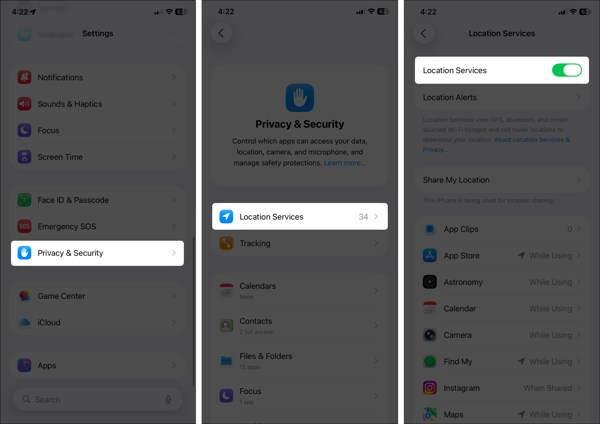
打开 设置 iPhone 上的应用程序。
前往 隐私与安全 选项卡,然后选择 位置服务.
Make sure to toggle on Location Services.
If Location Services is enabled, turn it off and toggle it back on.
轻敲 查找我的 on the list, and choose 总是 或者 使用时.
Solution 2: Configure Find My
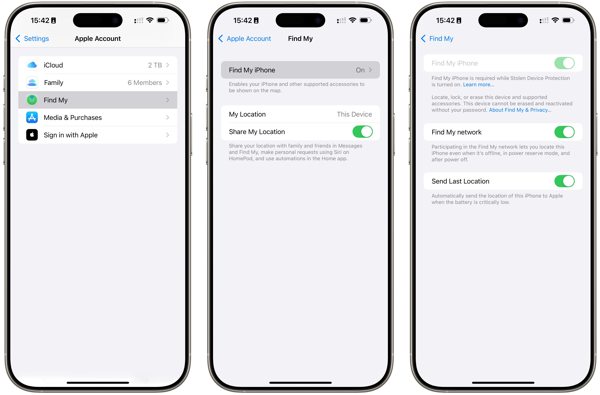
前往您的 设置 应用程序。
点击您的个人资料并选择 查找我的.
轻敲 查找我的iPhone 并开启 查找我的iPhone.
Back to the Find My screen and toggle on 分享我的位置.
如果出现提示,点击 允许 to confirm turning on GPS tracking.
Next, check if the iPhone location sharing not updating issue disappeared.
Solution 3: Check Your Connection
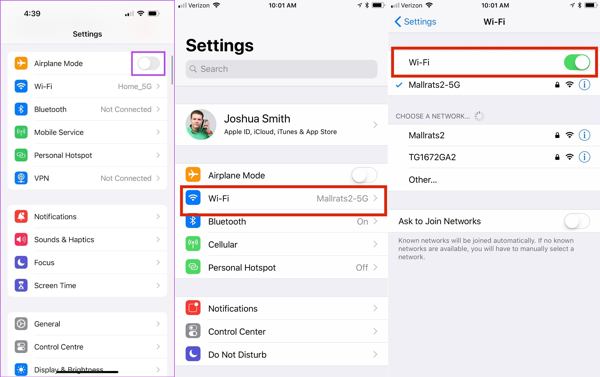
跑过 设置 iPhone 上的应用程序。
切换至 飞行模式.
然后,关掉 飞行模式.
If you still find iPhone not sharing location, check your internet signal.
轻敲 无线上网 在 设置 and switch to a stable network.
笔记:
If you don’t have a Wi-Fi network, connect to a cellular data network instead.
Solution 4: Disable Location Restrictions
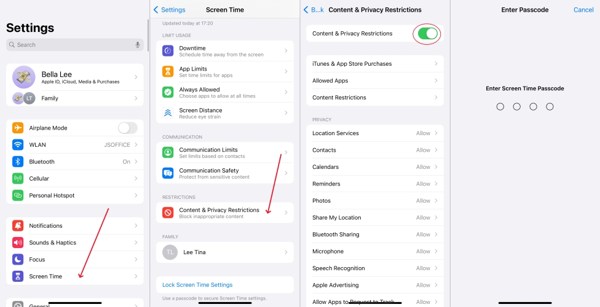
When iPhone location sharing is not updating due to restrictions, go to 检测时间 在你的 设置 应用程序。
如果出现提示,请输入您的屏幕使用时间密码。
选择 内容和隐私限制.
关闭 内容和隐私限制 to completely disable restrictions.
笔记:
If you want to keep restrictions, turn on 内容和隐私限制, 挑选 分享我的位置 在下面 隐私,并选择 允许.
解决方案 5:更新软件
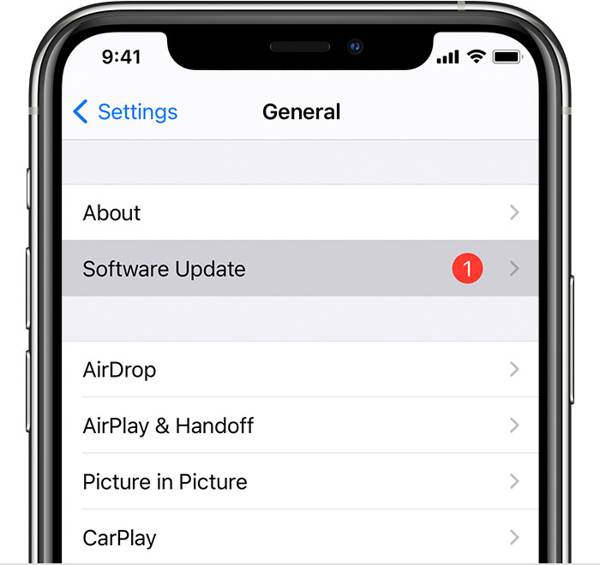
If you are still running an old version of iOS and no location is found when your iPhone shares location, go to the 设置 应用程序。
去 一般的 并选择 软件更新 搜索更新。
如果有可用更新,请点击 下载并安装 按钮。
Follow the onscreen instructions to install the update.
笔记:
You’d better not install a beta version of iOS. If iPhone location stops sharing after you update to a beta, go back to a standard version of iOS.
Solution 6: Reset Location & Privacy
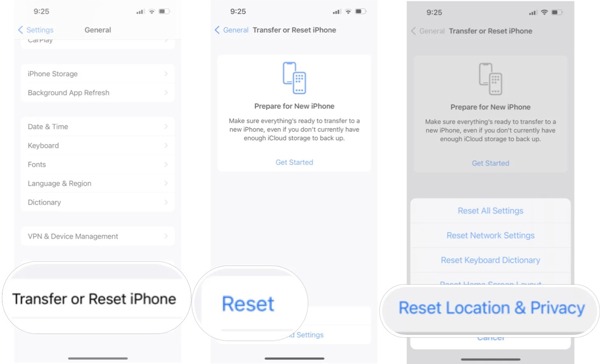
前往 一般的 tab in your Settings app when your iPhone is not sharing location.
向下滚动并点击 转移或重置 iPhone.
轻敲 重置 and pick Reset Location & Privacy.
如果系统提示,请输入您的 iPhone 密码或 Apple ID 密码。
When your iPhone restarts, set up Find My and share your location.
Part 3: Bonus Tip: How to Fake iPhone Location
Location Sharing on iPhone is a useful feature, but it is not perfect. It may expose your geolocation and privacy to someone else. Moreover, many apps capture your location information for marketing and advertising. If you turn on Location Services, these services will get your last location available. Can you stop sharing your location without others knowing? 艾卡戈 can help you resolve this problem.

4,000,000+ 次下载
How to Fake iPhone Location Without Notifying Others
步骤1 连接到您的设备
Run the iPhone location spoofing software once you install it on your PC. There is another version for Mac. Plug your iPhone into your PC with a Lightning cable. Then, the software will detect your device automatically.

第2步 选择一种模式
On the mode window, you will see four options. If you just need to change your iPhone location, choose 修改位置其他三种模式, 单站模式、多站模式, 和 操纵杆模式, are used to make virtual locations.

第 3 步 更改 iPhone 位置
在 修改位置 dialog. If you don’t have an address, click a proper position on the map, and you will see the address. Finally, click on the 调整 button to confirm changing your location. Now, turn to your iPhone and share your location.

结论
现在,你应该已经了解在 iPhone 上无法共享位置时可以怎么做了 在 iPhone 上位置共享不可用. 。首先,你可以了解这一问题产生的原因。更重要的是,你可以按照文中提供的有效解决方案,快速摆脱这一问题。如果你希望保护自己的位置信息和隐私,我们建议你使用 艾卡戈. 。它可以让你在不移动一步的情况下更改 iPhone 的定位。直观的界面设计让操作非常简单,尤其适合新手和普通用户。
Penny 专注于 GPS 故障排除和 Windows 优化。她曾担任技术支持工程师,高效地帮助客户解决定位相关和系统方面的问题。凭借丰富的 IT 支持经验,她能够提供真正行之有效的实用解决方案。闲暇时,她喜欢徒步和地理寻宝,在真实环境中测试 GPS 技术。
热门解决方案
-
GPS定位
-
解锁iOS
-
iOS 技巧
-
解锁 Android


