



 解决方案
解决方案 支持中心
支持中心 关于我们
关于我们 联系
联系What Location Expired Mean on iPhone and How to Fix It
 潘妮沃伦 发表于 2026 年 6 月 23 日GPS定位4 分钟阅读
"When my friends and I are trying to share our location, my iPhone says Expired Location before the location can even load in. Why does it say Location Expired?" According to our research, this common error occurs when your iPhone cannot update or share its current location information. Some iPhone users face this frustrating issue. This article shares the effective solutions to fix this error without losing data.

在本文中:
Part 1. What Does Location Expired Mean and Why Does It Occur
What does Location Expired mean? The error message is alarming on iOS devices. It interrupts the ability to track or share your whereabouts. Typically, this error occurs when sharing location on the Messages or other apps. It means that the location information is no longer available or up-to-date. When the error appears, you cannot see the shared location or share your location on your iPhone.
Before walking through the solutions, let’s explore the underlying causes why it keeps saying Location Expired on your iPhone.
- 1.Location Services is disabled accidentally.
- 2.Find My is restricted or stuck.
- 3.There is a problem with your iPhone’s network connection.
- 4.The location was shared a long time ago and has naturally expired.
- 5.Outdated iOS.
- 6.软件故障。
Part 2. How to Fix Location Expired on iPhone
While seeing an iPhone error message saying Location Expired can be frustrating, you can try the solutions below one by one to fix this error on your iPhone. Then, you can share your location normally.
Solution 1: Double Check Location Services
打开 设置 在你的 iPhone 上。
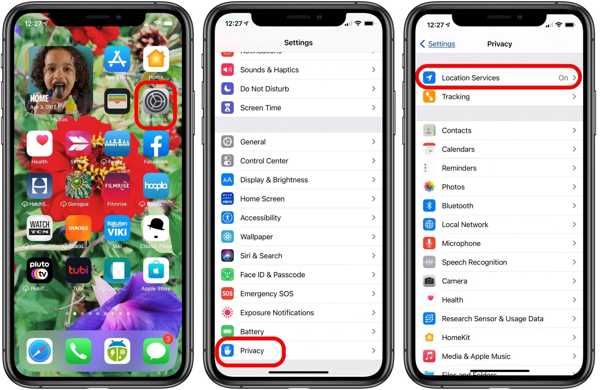
前往 隐私 标签。
点击 位置服务 按钮。
切换到 位置服务 选项。
然后,点击 分享我的位置 按钮。
切换到 分享我的位置 选项。
Make sure to allow the desired contact to fix the Location Expired on iPhone.
解决方案2:重新启动iPhone
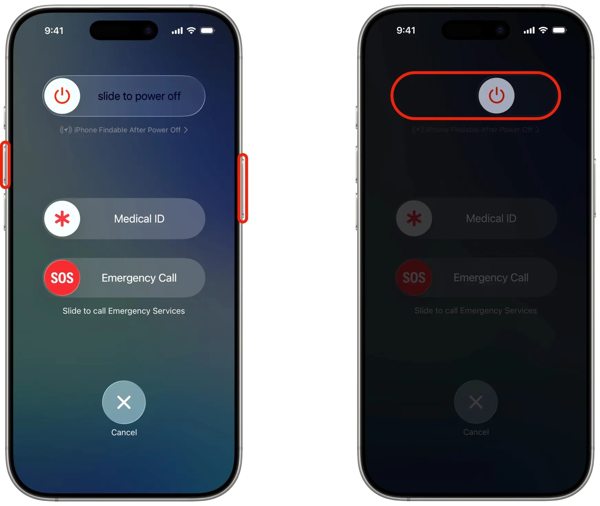
对于带有 Face ID 的 iPhone,按住任一 体积 按钮 + 边 button together. For an iPhone without Face ID, press and hold the 边 或者 力量 按钮。
When the power-off screen pops up, release the buttons or button.
将滑块向右滑动即可关闭设备。
After your touchscreen turns black, wait for a few minutes.
Then, hold down the Side 或者 力量 按钮,直到看到 Apple 徽标。
Now, try to share your location again to check if Location Expired is fixed.
解决方案3:更正日期和时间
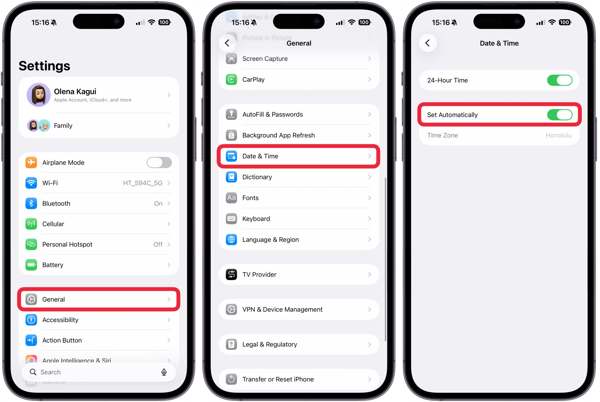
前往您的 设置 应用程序从主屏幕。
导航 一般的 和 约会时间.
切换至 自动设置.
Connect to a stable network and fix Location Expired on iPhone.
Solution 4: Check Your Network
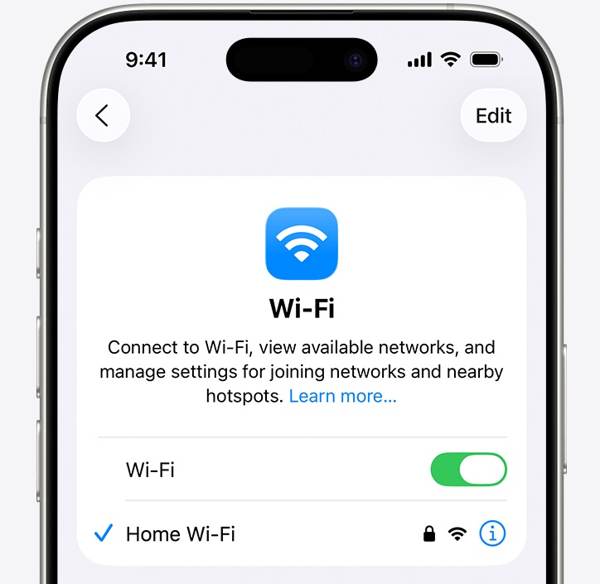
Sharing location on iPhone works through an internet connection. If you are using Wi-Fi and Location Expired occurs on your iPhone, connect to a cellular data network or vice versa. Then, share your location again.
Solution 5: Re-enable Find My
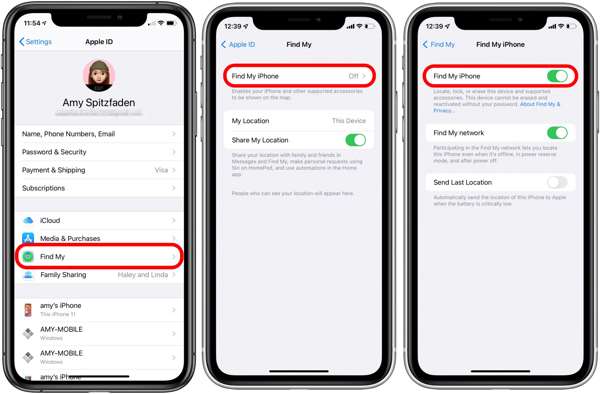
开始 设置 应用程序从主屏幕。
点击您的个人资料。
选择 查找我的 选项并点击 查找我的iPhone.
切换至 查找我的iPhone 和 Find My network to fix Location Expired on iPhone.
If Find My iPhone is enabled, toggle it off and turn it back on.
解决方案6:更新iOS
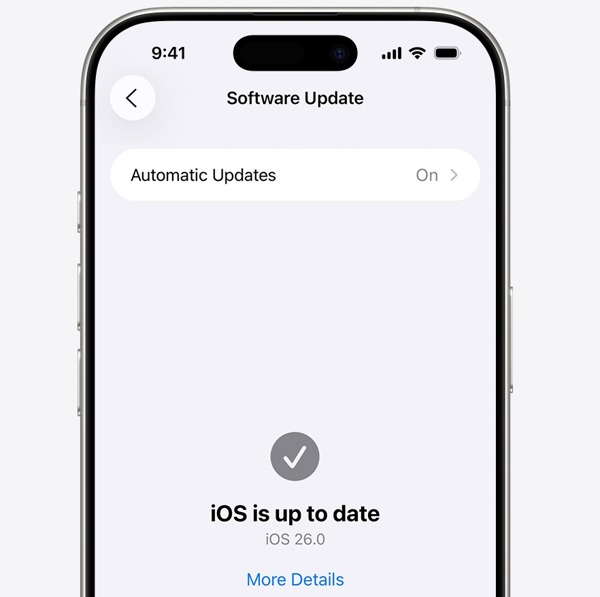
运行你的 设置 应用程序。
导航 一般的 和 软件更新.
如果有可用更新,请点击 下载并安装 按钮。
Follow the onscreen instructions to update the iOS.
完成后,您的 iPhone 将重新启动。
Try to share your location to see if the Location Expired error disappears.
解决方案7:重置位置和隐私
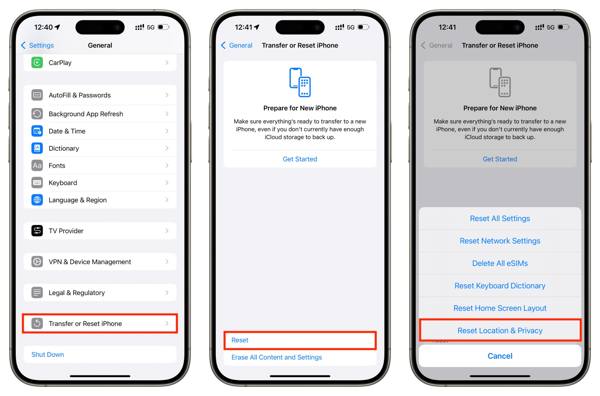
打开 设置 应用程序。
去 一般的 和 转移或重置 iPhone.
点击 重置 按钮。
选择 重置位置和隐私 选项。
Next, turn on Location Services and Find My iPhone to fix 位置已过期.
Part 3. One-stop Solution to Fix iPhone Location Expired
If you have performed the common solutions but the iPhone Location Expired error persists, you can try imyPass iLocaGo. It allows you to share any location without turning off Location Services on iOS devices. Plus, the user-friendly design makes it easy to use.

4,000,000+ 次下载
伪装 iPhone 位置 只需单击一下。
以多种模式模拟移动轨迹。
Work with accurate addresses and any locations.
提供自定义选项,例如速度。
安装 Life360 位置伪装工具.
How to Fix Location Expired on Your iPhone
检测您的 iPhone
Launch the iPhone location spoofing software once you install it on your PC. There is another version for Mac. Next, connect your iPhone to your PC with a Lightning cable. Then, the software will detect your device immediately.

选择一种模式
选择 修改位置 mode if you want to change the static location. The other three modes, 一站式模式, 多站模式, 和 操纵杆模式用于创建虚拟路线。

伪装你的定位
Next, type in an accurate address into the field. If you don’t have an address, click the right position on the interactive map. Finally, click on the 调整 button to confirm it. Now, turn on your iPhone and check if the Location Expired error is resolved.y.

结论
This article explained why it says Location Expired on your iPhone. More importantly, we shared the effective solutions to help you fix this error and enable you to share your location as usual. The good news is that software glitches or conflict settings cause this error. If the common solutions are unavailable, try imyPass iLocaGo. It allows you to share any address around the world on your iPhone without disabling Location Services.
Penny 专注于 GPS 故障排除和 Windows 优化。她曾担任技术支持工程师,高效地帮助客户解决定位相关和系统方面的问题。凭借丰富的 IT 支持经验,她能够提供真正行之有效的实用解决方案。闲暇时,她喜欢徒步和地理寻宝,在真实环境中测试 GPS 技术。
热门解决方案
-
GPS定位
-
解锁iOS
-
iOS 技巧
-
解锁 Android


