



 解决方案
解决方案 支持中心
支持中心 关于我们
关于我们 联系
联系解锁 Verizon 手机以使用你偏好的 SIM 卡
 塞缪尔·斯宾塞 发表于 2026 年 5 月 20 日解锁iOS3 分钟阅读
在全球各地的 Apple 官方零售店购买 iPhone,是对用户而言最被推荐的购买方式。但从运营商处购买同样很方便,比如 Verizon,因为他们会提供大幅折扣和促销活动。此外,很多用户在选择按月分期付款购买 iPhone 时,也会通过这些运营商购机。
不过,你的 iPhone 在网络使用上会有一些限制。除了 Verizon 提供的 SIM 卡,你不能使用其他 SIM 卡。那么,如果你因为出国旅行或其他正当理由需要使用其他卡,该怎么办?请继续往下阅读本文了解相关方法。 如何解锁威瑞森手机 请在下文中滚动查看本篇文章的内容。

在本文中:
第一部分:Verizon 的解锁政策
在进行其他操作之前,你必须先了解 Verizon 的解锁政策。这样一来,你就清楚你的 iPhone 何时、以及如何可以被解锁。事实上,当你解锁 AT&T 手机、T‑Mobile 和其他运营商的手机时,它们的解锁政策与此基本相同。 自动解锁:, 从 Verizon 购买的设备,在购买后 60 天会自动解锁。
- 分期/全款零售: 无论是通过分期付款计划购买,还是以全额零售价购买,同样适用 60 天自动解锁的规定。
- 预付费设备: 预付费设备在激活后 365 天才会被解锁。
- 挂失/被盗: 被报告为丢失或被盗的设备,在相关申报未解除之前,运营商不会为其解锁。
- 上一部分已经简单介绍过 Verizon iPhone 解锁的大致流程。本部分将会给出解锁 Verizon iPhone 的详细分步指南。请参考下列内容。 1. 自动解锁方式(适用于大多数用户).
第二部分:如何解锁你的 Verizon iPhone(步骤详解)
前文提到,从 Verizon 购买的 iPhone 在购买 60 天后会自动解锁。此方式不需要任何第三方工具、应用程序或其他可下载选项。下面是运营商自动解锁后,你需要如何完成 iPhone 设置。
先将 iPhone 关机。然后,使用取卡针弹出卡槽,插入来自你所选运营商的另一张 SIM 卡。接着重新开机。
按照屏幕上的指示进行操作,包括将 iPhone 连接到 Wi‑Fi 或移动数据。然后等待激活过程完成。
2. 提交人工解锁申请(如有需要).
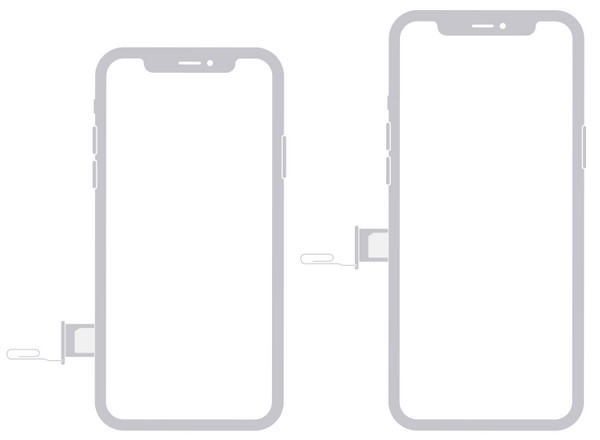
另外,你也可以向 Verizon 提交解锁申请,以在 iPhone 上解锁 SIM 卡。但这种方式需要提供与你的 iPhone 以及你本人相关的多种信息。你必须在联系运营商之前先准备好这些信息。你需要知道 iPhone 的 IMEI 码、购买凭证以及其他关键信息。
此外,Verizon 为你的 iPhone 执行解锁的处理时间可能为 1~3 天;某些情况下,可能需要一周甚至一个月。请参考下列步骤,了解如何向 Verizon 提交人工解锁申请。
先查询你这台 Verizon iPhone 的 IMEI 码。如果你不知道它,可以在 iPhone 主屏幕上轻点“设置”应用,然后在列表中点“通用”按钮,在屏幕上点“关于本机”按钮,最后在“IMEI”一栏查看该号码。你也可以通过在拨号界面输入 * 来查询。 接着,请使用你的 iPhone 拨打 Verizon 客服电话。你可以拨打 611 或热线 (800) 922-0204。或者,你也可以前往他们的实体门店,或访问其官方网站,通过在线聊天与客服联络。最后,只需等待处理完成,运营商会通知你结果。. 3. 关于第三方解锁服务.
你也可以选择使用第三方服务来解锁来自 Verizon 的 iPhone,可以是下载的解锁工具,也可以是在线解锁程序。不过,这些工具的成功率并无法得到充分保证。原因在于,如果在未满足 Verizon 要求或未遵守其解锁政策的情况下擅自解锁 Verizon iPhone,是属于违法行为。
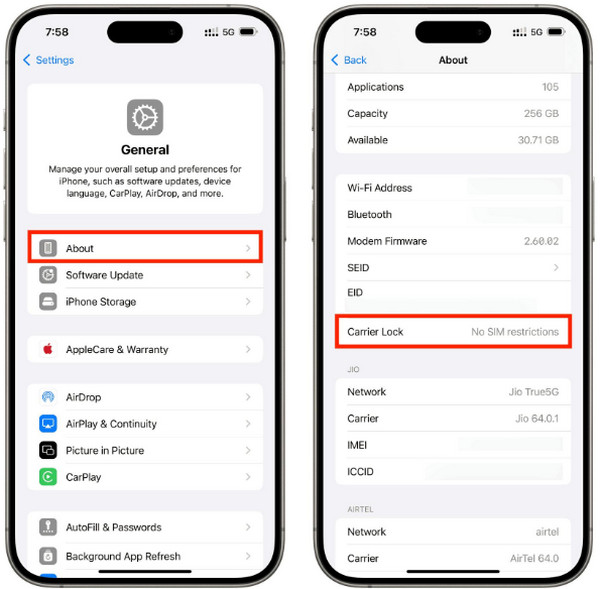
在完成解锁流程后,你可能会想确认一下 iPhone 是否真的已解锁。这样可以明确设备当前的状态。你可以直接在 iPhone 上完成检查,无需任何第三方工具或应用。如何判断我的 Verizon 手机是否已解锁?请参考下面的步骤。 设置 在完成解锁后,先进入你 iPhone 的“设置”部分。随后,应用会显示一系列可对该 Apple 设备进行的操作选项。请点选“通用”部分,然后屏幕上会显示关于这台 iPhone 的所有关键信息。向下滑动屏幕,前往“运营商锁定”一栏。如果 iPhone 已解锁,你会看到“无 SIM 卡限制”的提示。 一般的 来自 Verizon 的 iPhone 同样可能出现问题,比如忘记锁屏密码。如果遇到这种情况,某款专门的解锁工具就是解决该问题的终极方案。只需几次点击,就能移除密码、PIN 码、Touch ID 和 Face ID!该工具无需连接互联网,因为它通过 USB 数据线即可在离线状态下工作。除此之外,它还能绕过 iPhone 上的其他多种限制,包括 iCloud 激活锁、屏幕使用时间、MDM、SIM 锁等。想要使用这款工具吗?其详细使用步骤如下所示。 关于 先快速访问该工具的官方网站,然后在首页界面中下载该工具。找到已下载的安装文件并进行设置,具体操作需根据你电脑上对该工具的系统要求来执行。随后安装并打开该程序,开始解锁流程。 国际移动识别码 在左上角点击相应功能按钮。然后,使用兼容的 USB 数据线将 iPhone 连接到电脑。从已识别的设备列表中选择你的 iPhone,并点击“下一步”按钮。#06#.
固件包会开始下载。请点击底部的“下载”按钮。稍后工具会要求你再次确认该操作。在屏幕底部点击“确认”按钮,解锁过程随即开始。点击“完成”。
3. What About Third-Party Unlock Services
Third-party services that can unlock an iPhone from Verizon can also be used. You can use a downloaded tool or online programs. However, the success rate of the tools does not guarantee you a high success rate. The reason is that unlocking your iPhone Verizon without meeting the requirements or the unlock policy is illegal.
第三部分:如何检查你的 Verizon iPhone 是否已解锁
After the unlocking process, you might want to check if the iPhone is unlocked. This way, you know its status. Checking it can be done with your iPhone itself without the need for third-party tools or apps. How to tell if my Verizon phone is unlocked? Please use the steps below as your reference.
打开 设置 从选项 主屏幕 section of your iPhone after unlocking it. Then, the app will show you the list of options that can be done with the mentioned Apple device. Please select the 一般的 在应用首页界面中轻点“通用”.
前往 关于 section. Then, all of the important information about the iPhone will appear on the screen. Please swipe down on the screen and go to the 载体锁 section. If the iPhone is unlocked, you will see the No SIM Restrictions 信息。
第四部分:如果你想解锁 Verizon iPhone 的屏幕
The iPhone from Verizon can also experience issues, including a forgotten passcode. If so, imyPass iPassGo is the ultimate solution to the said problem. Passcodes, PINs, Touch ID, and Face ID can be removed in a few clicks! It does not need an internet connection because the tool works with a USB cable and offline. Besides that, there are other features it can bypass on your iPhone. It includes iCloud Activation Lock, Screen Time, MDM, SIM lock, and more. Do you want to use the tool? The detailed instructions on how to use it are posted below.
Pay a quick visit to the website of imyPass iPassGo. Then, download the tool from the first interface. Locate the downloaded file and set it up. It depends on the requirements of the tool for your computer. Later, install and open it to start the process.
是一款第三方工具,可以修改 iPhone 和 Android 的定位,这些设备都可以玩《Pokémon GO》。该程序提供摇杆模式(Joystick Mode),方便你手动控制虚拟位置的移动,是在现实中不走路也能孵蛋的强大功能。 开始解锁 button at the top left. Later, plug your iPhone into the computer using your compatible USB cable. Select your iPhone from the listed devices and click the 现在开始 按钮继续。
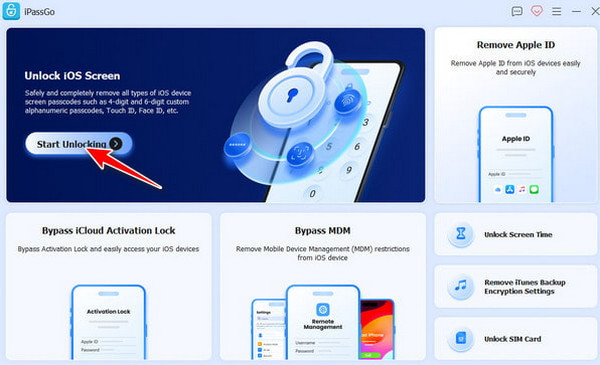
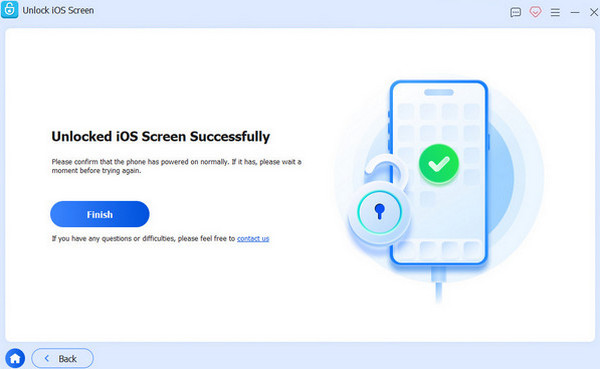
The firmware package will start to download. Please click the 开始移除 button at the bottom. The tool will require you to confirm the process afterward. Click the 再次确认 button at the bottom. The unlocking process will start. Click the 结束 按钮来完成该过程。
结论
总的来说,只有在 解锁威瑞森手机 满足上述运营商的解锁政策时才能进行。这里介绍了解锁过程的三种主要方法。 imyPass iPassGo 当你想要解锁 Verizon iPhone 的屏幕时,也可以了解到这些信息。下载该工具将帮助你更深入地了解它!
Samuel 专注于密码安全和数字隐私。他曾担任小型企业的网络安全顾问,帮助它们保护数字资产。凭借网络安全和道德黑客方面的认证,他能够将复杂的安全话题转化为易于理解和操作的建议。他也乐于分享密码方面的技巧,帮助用户更加自信地保护自己的账户。
热门解决方案
-
解锁iOS
-
iOS 技巧
-
解锁 Android
-
密码技巧


