



 Lösung
 Support-Center
 Über uns
 Kontakt
Can the Apple Store Unlock Your iPhone Without Password
 Samuel Spender Veröffentlicht auf 09. Mai 2026iOS entsperren3-minütige Lektüre
"I accidentally changed my password, and now I cannot remember it. Could Apple stuff at the Apple Store help me to unlock my iPhone without losing any data?" If you have the same question, maybe you are locked out of your iOS device and forgot the lock screen passcode. In fact, you have options to regain access to your device even if you forgot your passcode. Anyway, this article will answer this question and share more information.

In diesem Artikel:
Part 1. Can iPhone Unlock My iPhone
The lock screen passcode is used to protect your iPhone and data. You can enter the passcode and unlock your device to get to the Home screen. Can the Apple Store unlock your iPhone? Unfortunately, the answer is no. If you have forgotten the passcode, you will have to reset your device.
Part 2. How to Unlock a Locked iPhone
As mentioned previously, you have several ways to unlock a locked iPhone on your own when you forgot your passcode. Of course, these methods have some prerequisites. We share the proven methods respectively.
How to Unlock an iPhone Without Apple Store on Computer
Preconditions
- 1.Die neueste Version von iTunes oder Finder.
- 2.Ein Computer.
- 3.A USB cable.
Öffnen Sie unter Windows und macOS Mojave oder früher iTunes.
On macOS Catalina or later, open Finder.
Connect your iPhone to the computer with a compatible cable.
Put your iPhone in Wiederherstellungsmodus:
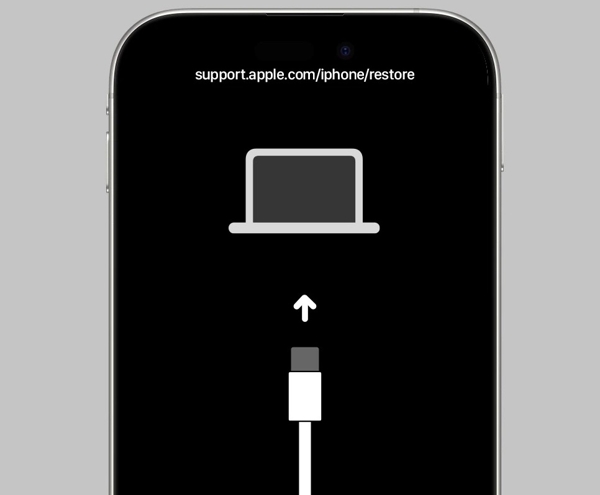
iPhone mit Face ID
Press and quickly press the Lautstärke erhöhen Taste.
Führe das gleiche Verfahren mit dem/der/dem/der/dem/der/dem/der/dem/der/dem/der/den ...das/der/den/das/den/den/das/der/den/das/den/das/der Lautstärke runter Taste.
Halten Sie die Taste gedrückt Seite button to enter Recovery Mode.
iPhone 7/7 Plus
Halten Sie die gedrückt Lautstärke runter + Seite Knöpfe zusammen.
When the Recovery Mode screen appears, release the buttons.
iPhone with a Home button
Drücken Sie lange auf die Taste Heim + Leistung Tasten gleichzeitig.
Let the buttons go once your device enters Recovery Mode.
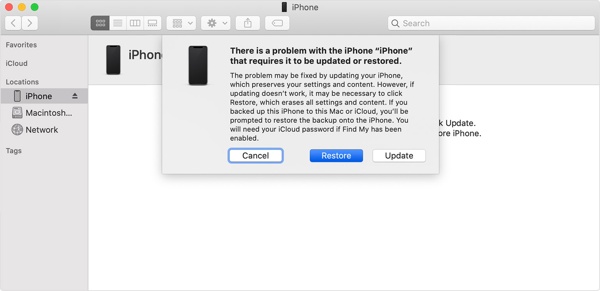
Sobald iTunes oder Finder Ihr iPhone erkennt, klicken Sie auf die Wiederherstellen Taste.
When restoring finishes, your iPhone will restart.
Then, you can unlock your iPhone without Apple and set it up as a new device.
How to Unlock an iPhone Without Apple Using Another Apple Device
Preconditions
- 1.Find My iPhone has been enabled.
- 2.Another Apple device associated with the same Apple ID.
- 3.Ihr Apple-ID-Passwort.
- 4.The Find My app.
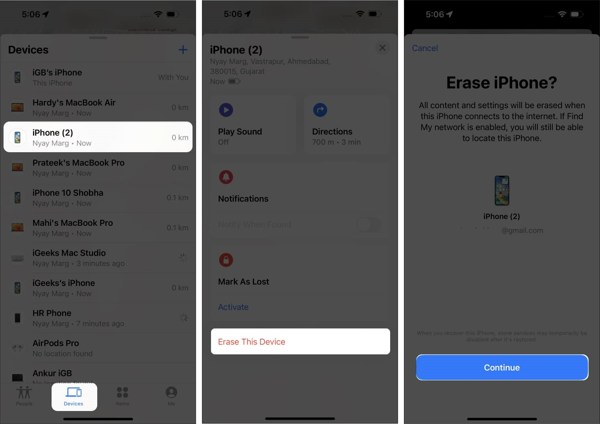
Führen Sie die aus Finde mein App.
Gehen Sie zum Geräte tab and choose your iPhone.
If you cannot find your iPhone, tap Hinzufügen neben Geräte, wählen AirTag hinzufügen, and add your device.
Tippen oder klicken Sie auf Dieses Gerät löschen Taste.
Wenn Sie dazu aufgefordert werden, tippen Sie auf Fortsetzen.
Follow the on-screen instructions to erase your device and unlock your iPhone without going to the Apple Store.
How to Unlock an iPhone Without Apple Store Online
Preconditions
- 1.Find My iPhone has been turned on.
- 2.Ihre Apple-ID und Ihr Passwort.
- 3.Ihr iPhone ist online.
- 4.Ein Webbrowser.
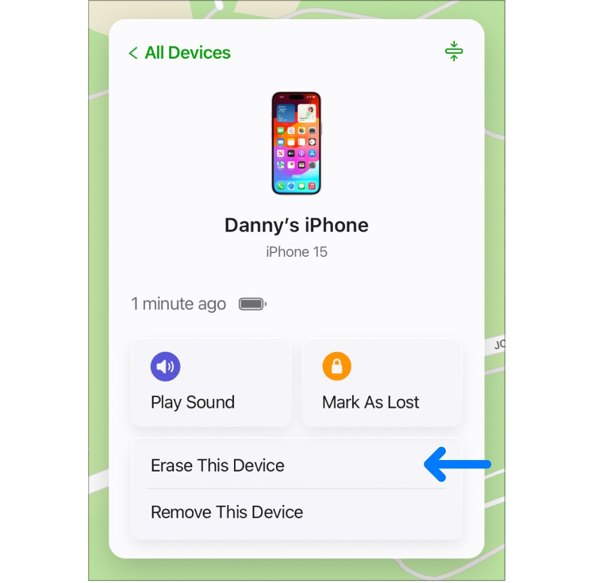
Gehen Sie in einem Webbrowser zu www.icloud.com/find.
Melden Sie sich mit Ihrer Apple-ID und Ihrem Passwort an.
Wählen Sie Ihr iPhone aus dem Alle Geräte Liste.
Drücke den Dieses Gerät löschen option on the pop-up dialog.
Enter your Apple ID password again.
Click Erase again to confirm unlocking your iPhone without Apple Store.
Weiterführende Literatur:
How to Unlock a Disabled iPhone Without Apple Store
Preconditions
- 1.Your iPhone has been updated to iOS 15.2 or above.
- 2.Your iPhone is disabled due to too many failed passcode attempts.
- 3.Ihr Apple-ID-Passwort.
Unter iOS 17 und höher
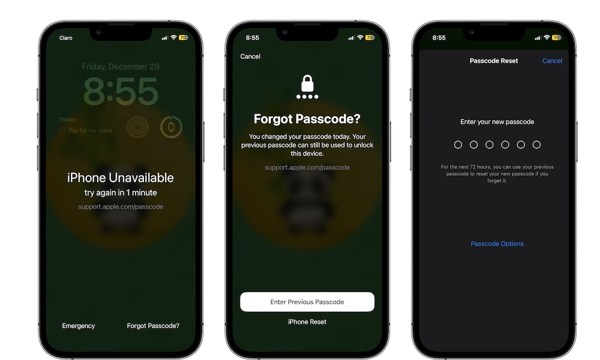
Tippen Sie auf die Passwort vergessen Schaltfläche unten.
If you just changed your passcode within 72 hours, choose Enter Previous Passcode.
Unlock your iPhone with the old passcode and enter a new passcode.
If not, choose iPhone zurücksetzen, enter your Apple ID password, and begin erasing your device.
Unter iOS 15.2 und neuer
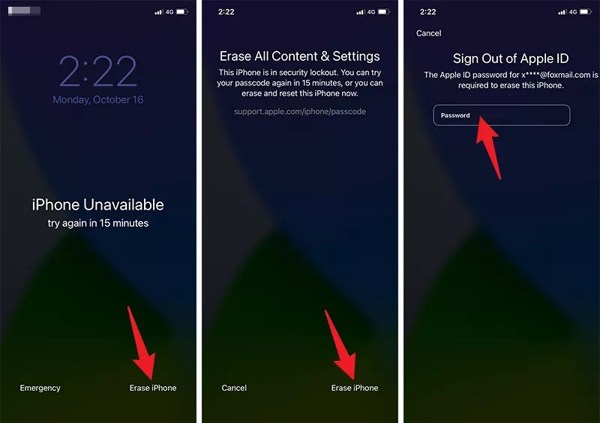
Tippen Sie auf die Löschen Iphone Schaltfläche unten.
Read the warning and tap Löschen Iphone.
Next, input your Apple ID password to begin unlocking your iPhone without Apple.
Part 3. How to Unlock a Locked iPhone Without a Password
Your Apple ID password plays a key role in unlocking an iPhone without the Apple Store. In fact, Apple staff also need your password to unlock your device. However, imyPass iPassGo can unlock any iPhone without restrictions.

Über 4.000.000 Downloads
Unlock an iPhone without a password.
Remove digit passcodes, Face IDs, and Touch IDs.
Work for a locked or disabled iOS device.
Bietet Zusatzfunktionen wie das Umgehen von MDM.
Unterstützt eine große Auswahl an iPhones und iPads.
So entsperren Sie Ihr iPhone ohne Passwort
Verbindung zu Ihrem Gerät herstellen
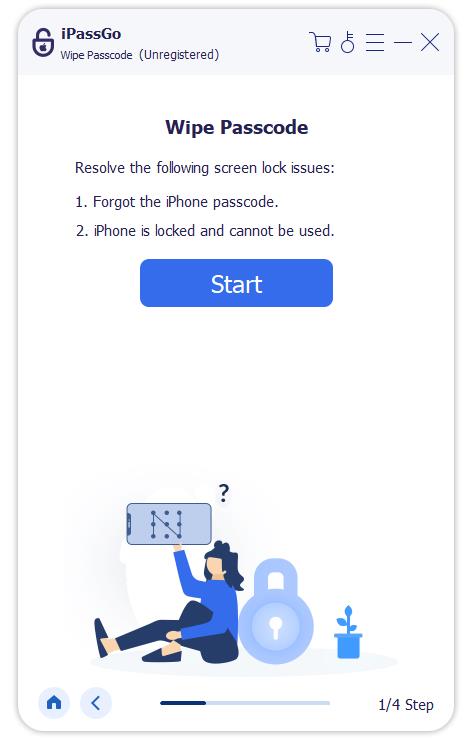
Laden Sie die iPhone-Entsperrsoftware auf Ihren PC oder Mac herunter und installieren Sie sie. Starten Sie sie und wählen Sie den Passwort löschen Modus, um fortzufahren. Verbinden Sie Ihr iPhone mit einem Lightning‑Kabel mit dem Computer. Wenn Sie dazu aufgefordert werden, vertrauen Sie diesem Computer.
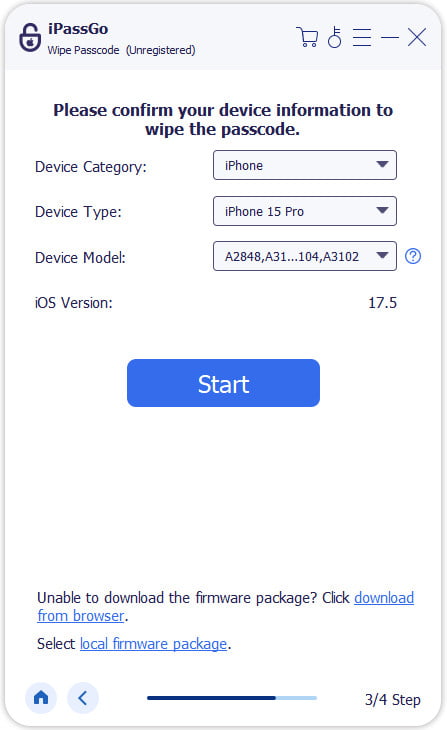
Laden Sie die Firmware herunter
Drücke den Anfang Schaltfläche, nachdem Ihr iPhone erkannt wurde. Sobald die Geräteinformationen geladen sind, überprüfen Sie diese. Klicken Sie dann auf die Download Schaltfläche, um den Download der Firmware zu starten.
Entsperren Sie Ihr iPhone ohne Apple
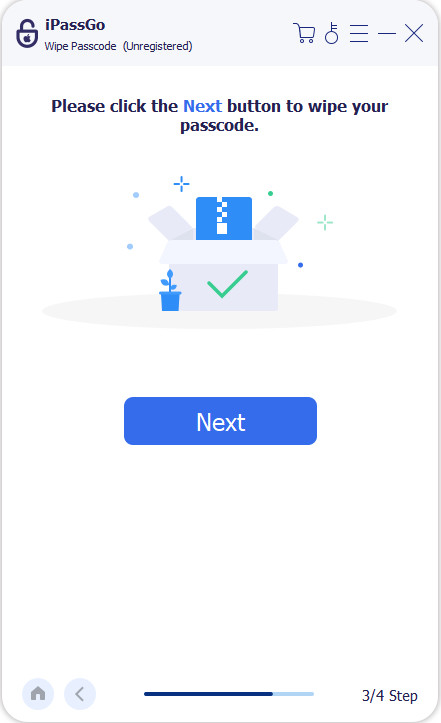
Wenn der Firmware‑Download abgeschlossen ist, klicken Sie auf die Freischalten Schaltfläche, um fortzufahren. Lesen Sie die Hinweise und bestätigen Sie, dass Sie Ihr iPhone ohne den Apple Store entsperren möchten. Folgen Sie den Anweisungen, um den Vorgang abzuschließen. Wenn er beendet ist, startet Ihr iPhone neu. Sie können es dann als neues Gerät einrichten.
Notiz:
Um Datenverlust zu vermeiden, sichern Sie Ihr iPhone vor dem Vorgang. Anschließend können Sie das Backup bei der Einrichtung wiederherstellen.
Fazit
In diesem Artikel wurde die Frage beantwortet, ob Apple Ihr iPhone entsperren kann. Noch wichtiger ist, dass wir mehrere Möglichkeiten vorgestellt haben, mit denen Sie Ihr iOS‑Gerät selbst entsperren können, wenn Sie Ihren Sperrbildschirm‑Code vergessen haben. Mit anderen Worten: Sie können ein gesperrtes iPhone entsperren, wenn Sie die Voraussetzungen erfüllen. imyPass iPassGo ist die ultimative Lösung, um Bildschirmsperren auf Ihrem iPhone ohne Einschränkungen zu entfernen.
Samuel ist auf Passwortsicherheit und digitalen Datenschutz spezialisiert. Früher arbeitete er als Cybersicherheitsberater für kleine Unternehmen, um deren digitale Werte zu schützen. Mit Zertifizierungen in Cybersicherheit und Ethical Hacking verwandelt er komplexe Sicherheitsthemen in leicht verständliche Ratschläge. Außerdem gibt er gerne Passworttipps, damit Nutzer ihre Konten selbstbewusster schützen können.
Heiße Lösungen
-
iOS entsperren
-
iOS-Tipps
-
Android entsperren
-
Passwort-Tipps


