解決
解決 サポートセンター
 私たちに関しては
 コンタクト
コンタクトWhat Is Defit App and How to Use Defit for Pokémon Go
 ペニーウォーレン に公開 2026年7月22日GPS位置情報3 分で読める
As a popular AR mobile game, Pokémon Go was released in 2016 by Niantic for iOS and Android devices. It uses GPS to locate, capture, train, and battle Pokémon. It means that you have to go out of your home and catch rare Pokémon surrounding you. However, walking long distances is not always convenient just to hatch eggs. Defit Pokémon Go is a popular feature that allows users to add distance to their progress bar without hacks.

記事上で:
Part 1. What Does Defit Mean
As mentioned previously, Defit is an app designed to spoof fitness trackers and location-based games, like Pokémon Go. It makes AR games think you are on the move, but you are not actually. With the Adventure Sync functionality, the app enables players to hatch eggs and earn Buddy Candy based on their recorded physical activity.
Does Defit still work for Pokémon Go today? Yes. However, it must work under the Adventure Sync functionality. The Adventure Sync utilizes health and fitness apps to track physical activity, such as steps and distance traveled. In other words, you must grant Pokémon Go access to this data when using Defit.
Part 2. How to Use Defit on Pokémon Go
To use Defit on Pokémon Go, you must install the Google Fit app on your phone. Moreover, you must activate the Adventure Sync functionality in your AR game. We share the process below:
携帯電話でPlayストアアプリを開きます。
Search for Google Fit and install it.
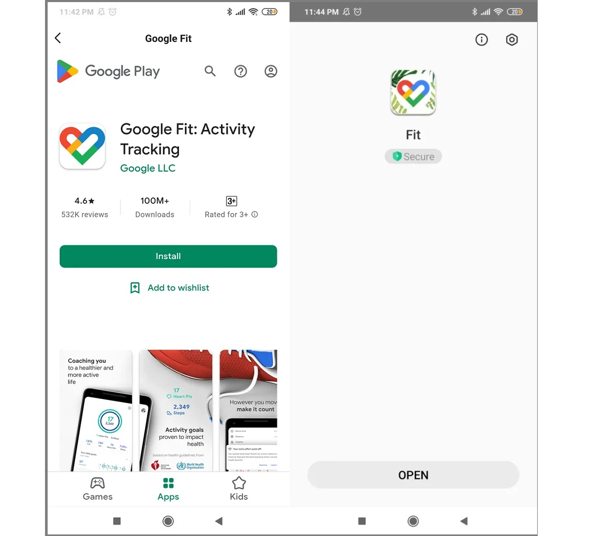
Next, install Defit from the Play Store and open it from your app tray.
Log in Defit with the same email address you use in Pokémon Go.
Allow the permissions and toggle on フィットネスデータを同期する.
Run your Pokémon Go app.
をタップします。 Poke Ball ボタンを押して選択 設定.
選択する アドベンチャーシンク オンにします。
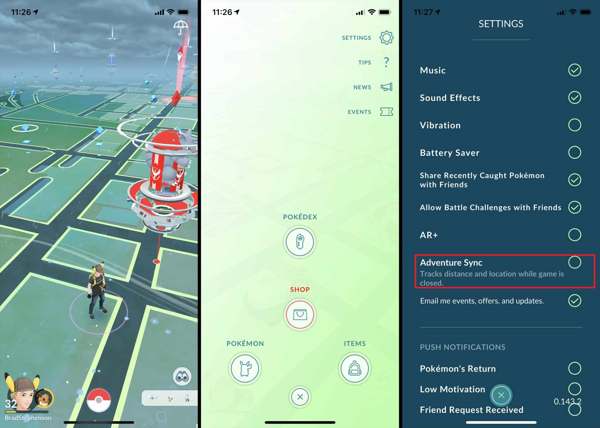
プロンプトが表示されたらタップします Turn It On そしてヒット わかった.
Close the game and switch to Defit.
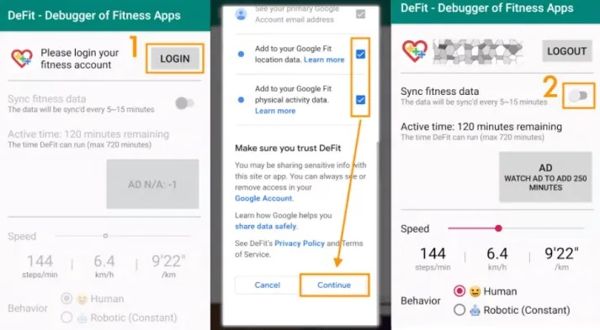
をタップします。 追加 button to update Defit with new steps and distance.
Part 3. Apps like Defit for Pokémon Go
アイポゴ
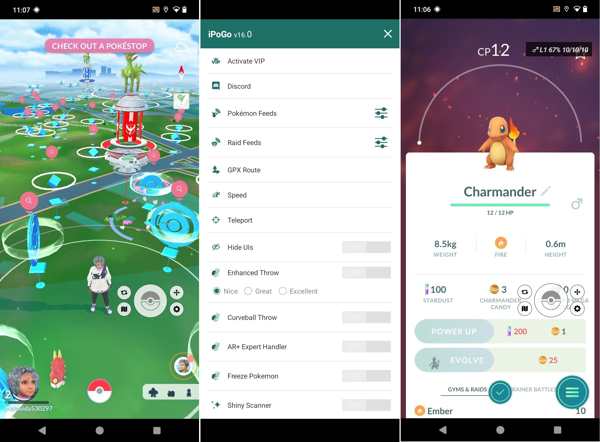
iPogo is an app like Defit for Pokémon Go. It is available on both iOS and Android. Once you install the app on your mobile device, you can play the AR game without the location limitations.
Key Features of iPogo
- 1.Travel anywhere in the world by entering coordinates.
- 2.Move around without walking.
- 3.Shiny Pokémon automatically.
- 4.Auto-catch throws Pokéballs at Pokémon.
GPS ジョイスティック
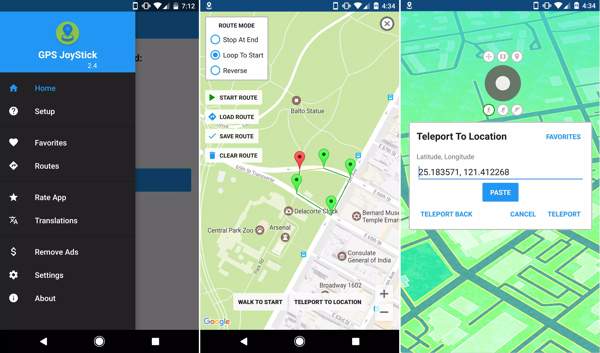
GPS JoyStick is an alternative to Defit Pokémon Go. The app enables you to change your GPS location instantly while playing location-based mobile games. Moreover, it includes a wide range of custom options.
Key Features of GPS JoyStick
- 1.Modify GPS location on iOS and Android instantly.
- 2.Offer 3 customizable speeds.
- 3.Create and save routes on a map.
- 4.Import and export GPX files.
iLocaGo について
Can you get banned for using Defit Pokémon Go? Yes. In fact, all spoofer apps can be detected by Niantic. If you are worried about your account being banned, try iLocaGo について. It allows you to play joystick games easily.
4,000,000以上のダウンロード
Change the GPS location on your iPhone or Android mobile device in one click.
Simulate human movements in multiple modes.
Provide customized options, like speed.
Support a wide array of iPhones and Android device models.
How to Use the Defit Alternative for Pokémon Go
Install Defit alternative
Open the Defit alternative after installing it on your computer. Connect your handset to the computer with a compatible cable.
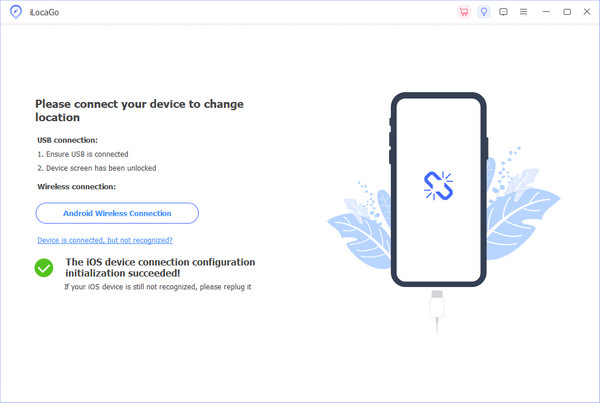
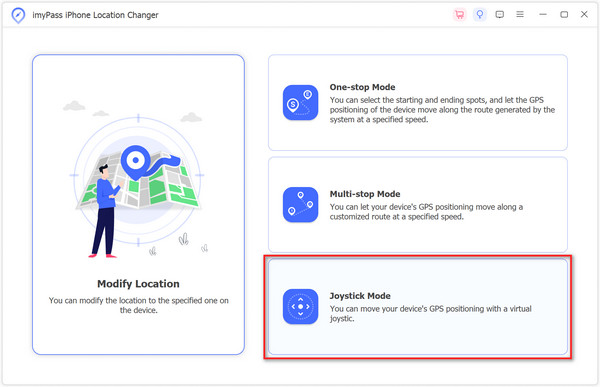
モードを選択してください
Once your device is recognized, choose the right mode. The 修正する Location is used to change the static location. The other three modes are used to simulate movements. Here, we choose ジョイスティック モード.
Change locations
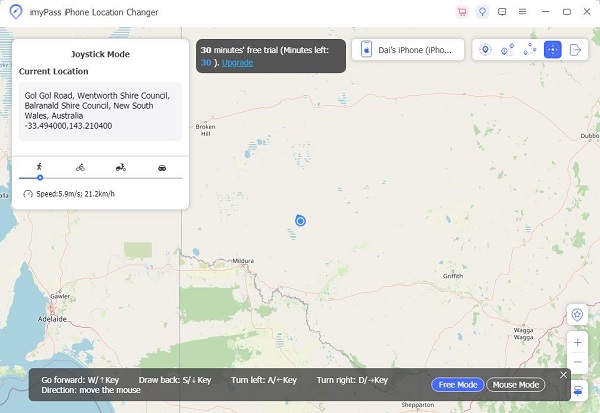
クリック 移動開始 and use your mouse or keyboard to control the movement. Then, turn to your phone and start playing Pokémon Go. When the game is done, disconnect your mobile device and close the software.
結論
This article explained what Defit Pokémon Go is. You can learn what the app is used for according to our introduction. Furthermore, we demonstrated how to use the app when playing your AR game. Plus, we shared three applications similar to Defit. iLocaGo について, for example, is able to change your phone location and simulate movements for location-based apps. More importantly, it won’t install any app on your mobile device.
Penny は、GPS のトラブルシューティングと Windows の最適化を専門としています。以前はテクニカルサポートエンジニアとして勤務し、クライアントの位置情報関連の問題やシステム上の不具合を効率的に解決してきました。IT サポートの経験に裏打ちされた確かな知識を基に、実際に役立つ実用的なソリューションを提供しています。休日にはハイキングやジオキャッシングを楽しみ、実世界で GPS 技術を試しています。
ホットなソリューション
-
GPS位置情報
-
iOSのロックを解除する
-
iOSのヒント
-
Androidのロックを解除