解決
解決 サポートセンター
 私たちに関しては
 コンタクト
コンタクトiPhone、iPad、Mac、PCで写真をiCloudに同期する方法
 Clara Prescott 公開日: 2025年12月19日データ転送読了時間 3 分
Considering the limited storage, Apple had released cloud storage for users to expand memory. In other words, you can sync photos to iCloud on your Apple product and access them across your devices. Thus, you can free up space while keeping your photos without quality loss. In this article, you can learn the process and what you can do if you encounter issues when syncing photos on your device.

記事上で:
パート1:iPhoneで写真をiCloudに同期する方法
Appleアカウントを作成すると、5GBの無料iCloudストレージが割り当てられます。これにより、iPhoneまたはiPadで写真をワイヤレスでiCloudに同期できます。ストレージが足りない場合は、iCloud+をご購入いただけます。50GBプランは$0.99、200GBプランは$2.99、2TBプランは$6TB、12TBプランは$59.99です。
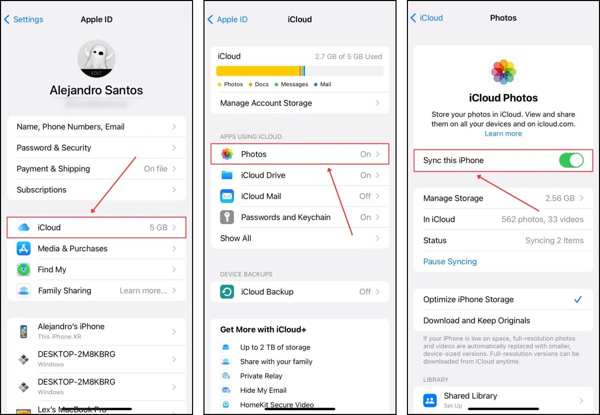
Open the Settings app on your iPhone or iPad.
iPhone を Wi-Fi ネットワークまたは携帯電話のデータに接続します。
プロフィールをタップし、iCloud を選びます。
Press Photos and toggle on Sync this iPhone.
Note: If you want to stop syncing photos to iCloud, turn off Sync this iPhone on the iCloud Photos screen.
パート2:Macで写真をiCloudに同期する方法
macOSをお使いの場合は、写真をiCloudにバックアップすることもできます。そうすることで、写真の編集、削除、追加などの変更がインターネット接続を介してすべてのデバイスに同期されます。
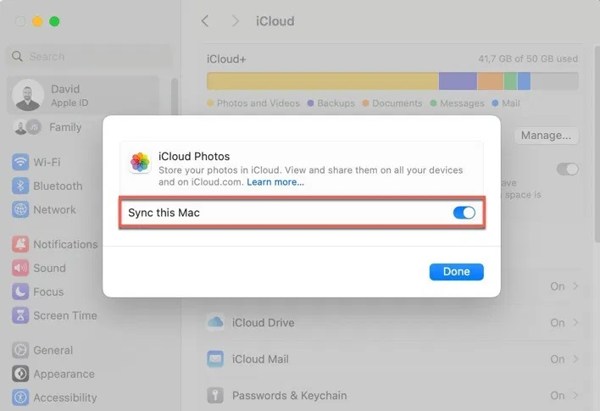
Apple メニューをクリックし、システム設定を選択します。
Navigate to the iCloud tab.
Choose the Photos app on the app list.
Turn on Sync this Mac and click Done.
Mac がインターネットに接続されると、写真は iCloud アカウントに送信されます。
パート3:PCで写真をiCloudに同期する方法
iCloudはAppleのクラウドサービスですが、PCでも利用できます。PCでiCloudを設定すると、Wi-Fiネットワークに接続されたパソコン上のiCloudに写真を移動できます。こうすることで、すべてのAppleデバイスから写真にアクセスできるようになります。
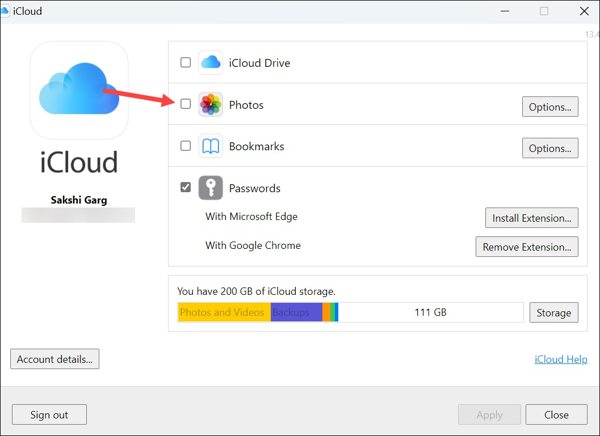
Microsoft Store から PC に iCloud をインストールします。
アプリを起動し、Apple ID の資格情報でサインインします。
Check the box next to Photos to enable iCloud Photos on PC.
Click the Options button, check iCloud Photos, and click Done.
Click the Apply button to confirm it.
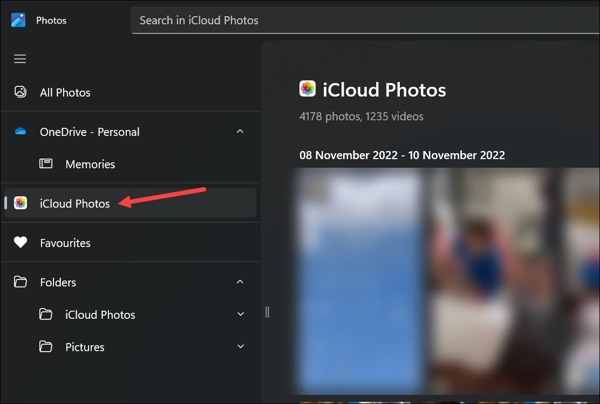
Open the Photos app on Windows 11/10. For older versions of PCs, open File Explorer.
Select iCloud Photos on the sidebar and view or manage photos.
パート4:iCloudに写真が同期されない問題を解決する方法
How long does it take to sync photos to iCloud? The answer depends on your internet condition and the number of your photos. Sometimes, it may take days or syncing to iCloud is paused. The reasons why my photos are not syncing to iCloud are complicated, but you can fix this problem by following the solutions below:
解決策1: インターネット接続を確認する
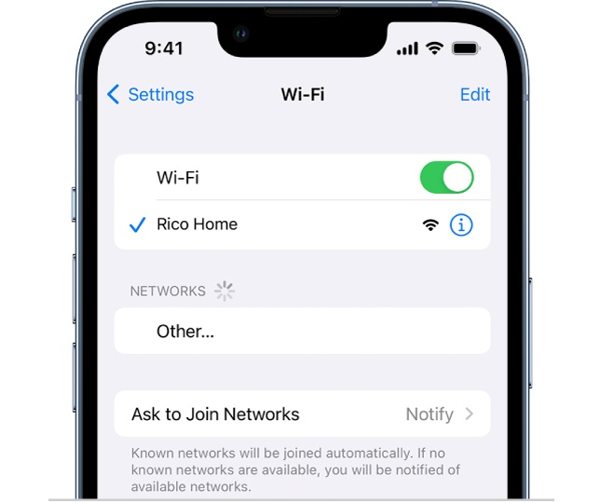
iCloudに写真を保存するには、安定したインターネット接続が必要です。ネットワークの状態が悪いと、処理が遅くなったり、フリーズしたりすることがあります。解決策は簡単です。インターネット接続を確認し、良好な接続を使用してください。
iPhoneやiPadでは、状況に応じてWi-Fiネットワークまたはモバイルデータ通信を使用できます。コンピューターの場合は、Wi-Fiではなく固定ネットワークを使用することをお勧めします。
解決策2:iCloud写真を強制同期する
デバイスのバッテリー消費を抑えるため、または安定したWi-Fi接続を待機しているため、iCloudへの写真の転送が一時停止されることがあります。iPhone、iPad、またはMacで写真をiCloudに強制同期できます。
For iPhone/iPad
Run your Photos app.
Enter the Recents album.
If you see a status message at the bottom, tap Sync Now.
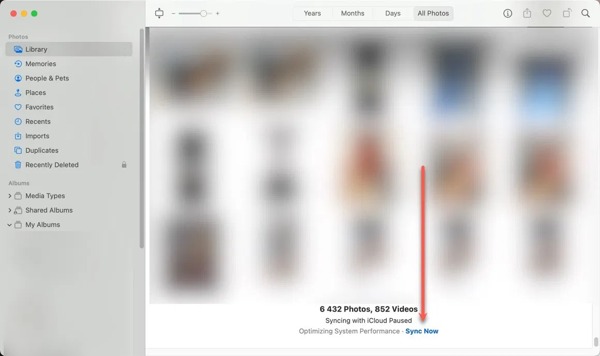
For Mac
Open the Photos app on your computer.
Go to the Library album on the sidebar.
Click the Sync Now button on the status message.
解決策3:iCloud写真をオフにしてオンにする
iPhoneでiCloudに写真を送信する際、iCloudフォトが停止するなど、ソフトウェアの不具合により送信が停止することがあります。この機能をオフにしてからオンに戻すと、iPhoneまたはiPadでこの問題を解決できます。
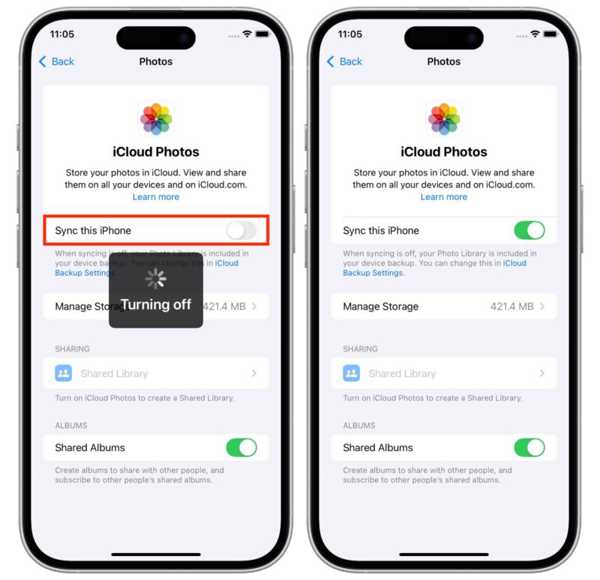
Open Settings and tap on your profile.
Navigate to iCloud and Photos.
このiPhoneを同期をオフに切り替えます。
A few minutes later, turn on Sync this iPhone.
解決策4:iCloudストレージを解放する
iPhoneからiCloudに写真をエクスポートするには、ストレージ容量が必要です。iCloudアカウントに大量のファイルやバックアップがある場合、ストレージ不足によりiCloudフォトが停止する可能性があります。iCloudバックアップを削除して、空き容量を増やすことができます。
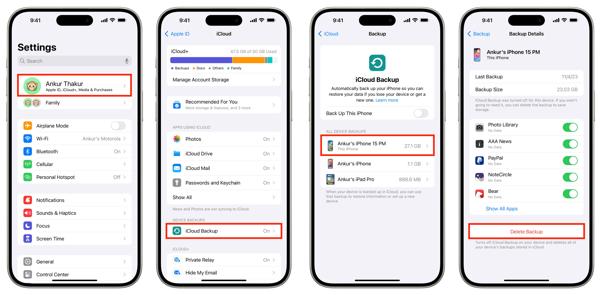
Tap on your profile in Settings.
Choose iCloud, and tap iCloud Backup.
Pick a backup under ALL DEVICES BACKUPS.
Tap Delete Backup and confirm it.
パート5:iCloudを使わずにiPhoneの写真を同期する方法
If you cannot fix iCloud photo sharing stops, try an alternative solution, such as imyPass iPhone Transfer. It enables you to sync photos between iPhone and computer, between iPhone and iPhone/iPad, or between iPhone and Android.
4,000,000以上のダウンロード
iCloudを使わずにiPhoneで写真を同期する方法
Connect to your device
Run the best photo transferring software after installing it on your computer. Plug your iPhone into your computer with a Lightning cable.
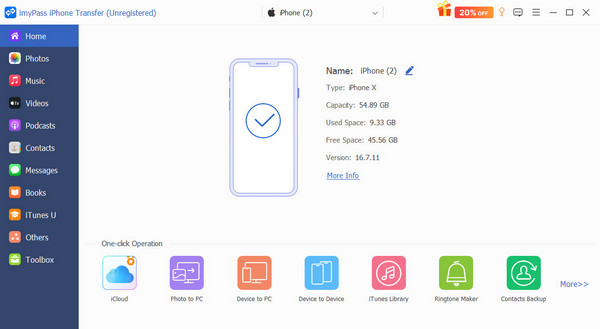
Preview iPhone photos
Go to the Photos tab on the sidebar after your device is recognized. View photos on your device.
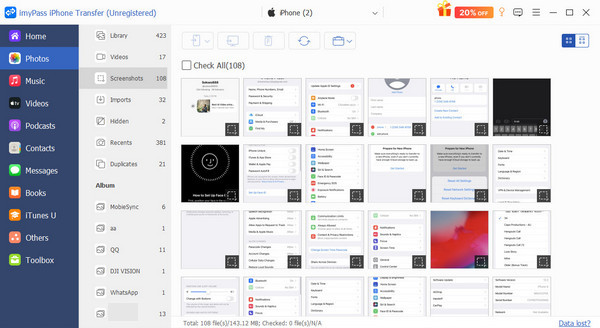
Transfer photos from iPhone to PC
Select the desired photos, click the PC button on the top ribbon, and choose a location folder. You can also share contacts on iPhone with other devices.
結論
This guide shared how to synchronize photos to iCloud from iPhone, iPad, Mac, and PC. You can follow our steps to upload your photos to your iCloud account. Plus, you should understand what to do if iCloud Photos stops syncing. imyPass iPhone Transfer can help you transfer photos and other data between an iPhone and other devices.
ClaraはimyPassの編集者です。彼女はデータ復旧を専門としています。あらゆるデバイスから失われたデータを復旧するための専門的なチュートリアルとソリューションを見つけることができます。多くのユーザーから、彼のチュートリアルは簡単で便利だとの報告があります。
ホットなソリューション
-
データの転送
-
データの回復
-
iOSのロックを解除する
-
iOSのヒント