



 Rozwiązanie
 Centrum Wsparcia
 O nas
O nas Kontakt
How to Remove Activation Lock from Your iPhone or iPad
 Samuel Spenser Opublikowano dnia 17 lipca 2026Odblokuj iOS4-minutowe czytanie
Once you get an iOS device, you will be asked to sign in with an Apple Account. If you turn on Find My iPhone or Find My iPad, iCloud Activation Lock will be automatically enabled. This security measure is designed to stop thieves from accessing an Apple device without offering the associated account. This guide shares the proven methods for Usuwanie blokady aktywacji iCloud with or without the Apple Account password.

W tym artykule:
Part 1. What Activation Lock Removal Means
As mentioned previously, Apple Activation Lock is an Apple security measure. It ties an iOS or iPadOS device to the owner’s Apple Account. Whenever activating the device after it has been erased or reset, the associated Apple Account password is required.
According to Apple, this security measure is designed to deter theft and protect user data. On the other hand, MDM solutions control iPhones and iPad devices with Activation Lock. If an MDM solution enrolls your device, you have to remove Activation Lock on your iPhone or iPad with a bypass code.
Bear in mind that a factory reset cannot remove the lock. iCloud Activation Lock removal means getting rid of the security measure with or without the password.
Part 2. How to Remove Activation Lock on iPad/iPhone
Depending on the condition of your device, you can remove Activation Lock on your iPad/iPhone, on a borrowed Apple device, or online. Of course, the process requires the associated Apple Account password.
How to Remove Activation Lock on iPad/iPhone
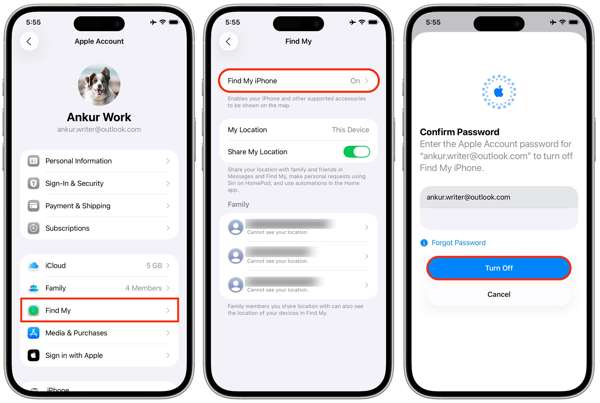
Otworzyć Ustawienia aplikację z ekranu głównego.
Kliknij swój profil.
Wybierz Znajdź mój opcję i dotknij Znajdź mojego IPhone'a lub Znajdź mojego iPada.
Wyłącz Znajdź mojego IPhone'a lub Znajdź mojego iPada.
When prompted, enter your Apple Account password.
Stuknij w Wyłączyć coś przycisk, aby to potwierdzić.
How to Remove Activation Lock on a Borrowed Apple Device
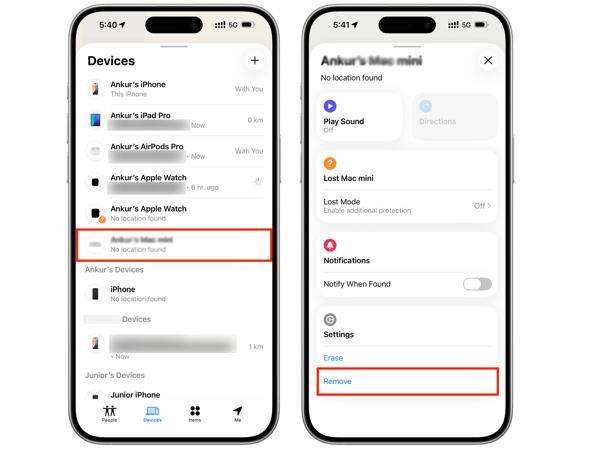
Install the Find My app on a borrowed iPhone or MacBook.
Run the app and log in with your Apple Account credentials.
Przejdź do Urządzenia patka.
Choose your iPhone or iPad from the list.
Expand the toolbar and hit the Usunąć przycisk.
If prompted, enter your Apple Account password again.
Finally, confirm iPad Activation Lock removal.
How to Remove Activation Lock Online
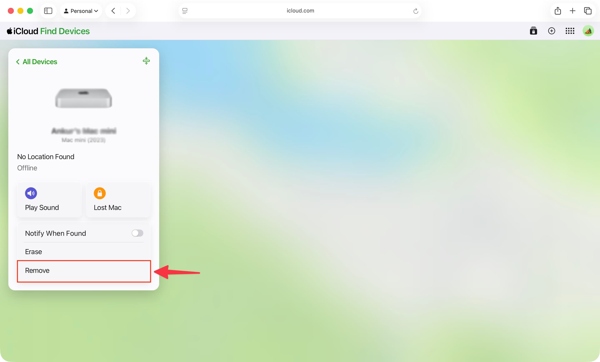
Wejdź na stronę www.icloud.com/find w przeglądarce internetowej.
Log in with your Apple Account and password.
Choose your iPhone or iPad from the Wszystkie urządzenia lista.
If your device is online, the feature will track the location on the map.
Kliknij Usunąć przycisk.
Enter your Apple Account password when prompted.
Follow the onscreen instructions to remove Activation Lock on iPad or iPhone.
How to Remove Activation Lock on Another Apple Device
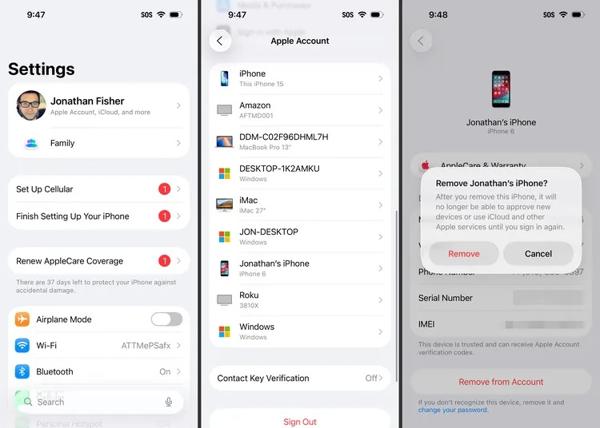
Uruchom Ustawienia lub Ustawienia systemowe app on another Apple device associated with the same Apple Account.
Kliknij swój profil.
Scroll down and choose your iPhone or iPad.
Uderz w Usuń z konta przycisk.
Następnie wybierz Usunąć on the alert box to confirm Activation Lock removal.
Part 3. How to Remove Activation Lock on iPhone with a Code
When your iPhone or iPad enrolls in an MDM solution, you can get an Activation Lock bypass code. This code lets you remove Activation Lock on your iPad or iPhone without the password. We share the workflow below:
Turn on your device and go to the Ustawienia aplikacja.
Nawigować do Ogólny, następnie Przenieś lub zresetuj iPhone'a.
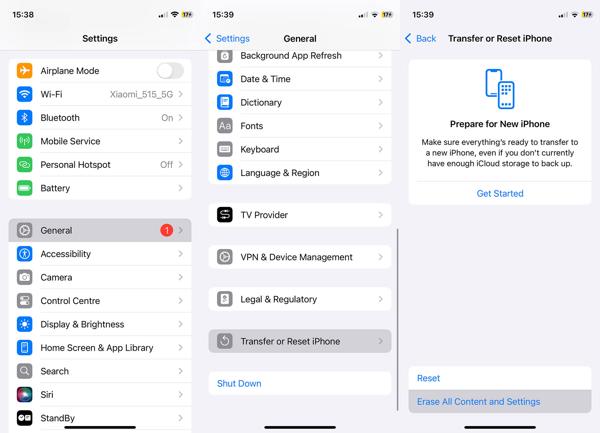
Stuknij w Skasuj całą zawartość i ustawienia opcja.
Follow the onscreen instructions to przywrócenie ustawień fabrycznych your device.
If your device is inaccessible, reset it with iTunes or Finder.
When it is done, restart your iPhone or iPad.
Set it up as a new device.
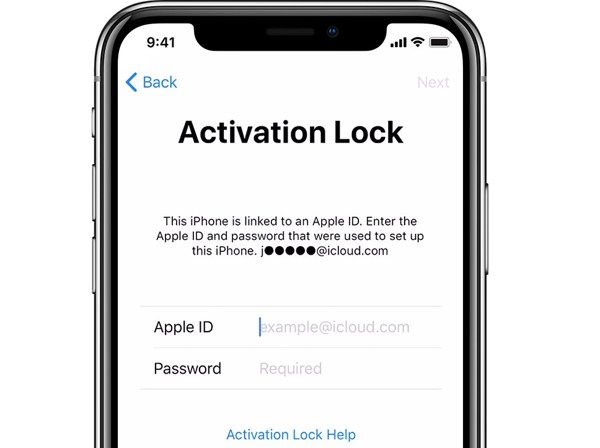
If your iPad is locked by Activation Lock, you will be asked to enter your Apple Account.
Keep the Apple ID field empty and enter the bypass code in the Hasło pole.
Stuknij w Następny button to remove Activation Lock on iPad without a password.
Part 4. How to Remove Activation Lock on iPad Without a Password
If you don’t have the associated Apple Account password and the bypass code, try imyPass iPassGo. It allows you to remove Activation Lock on your iPhone or iPad without the password. Moreover, the intuitive design makes it easy to learn and navigate.

Ponad 4 000 000 pobrań
Bypass Activation Lock from an iPhone or iPad without the password.
Zakończ proces w trzech krokach.
Offer bonus features, like unlocking Screen Time.
Obsługuje szeroką gamę modeli iPhone'ów i iPadów.
How to Remove Activation Lock on Your iPad Without the Password
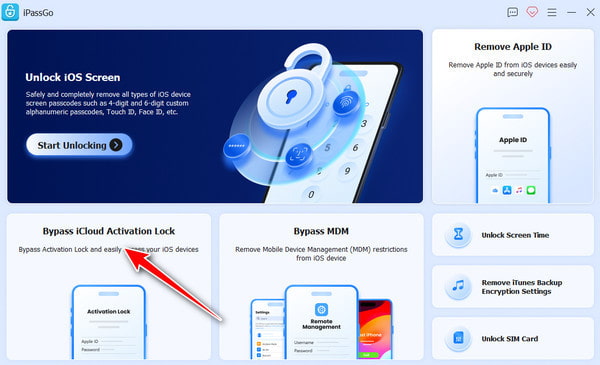
Install iPassGo
Launch the Activation Lock removal service after installing it on your computer. It is available on Windows 11/10/8/7 and macOS 10.12 or above. Choose the Omiń blokadę aktywacji iCloud tryb, aby kontynuować.
Połącz się z iPadem
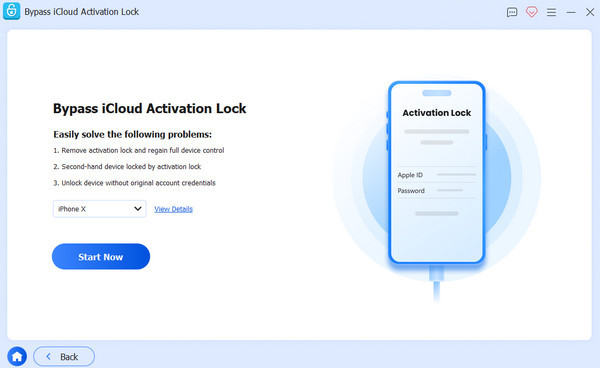
Connect your iPhone or iPad to your computer with a Lightning cable. Trust your computer, and the software will load your device information. Click the Zacząć teraz przycisk, aby kontynuować.
Usuń blokadę aktywacji
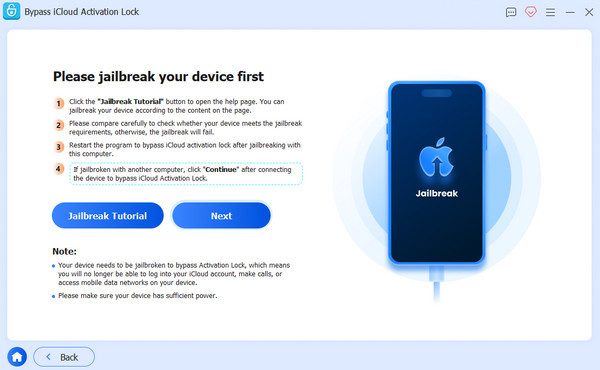
Kliknij Następny przycisk, jeśli wykonałeś już jailbreak na swoim urządzeniu. Jeśli nie, kliknij Poradnik jailbreakowania przycisk i postępuj zgodnie z instrukcjami, aby przeprowadzić jailbreak urządzenia. Sprawdź informacje o swoim urządzeniu i kliknij Rozpocznij omijanie aktywacji przycisk, aby rozpocząć usuwanie blokady aktywacji (Activation Lock).
Wniosek
W tym przewodniku wyjaśniono, czym jest Usuwanie blokady aktywacji Co ważniejsze, możesz poznać kilka sposobów przeprowadzenia tego procesu w różnych sytuacjach. Mając hasło do swojego konta Apple, możesz pozbyć się blokady iCloud na urządzeniu lub zdalnie. Jeśli twoje urządzenie jest zarejestrowane w rozwiązaniu MDM, możesz ominąć blokadę iCloud za pomocą kodu. imyPass iPassGo jest prostym sposobem na ominięcie blokady iCloud na urządzeniu bez hasła.
Samuel specjalizuje się w bezpieczeństwie haseł i prywatności cyfrowej. Kiedyś pracował jako konsultant ds. cyberbezpieczeństwa dla małych firm, pomagając im chronić zasoby cyfrowe. Dzięki certyfikatom z zakresu cyberbezpieczeństwa i etycznego hackingu potrafi przekładać złożone zagadnienia bezpieczeństwa na łatwe do zrozumienia porady. Lubi też dzielić się wskazówkami dotyczącymi haseł, aby pomagać użytkownikom pewniej chronić własne konta.
Gorące rozwiązania
-
Odblokuj iOS
-
Wskazówki dotyczące iOS
-
Odblokuj Androida
-
Wskazówki dotyczące hasła


