



 Solução
 Centro de Apoio
 Sobre nós
 Contato
How to Quickly Change Location on Your Skout Dating App
 Penny Warren publicado em fevereiro 06, 2026Localização GPSLeitura de 3 minutos
Unlike standard dating apps, Skout is a dating and live chat app. It is a location-based dating platform. It enables you to instantly meet people near you or around the world. You can see who is broadcasting in Live broadcasts and discover new friends nearby or around the globe. This guide explains como mudar a localização no Skout to discover potential friends or romantic interests on your iPhone or Android phone.

Neste artigo:
Part 1: Can You Change Location on Skout
Can you change location on Skout? The answer is determined by your situation. According to our research, Skout reads the GPS data on your mobile device and decides your location. If you have a premium paid account, you can temporarily change your location. The prices of premium accounts start at $9.99 per month.
Part 2: How to Change Location on Skout Profile
If you travel to a new city or work in a new country, you can change your location on the Skout dating app from your profile. This method uses the Location Services on your iPhone or Android phone.
Execute o Definições app on your iPhone or phone.
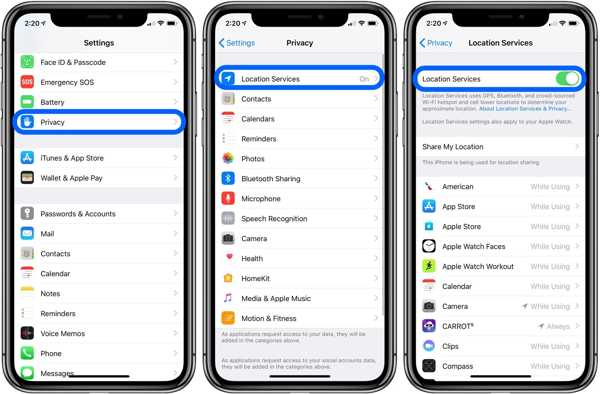
Vamos para Privacy, Location Servicese ative Serviços de localização on iOS. For Android, go to Localizaçãoe ative Usar localização.
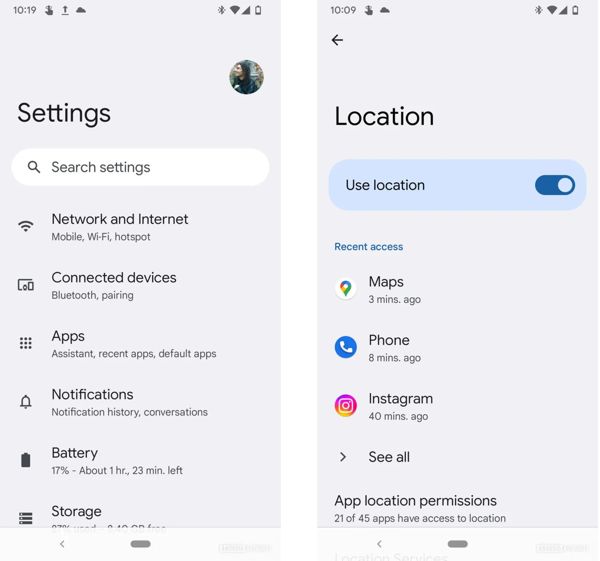
Open the Skout app from your app drawer.
Toque no seu perfil e clique Editar.
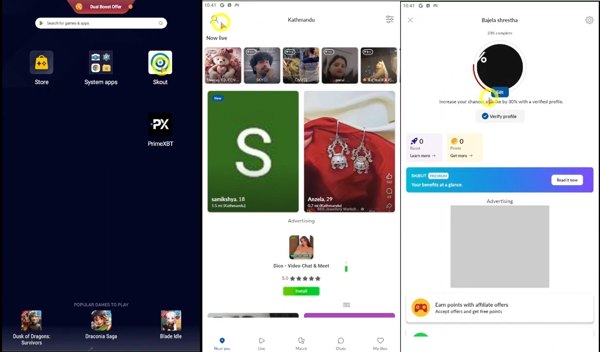
Role para baixo e toque em Cidade natal no Detalhes aba.
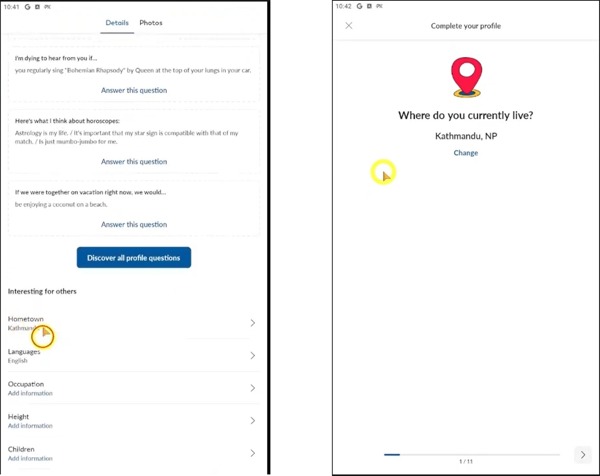
Toque em Mudar button to detect where you currently live.
Part 3: How to Change Location on Skout Without Notifying Others
As mentioned previously, Skout allows you to manually change location if you move to another city. That narrows the people you can reach on the platform. In other words, you cannot see foreigners on Skout.
There are ways to spoof location on your iPhone or Android phone. A VPN service, for example, allows you to change your IP address to a virtual service. However, it usually doesn’t work for GPS-based apps, including Skout.
Thankfully, iLocaGo can help you resolve this problem. It is able to change your GPS location when accessing Skout. More importantly, it works on both iOS and Android devices. No one can detect your changes since it won’t install any app on your mobile device. Therefore, it is an ideal method to explore people around the world.

Mais de 4.000.000 de downloads
Change the GPS location on the Skout app with one click.
Garantimos endereços precisos e qualquer localização.
Criar locais virtuais e rotas em múltiplos modos.
Available to almost all apps and games, including Skout.
Compatible with the latest versions of iOS and Android.
How to Change Location on Skout to Worldwide
Conecte-se ao seu dispositivo
Download and install the location changer software for Skout on your PC. It is compatible with Windows 11/10/8/7 and there is another version for Mac. Launch the software from your desktop. Link your iPhone or Android phone to your computer with a USB cable. If prompted, tap Confiar on your screen to trust this PC. If you are using Skout on Android, you can connect it to your computer with a Wi-Fi network, too.

Escolha Modificar local
Once your device is recognized, you will be presented with the mode window. Here you can see four modes:
Modify Location: Change your device location with an accurate address or any position.
One-stop Mode: Select the starting and ending spots to simulate a virtual route.
Multi-stop Mode: Set the starting spot and multiple stops to create a virtual route.
Joystick Mode: Move your device’s GPS positions with your mouse and keyboard.
Here, we choose Modificar localização seguir adiante.

Change location on Skout
By default, your current location will show on the map. You can type in an address into the field on the Modificar localização dialog. If you don’t have an address, click and pin a proper position on the map. Finally, click on the Modificar botão para confirmar a alteração.
Then, turn on your device and open the Skout app. You will see the people from the fake location.

Observação: When you want to stop location change on Skout, disconnect your mobile device and close the software.
Conclusão
Agora, você deve entender how to change location on Skout on your iPhone or Android device. First of all, you can change the location in your profile, but Skout decides your location according to the GPS data. In other words, you have to use a location changer tool to change Skout to another address. From this point, we recommended iLocaGo, an ideal location spoofer software program. It works on both iPhone and Android devices. Moreover, the user-friendly interface makes it easy to use, especially for beginners.
Penny é editora sênior da imyPass. Ela se dedica a descobrir soluções de localização GPS perfeitas para todos os cenários e também tem experiência em consertar computadores.
Soluções quentes
-
Localização GPS
- Melhores locais de Pokémon Go com coordenadas
- Desligue sua localização no Life360
- Como alterar a localização no iPhone
- Análise do iSpoofer Pokémon Go
- Defina locais virtuais no iPhone e Android
- TikTok rastreie sua localização
- Monster Hunter Agora Joystick
- Revisão do localizador de localização de IP
- Alterar localização do Mobile Legends
- Alterar localização no Tiktok
-
Desbloquear iOS
-
Dicas para iOS
-
Desbloquear Android


