



 Solução
 Centro de Apoio
 Sobre nós
 Contato
How to Stop TikTok from Tracking Your Location on Mobile
 Penny Warren publicado em março 06, 2026Localização GPSLeitura de 3 minutos
Does TikTok track your location? Yes, it does. TikTok uses a multi-layered approach to determine where you are. Even if you try to hide your location, the app uses environmental signals to find you. TikTok’s business model relies on hyper-local relevance. For example, it allows local businesses to show you ads based on your real-time movements.
You can check how TikTok tracks your location. And although it's not easy to 100% prevent TikTok tracking, there are some methods to limit it. If you want to try to protect your privacy, you can try the methods in this post right away.

Neste artigo:
Part 1. How TikTok Tracks Your Location
TikTok can know your location in different ways, even if you turn off the location service on your phone. Please check how it works:
Precise GPS Location (New for 2026)
- Before 2026: TikTok explicitly stated it did not collect precise GPS data.
- In and after 2026: If you grant permission in your device settings, TikTok can track your precise GPS location (accurate within a few meters). This allows them to know exactly which building you are in.
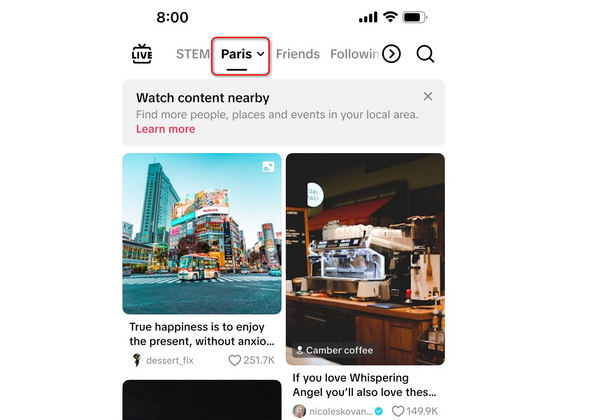
The Nearby Feed: This precise data is used to power the new Nearby content feed, showing you local events, restaurant reviews, and other types of ads.
Approximate Location (Automatic)
Even if you've turned off location service for TikTok, it still can estimate your location using:
- Endereço de IP: Your internet connection reveals your city and region.
- SIM Card/Mobile Network: The app identifies your country and carrier region.
- System Settings: Your phone's language and region settings provide additional clues.
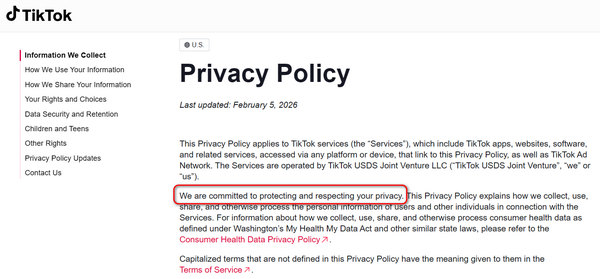
You May Need to Know: TikTok is committed to protecting and respecting your privacy. You can go to www.tiktok.com/legal/page/us/privacy-policy/en to see how TikTok uses your privacy.
Why Does TikTok Want Your Location?
- Algorithm Customization: To show you trending sounds and challenges popular in your specific city.
- Hyper-Local Advertising: To send ads from businesses nearby, which is a key business model of TikTok.
- Off-Platform Targeting: The 2026 policy explicitly states TikTok may use your location data to show you ads on third-party websites outside the TikTok app.
Part 2. Why You Want to Protect Your Location on TikTok
The January 2026 policy update caused a massive backlash (and a surge in app deletions) because it explicitly states the collection of sensitive personal information that can be inferred from your location and behavior, including:
- Citizenship or immigration status
- Racial or ethnic origin
- Sexual orientation
Many users want to prevent TikTok from tracking them for a clear browsing experience or to protect their privacy in case hackers steal their information. Although you cannot 100% stop TikTok from tracking your location, there are some methods to limit it.
You May Also Like:
Part 3. 2 Ways to Limit TikTok's Location Tracking
1. Usando imyPass iLocaGo
imyPass iLocaGo can change the GPS location on your iPhone or Android phone. TikTok will replace the modified location to your real location, With location service turned off, you can easily limit TikTok's location tracking. This program is also very easy to use and work stable. You can change your phone's location to anywhere you want on the earth. If you want to protect your location info right away, you can try it.
Get imyPass iLocaGo
Clique no Download button below to download, install, and launch this program.
Connect your phone
Connect your iPhone or Android phone to your computer with a USB cable. imyPass iLocaGo will recognize your phone when connected. Then, select Modificar localização.

Change your location on phone
Locate the Search box on the top left side. Input keywords of a location and then select your desired accurate location from the prompts. Finally, click the Modificar button to change GPS location for TikTok.

2. Turn Off Location Service
You just need to turn off the location service only for TikTok. Check the steps on iOS and Android.
On iOS:
- 1.Vamos para Definições > privacidade e segurança > Serviços de localização.
- 2.Find TikTok and set it to Nunca.
- 3.Garantir Localização precisa está desligado.
No Android:
- 1.Vamos para Definições > Aplicativos > TikTok > Permissões.
- 2.Toque Localização e selecione Não permita.
- 3.Desligue o Use localização precisa.
You May Need to Know:
From our test, using a VPN/proxy or changing a SIM card cannot help you stop location tracking from TikTok, we can still browse some business short videos nearby. However, spoofing location on a mobile phone can work. So, you can try a GPS spoofer like imyPass iLocaGo to prevent TikTok from knowing your real location.
Perguntas frequentes.
-
Does TikTok track you outside the app?
Yes, TikTok tracks your activity outside the app extensively, even if you don't log in to or have a TikTok account. As of 2026, investigations show that TikTok has built a tracking empire that rivals Google and Meta, using invisible tools embedded in millions of third-party websites.
-
Can TikTok track your IP address?
Yes, TikTok can know your IP address. TikTok needs to use your IP address to know your real location.
-
Is TikTok watching me through my camera?
TikTok can use your camera as long as you permit it. But there's no evidence that TikTok chronically uses cameras to watch its users.
Conclusão
Many users want to know how to stop TikTok from tracking your location. Unfortunately, it's hardly possible for most users to prevent location tracking. But TikTok states it will protect all users' privacy. What you can do is to limit TikTok's location tracking. imyPass iLocaGo can help you do that easily. It will spoof the GPS location on your phone so that TikTok will use the modified location instead of your real location. This will protect your location info to some extent.
Penny é editora sênior da imyPass. Ela se dedica a descobrir soluções de localização GPS perfeitas para todos os cenários e também tem experiência em consertar computadores.
Soluções quentes
-
Localização GPS
- Melhores locais de Pokémon Go com coordenadas
- Desligue sua localização no Life360
- Como alterar a localização no iPhone
- Análise do iSpoofer Pokémon Go
- Defina locais virtuais no iPhone e Android
- TikTok rastreie sua localização
- Monster Hunter Agora Joystick
- Revisão do localizador de localização de IP
- Alterar localização do Mobile Legends
- Alterar localização no Tiktok
-
Desbloquear iOS
-
Dicas para iOS
-
Desbloquear Android


