Solução
 Centro de Apoio
 Sobre nós
 Contato
What Is Defit App and How to Use Defit for Pokémon Go
 Penny Warren publicado em julho 22, 2026Localização GPSLeitura de 3 minutos
As a popular AR mobile game, Pokémon Go was released in 2016 by Niantic for iOS and Android devices. It uses GPS to locate, capture, train, and battle Pokémon. It means that you have to go out of your home and catch rare Pokémon surrounding you. However, walking long distances is not always convenient just to hatch eggs. Defit Pokémon Go is a popular feature that allows users to add distance to their progress bar without hacks.

Neste artigo:
Part 1. What Does Defit Mean
As mentioned previously, Defit is an app designed to spoof fitness trackers and location-based games, like Pokémon Go. It makes AR games think you are on the move, but you are not actually. With the Adventure Sync functionality, the app enables players to hatch eggs and earn Buddy Candy based on their recorded physical activity.
Does Defit still work for Pokémon Go today? Yes. However, it must work under the Adventure Sync functionality. The Adventure Sync utilizes health and fitness apps to track physical activity, such as steps and distance traveled. In other words, you must grant Pokémon Go access to this data when using Defit.
Part 2. How to Use Defit on Pokémon Go
To use Defit on Pokémon Go, you must install the Google Fit app on your phone. Moreover, you must activate the Adventure Sync functionality in your AR game. We share the process below:
Abra o aplicativo Play Store no seu celular.
Search for Google Fit and install it.
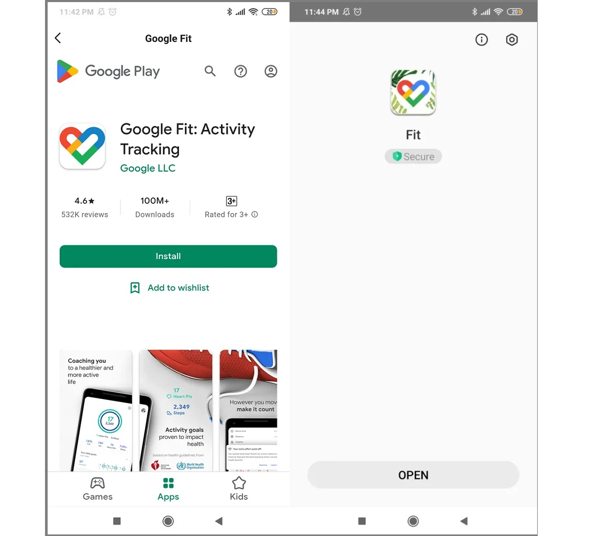
Next, install Defit from the Play Store and open it from your app tray.
Log in Defit with the same email address you use in Pokémon Go.
Allow the permissions and toggle on Sincronizar dados de condicionamento físico.
Run your Pokémon Go app.
Toque em Poke Ball botão e escolha Definições.
Selecionar Sincronização de aventura para ligá-lo.
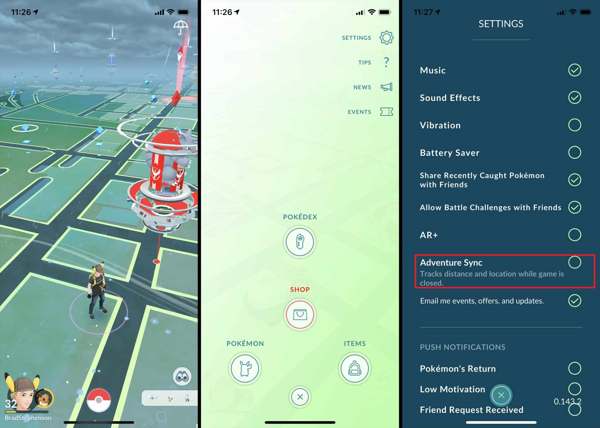
Quando solicitado, toque em Turn It On e bater OK.
Close the game and switch to Defit.
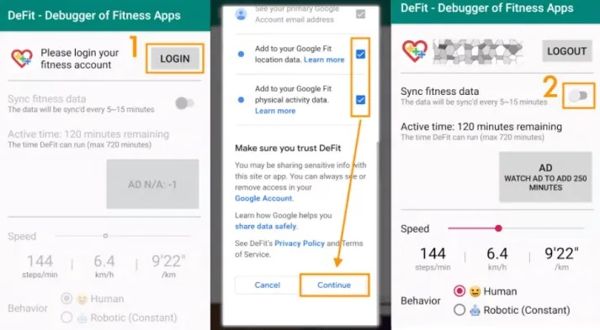
Toque em Adicionar button to update Defit with new steps and distance.
Part 3. Apps like Defit for Pokémon Go
iPogo
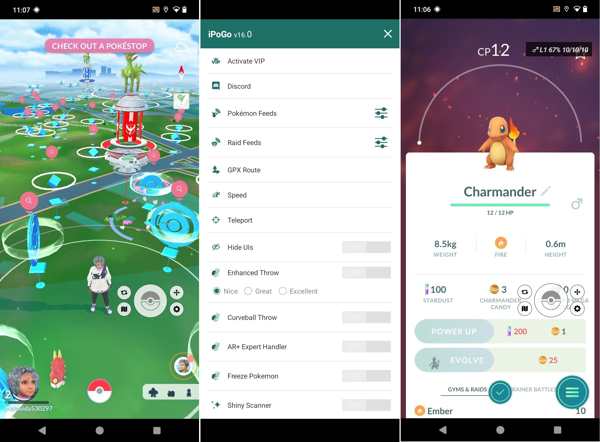
iPogo is an app like Defit for Pokémon Go. It is available on both iOS and Android. Once you install the app on your mobile device, you can play the AR game without the location limitations.
Key Features of iPogo
- 1.Travel anywhere in the world by entering coordinates.
- 2.Move around without walking.
- 3.Shiny Pokémon automatically.
- 4.Auto-catch throws Pokéballs at Pokémon.
JoyStick GPS
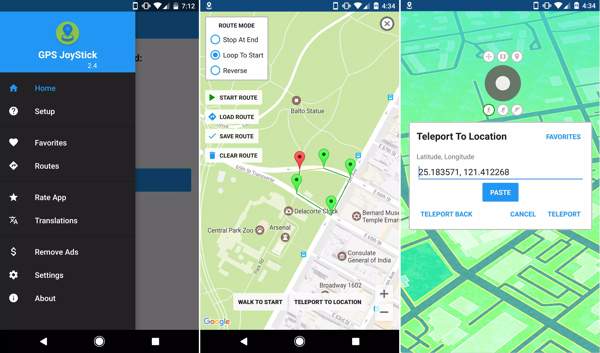
GPS JoyStick is an alternative to Defit Pokémon Go. The app enables you to change your GPS location instantly while playing location-based mobile games. Moreover, it includes a wide range of custom options.
Key Features of GPS JoyStick
- 1.Modify GPS location on iOS and Android instantly.
- 2.Offer 3 customizable speeds.
- 3.Create and save routes on a map.
- 4.Import and export GPX files.
Leitura estendida:
imyPass iLocaGo
Can you get banned for using Defit Pokémon Go? Yes. In fact, all spoofer apps can be detected by Niantic. If you are worried about your account being banned, try imyPass iLocaGo. It allows you to play joystick games easily.
Mais de 4.000.000 de downloads
Change the GPS location on your iPhone or Android mobile device in one click.
Simulate human movements in multiple modes.
Provide customized options, like speed.
Support a wide array of iPhones and Android device models.
How to Use the Defit Alternative for Pokémon Go
Install Defit alternative
Open the Defit alternative after installing it on your computer. Connect your handset to the computer with a compatible cable.
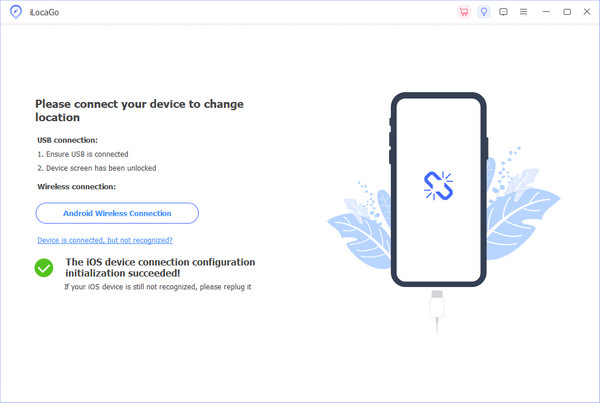
Escolha um modo
Once your device is recognized, choose the right mode. The Modificar Location is used to change the static location. The other three modes are used to simulate movements. Here, we choose Modo joystick.
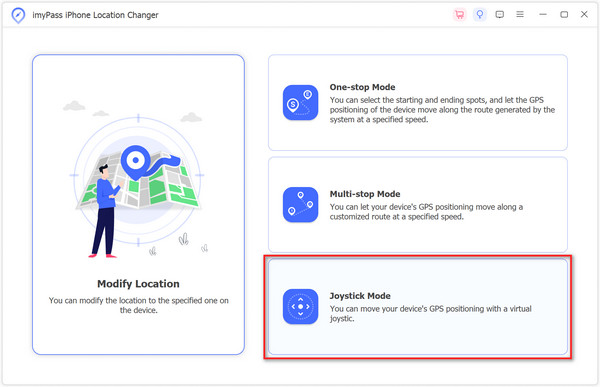
Change locations
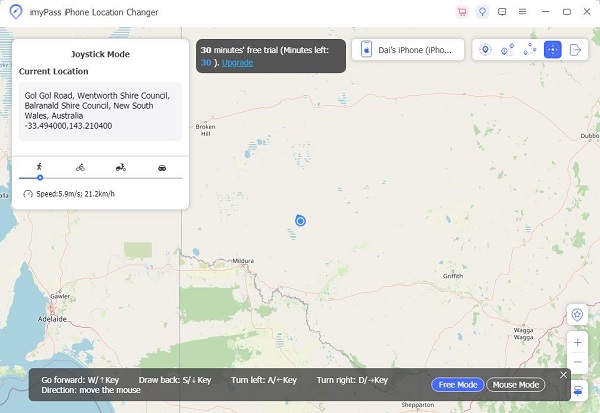
Clique Iniciar movimento and use your mouse or keyboard to control the movement. Then, turn to your phone and start playing Pokémon Go. When the game is done, disconnect your mobile device and close the software.
Conclusão
This article explained what Defit Pokémon Go is. You can learn what the app is used for according to our introduction. Furthermore, we demonstrated how to use the app when playing your AR game. Plus, we shared three applications similar to Defit. imyPass iLocaGo, for example, is able to change your phone location and simulate movements for location-based apps. More importantly, it won’t install any app on your mobile device.
Penny focuses on GPS troubleshooting and Windows optimization. She formerly worked as a technical support engineer, helping clients solve location-based and system issues efficiently. Backed by IT support experience, she provides practical solutions that really work. In her free time, she likes hiking and geocaching, testing GPS tech in the real world.
Soluções quentes
-
Localização GPS
-
Desbloquear iOS
-
Dicas para iOS
-
Desbloquear Android