



 Solução
 Centro de Apoio
 Sobre nós
 Contato
How to Fix Your iPhone Location Sharing Not Working
 Penny Warren publicado em março 19, 2026Localização GPSLeitura de 3 minutos
“I can send my girlfriend my location indefinitely, and we always have shared it with each other, but now her phone won’t come through to me anymore. How to fix location sharing not working on my iPhone?” Location Sharing is an essential feature on iOS devices. It enables users to track friends and family’s location as well as share their own location. If this feature suddenly doesn’t work, you can fix it on your own by following our solutions.

Neste artigo:
Part 1: Why iPhone Location Sharing Is Not Working
On an iPhone, you can share your location in the Find My app, an instant messaging app, or a map app once you set up Location Services properly. This feature is also helpful when you need to track your iPhone location and find your device or check its current position. Before walking through the solutions, let’s discuss the causes first. Understanding the causes and identifying your situation can help you fix the iPhone that is not sharing location quickly. The main causes include:
• Location Services are disabled.
• Connectivity issues or unstable internet connection.
• Low battery.
• Software glitches.
• Privacy restrictions.
Part 2: How to Fix Location Sharing Not Working on iPhone
Excluding hardware malfunction, you can fix the share my location issue on iPhone on your own. You can perform the solutions below one by one to make location sharing normal. Let’s start the journey.
Solução 1: Ative os Serviços de Localização
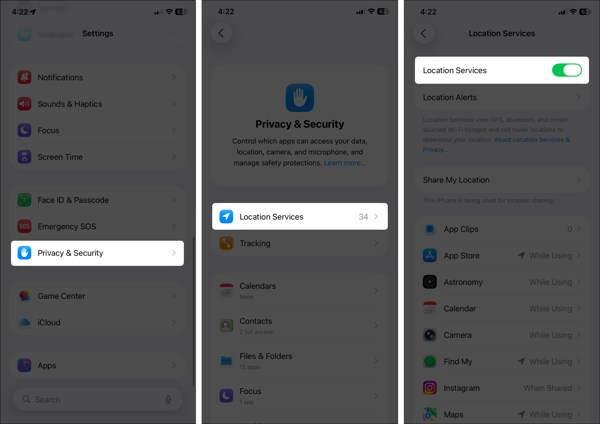
Abra o Definições aplicativo no seu iPhone.
Vou ao privacidade e segurança guia e escolha Serviços de localização.
Make sure to toggle on Location Services.
If Location Services is enabled, turn it off and toggle it back on.
Toque Encontre o meu on the list, and choose Sempre ou Ao usar.
Solution 2: Configure Find My
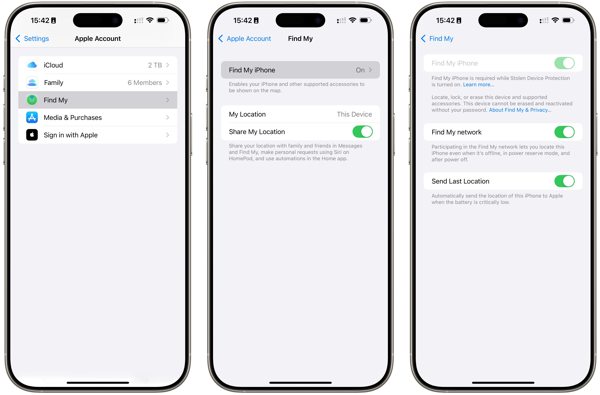
Vá para sua Definições aplicativo.
Toque no seu perfil e escolha Encontre o meu.
Toque Encontre meu iphone e ligue Encontre meu iphone.
Back to the Find My screen and toggle on Compartilhar minha localização.
Se solicitado, toque em Permitir to confirm turning on GPS tracking.
Next, check if the iPhone location sharing not updating issue disappeared.
Solution 3: Check Your Connection
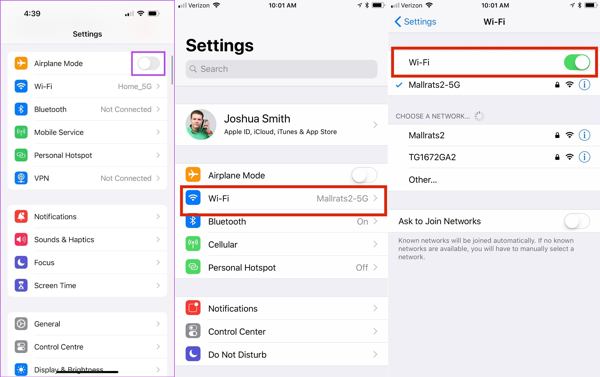
Execute o Definições aplicativo no seu iPhone.
Ativar/desativar Modo avião.
Em seguida, desligue Modo avião.
If you still find iPhone not sharing location, check your internet signal.
Toque Wi-fi dentro Definições and switch to a stable network.
Observação:
If you don’t have a Wi-Fi network, connect to a cellular data network instead.
Solution 4: Disable Location Restrictions
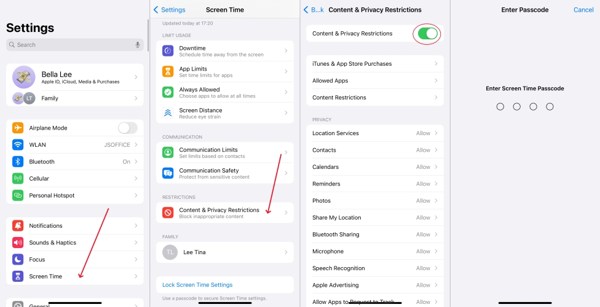
When iPhone location sharing is not updating due to restrictions, go to Tempo de tela na tua Definições aplicativo.
Se solicitado, digite sua senha do Tempo de Uso.
Escolher Restrições de conteúdo e privacidade.
Desligar Restrições de conteúdo e privacidade to completely disable restrictions.
Observação:
If you want to keep restrictions, turn on Restrições de conteúdo e privacidade, escolha Compartilhar minha localização debaixo Privacidadee escolha Permitir.
Solução 5: Atualizar o software
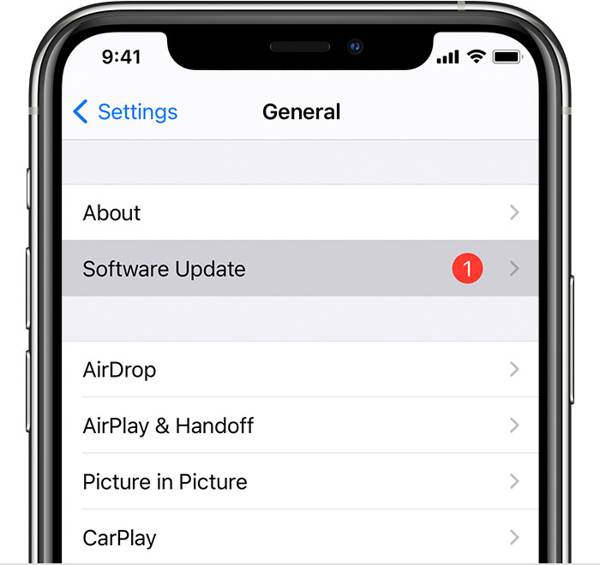
If you are still running an old version of iOS and no location is found when your iPhone shares location, go to the Definições aplicativo.
Vamos para Em geral e escolha Atualização de software para procurar atualizações.
Se uma atualização estiver disponível, toque em Baixar e instalar botão.
Follow the onscreen instructions to install the update.
Observação:
You’d better not install a beta version of iOS. If iPhone location stops sharing after you update to a beta, go back to a standard version of iOS.
Solution 6: Reset Location & Privacy
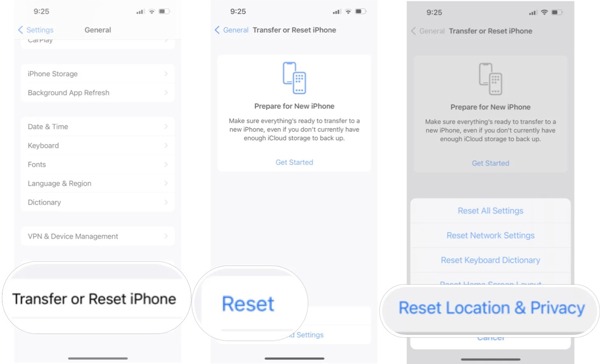
Vou ao Em geral tab in your Settings app when your iPhone is not sharing location.
Role para baixo e toque em Transferir ou redefinir o iPhone.
Toque Redefinir and pick Reset Location & Privacy.
Se solicitado, digite o código de acesso do seu iPhone ou a senha do seu ID Apple.
When your iPhone restarts, set up Find My and share your location.
Leitura Estendida:
Part 3: Bonus Tip: How to Fake iPhone Location
Location Sharing on iPhone is a useful feature, but it is not perfect. It may expose your geolocation and privacy to someone else. Moreover, many apps capture your location information for marketing and advertising. If you turn on Location Services, these services will get your last location available. Can you stop sharing your location without others knowing? iLocaGo can help you resolve this problem.

Mais de 4.000.000 de downloads
Fake iPhone location without disabling Location Sharing.
Change to any address and location around the world.
Create virtual routes for AR games and more.
Ofereça vários modos para diferentes propósitos.
Work on the latest versions of iOS and iPadOS.
How to Fake iPhone Location Without Notifying Others
Passo 1 Conecte-se ao seu dispositivo
Run the iPhone location spoofing software once you install it on your PC. There is another version for Mac. Plug your iPhone into your PC with a Lightning cable. Then, the software will detect your device automatically.

Passo 2 Escolha um modo
On the mode window, you will see four options. If you just need to change your iPhone location, choose Modificar localizaçãoOs outros três modos, Modo de parada única, modo de parada múltipla, e Modo joystick, are used to make virtual locations.

etapa 3 Alterar localização do iPhone
Insira um endereço preciso no campo Modificar localização dialog. If you don’t have an address, click a proper position on the map, and you will see the address. Finally, click on the Modificar button to confirm changing your location. Now, turn to your iPhone and share your location.

Conclusão
Now, you should understand what you can do if sharing location is unavailable on an iPhone. First, you can learn why this problem happens. More importantly, you can follow the proven solutions to get rid of the issue quickly. If you wish to protect your location information and privacy, we suggest iLocaGo. It allows you to change your iPhone location without moving one step. The intuitive design makes it easy to use, especially for beginners and ordinary people.
Penny focuses on GPS troubleshooting and Windows optimization. She formerly worked as a technical support engineer, helping clients solve location-based and system issues efficiently. Backed by IT support experience, she provides practical solutions that really work. In her free time, she likes hiking and geocaching, testing GPS tech in the real world.
Soluções quentes
-
Localização GPS
-
Desbloquear iOS
-
Dicas para iOS
-
Desbloquear Android


