



 Solução
 Centro de Apoio
 Sobre nós
 Contato
Share Fake Location to Protect Personal Privacy on Mobile Phones
 Penny Warren publicado em abril 02, 2026Localização GPSLeitura de 3 minutos
Have you had a family member, friend, or colleague ask for your location in real time? It commonly happens when you go out of town, or when they need to meet you at a place neither of you is familiar with. However, there are instances where we need to share a fake location. This way, we can protect our personal privacy or prank our friends.
If you are interested in doing that, this post will help you a lot. It contains three quick methods to send a fake location on an iPhone or Android phone. Please continue browsing this post to know all the details you need to discover.

Neste artigo:
Recommended: Best Location Changer for All Mobiles
iPhone and Android phones have different operating systems. So, changing your real-time location might require you to use a different app or program. imyPass iLocaGo can help you with this matter! It is an Android phone and an iPhone location changer tool. The program supports the latest versions of iOS and Android.
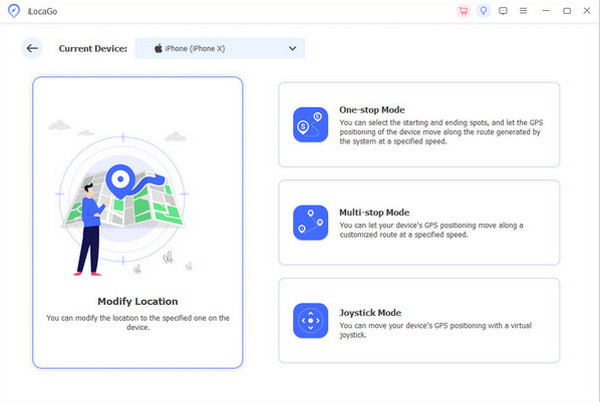
The mentioned software has Multi-stop, One-stop, Custom Speed, and Joystick modes. You can use these features to change your location on Android and iPhone, depending on your needs. Please use the steps below to learn how to use the tool.
Visite o site oficial de imyPass iLocaGo. Then, download it from the website and install it afterward. Later, please open the tool to start the procedure.
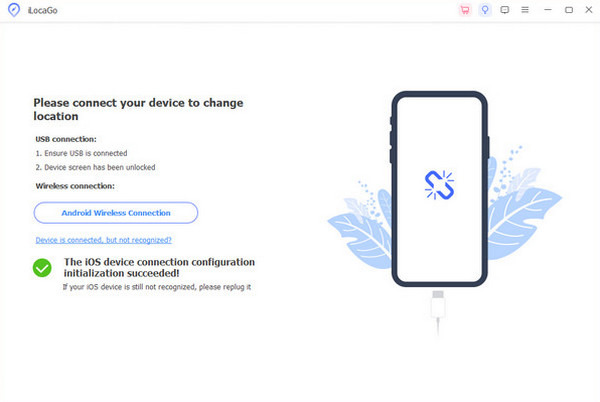
Grab your USB cable. Then, please use it to plug the iPhone or Android phone into the computer where the tool is downloaded. Later, select your device name at the top of the main interface. The supported features for changing the location will be prompted.
Please choose between the Modificar localização, Modo joystick, Modo de parada única, e Modo de parada múltipla. They have different procedures, but the same interface. Please follow the on-screen instructions to change your location.
Part 1. How to Send a Fake Location on iPhone
iPhone has strict security features to protect your data and information. So, changing and sharing a fake location is a bit of a hassle. AVG Secure can help you with this issue. It is a aplicativo GPS falso that allows you to change your real-time location. You can share the fake location afterward using the app you prefer, like Find My.
However, using this application is too risky. Some countries prohibit this type of application, since it poses a threat to national security. If allowed, you may follow the steps below to learn how to use the app.
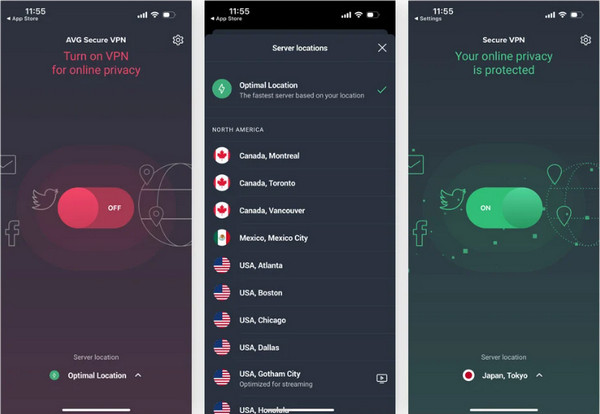
Download, set up, and open AVG Secure on your iPhone. After that, toggle the Desligado slider on the first screen of the app. The app will scan for the available location you can choose from. Please swipe down on the screen and select your preferred fake location.
Please wait for your iPhone to connect to the server for the chosen location. The location will appear at the bottom center of the app. The slider will turn to the On position afterward, indicating that the server is working correctly.
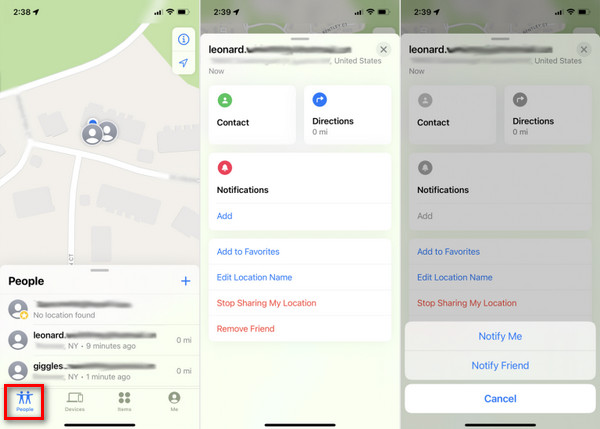
Now, share your iPhone location using Encontre o meu. Open the app and choose the Pessoas button at the bottom left. Then, please select the person you want to share your fake location with. Tap the Mais botão e, em seguida, selecione Compartilhar minha localização. The other information will appear afterward.
Part 2. How to Send a Fake Location on Android
Compared to the iPhone, an Android phone has fewer restrictions on its security features. So, changing and sharing a fake location is much easier. Fake GPS Location Spoofer is a third-party app that can help you. However, you still need to use Google Maps to share your location after changing it using the app. Please refer to the steps below for a somewhat demanding procedure.
No Definições app on an Android phone, please tap About Phone at the bottom. Then, go to the Número da versão section at the bottom. Tap the button seven times until the You are Now a Developer message appears.
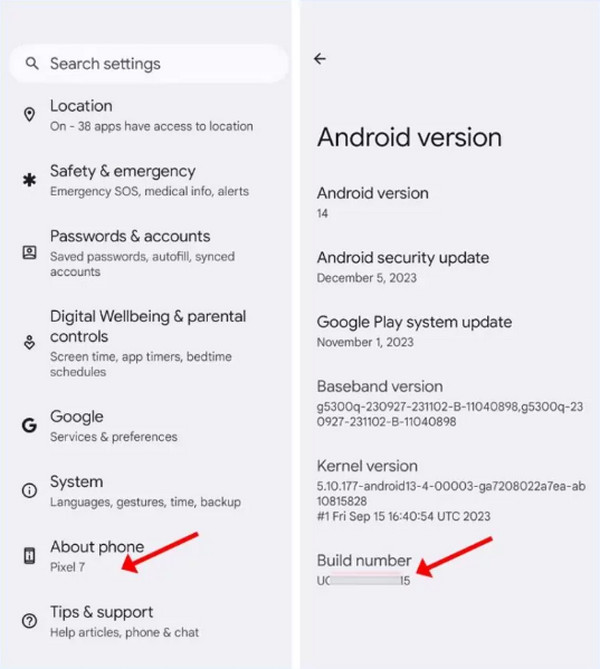
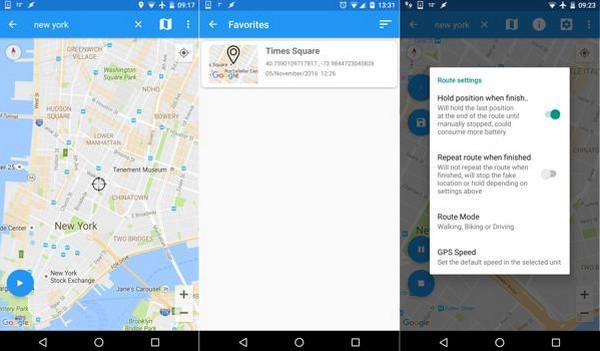
Baixe e abra Falsificador de localização GPS falso. After that, search for your preferred location at the top. Later, tap the Começar ou Jogar button to start changing your location on your Android phone.
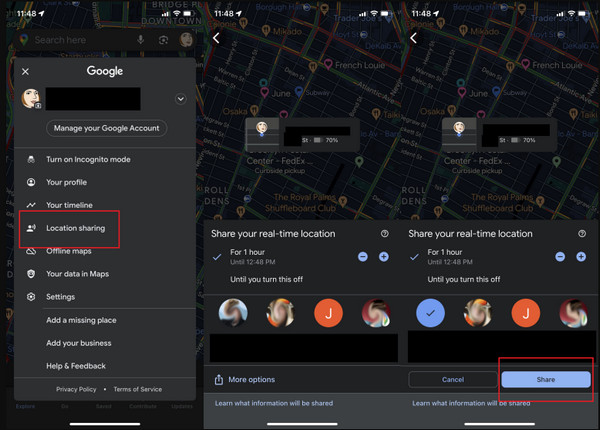
Agora, abra Google Mapas. Tap your account profile at the top right. Then, select the Compartilhamento de localização button from the list. Your contacts will appear on the screen. Select your preferred one. Finally, tap the Compartilhar botão.
Part 3. How to Send a Fake Location on WhatsApp Specifically
WhatsApp is the top app people use to fake their location on an Android phone or an iPhone. How to send a fake location on WhatsApp? You also need to use a GPS falso to complete this process. The good thing about it is that it has a built-in feature that enables you to send a fake location by sharing a static location on your map.
However, ensure you send a reasonable location to your friends and family so they do not think you are faking your location. Refer to the steps below for an easy process.
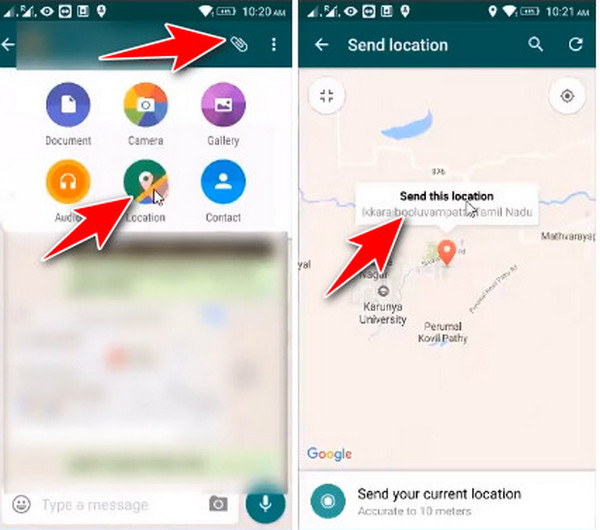
Por favor, abra o O que você acha do WhatsApp? application. After that, tap the Localização button by tapping the Attachment button at the top right. Then, search for a location you prefer for your iPhone or Android phone.
Por favor, toque no Send This Location button that will appear on the location. Tap the Enviar button after selecting the contact you want to send it to.
Part 4. Can You Send Moving Fake Live Location?
Sending a fake location to different applications is simple, as proven by the previous methods. However, can you send a moving fake live location? Definitely, yes! This method cannot be done without third-party apps or programs. imyPass iLocaGo can help you with this. You can use the Multi-stop Mode feature of the tool. This way, you can set multiple locations from your iPhone or Android phone.
However, ensure that the chosen locations are reasonable. A random stop in your area might be suspicious if you are changing your location on the mentioned devices. In this case, your friends or family will doubt your real-time location.
Conclusão
All in all, you will know how to enviar uma localização falsa on your iPhone or Android phone in this post. The three easy ways to do the process are included. imyPass iLocaGo is also recommended as a third-party tool that can change your location from your iPhone or Android phone. Downloading the tool will help you familiarize yourself with the features it supports.
Penny focuses on GPS troubleshooting and Windows optimization. She formerly worked as a technical support engineer, helping clients solve location-based and system issues efficiently. Backed by IT support experience, she provides practical solutions that really work. In her free time, she likes hiking and geocaching, testing GPS tech in the real world.
Soluções quentes
-
Localização GPS
-
Desbloquear iOS
-
Dicas para iOS
-
Desbloquear Android


