Solução
 Centro de Apoio
 Sobre nós
 Contato
Como Falsificar Localização no Instagram no iPhone/Android
 Penny Warren publicado em outubro 23, 2026Localização GPSLeitura de 3 minutos
Today, more and more people want to keep their real location private when sharing photos and videos online. On Instagram, you can add a location tag to your posts or Stories, and in some cases, create a custom place. In this guide, we'll show you how to criar um local no Instagram, add a location to your Story, and explore other ways to fake your Instagram location.

Neste artigo:
Part 1: How to Create a Custom Location on Instagram
Can't find the place you want to tag on Instagram? You can try creating a custom location through Facebook first. Here's how.
Open the Facebook app and start a new post.
Toque Check-in and search for the location you want to create.
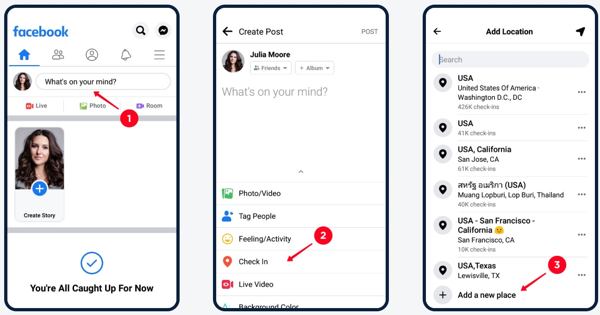
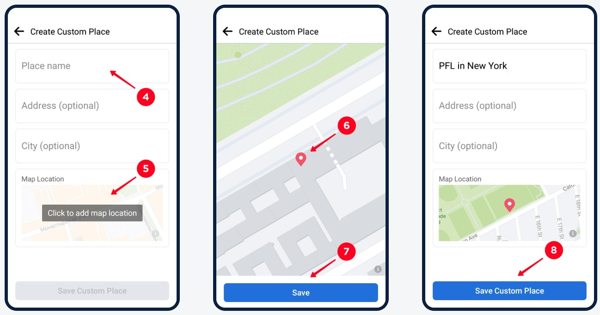
If it doesn't appear, tap Adicionar um novo local.
Enter the place name, choose a category, add the location details, and save it.
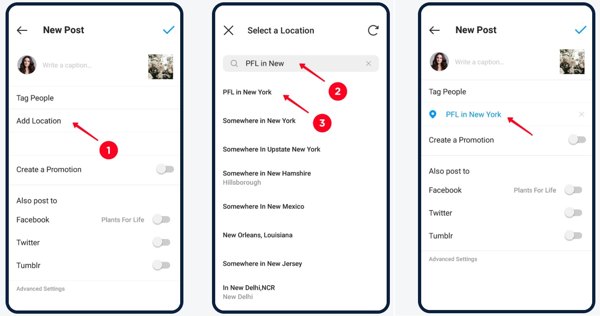
Open Instagram, create a post, tap Adicionar local, and search for your new place.
Observação:
Facebook's location-creation option may not be available to every account. A new place may also take time to appear on Instagram, and creating it on Facebook doesn't guarantee it will become available as an Instagram location tag.
Part 2: How to Add Your Location to Instagram Story
Want to show a location on your Instagram Story? You can add a location sticker in just a few steps.
Open Instagram and create a Story using a new or existing photos or videos.
Toque em Adesivos icon at the top of the screen.
Selecionar Localização and search for the place you want to tag.
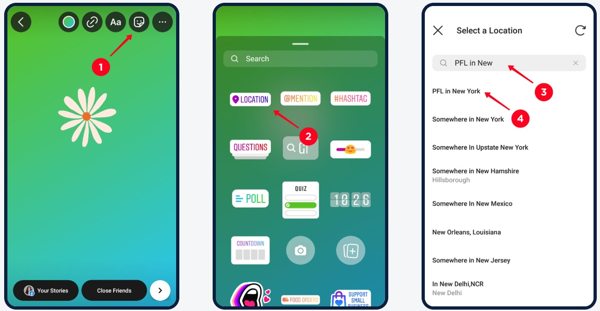
Tap the correct location to add it to your Story. Adjust the sticker's position if needed, then share your Story.
Part 3: How to Fake Instagram Location Without Facebook
Don't want to use Facebook to create a custom location? You can try changing your phone's GPS location instead. imyPass iLocaGo lets you change the GPS location on iPhone or Android devices without jailbreaking or rooting. It allows you to fake Instagram location in a few steps. Moreover, it is safe and legal to use.
Mais de 4.000.000 de downloads
Fake location on Instagram to any place.
Change your location on Tinder, Hinge and more apps.
Offer different modes to simulate locations and routes.
Customize speed and destinations while moving.
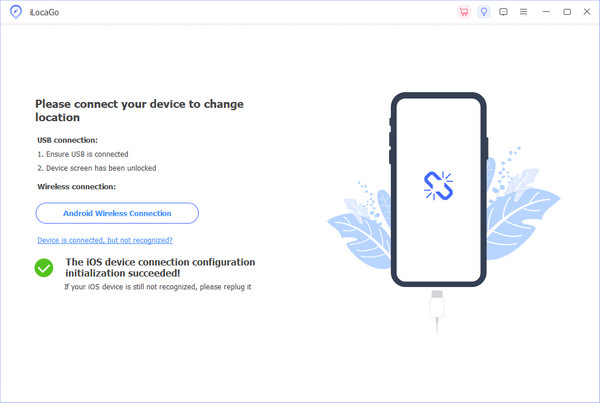
Connect Your Phone to a Computer
Install and launch imyPass iLocaGo on your Windows PC or Mac. Connect your iPhone or Android phone using a USB cable. If prompted, tap Confiar on your iPhone to authorize the connection.
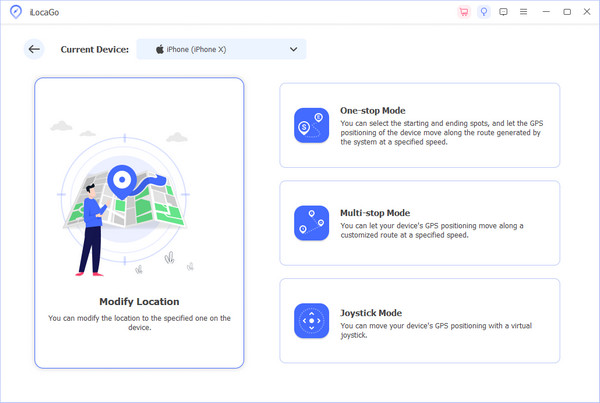
Choose a Location Mode
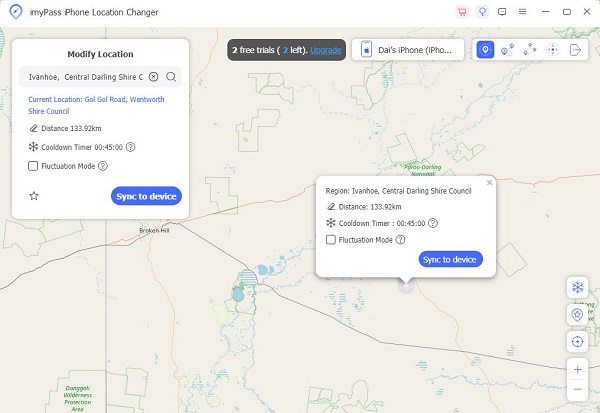
Once the program detects your phone, select Modificar localização to change your device's GPS location. You can choose other three modes if you want to simulate a route.
Choose a Fake Location
Enter an address in the search field or select a spot on the map. Click Sincronizar com o dispositivo to apply this new location. Then, open Instagram and share a post with the fake location.
Part 4: Why Does Fake Instagram Location Not Show Up
Have you changed your GPS location, but Instagram still doesn't show the expected location? This can happen for several reasons. Here are three things to check.
- Syncing Delays: The new location may not show up immediately after you change your GPS. Give it a little time, then close and reopen Instagram.
- Location Services Issue: Check whether Location Services are enabled for both Facebook and Instagram, and review Instagram's location permissions.
- Falhas de software: Try restarting Instagram, checking your internet connection, and updating the app to the latest version.
Perguntas frequentes.
-
Por que aplicativos de localização falsa funcionam no Instagram?
O Instagram utiliza APIs de localização de sensores GPS. Portanto, se você usar um aplicativo de localização falso, o Instagram detectará o GPS falsificado como sua localização real.
-
Como os influenciadores podem usar localizações falsas?
Criadores de conteúdo frequentemente usam localizações simuladas para proteger a privacidade. O uso ético exige transparência e evitar enganar parceiros comerciais. O uso excessivo de tags falsas pode reduzir as métricas de engajamento.
-
Alterar a localização no Instagram pode afetar os anúncios ou o alcance?
Sim, alterar os dados de localização pode redefinir o direcionamento de anúncios e direcionar o alcance do seu conteúdo para regiões não relevantes. O algoritmo do Instagram prioriza o engajamento local, portanto, um GPS falso pode distorcer as análises e diminuir a relevância.
Conclusão
Este tutorial compartilhou como adicione locais engraçados do Instagram on your mobile device. You can create a custom location through Facebook, add a location tag to your Story, or try imyPass iLocaGo to change your phone's GPS location. Make your Instagram content stand out with creative location tags and give your followers something new to explore!
Penny focuses on GPS troubleshooting and Windows optimization. She formerly worked as a technical support engineer, helping clients solve location-based and system issues efficiently. Backed by IT support experience, she provides practical solutions that really work. In her free time, she likes hiking and geocaching, testing GPS tech in the real world.
Soluções quentes
-
Localização GPS
-
Desbloquear iOS
-
Dicas para iOS
-
Desbloquear Android