Solução
 Centro de Apoio
 Sobre nós
 Contato
Why Stellar iPhone Recover Remains a Top-Notch for Recovering Data
 Clara Prescott publicado em abril 16, 2026Recuperar dadosLeitura de 3 minutos
Surely you have experienced updating iOS, only to find that your files suddenly vanish. Checking iCloud backup is often the first instinct, but when your data is not there, the next step is searching online. Many users encounter Recuperação de dados Stellar para iPhone in these situations. This tool helps retrieve lost photos, contacts, and documents safely. In this article, we review its features, pricing, step-by-step usage, and alternatives, so you can decide if it is the right solution for your data recovery needs.

Neste artigo:
Part 1. What is Stellar iPhone Data Recovery?
Stellar iPhone Data Recovery Software is a reliable tool for retrieving lost or suddenly deleted data from iPhones, including photos, contacts, messages, videos, and documents. It can work with different versions of iOS and retrieve data lost due to accidental deletion, system crashes, and device failures. The software allows for easy recovery with its simple interface, enabling users to preview files before recovery.
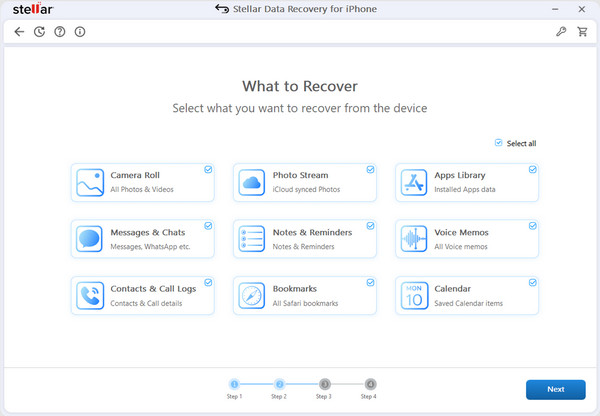
Compatible with both Windows and Mac, Stellar iPhone Recovery provides a secure and efficient solution for individuals and professionals seeking to regain important iPhone data quickly and safely.
Part 2. In-Depth Review: Features & Performance
1. Key Features & How It Works
Stellar iPhone Recovery is designed to make data recovery surprisingly simple. It can retrieve everything from photos and videos to messages, contacts, and even app data. The tool offers quick scans for recently deleted items and deep scans for more stubborn losses.
One of its best features is the ability to preview files before restoring them, so you know exactly what you are getting back. Whether you are on Windows or Mac, the interface feels clean and straightforward, making the recovery process less stressful for anyone facing unexpected data loss.
2. The Free Version: What Can You Really Do?
The free version of Stellar iPhone Recovery is more than just a teaser. It lets you scan your device and see exactly what files are recoverable. While you cannot restore everything without upgrading, this peek at your lost data helps you decide if the paid version is worth it. It is a low-risk way to test its capabilities and get a sense of how much it can save, giving you confidence before you commit.
3. Effectiveness & Success Rate
Stellar iPhone Recovery handles even tricky data loss situations with surprising accuracy, making it comparable to the Recuperação de dados UltFone iOS. Whether files vanished after an iOS update, a crash, or accidental deletion, its scanning engine digs deep to find hidden or partially overwritten data. Although the success rate is not 100%, the recovery tool is very reliable, especially when the user needs the most important data. The detailed preview and scanning features make it one of the most reliable recovery tools, especially for those interested in iPhone data recovery.
Part 3. Pricing & Plans: Is It Worth the Cost?
Standard Plan: Features & Cost
The Standard plan is suitable for general consumers who wish to recover lost photos, videos, messages, contacts, and call logs on up to three devices. It is priced at $39.99 after discount and includes all recovery functions. It supports all devices, including the newest iPhone models, iPhone 6 to iPhone 18 Pro, and all iOS versions up to iOS 27. It permits you to take a look at the recoverable files before recovery, thus saving you money on things you do not need. It is a reliable plan without overspending.
Toolkit Plan: Features & Added Value
The Toolkit plan costs $49.99 after discount and adds extra functionality for users who want more control over their devices. Apart from all the features available in the Standard plan, this plan also offers iPhone Data Eraser, which securely deletes important data, iOS system repair for troubleshooting software problems, and Apple ID removal for those who have forgotten their Apple ID. This plan is recommended for professionals or for those who need to perform multiple recovery jobs, offering a range of features with Stellar Data Recovery for iPhone.
Which Plan Should You Choose?
If you only need to recover lost files like photos, messages, or contacts, the Standard plan is enough. For extra tools like permanently erasing data, fixing iOS issues, or removing an Apple ID, the Toolkit plan is the better choice.
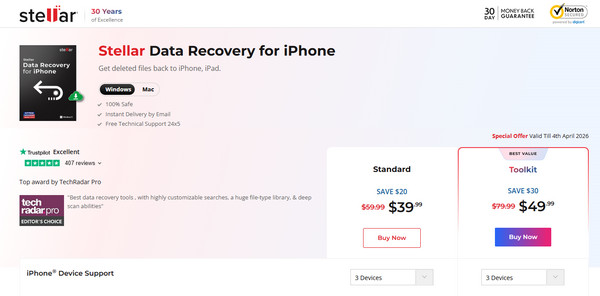
Both plans support multiple devices and the latest iOS versions, making Stellar Data Recovery on iPhone a safe and reliable solution for any level of data recovery.
Part 4. How to Use Stellar iPhone Data Recovery
Using Stellar iPhone Recovery is straightforward, even if you have never tried data recovery before.
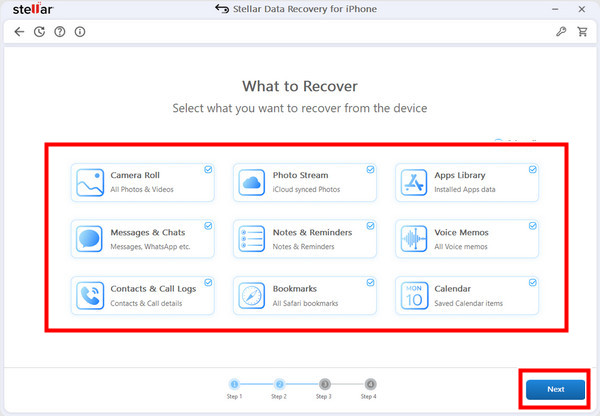
Passo 1: Connect and Select Files
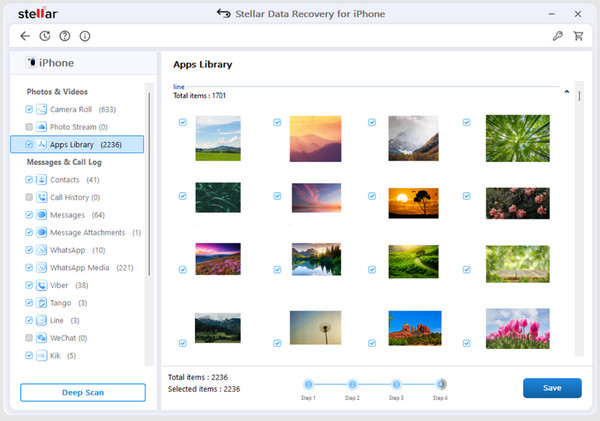
First, you need to connect the iPhone that you want to recover. Then, choose Recuperar do iPhone and select all the files that you want to recover, such as photos, messages, and documents. It is important to choose exactly what you need to recover, and this speeds up the recovery process.
Passo 2: Scan Your Device
Clique no Próximo button to start scanning. The software will dive deep into your iPhone’s data, searching for lost or deleted files. Depending on how much data is on your device, this process may take a few minutes, so be patient while it completes a thorough scan.
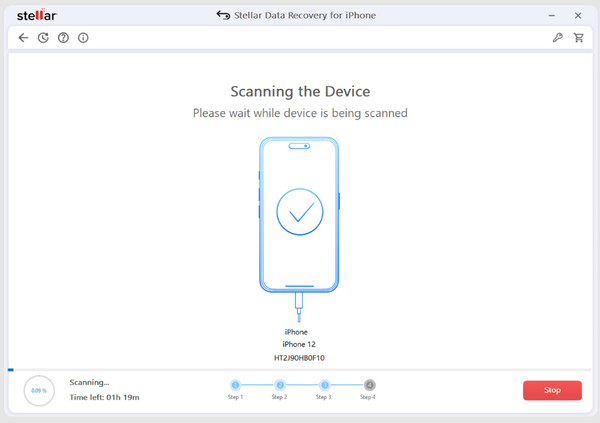
Etapa 3: Preview and Save
Once the scan has finished, deleted files are highlighted in red, and they are recoverable files. To recover them, one simply checks the boxes next to them and clicks on Salvar, and they are restored. This helps in ensuring that one does not recover files unnecessarily, keeping the process efficient and safe.
Part 5. Pros and Cons
Prós
- Allows recovery of various data types, including photos, messages, contacts, and videos.
- It offers a preview feature so you can select exactly which files to restore.
- The software supports both Windows and Mac, making it accessible to most users.
- Multiple scanning modes allow for quick or deep recovery depending on the situation.
- Works with the latest iPhone devices and iOS, ensuring users do not miss out if they use newer devices.
Contras
- The free version only allows scanning and preview, not full recovery.
- Deep scans can take time on devices with large amounts of data.
- Some advanced features, like data erasing or system repair, require the Toolkit plan.
- Recovery success depends on whether deleted files have been overwritten.
- The interface may feel slightly overwhelming for complete beginners at first.
Part 6. Top Alternative to Consider
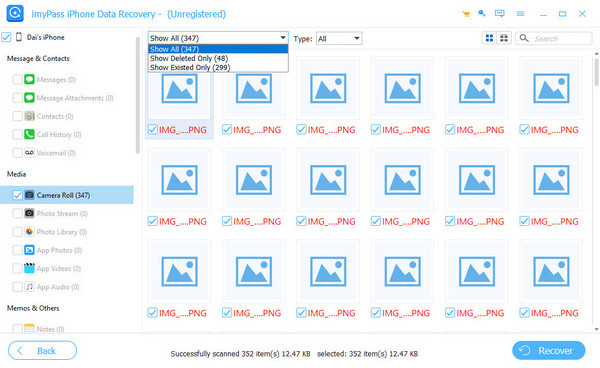
If you want another reliable option, Recuperação de dados do iPhone imyPass is worth a look. It uses a high-tech deep scanner to recover all lost or deleted content on your iPhone quickly and efficiently. The software supports a wide range of data types, including photos, messages, contacts, and app files, and works across most iPhone models and iOS versions.
Like Stellar, it allows you to preview recoverable files before restoring them, giving you control over what gets recovered. For anyone seeking a dependable iPhone data recovery solution, imyPass is a strong alternative.
Conclusão
You will need the Recuperação de iPhone Stellar to restore all the recoverable data that is currently non-existense on an iOS device. As you can see, it features a high-quality iOS data recovery method that is comparable to the top-notch software. But if you feel that the app is not enough, then we suggest you pick its top alternative here.
Clara has over 8 years of experience helping users recover lost files and transfer data. She previously worked as a data recovery technician for a major IT service company. Certified in Data Recovery and Digital Forensics, her articles focus on simple solutions that make complicated recovery tasks easier for everyday users.
Soluções quentes
-
Recuperar dados
- Análise da recuperação de dados do AppGeeker iOS
- Disk Drill iPhone Data Recovery Review
- How to Get iPhone Out of Recovery Mode
- How to Fix support.apple.com/iphone/restore
- How to Recover Data from DFU Mode
- Análise do Gbyte iPhone Data Recovery
- How to Recover iPhone Deleted Photos After 30 Days
- How to Recover Deleted Photos on iPad
-
Desbloquear iOS
-
Transferir dados
-
Dicas para iOS

Recuperação de dados do iPhone
Recuperar dados do iPhone excluídos ou perdidos
Download grátis Download grátis