Solução
 Centro de Apoio
 Sobre nós
 Contato
What Is iMobie DroidKit for Android and How to Use It
 Gideon Byron publicado em julho 22, 2026Desbloquear AndroidLeitura de 3 minutos
Android gives users freedom; however, users can encounter a variety of issues. If you forgot the lock screen password, for example, you will be locked out of your device. Accidental data deletion is another big challenge. Moreover, Android devices are locked by FRP once users log in with Google accounts. iMobie DroidKit is a full Android toolkit to help users resolve various issues on smartphones and tablets. Here is an unbiased review.

Neste artigo:
Part 1. DroidKit Review
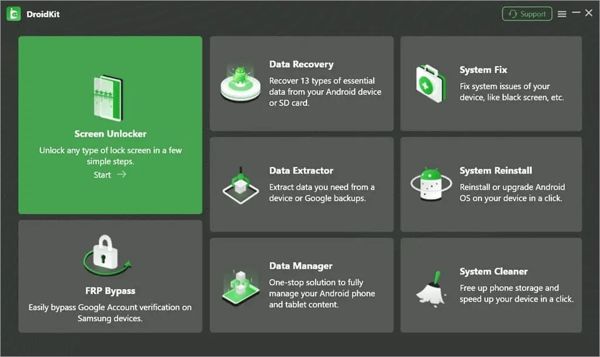
DroidKit is a legitimate software program developed by iMobie. As an all-in-one toolkit, it can deal with any problem concerning Android devices in a single place. In addition to downloading different applications for various problems, DroidKit offers you a solution for all Android-related problems.
Main Features of iMobie DroidKit
- 1.Unlock the screen on many Android devices quickly.
- 2.Work for any type of Android screen lock.
- 3.Bypass Google Account Verification on Samsung and other devices.
- 4.Recover deleted data from Android devices and SD cards.
- 5.Extract data from a device or Google backups.
- 6.Manage Android data on a computer.
- 7.Fix software glitches, like a black screen.
- 8.Reinstall or upgrade the Android OS.
- 9.Free up phone storage and speed up your phone.
- 10.10.Support over 2,000 Android phone models.
DroidKit Review
Pros
- It is compatible with Android 6.0 to 17.
- DroidKit works on devices released by Samsung, Google, OnePlus, Xiaomi, Redmi, OPPO, etc.
- It allows users to purchase only the required feature to cut costs.
- The user-friendly interface offers on-screen instructions.
- It can unlock an Android phone without the password or root.
Contras
- The entire software is very expensive.
- DroidKit requires a computer.
- The System Fix feature is exclusive to Samsung and Xiaomi devices.
- The Deep Recovery needs root access.
Is DroidKit Free?
No. You can download the free trial of DroidKit from the official website. The full subsection costs $69.99 per year. If it is expensive, you can purchase a single feature. The Screen Unlocker feature costs $39.99, the DroidKit FRP Bypass feature costs $39.99, the Data Manager feature costs $29.99, and the System Reinstall feature costs $19.99.
Is DroidKit Safe?
Yes, DroidKit is safe and feature-rich if you download it from official or trusted sources. It won’t install malware on your device. According to our test, most antivirus software won’t report viruses when using or installing the DroidKit Android toolkit.
Part 2. How to Use DroidKit to Unlock the Screen
To use DroidKit screen unlock, you need to install the program on a computer. Subscribe to a plan according to your needs and situation. The free trial can unlock nothing. Then, follow the steps below to unlock your screen.
Connect your Android device to your computer with a USB cable.
Launch DroidKit and log in with your subscription plan.
Escolha o Desbloqueador de tela option in the home interface.
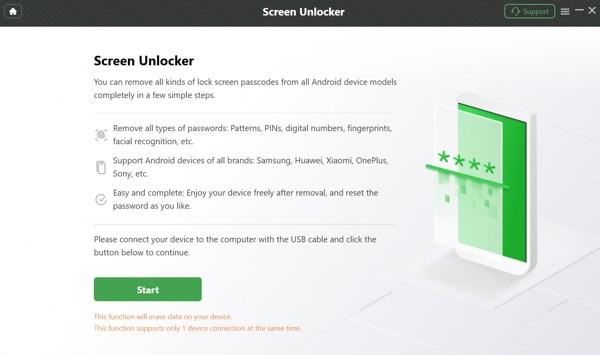
Read the alerts on the screen and click the Começar botão para iniciar o processo.
Quando solicitado, escolha Dispositivo conectado in the dialog.
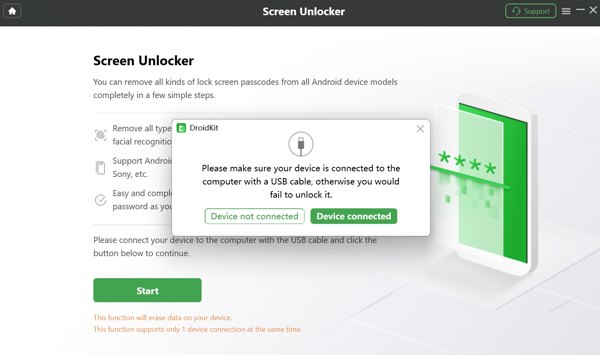
Then, the software will prepare the configuration file for your phone.
Once preparation is completed, click the Remover agora botão.
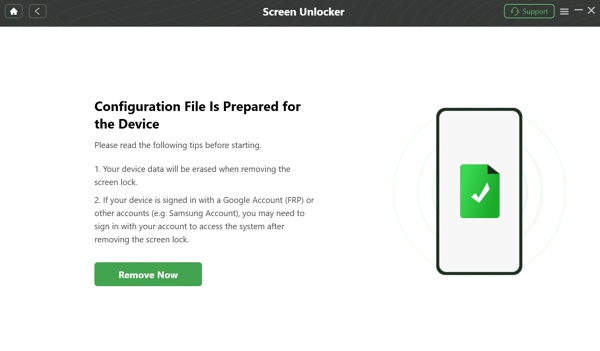
Next, select your phone brand and choose the Wipe device data opção.
Clique no OK botão para continuar.
Follow the onscreen instructions to put your phone in Recovery Mode.
Then, the DroidKit will begin unlocking your phone screen immediately.
Aguarde a conclusão do processo e desconecte o telefone.
Observação:
Bear in mind that the process will erase all data on your phone. To avoid data loss, you’d better back up your device first.
Part 3. A Great Alternative to DroidKit
DroidKit is not a perfect program. For example, it is not compatible with all Android brands and models. The success rate of FRP bypass is inconsistent. More importantly, not all recovery scenarios are supported. It makes sense that you wish to look for an alternative to DroidKit. From this point, we recommend imyPass AnyPassGo. It is a compact program to unlock the Android phone screen or FRP. With the intuitive design, it is friendly to beginners. .
Mais de 4.000.000 de downloads
Unlock the Android phone screen without the password.
Remove PIN, pattern, fingerprint, Face ID, and more.
Bypass FRP from Android devices without the Google password.
Easy to use and deliver a high success rate.
Support a wide range of Android brands and device models.
How to Use the DroidKit Alternative to Unlock Phone Screen
Install the DroidKit alternative
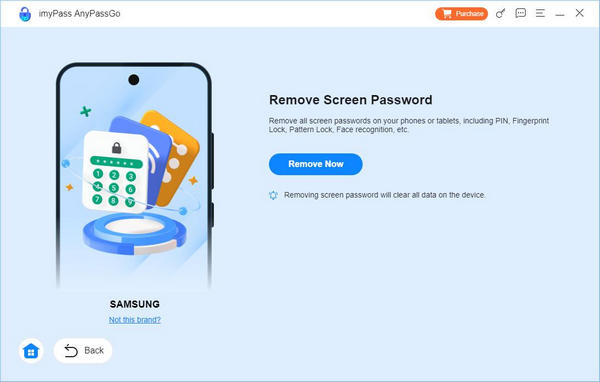
Download the Android screen unlocking software from the official website. Then, install it on your computer following the onscreen instructions. It is available on Windows 11/10/8/7. When you forgot your phone screen, launch the software from your desktop and choose the Remover senha da tela modo para prosseguir.
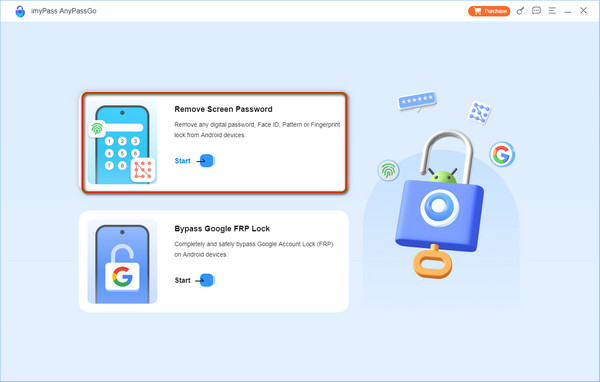
If your phone is locked by FRP, choose Ignorar bloqueio do Google FRP em vez de.
Conecte-se ao seu telefone
Plug your locked phone into the computer with a compatible USB cable. Turn to the software and choose your phone brand. If the software fails to detect your device, click This device is connected but cannot be recognized and follow the prompts to try again.
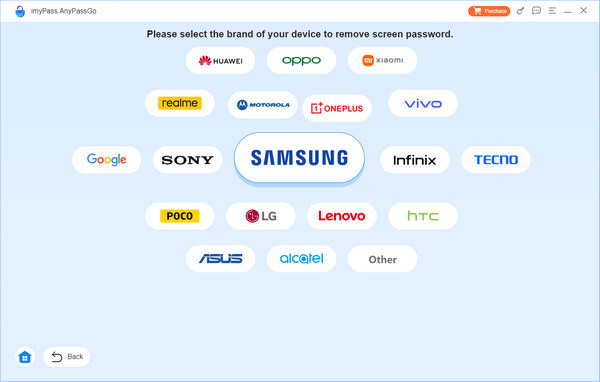
Unlock your screen
Once the connection is successful, click the Remover agora button to initiate unlocking your phone screen with the DroidKit alternative. When it is done, close the software and disconnect your phone. Then, restart your device and set it up.
Conclusão
Este artigo reviewed DroidKit, one of the best all-in-one Android toolkits on the market. Now, you should understand what the toolkit can do, its advantages and downsides, and other necessary information. Plus, you can learn the concrete guide to screen unlock with the software. The knowledge can help you make a better decision. If it is unavailable on your device, try the alternative program, imyPass AnyPassGo. It is easier to use, more cost-effective, and delivers a higher success rate.
Gideon writes about unlocking iOS, Android, and Windows devices. He previously worked as a mobile device specialist in a repair center, assisting customers with locked devices and password recovery. In his spare time, he tests new unlock tools, customizes smart devices and makes complex unlock processes simple and safe.
Soluções quentes
-
Desbloquear Android
-
Desbloquear iOS
-
dicas de senha
-
Dicas para iOS