



 Solução
 Centro de Apoio
 Sobre nós
 Contato
What Does Lost Mode Do on iPhone and How to Unlock It
 Samuel Spenser publicado em outubro 22, 2026Desbloquear iOSLeitura de 3 minutos
Apple adds several security measures to iPhones to protect privacy and data. Suppose an iPhone has been stolen or lost, the owner can turn on Lost Mode remotely. However, some users wonder if someone can unlock an iPhone in Lost Mode. We researched this problem online and found there is a lot of misinformation about how secure Lost Mode really is. This article will answer this question in detail.

Neste artigo:
Part 1: Can Someone Unlock My iPhone in Lost Mode
Can someone unlock my iPhone in Lost Mode without the passcode? The short answer is no. Lost Mode is specifically designed for unauthorized access to iOS devices. Without the device passcode or the linked Apple Account password, no one can unlock it.
Part 2: What Does Lost Mode Do on iPhone
What does Lost Mode do on iPhone? Lost Mode is part of Apple's Find My. If an iPhone is stolen or lost, the user can remotely enable it on iCloud.com or in the Find My app. Then, the device is immediately secured, and access is restricted. Once Lost Mode is turned on:
- 1.Your iPhone will be locked with the current passcode.
- 2.Apple Pay cards and passes are suspended.
- 3.Notifications and alarms become silenced, but phone calls and FaceTime can come through.
- 4.You can send a message and contact number on the Lock Screen.
- 5.iPhone location can be tracked when it is online.
- 6.You will receive a confirmation email from Apple.
Bear in mind that all your data and account will not be removed from the lost iPhone.
Part 3: How to Unlock an iPhone in Lost Mode
You can unlock an iPhone in Lost Mode with the associated Apple Account credentials or current passcode. In other words, you can get rid of Lost Mode on an iPhone or remotely after you find your device.
Way 1: How to Turn off Lost Mode on iCloud
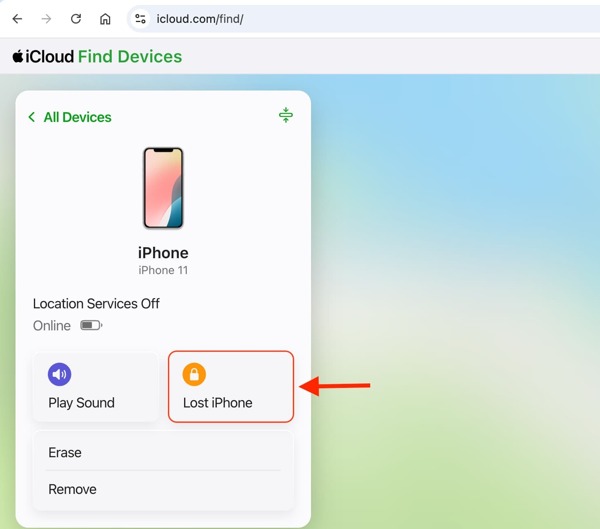
Go to www.icloud.com/find/ in a web browser.
Log in with the linked Apple Account and password.
Clique Todos os dispositivos and select the stolen or lost iPhone.
Clique no Lost iPhone ou Modo perdido botão.
Bater Pare o modo perdido to turn off Lost Mode on iPhone.
Way 2: How to Unlock an iPhone in Lost Mode with Passcode
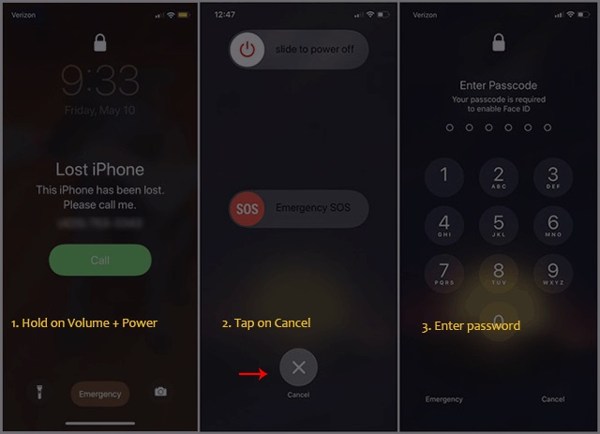
Hold one of the Volume botões e o Lado button on the Lost iPhone screen for a while to display the power-off screen.
Toque em Cancelar botão na parte inferior.
Enter the current passcode to unlock the iPhone in Lost Mode.
Way 3: How to Turn off Lost Mode in Find My
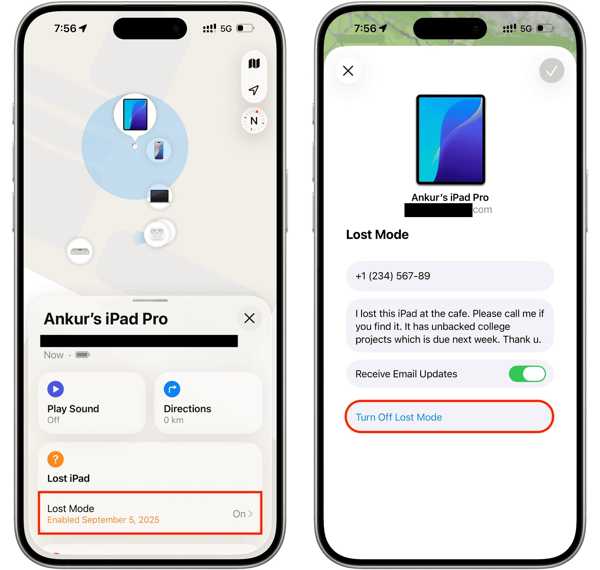
Execute o Encontre o meu aplicativo em outro dispositivo Apple.
Sign in to the associated Apple Account and password.
Vou ao Dispositivos tab and choose the lost iPhone.
Acerte o Modo perdido option on the toolbar.
aperte o Desligue o modo perdido botão.
Part 4: Bonus Tip: How to Unlock an iPhone Without a Passcode
If you forgot your iPhone passcode, imyPass iPassGo allows you to bypass the lock screen and unlock your iPhone directly. It works for all screen lock types on iOS devices. Furthermore, the clean interface simplifies the workflow.

Mais de 4.000.000 de downloads
Unlock an iPhone directly without a password.
Easy to use and complete the process in three steps.
Remove digit passcodes, Face IDs, and Touch IDs.
Offer bonus features, such as bypassing Screen Time.
Support the latest editions of iOS and iPadOS.
How to Unlock an iPhone Without a Password
Link the iPhone to the computer
Download and install the iPhone unlocking software on your PC. There is another version for Mac. When you need to unlock an iPhone, launch it and choose the Desbloquear tela do iOS mode. Connect your iPhone to the PC with a Lightning cable.
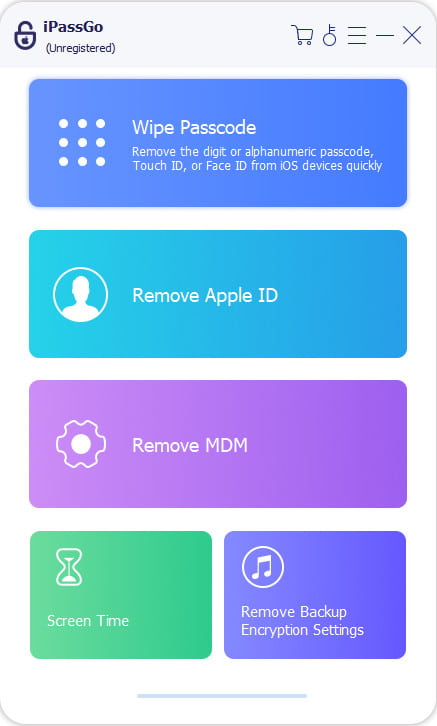
Baixe o firmware
Once the software detects the iPhone, check the device information. Then, click the Comece agora button to begin downloading the firmware package. It may take a while, depending on the internet connection.
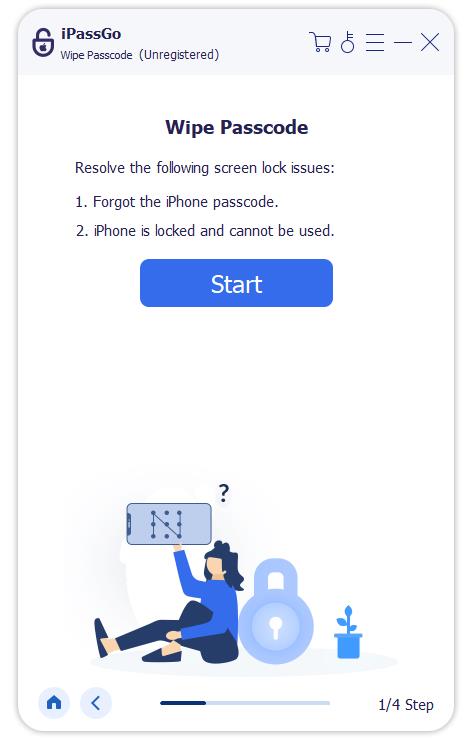
Unlock iPhone passcode
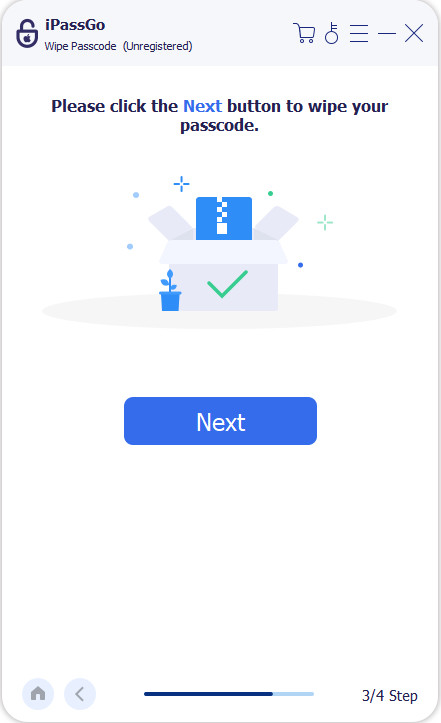
Após fazer o download, clique no Começar a remover button to proceed. Read the notification and confirm unlocking. Next, click the Confirm Again button to start unlocking your iPhone without a passcode.
Observação:
The process deletes all your data. You'd better back up your iPhone before the process.
Conclusão
Este artigo explicou Modo perdido do iPhone. You should understand what the term means and how it works. More importantly, you can learn three ways to unlock an iPhone with the current passcode or associated Apple Account credentials, even if it is already in Lost Mode. Furthermore, we recommend imyPass iPassGo to help you unlock any iPhone that is locked, disabled, or frozen without a password.
Samuel specializes in password security and digital privacy. He used to work as a cybersecurity consultant for small businesses to protect digital assets. With certifications in Cybersecurity and Ethical Hacking, he turns complex security topics into easy-to-follow advice. He also enjoys sharing password tips to help users protect their accounts more confidently.
Soluções quentes
-
Desbloquear iOS
-
Dicas para iOS
-
Desbloquear Android
-
dicas de senha


