



 Solução
 Centro de Apoio
 Sobre nós
 Contato
How to Remove Activation Lock Without Previous Owner
 Samuel Spenser publicado em julho 29, 2026Desbloquear iOSLeitura de 3 minutos
Suppose you got a second-hand iPhone or iPad, chances are that your device is locked by iCloud Activation Lock. As a result, you will be asked to enter the old Apple ID password when you set up the device. In other words, Apple Activation Lock is a double-edged sword. It protects iOS devices from theft, as well as locks devices against unauthorized access. This guide shares multiple ways to remove Apple Activation Lock without the old owner.

Neste artigo:
Part 1: How to Remove Activation Lock with Apple Account
When you purchased or got a used iPhone, you may have the associated Apple Account. Then, you can turn off Activation Lock on your device directly. You cannot find the Activation Lock in Settings. Alternatively, you need to turn off Find My iPhone or Find My iPad. Then, Activation Lock will be disabled automatically.
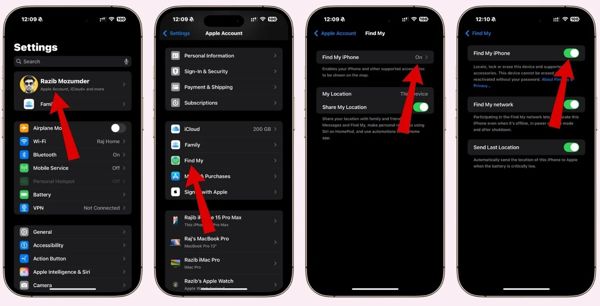
Execute o Aplicativo de configurações no seu iPhone ou iPad.
Tap on your profile at the top of the screen.
Escolha o Encontre o meu opção.
Toque em Encontre meu iphone botão.
Desligue o Encontre meu iphone opção.
When prompted, enter the Apple Account and password.
Finally, confirm turning off Find My iPhone.
Observação:
If you don’t have the associated Apple Account and password, explore other methods.
Part 2: How to Remove Activation Lock via Bypass DNS
If your device runs iOS 8 or earlier, you can remove Activation Lock without the previous owner for free via DNS. In fact, this method utilizes a bug on iPhones and iPad devices. Moreover, the success rate is different, depending on your device model.
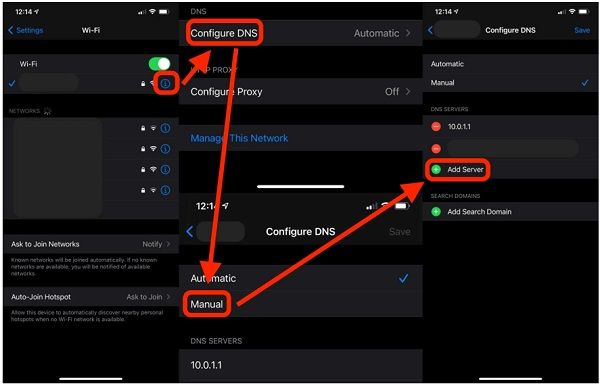
Power on your iPhone or iPad and set it up following the instructions.
If you have set up your device, go to the Definições app and tap Wi-Fi.
On the Wi-Fi settings screen, tap the Informações button on the current network.
Escolher forget this network.
Em seguida, toque no Informações button on the network again to enter the DNS settings screen.
Toque Configurar DNS e escolha Manual.
Enter the DNS address according to your location:
- North America – 104.154.51.7
- South America – 35.199.88.219
- Europe – 104.155.28.90
- Asia – 104.155.220.58
- Australia and Oceania – 35.189.47.23
Toque em Voltar botão para ir para a tela anterior.
Then, connect to the Wi-Fi and enter the password.
Observação:
Some features on your iPhone may not be available.
Part 3: How to Remove Activation Lock by Apple Support
Another way to remove Activation Lock on iPad without the previous owner is to ask Apple directly. You can visit a nearby Apple Store and ask customer support to help you or access the Apple Support website.
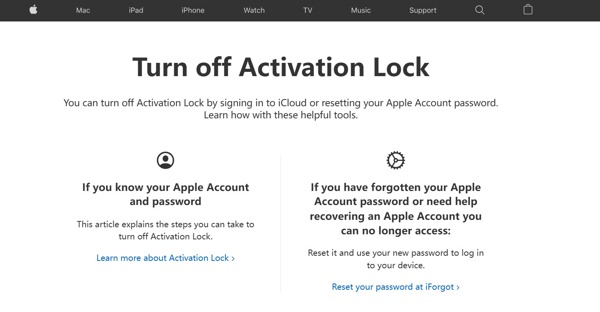
Go to https://al-support.apple.com/#/ in a web browser.
Find the serial number or IMEI:
Opção 1: Check the serial number or IMEI number on the box of your device.
Opção 2: Vou ao Definições aplicativo, escolha Em geral, tocar Sobre, e verifique Número de série e IMEI.
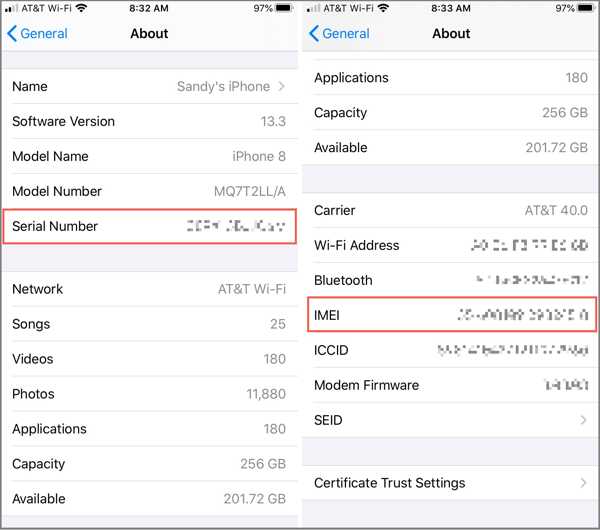
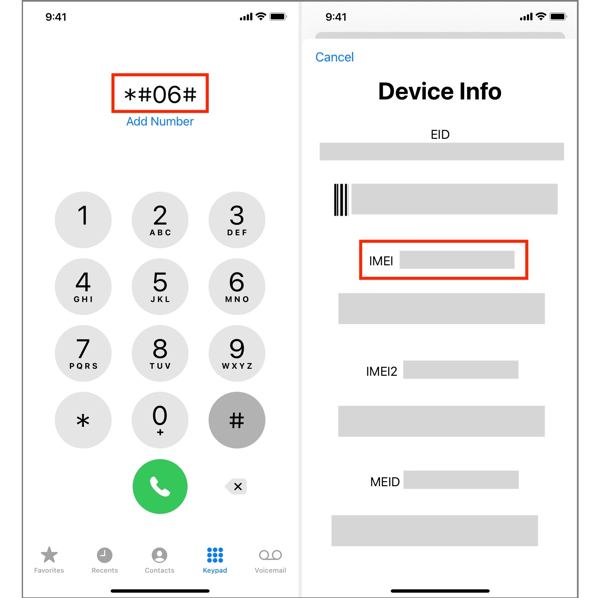
Option 3: Abra o Telefone app, type *#06#, e acerte o Chamar botão.
Provide the email address, serial number, or IMEI.
Once Apple receives your request, it will send you the next steps.
Observação:
Be aware that Apple may deny your request.
Part 4: How to Remove Activation Lock with Bypass Code
If your iPhone or iPad is enrolled in an MDM solution, you can remove Apple Activation Lock without the old owner using a bypass code. This code is generated once you enroll in the MDM.
Turn on your device.
Vamos para Definições, Em geral, então Transferir ou redefinir o iPhone.
Toque Apague todo o conteúdo e configurações.
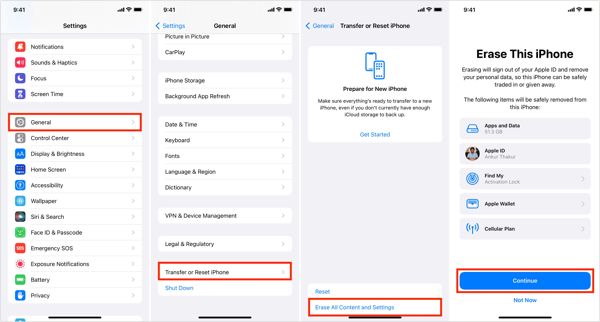
Leia o alerta e toque Continuar.
Se solicitado, digite a senha do seu iPhone.
Confirm erasing your device. Then, your iPhone will restauração de fábrica.
When your iPhone restarts, set it up as a new device.
On the Activation Lock screen, keep the identificação da Apple field empty.
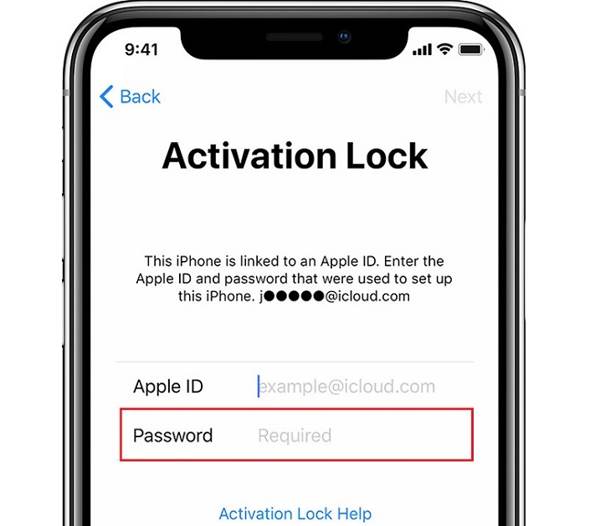
Enter the bypass code in the Senha campo.
Toque Próximo to remove Apple Activation Lock.
Part 5: How to Remove Activation Lock Quickly
If the methods above are unavailable, you will need a powerful unlocking tool, such as imyPass iPassGo. It is able to remove Activation Lock without the previous owner. Moreover, the user-friendly design makes it easy to use.

Mais de 4.000.000 de downloads
Remove Activation Lock without the password.
Ofereça instruções na tela para simplificar o processo.
Provide bonus features, like bypassing MDM.
Support a wide range of iPhones and iPad devices.
How to Remove Activation Lock from Your iPhone
Install the Activation Lock removal tool
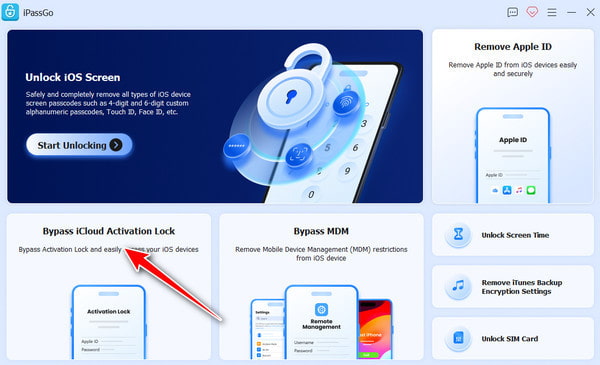
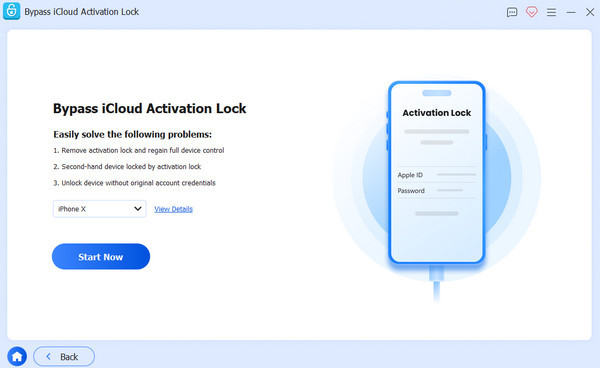
Launch the software to remove Activation Lock without the previous owner after you install it on your PC. There is another version for Mac. Choose the Ignorar o bloqueio de ativação do iCloud modo para prosseguir.
Conecte-se ao seu iPhone
Connect your iPhone to your PC with a Lightning cable. If prompted, tap the Confiar button on your screen to trust this PC. Click the Connected and Continue button. After your device is detected, click the Comece agora botão para confirmar a ação.
Remover bloqueio de ativação
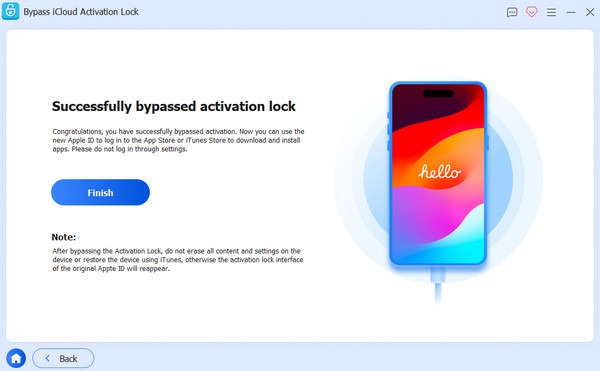
If you have jailbroke your device, click the Próximo button to move on. If not, click the Tutorial de jailbreak button and follow the onscreen instructions to jailbreak your device. Once your device information is loaded, check it. Then, click the Comece a ignorar a ativação button to initiate Activation Lock removal without the previous owner.
Conclusão
Este guia compartilhou várias maneiras de remove Activation Lock without the previous owner. The easy way to complete the process is to disable Find My on your device with the associated Apple Account credentials. On an old device, you can try bypassing DNS to get rid of Activation Lock. Of course, the success rate is low. Plus, you can try a bypass code to remove iCloud Lock. imyPass iPassGo is a simple option to remove any restrictions from your iOS device without the password.
Samuel specializes in password security and digital privacy. He used to work as a cybersecurity consultant for small businesses to protect digital assets. With certifications in Cybersecurity and Ethical Hacking, he turns complex security topics into easy-to-follow advice. He also enjoys sharing password tips to help users protect their accounts more confidently.
Soluções quentes
-
Desbloquear iOS
-
Dicas para iOS
-
Desbloquear Android
-
dicas de senha


