



 Solução
 Centro de Apoio
 Sobre nós
 Contato
How to Remove Company Portal from Your iPhone Quickly
 Samuel Spenser publicado em outubro 22, 2026Desbloquear iOSLeitura de 3 minutos
Este artigo explica how to remove the Company Portal from an iPhone. According to our research, some users face challenges when getting rid of the app from their iPhones. Unlike normal apps, Company Portal works as an MDM solution. It usually connects to an account. Before removing it, you need to do more configuration. This guide walks you through the complete process to uninstall the app from an iOS device.

Neste artigo:
Part 1: Why You Need to Remove Company Portal from iPhone
The Company Portal app is a mobile device management client developed by Microsoft. It is designed to help organizations manage and secure employee devices by enforcing policies, installing and uninstalling apps, and controlling access to corporate resources.
This app is installed by the IT administrator. Once installed, it will configure device management profiles on your iPhone. Simply removing the Intune Company Portal iPhone app can lead to errors.
In some cases, you can remove an account from the Company Portal:
- 1.You left the organization.
- 2.You stop using your iPhone at work.
- 3.You want full control over your iPhone.
- 4.You wish to install some apps and access content that are blocked by Intune.
Part 2: How to Remove Company Portal from iPhone
Before removing the Company Portal from your iPhone, you'd better learn the prerequisites. Then, you can follow the step-by-step tutorial below to get rid of the MDM app on your iOS device.
Pré-requisitos:
- 1.Your iPhone must be accessible. You can turn it on, unlock the screen, and access the Settings app and other functionalities. Plus, you need to provide your iPhone passcode for authentication.
- 2.You have the administrator account password to unenroll your iPhone from management if your organization has configured it.
- 3.You should back up your data since removing the app may erase your corporate data.
- 4.You also need to obtain IT administrator approval and ensure you have the necessary permissions to avoid compliance issues.
- 5.A stable internet connection is required for authentication and communication with management servers during the process.
Turn on your iPhone and open the Definições aplicativo.
Vou ao Em geral entry and select VPN e gerenciamento de dispositivos.
Choose the profile linked to your organization or Microsoft Intune.
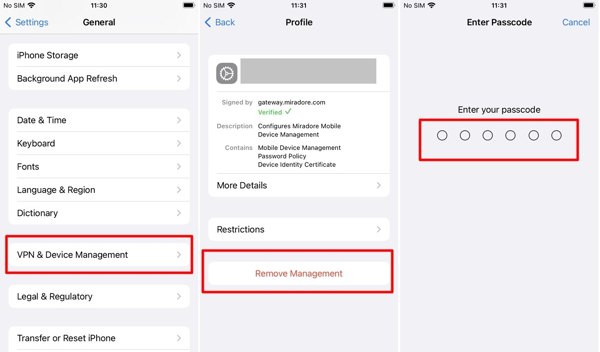
Toque em Remover gerenciamento botão.
Enter your iPhone passcode to authenticate it.
Enter the IT administrator's password to unenroll your account.
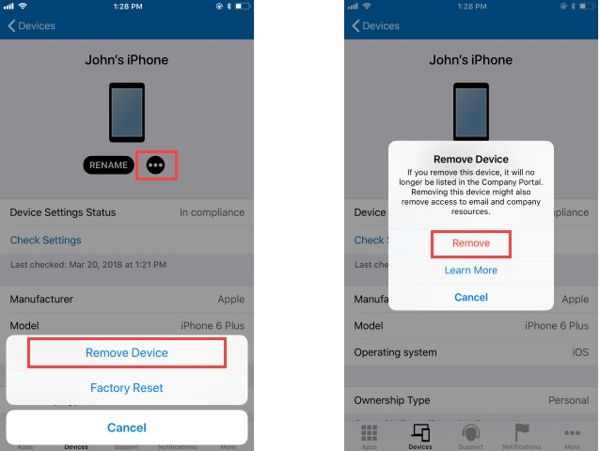
If you cannot remove the MDM profile from your iPhone, you need to remove the account from Intune Company Portal first. Log in to the Company Portal app, select Dispositivos, choose your iPhone, tap the Mais botão, escolha Remover dispositivo, e bater Remover.
Press and hold the Company Portal app on your home screen.
Next, choose the Excluir aplicativo option on the context menu.
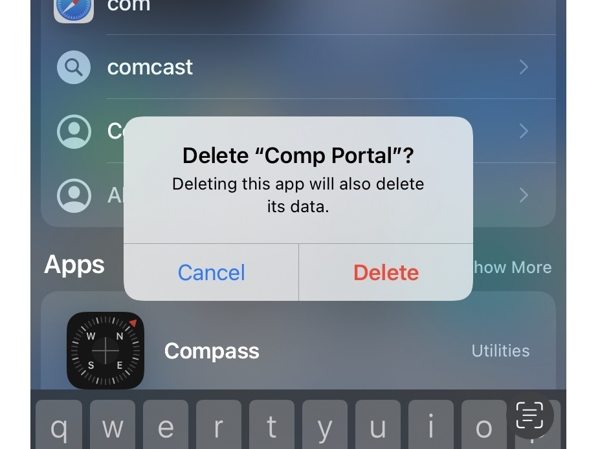
Por fim, toque em Excluir para confirmar sua ação.
Part 3: How to Remove Company Portal from iPhone Without a Password
Obviously, removing an account from the Company Portal on your iPhone requires several credentials. If you don't have the IT administrator password, try imyPass iPassGo. It allows you to bypass MDM without any restrictions. Moreover, the process won't interrupt your iOS device.

Mais de 4.000.000 de downloads
Remove Company Portal from an iPhone quickly.
Don't require a password during the process.
Proteja seus dados enquanto remove o MDM.
Simplify the workflow with on-screen instructions.
Suporte às versões mais recentes do iOS e iPadOS.
How to Remove Company Portal from iPhone Without a Password
Install the MDM removal tool
Download and install the MDM removal software on your computer. It is available on Windows 11/10/8/7 and macOS 10.12 or later. When you want to remove Company Portal from your iPhone, launch it from your hard drive. Then choose the Bypass MDM mode to proceed.
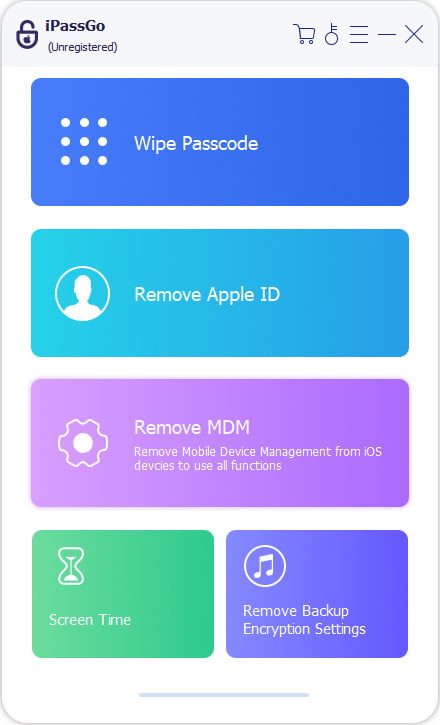
Conecte-se ao seu iPhone
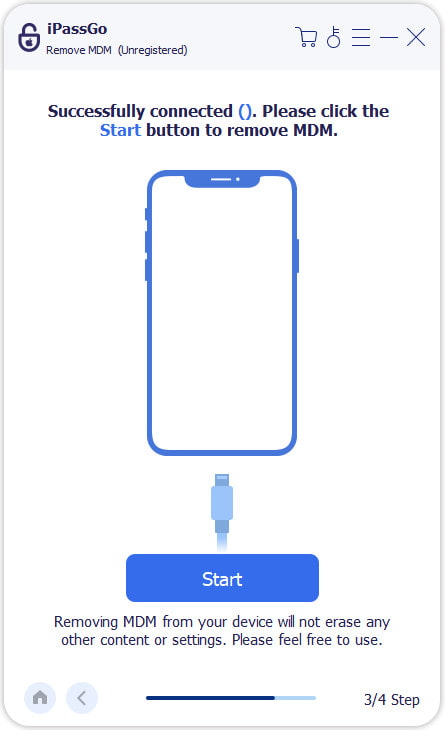
Connect your iPhone to your computer with a Lightning cable. Then, the software will recognize your device. If not, disconnect it and reconnect.
Remove Company Portal
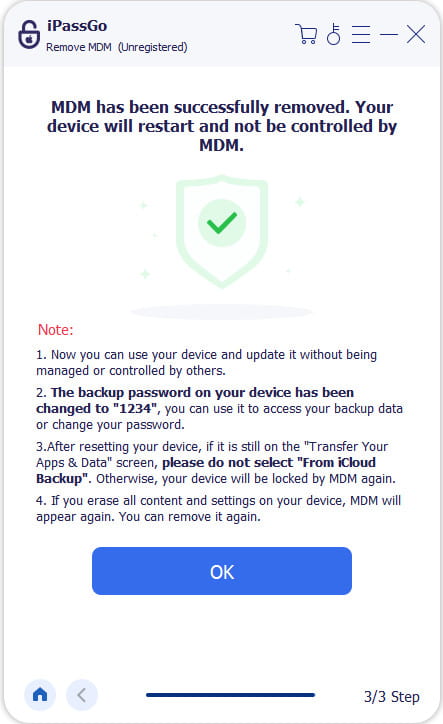
Quando estiver pronto, clique em Começar button. Then the software will automatically remove the Company Portal and other MDM profiles from your iPhone. During the process, ensure your device and computer maintain a stable connection. When it is done, your iPhone will restart. This program can also help you reset the Screen Time passcode on your iPhone or iPad.
Conclusão
Este guia explica como remove Company Portal from your iPhone. First, you should understand when to remove MDM from your iOS device. Moreover, you must follow the prerequisites, including the credentials. Then, you can perform the process following our steps to uninstall and delete the Intune MDM app. If you don't have all the required credentials, iPassGo is the ultimate solution to bypass MDM on your iPhone without a password or technical skills.
Samuel specializes in password security and digital privacy. He used to work as a cybersecurity consultant for small businesses to protect digital assets. With certifications in Cybersecurity and Ethical Hacking, he turns complex security topics into easy-to-follow advice. He also enjoys sharing password tips to help users protect their accounts more confidently.
Soluções quentes
-
Desbloquear iOS
-
Dicas para iOS
-
Desbloquear Android
-
dicas de senha


