



 Solução
 Centro de Apoio
 Sobre nós
 Contato
Unlock Your Device: Complete Guide to Removing ManageEngine MDM
 Samuel Spenser publicado em abril 22, 2026Desbloquear iOSLeitura de 3 minutos
ManageEngine Mobile Device Manager (MDM) is a widely used enterprise mobility management solution that helps businesses secure, monitor, and manage mobile devices. However, users may remain restricted by MDM profiles after leaving a company, purchasing a previously managed device, or encountering configuration-related limitations. In this guide, we will introduce effective methods to remove ManageEngine MDM and restore full access to your device's functionality.

Neste artigo:
Part 1: How to Remove ManageEngine MDM Using Web Console
It is the most secure and reliable approach to officially unenroll a device as it follows enterprise protocols and minimizes potential data risks. This method is intended for authorized users with valid administrator credentials. If you have admin permission, you can remove your device from ManageEngine MDM directly through the web console.
Steps to remove ManageEngine MDM via the web console
Open the ManageEngine MDM web console in your browser and sign in with an admin account.
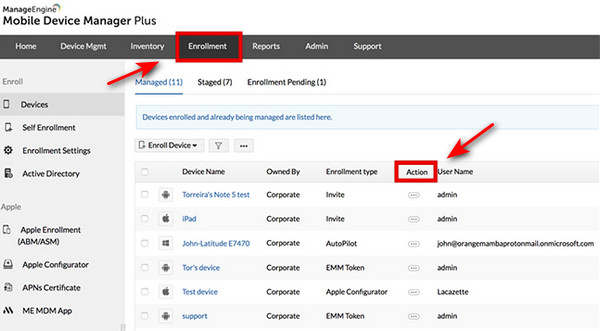
Selecione os Inscrição tab. Locate the device you want to remove from management. You can click the Procurar button to quickly find the target device.
Clique Ações in the top-right corner, and choose Remover dispositivo. Clique OK to confirm this action.
Part 2: How to Remove ManageEngine MDM from iOS Device
For iOS users who don't have access to the MDM web console, such as those who purchased a second-hand MDM-locked iPhone, or who cannot obtain enterprise administrator permission. There are several alternative ways to remove remote management from iPhone.
Remove ManageEngine MDM from iPhone Settings
If you can see the Remove Management option in Settings, it means the device is not supervised or restricted by an organization, and you can remove the MDM profile directly from Settings.
Steps to remove ManageEngine MDM from iPhone Settings
Abrir Definições on your iPhone, scroll down, and tap General.
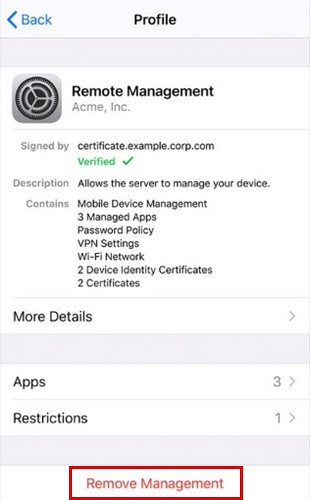
Selecionar VPN e gerenciamento de dispositivos, then tap the ManageEngine MDM profile.
Toque Remover gerenciamento. Enter your device passcode if prompted to confirm the removal. After that, ManageEngine MDM will be removed from your device.
Bypass ManageEngine MDM with imyPass iPassGo
If there is nenhuma opção para remover MDM, you can't access Settings, or you're unable to contact the administrator, using a professional bypass tool is the most effective solution. imyPass iPassGo is a reliable utility designed for iOS MDM bypass. It can remove MDM restrictions on all iOS models and versions without data loss.

Mais de 4.000.000 de downloads
Bypass MDM from your device to get full functions without a password.
Remove various MDM profiles, such as Jamf, Microsoft Intune, or IBM.
Unlock iPhone screen passcodes, Face ID, or Touch ID in a few clicks.
Erase Screen Time/iTunes encryption/Apple ID password easily.
Steps to remove ManageEngine MDM with iPassGo:
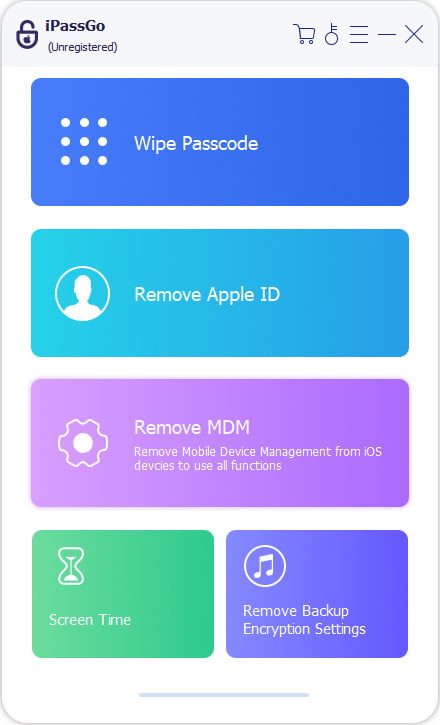
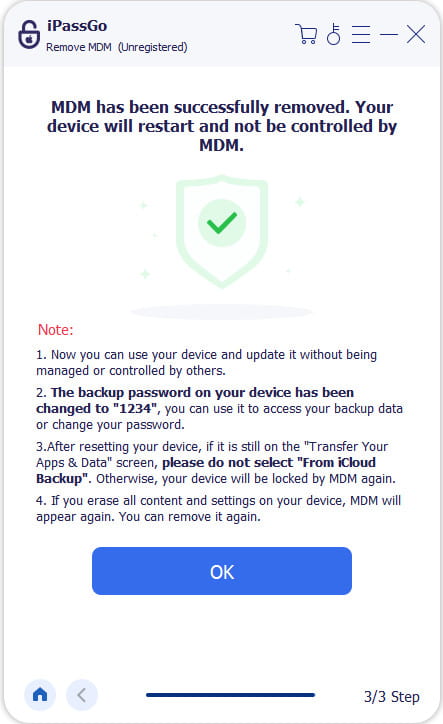
Launch the software on your computer, then choose the Remover MDM modo.
Connect your device to the computer with a USB cable, then click the Começar botão para prosseguir.
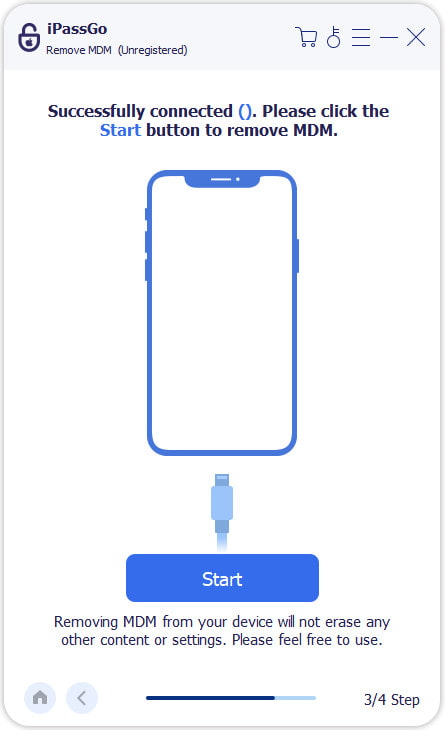
The software will start removing MDM from your device automatically.
Part 3: How to Remove ManageEngine MDM from Android Device
For Android users, you can also remove ManageEngine MDM using different methods depending on how the device is enrolled. Below are the most effective solutions for common Android management scenarios.
Remove ManageEngine MDM from Android Settings
This is the primary method for Android users with access to Settings and the MDM profile. It is typically suitable for personally managed devices or devices that were enrolled manually rather than through Android Enterprise Work Profile or fully managed corporate deployment.
Steps to remove ManageEngine MDM from Android Settings:
Vamos para Definições on your Android device and tap Segurança.
Toque Administrador do dispositivo, then locate and disable ManageEngine MDM.
Voltou para Settings > Applications > ManageEngine MDM e toque Desinstalar. The ME MDM will be removed from your device immediately.
Observação:
If the device is unmanaged by an MDM server and the ME MDM app is hidden, you won't be able to uninstall the ME MDM app from the device. To fix this, you need to make the app visible again. Follow the steps below:
• Open the link memdm://open no seu Android.
• Click on the link labeled "OPEN" to unhide the ME MDM app on your device.
Remove ManageEngine MDM with Work Profiles
If your device is managed through a Work Profile, you can remove ManageEngine MDM by deleting the work profile. This method is typical for corporate devices or BYOD (bring-your-own-device) scenarios.
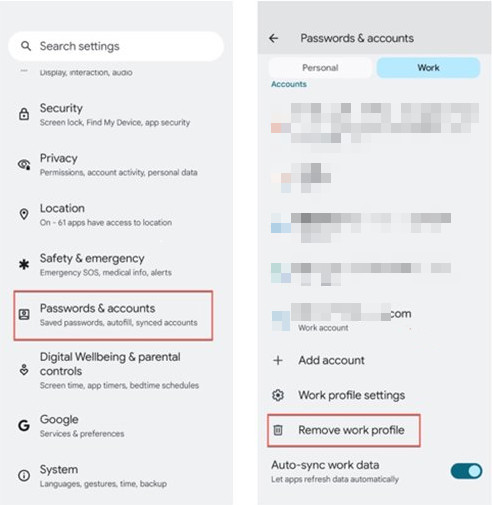
Abrir Definições no seu dispositivo Android.
Toque Contas and locate the Work Profile or corporate account managed by MDM.
Toque Remove Work Profile, then confirm the action.
Perguntas frequentes.
-
Can I remove ManageEngine MDM on iPhone without admin permission?
Yes! You can use imyPass iPassGo to bypass MDM locks without admin credentials. If the Remove Management option is available in Settings, you can also remove the MDM profile directly.
-
Can ManageEngine MDM be removed permanently?
Yes, with the administrator permission, you can remove MDM permanently through the web console by unenrolling the device from the management server.
-
Will removing ManageEngine MDM erase my data?
Usually, removing ManageEngine MDM does not delete personal data, but it may remove work apps, email accounts, VPN settings, and security restrictions pushed by the organization. It's recommended to back up important files before proceeding.
Conclusão
This guide provides clear, reliable methods for removing ManageEngine MDM from both iPhone and Android devices. By following the steps outlined here, you can regain full control of your device safely and efficiently. Whether using Settings, Work Profiles, or a trusted third-party tool like imyPass iPassGo, choose the approach that best fits your situation and remove the MDM restrictions permanently.
Samuel specializes in password security and digital privacy. He used to work as a cybersecurity consultant for small businesses to protect digital assets. With certifications in Cybersecurity and Ethical Hacking, he turns complex security topics into easy-to-follow advice. He also enjoys sharing password tips to help users protect their accounts more confidently.
Soluções quentes
-
Desbloquear iOS
-
Dicas para iOS
-
Desbloquear Android
-
dicas de senha


