



 Solução
 Centro de Apoio
 Sobre nós
 Contato
[2026] Unlock a Refurbished iPhone Explained and Solved
 Samuel Spenser publicado em julho 08, 2026Desbloquear iOSLeitura de 3 minutos
Key Takeaways:
- There are usually 3 types of locks that may occur on your refurbished iPhone.
- To unlock the screen or iCloud Activation Lock, imyPass iPassGo is the best.
- To remove the carrier lock, you'll need to contact the carrier.
It's great to have an iPhone refurbished and unlocked, as it saves money while offering access to the Apple ecosystem. But when you buy a refurbished iPhone only to find that you're locked out, it's not good. In this guide, we'll explore several efficient and reliable methods to unlock your refurbished iPhone so you can enjoy a fully functional iPhone without hassle.

Neste artigo:
Part 1. Common Types of Locks on Refurbished iPhones
Refurbished iPhones often come with locks that frustrate new owners. Understanding the three main types helps you diagnose the issue quickly.
Screen Passcode Lock
Usually, it is a 4-or-6-digit passcode, Face ID, or Touch ID lock. After too many failed attempts, the iPhone shows "iPhone Unavailable" or becomes disabled. This often happens when the previous owner didn't erase the iPhone properly.
Bloqueio de ativação do iCloud
This is Apple's anti-theft feature linked to Find My iPhone and the previous owner’s Apple ID, to prevent strangers from using a lost or stolen iPhone. If your iPhone is locked in this way, you can't set up, restore, or use it at all.
Bloqueio de operadora
This contract ties the iPhone to one specific carrier. You'll see a "SIM Not Supported" sort of thing when inserting a different carrier's SIM. It restricts the cellular service, but the Wi-Fi still works.
Many refurbished phones have more than one lock. Always check all three before buying or attempting fixes.
Now, learn the best ways to solve the 3 problems, and you can get an iPhone 13/14/15/16 refurbished and unlocked.
Part 2. How to Unlock iPhone Screen Without a Password
Many refurbished iPhone owners get locked out at the screen, but it's too much trouble to contact the original owner for the password. That's when quick and secure unlock of a refurbished iPhone becomes critical. Tools designed for unlocking refurbished smartphones can make things easier.
imyPass iPassGo is a professional tool for such situations, helping you regain access to the device yourself, without a password.

Mais de 4.000.000 de downloads
Há suporte para remover várias telas de bloqueio, incluindo senhas de 4/6 dígitos, Touch ID e Face ID.
Não é necessário digitar seu ID Apple original ou senha.
Easy to operate, suitable for users without a technical background.
Compatível com a maioria dos sistemas iOS e modelos de dispositivos do mercado.
Install the latest version of iPassGo software for your computer's operating system. Launch the software and select Limpar senha mode on the main screen to start the unlock.
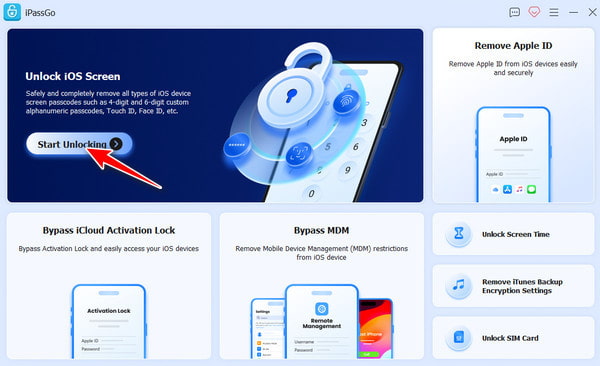
Connect your refurbished iPhone to your computer. The software automatically detects the device. If not, make sure the device trusts the computer.
Após confirmar as informações do dispositivo, clique no botão Começar botão e o software baixará automaticamente o pacote de firmware mais recente que corresponde ao seu dispositivo.
Quando o download do firmware estiver concluído, clique em Desbloquear. You will be prompted to enter 0000 to confirm the operation.
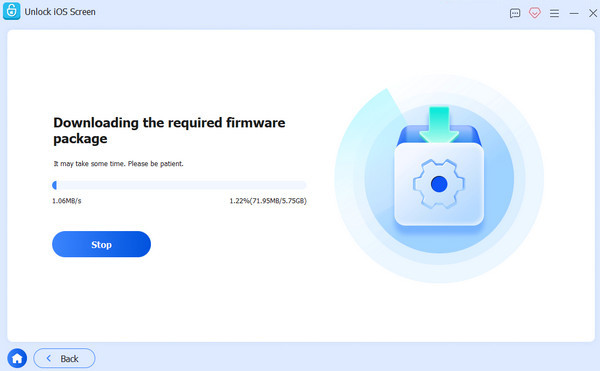
Once entered, the software will begin removing the device's lock screen password. When it's done, your iPhone will automatically restart, after which you can reset and use the device normally.
Part 3. How to Bypass iCloud Activation Lock on Refurbished iPhone
Even if the screen passcode has been removed, some refurbished iPhones are still locked. When you activate the iPhone and it says "This device has been associated with an Apple ID", this means your iPhone is restricted by the Activation Lock.
imyPass iPassGo can handle this problem as well. It provides you with a solution to regain the use of your device without an Apple ID.
Download the latest version of imyPass iPassGo for your computer's operating system. After downloading, follow the installation wizard to complete the software installation.
Launch the software and connect the device. Then choose the Ignorar o bloqueio de ativação do iCloud mode from the interface. Connect your device to the computer with a USB cable. Trust this computer on your iOS device if needed.
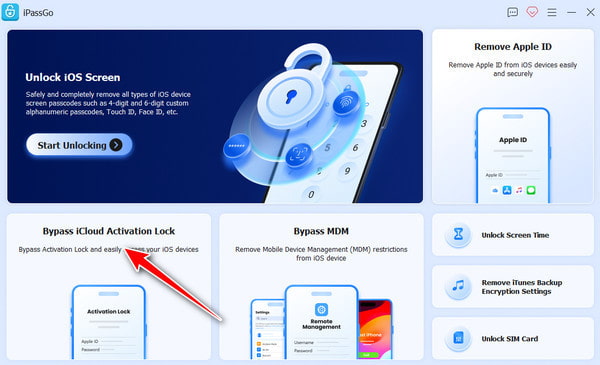
Before going on, you'll need to jailbreak your device. The software itself offers a detailed guide to desbloquear seu iPhone. Clique no Tutorial de jailbreak button, and you can follow the prompts to complete this step. After jailbreaking, click Próximo.
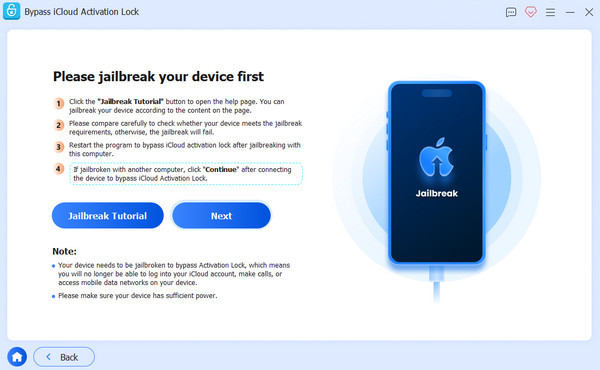
The software will display the risks and detected equipment information during the operation. Check if the information is accurate, which promises the smooth operation of the following steps.
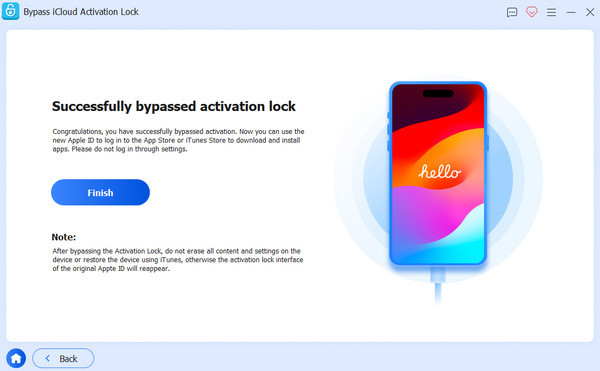
Clique Comece a ignorar a ativação. The software automatically bypasses the activation lock, which can take a few minutes. When finished, your iPhone will restart. Once launched, you can set up your device with your new Apple ID to access features like the App Store.
Part 4. How to Remove Carrier Lock on Refurbished iPhone
Falha no SIM do iPhone doesn't 100% mean your iPhone is carrier-locked. How do you know if it is the case? Go to Definições > Em geral > Sobre and look for Bloqueio de operadora. If it says "No SIM restrictions", great, it is already unlocked. But if it displays a specific carrier or says "SIM locked", you'll have to remove the carrier lock yourself.
Too bad imyPass can't help you with this. But don't worry, together we will walk through the steps of asking the carrier for an unlock.
First things first, ensure your device is fully paid off, the account is in good standing, and it hasn't been reported lost or stolen. If not, your request will likely not be approved.
Contact your carrier's unlock portal or customer service.
- For AT&T: You can submit an unlock request directly through the AT&T Device Unlock Portal.
- For Verizon: log in via your Verizon Device Unlocking Policy Page.
- For other carriers: If your carrier doesn't have an online form, you can contact customer support via phone or live chat.
Provide them with your IMEI number. You can dial *#06# on your phone to find it, or check in Definições. Depending on the carrier's policy, some carriers may also charge an unlocking fee.
Wait for approval, which may take from minutes to a few days.
Once approved, you can back up your iPhone and insert a new SIM.
Extra Tips: How to Buy a Reliable Refurbished iPhone
Choose a trusted seller. Apple Certified Refurbished is mostly reliable. Amazon Renewed, Swappa, and Back Market are good. Avoid sources like random eBay or Facebook Marketplace sellers.
Make sure the iPhone is fully unlocked before buying, so you don't have to get your refurbished phone unlocked yourself. Check on the device's carrier lock status, iCloud, and blacklist status. Always ask the seller to remove the device from their iCloud account before you pay.
Check on the device's condition. Observe the battery health, screen, camera, and buttons. No signs of water damage or unauthorized repairs.
Review Warranty. Before paying, ask if the seller offers a warranty of at least three months or a return or exchange guarantee. It would be much easier to solve problems if the seller could ensure timely help.
Conclusão
Whether through official means or using the unlock tools, you can quickly unlock refurbished mobiles, lift restrictions, and restore your device to its full potential. With imyPass iPassGo, it's easy and smooth to desbloquear um iPhone recondicionado.
Samuel specializes in password security and digital privacy. He used to work as a cybersecurity consultant for small businesses to protect digital assets. With certifications in Cybersecurity and Ethical Hacking, he turns complex security topics into easy-to-follow advice. He also enjoys sharing password tips to help users protect their accounts more confidently.
Soluções quentes
-
Desbloquear iOS
-
Dicas para iOS
-
Desbloquear Android
-
dicas de senha


