Çözüm
Çözüm Destek Merkezi
 Hakkımızda
 İletişim
What to Do If You Forgot Voicemail Password on iOS/Android
 Samuel Spenser yayınlandı 19 Mart 2026Şifre İpuçları3 dakikalık okuma
Voicemail is a useful feature that allows callers to leave a voice message when their call goes unanswered. With this feature, you never miss important calls on your iPhone or Android phone. To protect voicemails, users are allowed to set up a password. If you forget your voicemail password, you will lose information and cannot access the voice messages. This guide explains how to reset the password on your iOS or Android device.

Bu makalede:
Part 1: How to Recover a Forgotten Voicemail Password on iPhone
What to do if you forgot your voicemail password? You can recover it using imyPass iPhone Şifre Yöneticisi. It helps you remember all the passwords you have used on your iOS device. Moreover, it allows you to back up your voicemail password to your computer.
4.000.000+ İndirme
Recover voicemail password on your iPhone.
Çok çeşitli şifreleri destekleyin.
Back up the voicemail password to a computer.
En son iPhone ve iPad modelleriyle uyumludur.
How to Recover a Forgotten Voicemail Password on Your iPhone
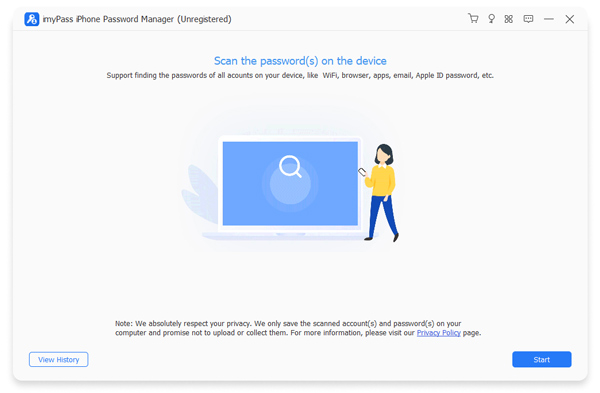
Aşama 1 iPhone'unuzu tarayın
Launch the voicemail password recovery software after installing it on your PC. There is another version for Mac. Plug your iPhone into your PC with a Lightning cable. Click the Başlama Cihazınız algılandığında düğmesine basın.
Adım 2 View voicemail password
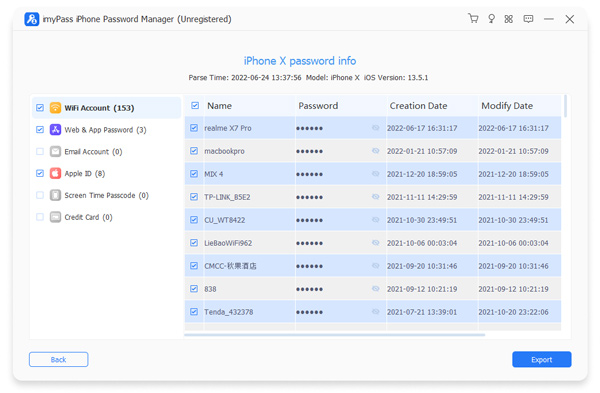
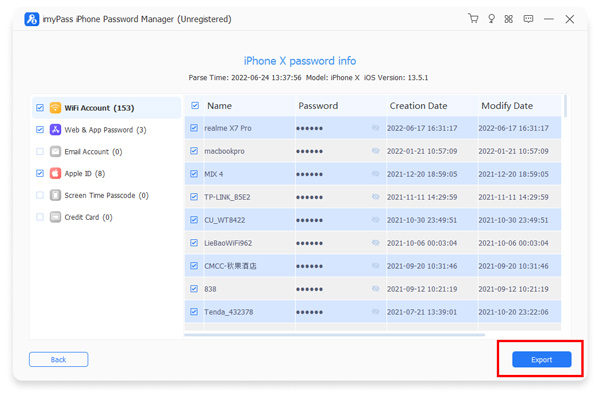
After your iPhone is scanned, select the right password type on the sidebar. Here, we select Web ve Uygulama Şifresi. Then, browse up and down until you find your voicemail item. Click the Göz button display your voicemail password.
Aşama 3 Export voicemail password
If you want to back up your voicemail password, select it on the list and click the İhracat button. Then, save it as a CSV file. You can view the voicemail password on your computer at any time.
Part 2: How to Reset Forgotten Voicemail Password on iPhone
Did you forget your voicemail password on your iPhone? Never fear. iOS allows you to reset your voicemail password easily. In fact, you can change your voicemail password on your iPhone directly without the previous password.
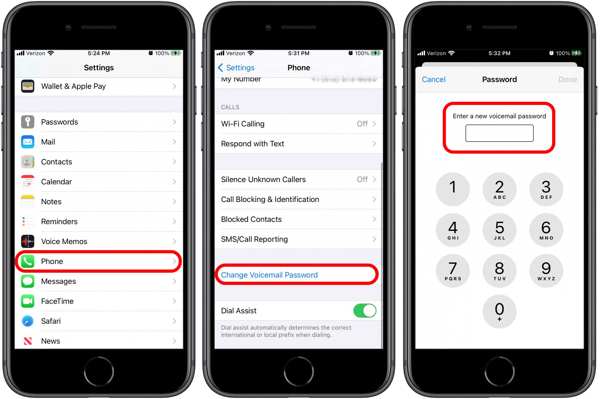
Aç Ayarlar iPhone'unuzdaki uygulama.
Aşağı kaydırın ve seçin Telefon.
Şuna dokunun: Sesli Posta Şifresini Değiştir buton.
Enter a new voicemail password with 4 to 10 digits.
Type in the new password again, and tap Tamamlamak.
Part 3: How to Reset Forgotten Voicemail Password on Android
On Android devices, you must provide your current password to change your voicemail PIN. However, Samsung enables users to reset forgotten voicemail passwords on its Android phones and tablets directly.
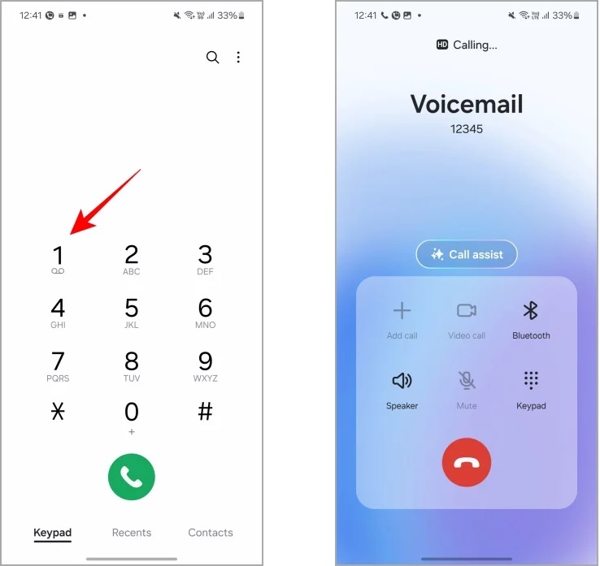
Çalıştır Telefon app on your Galaxy device.
basın ve basılı tutun 1 until it starts to call your voicemail.
Basmak 5 or listen to the automated voice.
Next, press 1 or the number for changing the password.
Input the new voicemail password followed by #.
Listen to the new password and confirm it by pressing #.
Part 4: How to Reset Forgotten Voicemail Password via Carriers
A voicemail password, also known as a PIN, is a security measure that protects your voice messages. It prevents others from listening to your messages without permission. If you cannot remember the password for voicemail, you can reset it through your carrier.
How to Reset Forgotten T-Mobile Voicemail Password
Open the Phone app on your phone.
Input the T-Mobile voicemail reset code: #793#.
Şuna dokunun: Arama buton.
Now, your voicemail password is changed to the last four digits of your phone number.
Then, you can change your voicemail password with the temporary password.
How to Reset Forgotten Verizon Voicemail Password
In the My Verizon app
Çalıştır Benim Verizon'ım uygulama.
git Ben, Seç Profile & settingsve dokunun Voicemail password.
Musluk Create my own password veya Choose a password for me.
Enter a new password into the field.
Musluk Güncelleme.
Call from a phone
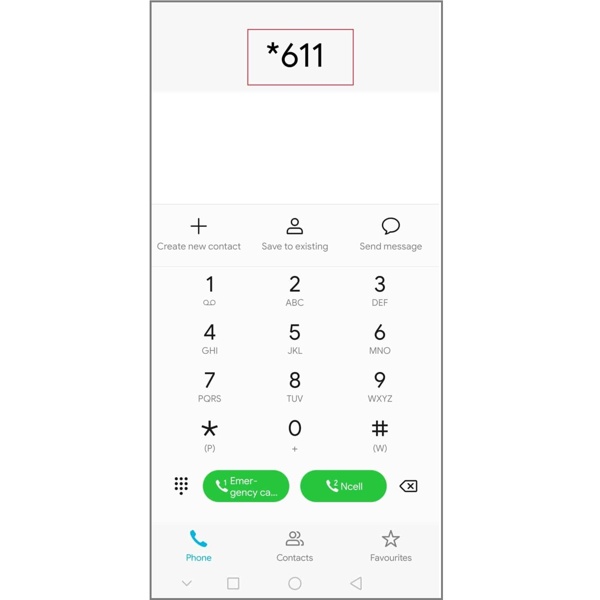
Aç Telefon uygulama.
Aramak *611 ve dokunun Arama.
Provide the requested information.
When you are asked to state the reason for your call, say Reset voicemail password.
Ardından, yönlendirmeleri izleyerek Verizon telesekreterinin unutulan şifresini sıfırlayın.
Unutulan AT&T telesekreter şifresi nasıl sıfırlanır
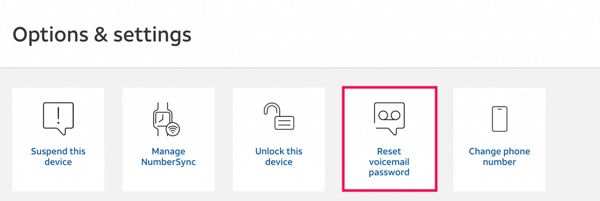
Bir tarayıcıda AT&T oturum açma ekranına gidin.
Hesabınıza giriş yapın.
Yeni bir telesekreter şifresine ihtiyaç duyan cihazınızı bulun.
Tıkla Cihazı Yönet buton.
Daha sonra seçin Reset voicemail password içinde Seçenekler ve ayarlar bölüm.
İstendiğinde tıklayın Evet.
Şimdi kısa mesajla geçici bir telesekreter kodu alacaksınız.
Şimdi kısa mesajla geçici bir telesekreter kodu alacaksınız.
Unutulan Tracfone telesekreter şifresi nasıl sıfırlanır
Yeni bir sohbet oluşturun ve alıcı numarası olarak 611611 yazın.
Tip telesekreter ifadesini mesaj alanına yazın ve Göndermek.
öğesine dokunun. e.
Bağlantı içeren mesajı aldıktan sonra, şu yanıtı verin:.
Ardından, unutulan telesekreter şifresi telefon numaranızın son dört hanesiyle değiştirilecektir. 1 Son olarak, şifre sıfırlamasını onaylamak için arama ekranında.
tuşunu basılı tutun.
Diğer operatörler için unutulan telesekreter şifresi nasıl sıfırlanır.
Genişletilmiş Okuma:
Çözüm
Başka bir operatör kullanıyorsanız, müşteri hizmetlerine telefonla veya resmi web sitesi üzerinden ulaşabilirsiniz. Ardından, telesekreter şifresinin sıfırlanmasını talep edin ve gerekli bilgileri sağlayın. Bu makale,. telesekreter şifrenizi unuttuğunuzda. imyPass iPhone Şifre Yöneticisi neler yapabileceğinizi açıkladı. Öncelikle, şifrenizi iPhone veya Android telefonunuzdan sıfırlamayı deneyebilirsiniz. Bu mümkün değilse, operatörünüzle iletişime geçip telesekreter şifresini sıfırlamanız gerekir. Büyük bir operatör kullanıyorsanız, temel talimatlarımızı izleyerek şifreyi kendiniz sıfırlayabilirsiniz.
Samuel, parola güvenliği ve dijital gizlilik konusunda uzmanlaşmıştır. Daha önce küçük işletmelerin dijital varlıklarını korumalarına yardımcı olmak için siber güvenlik danışmanı olarak çalıştı. Siber Güvenlik ve Etik Hackleme sertifikalarına sahip olan Samuel, karmaşık güvenlik konularını kolay anlaşılır tavsiyelere dönüştürür. Ayrıca kullanıcıların hesaplarını daha güvenle koruyabilmeleri için parola ipuçlarını paylaşmaktan keyif alır.
Sıcak Çözümler
-
Şifre İpuçları
- En İyi 4 Instagram Şifre Bulucu
- Instagram Şifrenizi Nasıl Görürsünüz
- Snapchat Hesabınızın Kilidi Nasıl Açılır
- Unutulan Twitter Şifresi Nasıl Sıfırlanır
- Chrome'da Kayıtlı Şifreler Nasıl Görüntülenir
- Apple Kimliği Şifremi Unuttuğumda Ne Yapmalıyım
- Snapchat Şifrenizi Nasıl Sıfırlarsınız
- Unutulan Discord Şifresi Nasıl Sıfırlanır
-
iOS'un kilidini aç
-
Android'in kilidini aç
-
Windows Şifresi