



 解决方案
解决方案 支持中心
支持中心 关于我们
关于我们 联系
联系关闭按 Home 键解锁:停止按下并开始点击
 塞缪尔·斯宾塞 发表于 2025 年 8 月 26 日解锁iOS3 分钟阅读
你手里拿着 iPhone,一只手拿着包,另一只手拿着咖啡。你只想查看一条消息。但手机却提示“按 Home 键解锁”。现在,你不得不挪动手机,笨拙地按下一个按钮。时间长了,这个小小的步骤会变得非常烦人,尤其是当你的 Home 键开始感觉迟钝或无法正常工作时。
这就是“按 Home 键解锁”的缺点。听起来很简单,但对很多人来说,它只会碍事。如果你一直在想:“我可以禁用这个功能吗?”是的,你可以!好消息是,这篇文章会帮助你做到这一点。我们将向你展示如何 关闭主页按钮 只需轻轻一触,即可解锁您的设备。更快、更流畅、更便捷。现在就让我们来修复它!

第 1 部分:按 Home 键解锁
iOS 10 发布后,苹果改变了 iPhone 的解锁方式。“按 Home 键解锁”功能也随之推出。现在,您只需按一下 Home 键即可唤醒并解锁 iPhone 或 iPad,而无需使用以前的“滑动解锁”手势。
它适用于 iPhone 6s、iPhone 7、iPhone 8、iPhone SE 以及大多数配备 Home 键的 iPad。按下 Home 键后,屏幕会唤醒。之后,您可以使用密码或 Touch ID 进入。
它有助于快速简便地解锁,还能防止手机在口袋中被误解锁。但对于某些用户来说,它感觉比直接触摸按钮更慢。因此,许多人会想方设法关闭它或加快解锁速度。如果您想更改设置,可以在“辅助功能”下找到此设置。
因此,如果您想在不按 Home 键的情况下解锁 iPad 以及 iPhone,请查看以下部分!
第 2 部分:禁用按 Home 键解锁
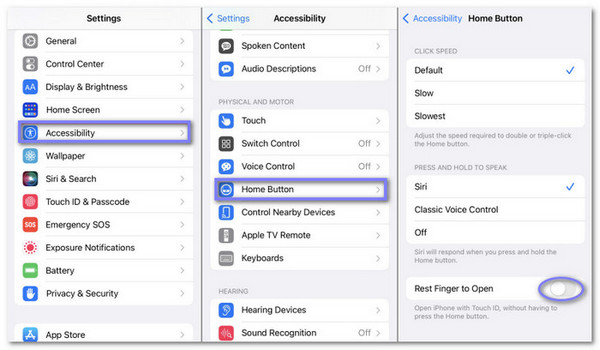
如果您厌倦了每次解锁 iPhone 时都要按下 Home 键,可以更改设置。有些 iPhone 允许您只需将手指放在屏幕上方即可解锁。此设置有助于更快、更轻松地解锁。它是“辅助功能”选项的一部分。启用后,您无需再按下 Home 键。只需轻触 Home 键,手机就会自动打开。此功能非常有用,尤其是在按钮难以按下的情况下。
按照以下步骤了解如何关闭“按 Home 键解锁”:
找出 设置 应用程序并打开它。
向下滚动并点击 一般的。您可以在这里更改手机的大部分系统设置。
里面 一般的, 按 无障碍,然后再次滚动并点击 主页按钮.
现在,寻找一个名为 休息手指打开 然后点击旁边的开关将其打开。
启用此功能后,您无需按下 Home 键即可解锁设备。只需将手指放在上面即可。
第 3 部分:关闭 Touch ID 解锁
Touch ID 可以帮助你用指纹解锁 iPhone。但并不是每个人都想使用它,尤其是在 Touch ID 无法正常工作可能是它读取指纹不太好,或者你只是喜欢用密码。你可以关闭 Touch ID 来解锁,但仍然可以使用其他功能,例如 App Store 或 Apple Pay。关闭后,你的 iPhone 会要求你输入密码。如果你与别人共享手机或想要更多控制权,这个功能会很有用。
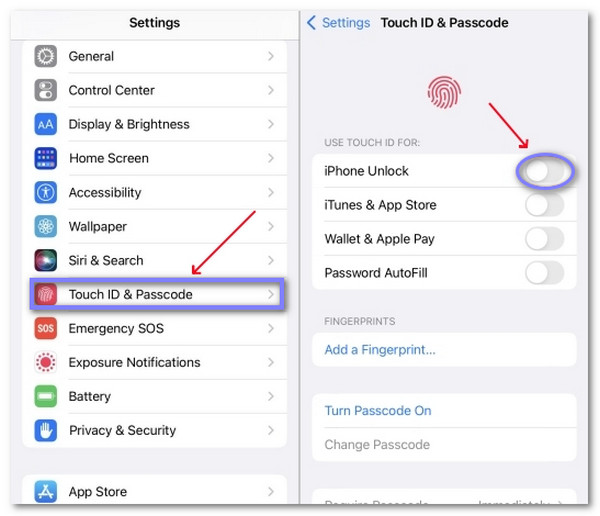
找出 设置 在 iPhone 上打开应用程序。点击即可打开。
向下滚动一点并点击 一般的.
接下来,再次滚动并点击 触摸 ID 和密码您将被要求输入密码。请输入您的 4 位或 6 位密码以继续。
现在,查看以下部分 使用 Touch ID。您将看到旁边有一个开关 iPhone解锁只需轻点开关即可关闭。就这样。你的 iPhone 将无法再使用 Touch ID 解锁。
关闭 Touch ID 意味着您以后需要使用密码来解锁手机。如果您改变主意,可以随时重新开启。
第 4 部分:如何使用损坏的 Home 键解锁 iPhone
如果你的 iPhone 主屏幕按钮坏了,你可能会感到很卡。你无法输入密码,无法滑动屏幕,也无法登录。那么,如何在不按下主屏幕按钮的情况下解锁 iPhone 呢?有一个简单的解决方法,那就是使用 imyPass iPassGo.
这款工具即使在 Home 键失灵的情况下也能解锁 iPhone。它无需您点击或按下手机上的任何按钮。只需使用电脑,连接设备,点击几个按钮,imyPass iPassGo 就会帮您移除密码。
您无需任何技术技能,只需按照屏幕上的步骤操作即可。它适用于所有 iPhone 型号,安全可靠。
首先,点击 免费下载 点击下方按钮获取安装程序。文件保存后,运行它。按照简单的安装窗口操作,直到该工具完全安装在您的计算机上。
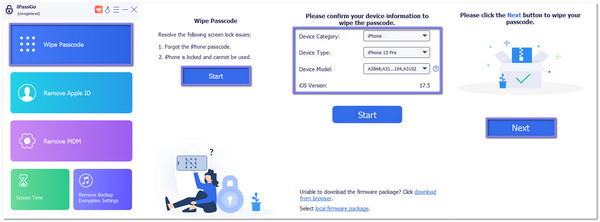
工具打开后,查看主屏幕并点击 擦除密码。此模式可帮助您解锁 iPhone,即使 Home 键不起作用。
使用 Lightning 数据线将 iPhone 连接到电脑。请稍等片刻。该工具将扫描并检查您的设备。准备就绪后,点击 开始 移至下一部分。
检查屏幕上的信息;它会显示您的 iPhone 型号和 iOS 版本。如果正确,请点击 开始 下载固件。该工具将在线抓取固件并进行验证。这部分只需几分钟。
现在,是时候通过单击 开锁 按钮,然后会弹出一个屏幕,要求您输入 0000。这意味着您同意解锁您的设备。输入后请稍等片刻,imyPass iPassGo 将完成剩余操作。您的 iPhone 很快就会解锁。
就是这样!imyPass iPassGo 让您轻松解锁 iPhone,即使 Home 键坏了。您还可以使用它来 解锁屏幕损坏的 iPhone 因为当您的屏幕破裂、冻结或不允许您滑动或点击时,您将无法输入密码。
结论
好了!你已经学会了如何 关闭 Home 键即可解锁 你的 iPhone。它让操作更快捷、更轻松。现在你只需将手指放在地上,无需用力按压。如果你的 Home 键不够用或无法正常使用,它也能帮到你。
如果您的 iPhone 被锁定或按钮损坏,您可以使用 imyPass iPassGo。这是一款简单的解锁工具,无需任何操作即可使用。它可以帮助您快速安全地恢复设备。
现在你已经准备好了。你的 iPhone 使用起来更流畅了,而且你知道下次该怎么做了。
Samuel 是 imyPass 的高级编辑。他是密码解锁专家,拥有超过五年的手机解锁教程编写经验。
热门解决方案
-
解锁iOS
-
iOS 技巧
-
解锁 Android
-
密码


