解決方案
解決方案 支持中心
支持中心 關於我們
關於我們 聯絡
聯絡Can You Recover Deleted Instagram Messages & How to Do It
 克拉拉·普雷斯科特 發表於 2026 年 8 月 27 日恢復數據3 分鐘閱讀
If you've accidentally deleted an important Instagram message, you're probably wondering if there's a way to get it back. To be real with you, Instagram does not have a built-in Undo button to retrieve your deleted conversation. While you can recover deleted messages, it depends on how the messages were removed and how much time has passed. In this post, we'll teach you how to see deleted messages on Instagram in several proven ways. We will cover the official way, through Android notification history, checking other devices/accounts, and using trusted data recovery tools. This way, we can help you find the most suitable recovery method before you permanently lose your deleted Instagram messages.

在本文中:
Method 1: The Official Method (Request Instagram Data)
Is there a way to recover deleted Instagram messages? Many Instagrammers aren't aware that Instagram holds a copy of recently deleted messages from a conversation. Meta keeps a copy of deleted messages on its server up to 90 days. However, you need to download your account data before the timeline fully lapses. Otherwise, they will be permanently removed.
Go to your Instagram Profile, click the 菜單, 並選擇 帳戶中心.選擇 Your information and permissions, 然後 Export your information.
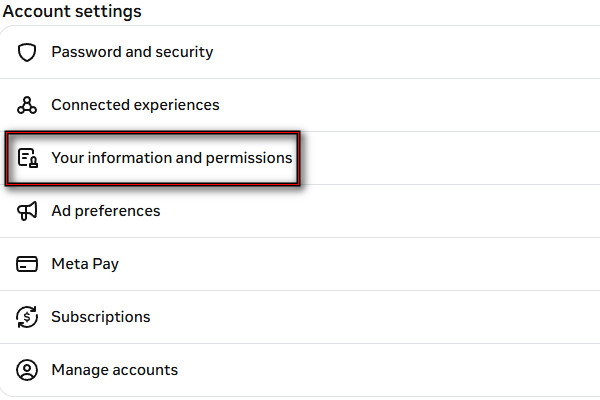
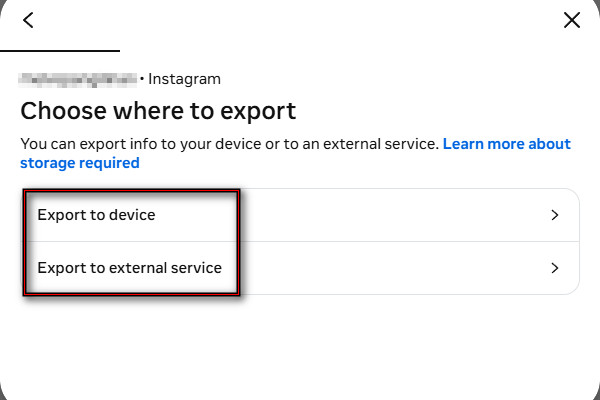
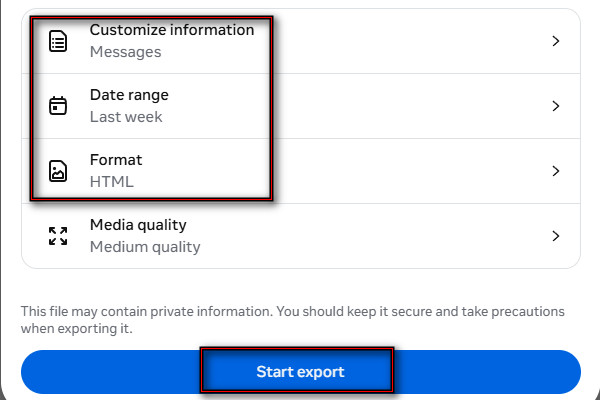
點擊 Create Export, select your profile, and click Export to device or Export to external service. Right after, tap Customize information 並檢查 留言.
Set the date to the day you deleted the messages. Select a format (HTML or JSON) and click Start Export. Remember, you only have 4 days to download it.
Method 2: Via Android Notification History
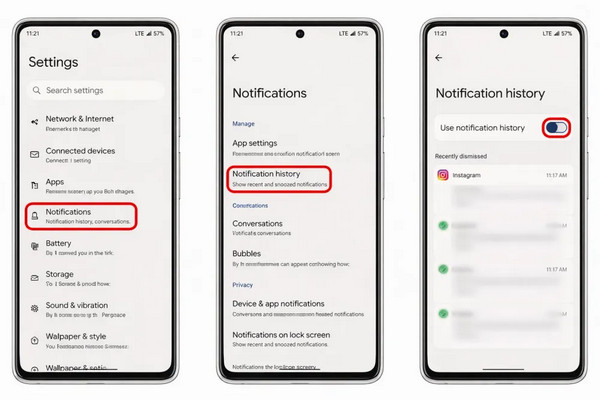
If you're using Android 11 or later, you can recover deleted Instagram messages by using the notification log. But it only works if you had Instagram notifications and Notification History turned on before the messages got deleted.
打開 設置 app, scroll down, and tap 通知 or Notifications & status bar.
Ensure the 通知歷史記錄 option is turned 在, and select Instagram. You will see the timestamped list of the messages you received.
筆記:
If the Instagram message was a photo, the notification log will only display that someone sent a photo. It means you won't be able to recover a deleted photo.
Method 3: Check Other Devices/Accounts
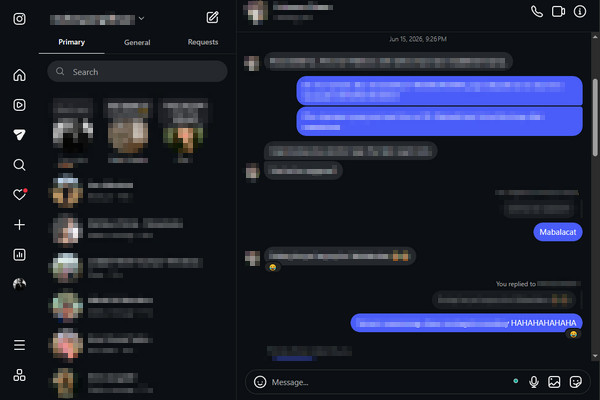
Instagram syncs conversations on different devices logged into the same account. Sometimes, you can still access the deleted conversation on another device that hasn't refreshed its data yet. However, there is a very low chance of seeing your deleted Instagram messages. See the instructions below to see how to read deleted Instagram messages:
Log in to the same Instagram account on a spare device and open 留言. It could be a smartphone, tablet, or through the Instagram web.
Check whether the conversation still appears. If visible, screenshot the messages before they disappear. Please avoid refreshing the app/page so the data isn't lost.
Method 4: Using Data Recovery Tools
1. imyPass iPhone資料恢復
imyPass iPhone 資料恢復, 顧名思義,是一款用於 iPhone/iPad 的資料救援程式。它會掃描你的 iPhone,協助你在沒有備份的情況下還原已刪除的 Instagram 訊息。除了訊息之外,你也可以批次恢復 Instagram 的圖片和影片。它能從舊款與新款的 iPhone 機型中救回資料,包括最新的 iPhone 16 和 17,並支援 iOS 5 至 iOS 27。
Here's how to get deleted Instagram messages back:
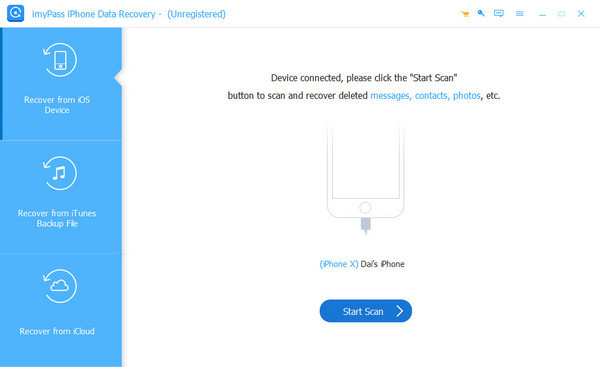
下載 imyPass iPhone 資料恢復 on your PC. After setting up, open it and connect the iPhone to the computer using a USB cable.
選擇 從 iOS 裝置恢復 選項並點擊 開始掃描 to scan all your data, including Instagram messages.
After the software analyzes your data, select 僅顯示已刪除的內容 to filter the data you deleted. Look for the Instagram messages you want to recover and select them.
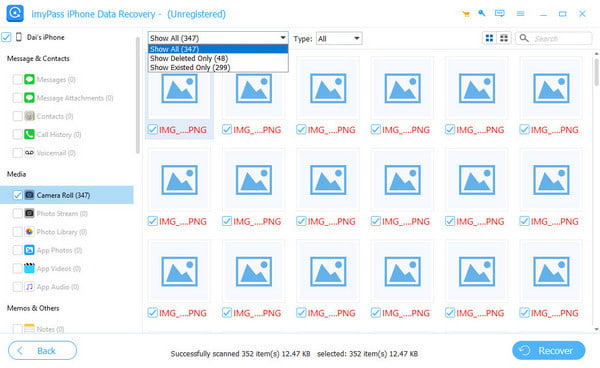
Look for the Instagram messages you want to recover and select them. Then click 恢復 to start recovering your deleted Instagram messages.
2. Disk Drill
Disk Drill can recover lost or deleted data from various sources, including Instagram messages. With it, you can inspect recovered Instagram database files to look for message records. However, the process is more technical than other recovery tools. See below how to find deleted messages on Instagram:
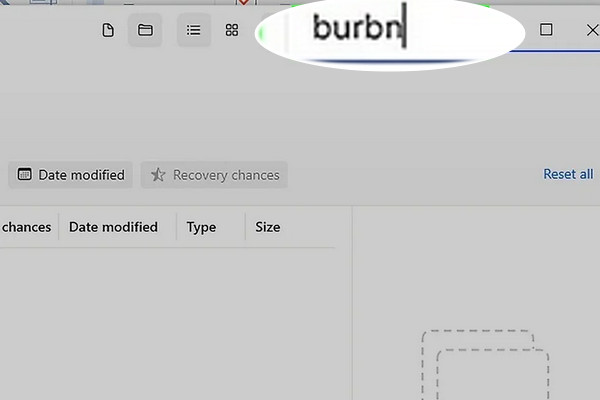
Download and install Disk Drill and DB Browser, then plug the iPhone into the computer. After scanning your iPhone, go to 其他 或搜尋 burbn.
筆記:
burbn is Instagram's original internal project name.
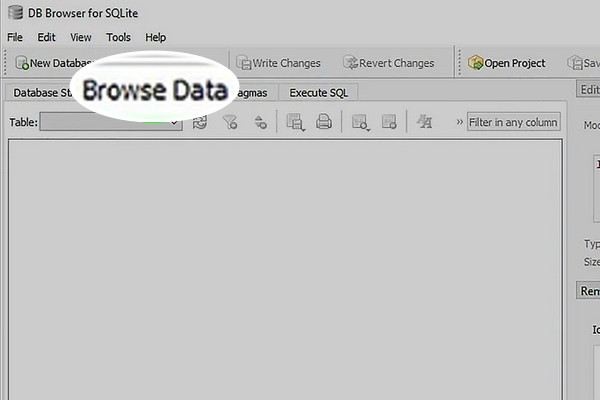
Copy and paste the files to another destination on your computer. Open any DB files in DB Browser and click Browse Data 尋找 Instagram 訊息。
3. Gbyte
Gbyte 可以在不覆寫資料的情況下擷取已刪除的 Instagram 聊天記錄。換句話說,它不會像 iTunes 一樣抹除你 iPhone 上的資料。它採用唯讀掃描(Read-Only),確保你的 Instagram 資料不會受損。請參考下方說明,瞭解如何找回已刪除的 Instagram 訊息:
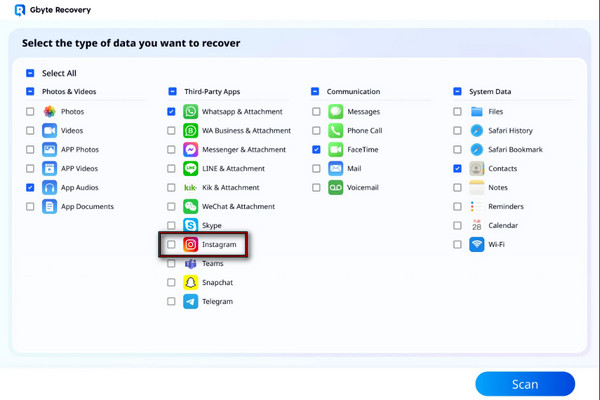
在 Gbyte 復原介面中,選擇 Instagram 選項並點擊 掃描.
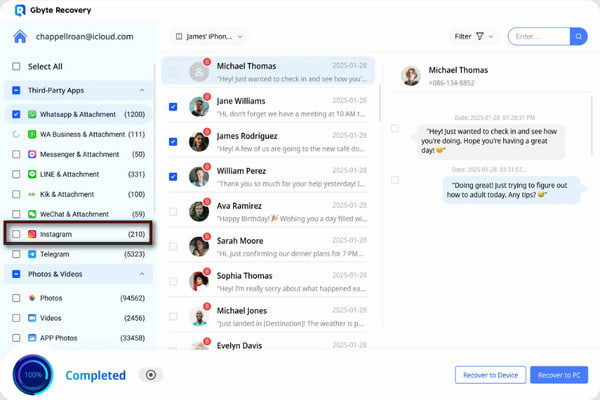
勾選所有想要恢復的 IG 訊息,然後點擊 恢復至設備 或「恢復到電腦」,將它們儲存到 PC。
Quick Method Comparison Table
| 方法 | 能恢復已刪除訊息嗎? | 需要備份 | 恢復成功率 | 最適合 |
| 申請 Instagram 資料 | 在 Instagram 90 天保存期限內 | 不 | 100% | 恢復仍儲存在伺服器上的訊息。 |
| Android 通知紀錄 | 部分 | 不 | 95% | 查看最近被刪除的訊息。 |
| 檢查其他裝置/帳號 | 不保證能成功 | 不 | 0% 至 50% | 尚未在其他裝置同步的對話。 |
| imyPass iPhone 資料恢復 | 是的 | 選修的 | 95% | 直接從 iPhone、iTunes 備份或 iCloud 備份中恢復已刪除的 Instagram 訊息。 |
| 磁碟鑽 | 不保證能成功 | 不 | 0% 至 50% | 檢視已恢復的 Instagram 資料庫檔案。 |
| Gbyte | 是的 | 不 | 90% | 在沒有備份的情況下恢復已刪除的 Instagram 訊息。 |
結論
學習 如何恢復已刪除的 Instagram 訊息 協助你找回不小心刪除的重要對話。雖然 Instagram 沒有提供已刪除聊天的直接還原按鈕,你仍可嘗試以上方法。但必須說明的是,能否成功恢復取決於這些已刪除的訊息是否仍存在,或已被新資料覆寫。若想要更有效的解決方案,我們強烈建議使用 imyPass iPhone 資料恢復. 。它會掃描你的 iPhone,尋找可恢復的聊天記錄,並讓你在正式恢復前預覽已刪除的資料。
Clara 擁有超過 8 年協助使用者找回遺失檔案與進行資料傳輸的經驗。她曾在大型 IT 服務公司擔任資料救援技術人員。持有資料救援與數位鑑識相關證照的她,撰寫的文章專注於提供簡單易行的方案,讓一般使用者也能輕鬆完成複雜的資料復原任務。
熱門解決方案
-
恢復數據
-
解鎖iOS
-
傳輸資料
-
iOS 提示